Have to keep rebuilding my indexing - Search stops working

Anak

Good advice on CCleaner. One time all my Restore points got wiped out. Finally tracked it back to a NEW install of CC which had in fact set as default cleaning Restore points. I had no clue. They changed that setting to unchecked in a later version. Now when I use CC I always check ALL settings.
 

My Computer My Computer

At a glance

Windows 7 Pro 64
Computer type
PC/Desktop
OS
Windows 7 Pro 64
I think I remember that uproar or maybe it's the one where avast bought piriform then almost 2months to the day later Ccleaner had the malware problem. Coincidence?

Piriform Timeline


Still good lindalo?
 

My Computer My Computer

At a glance

Originally Win 7 Hm Prem x64 Ver 6.1.7600 Bui...Intel i3 530 2.93GHz, 2933MHz 2 Cores 4 Logic...6GB of 1,333MHz DDR3 SDRAM32MB Intel Graphics Media Accelerator HD IGChip
Computer type
PC/Desktop
Computer Manufacturer/Model Number
Gateway DX4831-01e (Mid-Tower Desktop)
OS
Originally Win 7 Hm Prem x64 Ver 6.1.7600 Build 7601-SP1 | Upgraded to Windows 10 December 14, 2019
CPU
Intel i3 530 2.93GHz, 2933MHz 2 Cores 4 Logical Processors
Motherboard
Gateway H57M01 133 megahertz
Memory
6GB of 1,333MHz DDR3 SDRAM
Graphics Card(s)
32MB Intel Graphics Media Accelerator HD IGChip
Sound Card
Realtek High Definition Audio
Monitor(s) Displays
Gateway HX2000 20inch TFT active matrix TN
Screen Resolution
1600 x 900 x 59 hertz
Hard Drives
WDC WD10EADS-00M2B0 [HDD] (1000.20 GB) -- drive 0,
HL-DT-ST DVDRAM GH41N [CD-ROM dr]
Four card readers, and Four USB 2.0
PSU
300watts.
Case
Mid-Tower Desktop
Cooling
Stock from Gateway
Keyboard
Natural Ergonomic Keyboard 4000, see Other Info
Mouse
Orig. Gateway wore out now using Insignia USB wired optical
Internet Speed
Vz FIOS 10ms png 57.64Mbps down 65.53Mbps up Speedtest.org
Antivirus
Zamana Anti-logger with Anti-malware, MSE, Windows Firewall,
Browser
IE11.0.9600.19399-Upd ver11.0.135, Firefox 68.0.1 x64
Other Info
System Specs by Belarc.

BIOS: American Megatrends Inc. P01-A0 11/17/2009

Replaced the MS 'Natural' Standard PS/2 Enhanced 101-102 Keyboard with a new Natural Ergonomic Keyboard 4000 on August 1st 2014.

Canon Pixma MG3222 Printer.

Updated to IE11 on 12102015 | Fios Quantum Router g1100

Additional AV: SpywareBlaster, manual Mbam, SAS

My Computer My Computer

At a glance

Microsoft Windows 7 Home Premium 64-bit 7601 ...Intel(R) Core(TM) i7-4790 CPU @ 3.60GHz8.00 GBNVIDIA GeForce GT 720
Computer type
PC/Desktop
Computer Manufacturer/Model Number
Dell Studio
OS
Microsoft Windows 7 Home Premium 64-bit 7601 Multiprocessor Free Service Pack 1
CPU
Intel(R) Core(TM) i7-4790 CPU @ 3.60GHz
Motherboard
Dell Inc. 0KWVT8
Memory
8.00 GB
Graphics Card(s)
NVIDIA GeForce GT 720
Sound Card
(1) Bluetooth Hands-free Audio (2) NVIDIA High Definition
Screen Resolution
1920 x 1080 x 32 bits (4294967296 colors) @ 60 Hz
Hard Drives
(1) ATA ST1000DM003-1ER1 SCSI Disk Device (2) CF/MD Card (3) MS/Pro/Duo Card (4) SD/mini-MMC/RS Card (5) SM/xD Card (6) HP OfficeJet Pro 69 USB Device (7) Seagate BUP Slim BL USB Device
Keyboard
Logitech K800
Mouse
Logitech M705
Antivirus
Bitdefender Anti-Virus Plus 2018
Browser
IE 11
:thumbsup:..My pleasure.
 

My Computer My Computer

At a glance

Originally Win 7 Hm Prem x64 Ver 6.1.7600 Bui...Intel i3 530 2.93GHz, 2933MHz 2 Cores 4 Logic...6GB of 1,333MHz DDR3 SDRAM32MB Intel Graphics Media Accelerator HD IGChip
Computer type
PC/Desktop
Computer Manufacturer/Model Number
Gateway DX4831-01e (Mid-Tower Desktop)
OS
Originally Win 7 Hm Prem x64 Ver 6.1.7600 Build 7601-SP1 | Upgraded to Windows 10 December 14, 2019
CPU
Intel i3 530 2.93GHz, 2933MHz 2 Cores 4 Logical Processors
Motherboard
Gateway H57M01 133 megahertz
Memory
6GB of 1,333MHz DDR3 SDRAM
Graphics Card(s)
32MB Intel Graphics Media Accelerator HD IGChip
Sound Card
Realtek High Definition Audio
Monitor(s) Displays
Gateway HX2000 20inch TFT active matrix TN
Screen Resolution
1600 x 900 x 59 hertz
Hard Drives
WDC WD10EADS-00M2B0 [HDD] (1000.20 GB) -- drive 0,
HL-DT-ST DVDRAM GH41N [CD-ROM dr]
Four card readers, and Four USB 2.0
PSU
300watts.
Case
Mid-Tower Desktop
Cooling
Stock from Gateway
Keyboard
Natural Ergonomic Keyboard 4000, see Other Info
Mouse
Orig. Gateway wore out now using Insignia USB wired optical
Internet Speed
Vz FIOS 10ms png 57.64Mbps down 65.53Mbps up Speedtest.org
Antivirus
Zamana Anti-logger with Anti-malware, MSE, Windows Firewall,
Browser
IE11.0.9600.19399-Upd ver11.0.135, Firefox 68.0.1 x64
Other Info
System Specs by Belarc.

BIOS: American Megatrends Inc. P01-A0 11/17/2009

Replaced the MS 'Natural' Standard PS/2 Enhanced 101-102 Keyboard with a new Natural Ergonomic Keyboard 4000 on August 1st 2014.

Canon Pixma MG3222 Printer.

Updated to IE11 on 12102015 | Fios Quantum Router g1100

Additional AV: SpywareBlaster, manual Mbam, SAS
One Week Later . . .

Hello Anak,

Everything has gone fine until today with my indexing through Sunday, 2/11/18. I didn't try Monday or Tuesday, but today it's not working. I found a couple of errors as shown below:

Log Name: Application
Source: Microsoft-Windows-WMI
Date: 2/12/2018 12:35:18 PM
Event ID: 10
Task Category: None
Level: Error
Keywords: Classic
User: N/A
Computer: LINDA-PC
Description:
Event filter with query "SELECT * FROM __InstanceModificationEvent WITHIN 60 WHERE TargetInstance ISA "Win32_Processor" AND TargetInstance.LoadPercentage > 99" could not be reactivated in namespace "//./root/CIMV2" because of error 0x80041003. Events cannot be delivered through this filter until the problem is corrected.
Event Xml:
<Event xmlns="http://schemas.microsoft.com/win/2004/08/events/event">
<System>
<Provider Name="Microsoft-Windows-WMI" Guid="{1edeee53-0afe-4609-b846-d8c0b2075b1f}" EventSourceName="WinMgmt" />
<EventID Qualifiers="49152">10</EventID>
<Version>0</Version>
<Level>2</Level>
<Task>0</Task>
<Opcode>0</Opcode>
<Keywords>0x80000000000000</Keywords>
<TimeCreated SystemTime="2018-02-12T18:35:18.000000000Z" />
<EventRecordID>1483648</EventRecordID>
<Correlation />
<Execution ProcessID="0" ThreadID="0" />
<Channel>Application</Channel>
<Computer>LINDA-PC</Computer>
<Security />
</System>
<EventData>
<Data>//./root/CIMV2</Data>
<Data>SELECT * FROM __InstanceModificationEvent WITHIN 60 WHERE TargetInstance ISA "Win32_Processor" AND TargetInstance.LoadPercentage > 99</Data>
<Data>0x80041003</Data>
</EventData>
</Event>

And this one about the backup:

Log Name: Application
Source: Windows Backup
Date: 2/11/2018 7:05:54 PM
Event ID: 4104
Task Category: None
Level: Error
Keywords: Classic
User: N/A
Computer: LINDA-PC
Description:
The backup was not successful. The error is: There is not enough space on this drive to save the backup. Free up space by deleting older backups and unnecessary data or change your backup settings. (0x81000005).
Event Xml:
<Event xmlns="http://schemas.microsoft.com/win/2004/08/events/event">
<System>
<Provider Name="Windows Backup" />
<EventID Qualifiers="0">4104</EventID>
<Level>2</Level>
<Task>0</Task>
<Keywords>0x80000000000000</Keywords>
<TimeCreated SystemTime="2018-02-12T01:05:54.000000000Z" />
<EventRecordID>1483518</EventRecordID>
<Channel>Application</Channel>
<Computer>LINDA-PC</Computer>
<Security />
</System>
<EventData>
<Data>There is not enough space on this drive to save the backup. Free up space by deleting older backups and unnecessary data or change your backup settings. (0x81000005)</Data>
<Binary>05000081CB0500003F0900005B090000420ED1665C2BEE174B64529CB14610EA71000000</Binary>
</EventData>
</Event>


Not sure what the first one means.
Obviously, I still haven't done anything about my Seagate external drive being full, but thinking this probably doesn't affect the indexing problem?

Your thoughts would be very much appreciated!
 
Last edited:

My Computer My Computer

At a glance

Microsoft Windows 7 Home Premium 64-bit 7601 ...Intel(R) Core(TM) i7-4790 CPU @ 3.60GHz8.00 GBNVIDIA GeForce GT 720
Computer type
PC/Desktop
Computer Manufacturer/Model Number
Dell Studio
OS
Microsoft Windows 7 Home Premium 64-bit 7601 Multiprocessor Free Service Pack 1
CPU
Intel(R) Core(TM) i7-4790 CPU @ 3.60GHz
Motherboard
Dell Inc. 0KWVT8
Memory
8.00 GB
Graphics Card(s)
NVIDIA GeForce GT 720
Sound Card
(1) Bluetooth Hands-free Audio (2) NVIDIA High Definition
Screen Resolution
1920 x 1080 x 32 bits (4294967296 colors) @ 60 Hz
Hard Drives
(1) ATA ST1000DM003-1ER1 SCSI Disk Device (2) CF/MD Card (3) MS/Pro/Duo Card (4) SD/mini-MMC/RS Card (5) SM/xD Card (6) HP OfficeJet Pro 69 USB Device (7) Seagate BUP Slim BL USB Device
Keyboard
Logitech K800
Mouse
Logitech M705
Antivirus
Bitdefender Anti-Virus Plus 2018
Browser
IE 11
I was wondering how you were doing....

Hello Amak,

Everything has gone fine until today with my indexing through Sunday, 2/11/18. I didn't try Monday or Tuesday, but today it's not working. I found a couple of errors as shown below:

Not sure what the first one means.


Your thoughts would be very much appreciated!
Hi!

This has been the longest you've been able to run without the Index fouling eh? But lets not forget your adjustments to the Index may have also had a bearing on the longevity.
Before I explain, have you checked if somehow the STAS service has restarted itself? Sometimes these OEM machines have a mind of their own and reset to what they think is important. If it has we'll have to work on making it permanent. Post #9 shows how to get there to check. Can you check to see if STAS is in your startup? Startup Programs - Change

Now; The first one is a permissions event. According to this: Event ID 10 is logged in the Application log It says it can be safely ignored but it deals with the WMI and it may have a bearing on managing your seagate HDD (hard disk drive) and Idexing.

You would have to create and run the script. To make it a bit easier I set up the script into a file below.


  • Save the file to your desktop.

  • At the CMD Prompt enter: cd %userprofile%\Desktop and press Enter to change the directory. You should see your userprofile name\Desktop, i.e. C:\users\Linda-PC\Desktop>

  • Now enter WMI Workaround.vbs and press Enter to run it.
It should take a minute or so to run and it's up to you if you want to restart your machine, as for myself I would.

Obviously, I still haven't done anything about my Seagate external drive being full, but thinking this probably doesn't affect the indexing problem?

Description:
The backup was not successful. The error is: There is not enough space on this drive to save the backup. Free up space by deleting older backups and unnecessary data or change your backup settings. (0x81000005).
Obviously, but affecting the indexing problem? My jury is still out on that. You're dealing with a lot of folders and files, I've lost track does your seagate have a sync program, what make (blue, pink, silver?)/model is it?

Do you believe you'd be up to posting a screenshot of the disk management on that seagate? How to do it is here: Disk Management - Post a Screen Capture Image Before you use the snipping tool make sure the seagate is plugged in and recognized just as if you're getting ready to do a backup.

That's it for now...
 

My Computer My Computer

At a glance

Originally Win 7 Hm Prem x64 Ver 6.1.7600 Bui...Intel i3 530 2.93GHz, 2933MHz 2 Cores 4 Logic...6GB of 1,333MHz DDR3 SDRAM32MB Intel Graphics Media Accelerator HD IGChip
Computer type
PC/Desktop
Computer Manufacturer/Model Number
Gateway DX4831-01e (Mid-Tower Desktop)
OS
Originally Win 7 Hm Prem x64 Ver 6.1.7600 Build 7601-SP1 | Upgraded to Windows 10 December 14, 2019
CPU
Intel i3 530 2.93GHz, 2933MHz 2 Cores 4 Logical Processors
Motherboard
Gateway H57M01 133 megahertz
Memory
6GB of 1,333MHz DDR3 SDRAM
Graphics Card(s)
32MB Intel Graphics Media Accelerator HD IGChip
Sound Card
Realtek High Definition Audio
Monitor(s) Displays
Gateway HX2000 20inch TFT active matrix TN
Screen Resolution
1600 x 900 x 59 hertz
Hard Drives
WDC WD10EADS-00M2B0 [HDD] (1000.20 GB) -- drive 0,
HL-DT-ST DVDRAM GH41N [CD-ROM dr]
Four card readers, and Four USB 2.0
PSU
300watts.
Case
Mid-Tower Desktop
Cooling
Stock from Gateway
Keyboard
Natural Ergonomic Keyboard 4000, see Other Info
Mouse
Orig. Gateway wore out now using Insignia USB wired optical
Internet Speed
Vz FIOS 10ms png 57.64Mbps down 65.53Mbps up Speedtest.org
Antivirus
Zamana Anti-logger with Anti-malware, MSE, Windows Firewall,
Browser
IE11.0.9600.19399-Upd ver11.0.135, Firefox 68.0.1 x64
Other Info
System Specs by Belarc.

BIOS: American Megatrends Inc. P01-A0 11/17/2009

Replaced the MS 'Natural' Standard PS/2 Enhanced 101-102 Keyboard with a new Natural Ergonomic Keyboard 4000 on August 1st 2014.

Canon Pixma MG3222 Printer.

Updated to IE11 on 12102015 | Fios Quantum Router g1100

Additional AV: SpywareBlaster, manual Mbam, SAS
Hi!

Before I explain, have you checked if somehow the STAS service has restarted itself? Sometimes these OEM machines have a mind of their own and reset to what they think is important. If it has we'll have to work on making it permanent. Post #9 shows how to get there to check. Can you check to see if STAS is in your startup? Startup Programs - Change

Anak,

First of all, thank you very much, again. I think I may be a little lost on the above. This is what I did:
Under Services, windows search, status - started, startup type - manual, local system. Not sure if this answers your question?

Where I really got lost was checking the startup for STAS. I did system config, startup tab, didn't find anything that said STAS. Maybe that's a good thing?

As far as the Seagate (which is blue, BTW), at this point, I'm willing to completely remove it and see if that helps with the indexing problem. I can let Dell do the backup thing or get another external backup.

In the meantime, I went ahead and rebuilt my index again because I had to get some work done and needed my indexing. It really doesn't take very long to rebuild since I changed the search parameters. This may be the easiest way for me to address the problem. Although since I did that, it may very well put us back to square one as far as researching the problem.

Anyway, your thoughts are greatly appreciated, as always.
 

My Computer My Computer

At a glance

Microsoft Windows 7 Home Premium 64-bit 7601 ...Intel(R) Core(TM) i7-4790 CPU @ 3.60GHz8.00 GBNVIDIA GeForce GT 720
Computer type
PC/Desktop
Computer Manufacturer/Model Number
Dell Studio
OS
Microsoft Windows 7 Home Premium 64-bit 7601 Multiprocessor Free Service Pack 1
CPU
Intel(R) Core(TM) i7-4790 CPU @ 3.60GHz
Motherboard
Dell Inc. 0KWVT8
Memory
8.00 GB
Graphics Card(s)
NVIDIA GeForce GT 720
Sound Card
(1) Bluetooth Hands-free Audio (2) NVIDIA High Definition
Screen Resolution
1920 x 1080 x 32 bits (4294967296 colors) @ 60 Hz
Hard Drives
(1) ATA ST1000DM003-1ER1 SCSI Disk Device (2) CF/MD Card (3) MS/Pro/Duo Card (4) SD/mini-MMC/RS Card (5) SM/xD Card (6) HP OfficeJet Pro 69 USB Device (7) Seagate BUP Slim BL USB Device
Keyboard
Logitech K800
Mouse
Logitech M705
Antivirus
Bitdefender Anti-Virus Plus 2018
Browser
IE 11
Linda I'm going to interspace my colored answers after your replies within the quote.

Hi!

Before I explain, have you checked if somehow the STAS service has restarted itself? Sometimes these OEM machines have a mind of their own and reset to what they think is important. If it has we'll have to work on making it permanent. Post #9 shows how to get there to check. Can you check to see if STAS is in your startup? Startup Programs - Change

Anak,

First of all, thank you very much, again. I think I may be a little lost on the above. This is what I did:
Under Services, windows search, status - started, startup type - manual, local system. Not sure if this answers your question?

Your welcome; You did well grasshopper. As long as STAS was still manual and local system, that was what we wanted.


Where I really got lost was checking the startup for STAS. I did system config, startup tab, didn't find anything that said STAS. Maybe that's a good thing?

Again you did well; That not finding STAS in startup is a good thing, once we get the indexing to calm down you can make a decision on backups and maybe turn STAS and toaster back on.


As far as the Seagate (which is blue, BTW), at this point, I'm willing to completely remove it and see if that helps with the indexing problem. I can let Dell do the backup thing or get another external backup.

You can do that to see if it helps. If you let dell handle it there's two ways. You could leave STAS on manual and it will run when you invoke it or you can go back in services to change STAS back to the setting it was before you changed it. What was that, Auto? I believe Auto would allow unattended scheduled backups like while you're out or asleep.

Ya know, a new 4TB seagate would be around $110USD https://Seagate Desktop HDD ST4000DM000 4TB | www.newegg.com

The numbers in your system specs indicate that you have a 1TB HDD, Have you ever done a diskcleanup on it? Disk Cleanup - Open and Use
If you're unsure of some of the categories ask.

With system restore points if you have ones that are to old you can do them through disk cleanup or System Protection Restore Points - Delete

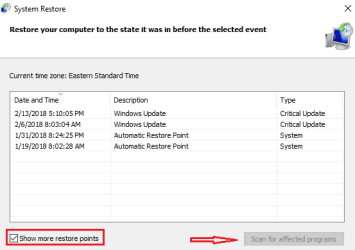
This way offers more control. Click on system restore and in the next window you'll see a window to click next on.
Then you'll see the list of your machines points, in the lower left click on show more points and you'll see all the ones that are on the machine,
sr2.PNG

sr3.PNG
I believe if you have ones that are more than a year old you can safely delete them, but it would be best to go over them, only you know what would be important. Highlight one by pointing at it then click on scan for affected programs to see if it's useful anymore, it may be associated with a program you need.

In the meantime, I went ahead and rebuilt my index again because I had to get some work done and needed my indexing. It really doesn't take very long to rebuild since I changed the search parameters. This may be the easiest way for me to address the problem. Although since I did that, it may very well put us back to square one as far as researching the problem.

Maybe not.


Anyway, your thoughts are greatly appreciated, as always.

Thank you.

You could try these index troubleshooters...
Fix and Repair broken Windows Search in Windows 10/8/7 easily

The Complete Guide to Fixing Windows 7 Search Indexing Issues

I put this in because it has a way to reset the index, but it involves the registry start at the blue contents bar
 

My Computer My Computer

At a glance

Originally Win 7 Hm Prem x64 Ver 6.1.7600 Bui...Intel i3 530 2.93GHz, 2933MHz 2 Cores 4 Logic...6GB of 1,333MHz DDR3 SDRAM32MB Intel Graphics Media Accelerator HD IGChip
Computer type
PC/Desktop
Computer Manufacturer/Model Number
Gateway DX4831-01e (Mid-Tower Desktop)
OS
Originally Win 7 Hm Prem x64 Ver 6.1.7600 Build 7601-SP1 | Upgraded to Windows 10 December 14, 2019
CPU
Intel i3 530 2.93GHz, 2933MHz 2 Cores 4 Logical Processors
Motherboard
Gateway H57M01 133 megahertz
Memory
6GB of 1,333MHz DDR3 SDRAM
Graphics Card(s)
32MB Intel Graphics Media Accelerator HD IGChip
Sound Card
Realtek High Definition Audio
Monitor(s) Displays
Gateway HX2000 20inch TFT active matrix TN
Screen Resolution
1600 x 900 x 59 hertz
Hard Drives
WDC WD10EADS-00M2B0 [HDD] (1000.20 GB) -- drive 0,
HL-DT-ST DVDRAM GH41N [CD-ROM dr]
Four card readers, and Four USB 2.0
PSU
300watts.
Case
Mid-Tower Desktop
Cooling
Stock from Gateway
Keyboard
Natural Ergonomic Keyboard 4000, see Other Info
Mouse
Orig. Gateway wore out now using Insignia USB wired optical
Internet Speed
Vz FIOS 10ms png 57.64Mbps down 65.53Mbps up Speedtest.org
Antivirus
Zamana Anti-logger with Anti-malware, MSE, Windows Firewall,
Browser
IE11.0.9600.19399-Upd ver11.0.135, Firefox 68.0.1 x64
Other Info
System Specs by Belarc.

BIOS: American Megatrends Inc. P01-A0 11/17/2009

Replaced the MS 'Natural' Standard PS/2 Enhanced 101-102 Keyboard with a new Natural Ergonomic Keyboard 4000 on August 1st 2014.

Canon Pixma MG3222 Printer.

Updated to IE11 on 12102015 | Fios Quantum Router g1100

Additional AV: SpywareBlaster, manual Mbam, SAS
I discovered that my Dell backup & recovery is indeed still working. They just wanted me to get an update with more bells & whistles, which I will save for another time.

I did run the Dell B&R and it repaired some system files and did a backup. I discovered that this process changed my startup type back to automatic, and I left it there. I did get a message "cannot repair boot files" which, if that is a problem, I am not aware of it interfering with anything I do.

Then I disconnected my Seagate since it is mostly full and I wanted to see if that would affect my indexing problem.

So, again, it's wait and see if it stops working again. I'll let you know how that goes :D
 

My Computer My Computer

At a glance

Microsoft Windows 7 Home Premium 64-bit 7601 ...Intel(R) Core(TM) i7-4790 CPU @ 3.60GHz8.00 GBNVIDIA GeForce GT 720
Computer type
PC/Desktop
Computer Manufacturer/Model Number
Dell Studio
OS
Microsoft Windows 7 Home Premium 64-bit 7601 Multiprocessor Free Service Pack 1
CPU
Intel(R) Core(TM) i7-4790 CPU @ 3.60GHz
Motherboard
Dell Inc. 0KWVT8
Memory
8.00 GB
Graphics Card(s)
NVIDIA GeForce GT 720
Sound Card
(1) Bluetooth Hands-free Audio (2) NVIDIA High Definition
Screen Resolution
1920 x 1080 x 32 bits (4294967296 colors) @ 60 Hz
Hard Drives
(1) ATA ST1000DM003-1ER1 SCSI Disk Device (2) CF/MD Card (3) MS/Pro/Duo Card (4) SD/mini-MMC/RS Card (5) SM/xD Card (6) HP OfficeJet Pro 69 USB Device (7) Seagate BUP Slim BL USB Device
Keyboard
Logitech K800
Mouse
Logitech M705
Antivirus
Bitdefender Anti-Virus Plus 2018
Browser
IE 11
If the message "cannot repair boot files" came while you were in the Dell B&R, that would mean there are corrupt boot files in that backup and most likely the restore function won't work.

  • Is this the first time you've seen that message?

  • Have you ever tried to restore your system with a backup?
 

My Computer My Computer

At a glance

Originally Win 7 Hm Prem x64 Ver 6.1.7600 Bui...Intel i3 530 2.93GHz, 2933MHz 2 Cores 4 Logic...6GB of 1,333MHz DDR3 SDRAM32MB Intel Graphics Media Accelerator HD IGChip
Computer type
PC/Desktop
Computer Manufacturer/Model Number
Gateway DX4831-01e (Mid-Tower Desktop)
OS
Originally Win 7 Hm Prem x64 Ver 6.1.7600 Build 7601-SP1 | Upgraded to Windows 10 December 14, 2019
CPU
Intel i3 530 2.93GHz, 2933MHz 2 Cores 4 Logical Processors
Motherboard
Gateway H57M01 133 megahertz
Memory
6GB of 1,333MHz DDR3 SDRAM
Graphics Card(s)
32MB Intel Graphics Media Accelerator HD IGChip
Sound Card
Realtek High Definition Audio
Monitor(s) Displays
Gateway HX2000 20inch TFT active matrix TN
Screen Resolution
1600 x 900 x 59 hertz
Hard Drives
WDC WD10EADS-00M2B0 [HDD] (1000.20 GB) -- drive 0,
HL-DT-ST DVDRAM GH41N [CD-ROM dr]
Four card readers, and Four USB 2.0
PSU
300watts.
Case
Mid-Tower Desktop
Cooling
Stock from Gateway
Keyboard
Natural Ergonomic Keyboard 4000, see Other Info
Mouse
Orig. Gateway wore out now using Insignia USB wired optical
Internet Speed
Vz FIOS 10ms png 57.64Mbps down 65.53Mbps up Speedtest.org
Antivirus
Zamana Anti-logger with Anti-malware, MSE, Windows Firewall,
Browser
IE11.0.9600.19399-Upd ver11.0.135, Firefox 68.0.1 x64
Other Info
System Specs by Belarc.

BIOS: American Megatrends Inc. P01-A0 11/17/2009

Replaced the MS 'Natural' Standard PS/2 Enhanced 101-102 Keyboard with a new Natural Ergonomic Keyboard 4000 on August 1st 2014.

Canon Pixma MG3222 Printer.

Updated to IE11 on 12102015 | Fios Quantum Router g1100

Additional AV: SpywareBlaster, manual Mbam, SAS
If the message "cannot repair boot files" came while you were in the Dell B&R, that would mean there are corrupt boot files in that backup and most likely the restore function won't work.

  • Is this the first time you've seen that message?
  • Have you ever tried to restore your system with a backup?
Yes, this is the first time I have seen this message. And I don't recall ever restoring my system with a backup.

Turns out, the Dell backup probably wasn't a great idea. I violated my own rule, LWEA (Leave Well Enough Alone).

Last night I didn't turn off my computer. This morning, there was just a black screen with a curser and I couldn't get anything to respond. I ended up switching the power strip off, because nothing else was working, and when I turned it back on I got the screen that gave me an option to restart windows normally or launch repair. I tried restarting normally and ended up with the same black screen. Turned off power, back on, and tried "launch repair". It went back into the Dell backup & recovery and I chose the "Instant Restore" option. After about 30 minutes, it finally made some repairs and I got windows back up. I haven't fully checked it out yet but hopefully I will get everything back the way it was.

Sigh . . .
 

My Computer My Computer

At a glance

Microsoft Windows 7 Home Premium 64-bit 7601 ...Intel(R) Core(TM) i7-4790 CPU @ 3.60GHz8.00 GBNVIDIA GeForce GT 720
Computer type
PC/Desktop
Computer Manufacturer/Model Number
Dell Studio
OS
Microsoft Windows 7 Home Premium 64-bit 7601 Multiprocessor Free Service Pack 1
CPU
Intel(R) Core(TM) i7-4790 CPU @ 3.60GHz
Motherboard
Dell Inc. 0KWVT8
Memory
8.00 GB
Graphics Card(s)
NVIDIA GeForce GT 720
Sound Card
(1) Bluetooth Hands-free Audio (2) NVIDIA High Definition
Screen Resolution
1920 x 1080 x 32 bits (4294967296 colors) @ 60 Hz
Hard Drives
(1) ATA ST1000DM003-1ER1 SCSI Disk Device (2) CF/MD Card (3) MS/Pro/Duo Card (4) SD/mini-MMC/RS Card (5) SM/xD Card (6) HP OfficeJet Pro 69 USB Device (7) Seagate BUP Slim BL USB Device
Keyboard
Logitech K800
Mouse
Logitech M705
Antivirus
Bitdefender Anti-Virus Plus 2018
Browser
IE 11
Sigh . . .

My sentiments exactly...
 

My Computer My Computer

At a glance

Originally Win 7 Hm Prem x64 Ver 6.1.7600 Bui...Intel i3 530 2.93GHz, 2933MHz 2 Cores 4 Logic...6GB of 1,333MHz DDR3 SDRAM32MB Intel Graphics Media Accelerator HD IGChip
Computer type
PC/Desktop
Computer Manufacturer/Model Number
Gateway DX4831-01e (Mid-Tower Desktop)
OS
Originally Win 7 Hm Prem x64 Ver 6.1.7600 Build 7601-SP1 | Upgraded to Windows 10 December 14, 2019
CPU
Intel i3 530 2.93GHz, 2933MHz 2 Cores 4 Logical Processors
Motherboard
Gateway H57M01 133 megahertz
Memory
6GB of 1,333MHz DDR3 SDRAM
Graphics Card(s)
32MB Intel Graphics Media Accelerator HD IGChip
Sound Card
Realtek High Definition Audio
Monitor(s) Displays
Gateway HX2000 20inch TFT active matrix TN
Screen Resolution
1600 x 900 x 59 hertz
Hard Drives
WDC WD10EADS-00M2B0 [HDD] (1000.20 GB) -- drive 0,
HL-DT-ST DVDRAM GH41N [CD-ROM dr]
Four card readers, and Four USB 2.0
PSU
300watts.
Case
Mid-Tower Desktop
Cooling
Stock from Gateway
Keyboard
Natural Ergonomic Keyboard 4000, see Other Info
Mouse
Orig. Gateway wore out now using Insignia USB wired optical
Internet Speed
Vz FIOS 10ms png 57.64Mbps down 65.53Mbps up Speedtest.org
Antivirus
Zamana Anti-logger with Anti-malware, MSE, Windows Firewall,
Browser
IE11.0.9600.19399-Upd ver11.0.135, Firefox 68.0.1 x64
Other Info
System Specs by Belarc.

BIOS: American Megatrends Inc. P01-A0 11/17/2009

Replaced the MS 'Natural' Standard PS/2 Enhanced 101-102 Keyboard with a new Natural Ergonomic Keyboard 4000 on August 1st 2014.

Canon Pixma MG3222 Printer.

Updated to IE11 on 12102015 | Fios Quantum Router g1100

Additional AV: SpywareBlaster, manual Mbam, SAS
Interestingly, as I was working today my search stopped working (again). This is the first time it has stopped while I was actually at my computer. I checked the event viewer, and there were no red or yellow flags. And my Seagate was not attached at the time.

I think at this point, probably the easiest thing for me to do is to rebuild the index when necessary. I narrowed down the search parameters, and it really doesn't take much time to do the rebuild.

But I do appreciate all your help and expertise and willingness to stay with me. It has definitely been a learning experience!
(wax on, wax off) :D:D:D
 

My Computer My Computer

At a glance

Microsoft Windows 7 Home Premium 64-bit 7601 ...Intel(R) Core(TM) i7-4790 CPU @ 3.60GHz8.00 GBNVIDIA GeForce GT 720
Computer type
PC/Desktop
Computer Manufacturer/Model Number
Dell Studio
OS
Microsoft Windows 7 Home Premium 64-bit 7601 Multiprocessor Free Service Pack 1
CPU
Intel(R) Core(TM) i7-4790 CPU @ 3.60GHz
Motherboard
Dell Inc. 0KWVT8
Memory
8.00 GB
Graphics Card(s)
NVIDIA GeForce GT 720
Sound Card
(1) Bluetooth Hands-free Audio (2) NVIDIA High Definition
Screen Resolution
1920 x 1080 x 32 bits (4294967296 colors) @ 60 Hz
Hard Drives
(1) ATA ST1000DM003-1ER1 SCSI Disk Device (2) CF/MD Card (3) MS/Pro/Duo Card (4) SD/mini-MMC/RS Card (5) SM/xD Card (6) HP OfficeJet Pro 69 USB Device (7) Seagate BUP Slim BL USB Device
Keyboard
Logitech K800
Mouse
Logitech M705
Antivirus
Bitdefender Anti-Virus Plus 2018
Browser
IE 11
Another free search program is Locate32, which is an excellent albeit dated app, which I use regularly assisting individuals with missing cat, mum and manifests. Works with AutoHotKey to automate search process from text files, etc.
 

My Computer My Computer

At a glance

Win 10 x64, Linux Lite, Win 7 x64, BlackArch,...
Computer type
PC/Desktop
Computer Manufacturer/Model Number
HP Desktop & Compaq Laptop
OS
Win 10 x64, Linux Lite, Win 7 x64, BlackArch, & Kali
Hard Drives
Samsung 850 Pro 256Gb,
Hitachi HDD 1Tb,
Crucial MX SSD 250Gb
Segate 3Tb USB 3.0 Ext. Backup HDD
Internet Speed
150Mbps dn, 20Mbps up
Antivirus
Avast Free, Malwarebytes Anti-Exploit & Anti-Ransomware
Browser
Firefox, Chrome, Opera, & VPN
I didn't see it but have you ran the troubleshooter? The easiest way would be to go to step #4 to view all then look for Search and Indexing, when it opens:

  • Click on Advanced at the lower left,

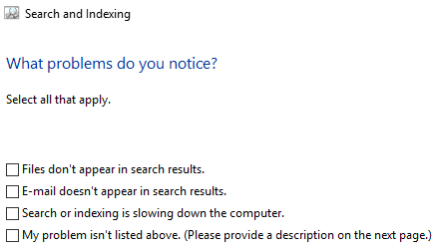
  • Then Run as Administrator click on Next, you'll see it run a bit and open to this:
si.png

  • I'd go with the first one, if it doesn't find anything then the last, type in your best description of the problem i.e. "search stopped (stops) working.

  • Click on Next let it run.

  • When done view details to see if it caught anything the biggest problem is permissions.

  • Close troubleshooter when done.

  • Use Search to test.
If you're okay with rebuilding as a workaround then that's okay, but it really shouldn't be that way. Have you been doing defrags of your hard drive?


It's been my pleasure.
 

My Computer My Computer

At a glance

Originally Win 7 Hm Prem x64 Ver 6.1.7600 Bui...Intel i3 530 2.93GHz, 2933MHz 2 Cores 4 Logic...6GB of 1,333MHz DDR3 SDRAM32MB Intel Graphics Media Accelerator HD IGChip
Computer type
PC/Desktop
Computer Manufacturer/Model Number
Gateway DX4831-01e (Mid-Tower Desktop)
OS
Originally Win 7 Hm Prem x64 Ver 6.1.7600 Build 7601-SP1 | Upgraded to Windows 10 December 14, 2019
CPU
Intel i3 530 2.93GHz, 2933MHz 2 Cores 4 Logical Processors
Motherboard
Gateway H57M01 133 megahertz
Memory
6GB of 1,333MHz DDR3 SDRAM
Graphics Card(s)
32MB Intel Graphics Media Accelerator HD IGChip
Sound Card
Realtek High Definition Audio
Monitor(s) Displays
Gateway HX2000 20inch TFT active matrix TN
Screen Resolution
1600 x 900 x 59 hertz
Hard Drives
WDC WD10EADS-00M2B0 [HDD] (1000.20 GB) -- drive 0,
HL-DT-ST DVDRAM GH41N [CD-ROM dr]
Four card readers, and Four USB 2.0
PSU
300watts.
Case
Mid-Tower Desktop
Cooling
Stock from Gateway
Keyboard
Natural Ergonomic Keyboard 4000, see Other Info
Mouse
Orig. Gateway wore out now using Insignia USB wired optical
Internet Speed
Vz FIOS 10ms png 57.64Mbps down 65.53Mbps up Speedtest.org
Antivirus
Zamana Anti-logger with Anti-malware, MSE, Windows Firewall,
Browser
IE11.0.9600.19399-Upd ver11.0.135, Firefox 68.0.1 x64
Other Info
System Specs by Belarc.

BIOS: American Megatrends Inc. P01-A0 11/17/2009

Replaced the MS 'Natural' Standard PS/2 Enhanced 101-102 Keyboard with a new Natural Ergonomic Keyboard 4000 on August 1st 2014.

Canon Pixma MG3222 Printer.

Updated to IE11 on 12102015 | Fios Quantum Router g1100

Additional AV: SpywareBlaster, manual Mbam, SAS
Another free search program is Locate32, which is an excellent albeit dated app, which I use regularly assisting individuals with missing cat, mum and manifests. Works with AutoHotKey to automate search process from text files, etc.

Thank you, Snick, I will check it out!
 

My Computer My Computer

At a glance

Microsoft Windows 7 Home Premium 64-bit 7601 ...Intel(R) Core(TM) i7-4790 CPU @ 3.60GHz8.00 GBNVIDIA GeForce GT 720
Computer type
PC/Desktop
Computer Manufacturer/Model Number
Dell Studio
OS
Microsoft Windows 7 Home Premium 64-bit 7601 Multiprocessor Free Service Pack 1
CPU
Intel(R) Core(TM) i7-4790 CPU @ 3.60GHz
Motherboard
Dell Inc. 0KWVT8
Memory
8.00 GB
Graphics Card(s)
NVIDIA GeForce GT 720
Sound Card
(1) Bluetooth Hands-free Audio (2) NVIDIA High Definition
Screen Resolution
1920 x 1080 x 32 bits (4294967296 colors) @ 60 Hz
Hard Drives
(1) ATA ST1000DM003-1ER1 SCSI Disk Device (2) CF/MD Card (3) MS/Pro/Duo Card (4) SD/mini-MMC/RS Card (5) SM/xD Card (6) HP OfficeJet Pro 69 USB Device (7) Seagate BUP Slim BL USB Device
Keyboard
Logitech K800
Mouse
Logitech M705
Antivirus
Bitdefender Anti-Virus Plus 2018
Browser
IE 11
I didn't see it but have you ran the troubleshooter? The easiest way would be to go to step #4 to view all then look for Search and Indexing, when it opens:

  • Click on Advanced at the lower left,
  • Then Run as Administrator click on Next, you'll see it run a bit and open to this:
View attachment 402831

  • I'd go with the first one, if it doesn't find anything then the last, type in your best description of the problem i.e. "search stopped (stops) working.
  • Click on Next let it run.
  • When done view details to see if it caught anything the biggest problem is permissions.
  • Close troubleshooter when done.
  • Use Search to test.


I tried this and it didn't find anything. Maybe I need to wait till search stops working again.

I believe my Bitdefender routinely does defrags, but in my attempt to confirm this, I just now discovered that my Bitdefender isn't working, apparently thanks to my fiasco with the Dell B/U. My next priority will be to get it up and running again. :zip::zip::zip:
 

My Computer My Computer

At a glance

Microsoft Windows 7 Home Premium 64-bit 7601 ...Intel(R) Core(TM) i7-4790 CPU @ 3.60GHz8.00 GBNVIDIA GeForce GT 720
Computer type
PC/Desktop
Computer Manufacturer/Model Number
Dell Studio
OS
Microsoft Windows 7 Home Premium 64-bit 7601 Multiprocessor Free Service Pack 1
CPU
Intel(R) Core(TM) i7-4790 CPU @ 3.60GHz
Motherboard
Dell Inc. 0KWVT8
Memory
8.00 GB
Graphics Card(s)
NVIDIA GeForce GT 720
Sound Card
(1) Bluetooth Hands-free Audio (2) NVIDIA High Definition
Screen Resolution
1920 x 1080 x 32 bits (4294967296 colors) @ 60 Hz
Hard Drives
(1) ATA ST1000DM003-1ER1 SCSI Disk Device (2) CF/MD Card (3) MS/Pro/Duo Card (4) SD/mini-MMC/RS Card (5) SM/xD Card (6) HP OfficeJet Pro 69 USB Device (7) Seagate BUP Slim BL USB Device
Keyboard
Logitech K800
Mouse
Logitech M705
Antivirus
Bitdefender Anti-Virus Plus 2018
Browser
IE 11
Perhaps check out the program called Everything. Once it creates its file index it is blinding fast. And does not carry the excess problems associated with Windows Indexing. Just a thought.

Hi Jo, While Everything is a fine program and is used by many members here including me I believe lindalo would like to get to the bottom of why the indexing is not working, but it would be a viable work-around.

Thank you, Snick, I will check it out!

I tried this and it didn't find anything. Maybe I need to wait till search stops working again.

I believe my Bitdefender routinely does defrags, but in my attempt to confirm this, I just now discovered that my Bitdefender isn't working, apparently thanks to my fiasco with the Dell B/U. My next priority will be to get it up and running again. :zip::zip::zip:
Don't forget JoWazzoo's suggestion for Everything if Locate32 doesn't work out, and don't miss downloading the 64bit version of either one you try because that matches your OS (operating system) 64bit version. The yellow highlight at locate32 means it's the latest version.
If you have problems installing either one try using: Compatibility Mode

Trying the Search and Index troubleshooter right after the Index fails again would be a good call.

You seem to have problems with some programs not running to their full potential, you may want to go over this: Optimize Windows 7 to help smooth out your performance.

You don't / won't need all of them but #'s 5 to 14, then #'s 16 to 18, #'s 20, 21, the rest would be your preference.
 

My Computer My Computer

At a glance

Originally Win 7 Hm Prem x64 Ver 6.1.7600 Bui...Intel i3 530 2.93GHz, 2933MHz 2 Cores 4 Logic...6GB of 1,333MHz DDR3 SDRAM32MB Intel Graphics Media Accelerator HD IGChip
Computer type
PC/Desktop
Computer Manufacturer/Model Number
Gateway DX4831-01e (Mid-Tower Desktop)
OS
Originally Win 7 Hm Prem x64 Ver 6.1.7600 Build 7601-SP1 | Upgraded to Windows 10 December 14, 2019
CPU
Intel i3 530 2.93GHz, 2933MHz 2 Cores 4 Logical Processors
Motherboard
Gateway H57M01 133 megahertz
Memory
6GB of 1,333MHz DDR3 SDRAM
Graphics Card(s)
32MB Intel Graphics Media Accelerator HD IGChip
Sound Card
Realtek High Definition Audio
Monitor(s) Displays
Gateway HX2000 20inch TFT active matrix TN
Screen Resolution
1600 x 900 x 59 hertz
Hard Drives
WDC WD10EADS-00M2B0 [HDD] (1000.20 GB) -- drive 0,
HL-DT-ST DVDRAM GH41N [CD-ROM dr]
Four card readers, and Four USB 2.0
PSU
300watts.
Case
Mid-Tower Desktop
Cooling
Stock from Gateway
Keyboard
Natural Ergonomic Keyboard 4000, see Other Info
Mouse
Orig. Gateway wore out now using Insignia USB wired optical
Internet Speed
Vz FIOS 10ms png 57.64Mbps down 65.53Mbps up Speedtest.org
Antivirus
Zamana Anti-logger with Anti-malware, MSE, Windows Firewall,
Browser
IE11.0.9600.19399-Upd ver11.0.135, Firefox 68.0.1 x64
Other Info
System Specs by Belarc.

BIOS: American Megatrends Inc. P01-A0 11/17/2009

Replaced the MS 'Natural' Standard PS/2 Enhanced 101-102 Keyboard with a new Natural Ergonomic Keyboard 4000 on August 1st 2014.

Canon Pixma MG3222 Printer.

Updated to IE11 on 12102015 | Fios Quantum Router g1100

Additional AV: SpywareBlaster, manual Mbam, SAS
Another decent Search program is from NoVirusThanks - Smart File Finder. But Everything is MUCH better.

FWIW - I never heard of Bitdefender doing defragging.

Note that I have been following along but had nothing to add over and above Anak.
 

My Computer My Computer

At a glance

Windows 7 Pro 64
Computer type
PC/Desktop
OS
Windows 7 Pro 64
FWIW - I never heard of Bitdefender doing defragging.
It seems it does:
Defragment your hard disk

It is recommended to defragment the hard disk in order to access files faster and improve overall system performance. It is recommended to defragment the hard disk in order to access files faster and improve overall system performance. The Disk Defragmenter helps you reduce file fragmentation and improves the performance of your system.

To start the Disk Defragmenter, follow these steps:

  1. Open the Bitdefender window.
  2. Go to the Tune-Up panel.
  3. Click Optimize and select Disk Defragmenter from the drop-down menu.
  4. Follow the wizard steps.
Source: https://Defragment your hard disk | www.bitdefender.com/support
Ya know? That gives me an idea....Thanks Jo!

Linda, shut that sucker off and make sure win7's defrag is on and run it at least once, then re-index your drive even if it hasn't crashed.
Also, make sure it's on a schedule: You could set it up for every 2, 3, even 4 weeks, once a week can be excessive unless you run a photo editor or some type of CAD program every day.

Here's why; 7's defrag is quite capable of keeping an orderly system and search may be getting confused with the way BD "thinks" is the best way to defrag a drive. There shouldn't be any conflicts, but Search is designed to work best with the way win7 "thinks" and defragging from a third-party program might just be enough to throw off the Indexing.

Over the years I've tried many defragers but always came back to windows, the others always seemed to slow my machines.

Note that I have been following along but had nothing to add over and above Anak.
That's okay Jo, you may have help solve lindalo's predicament so any time you have anything to add you go right ahead.
 

My Computer My Computer

At a glance

Originally Win 7 Hm Prem x64 Ver 6.1.7600 Bui...Intel i3 530 2.93GHz, 2933MHz 2 Cores 4 Logic...6GB of 1,333MHz DDR3 SDRAM32MB Intel Graphics Media Accelerator HD IGChip
Computer type
PC/Desktop
Computer Manufacturer/Model Number
Gateway DX4831-01e (Mid-Tower Desktop)
OS
Originally Win 7 Hm Prem x64 Ver 6.1.7600 Build 7601-SP1 | Upgraded to Windows 10 December 14, 2019
CPU
Intel i3 530 2.93GHz, 2933MHz 2 Cores 4 Logical Processors
Motherboard
Gateway H57M01 133 megahertz
Memory
6GB of 1,333MHz DDR3 SDRAM
Graphics Card(s)
32MB Intel Graphics Media Accelerator HD IGChip
Sound Card
Realtek High Definition Audio
Monitor(s) Displays
Gateway HX2000 20inch TFT active matrix TN
Screen Resolution
1600 x 900 x 59 hertz
Hard Drives
WDC WD10EADS-00M2B0 [HDD] (1000.20 GB) -- drive 0,
HL-DT-ST DVDRAM GH41N [CD-ROM dr]
Four card readers, and Four USB 2.0
PSU
300watts.
Case
Mid-Tower Desktop
Cooling
Stock from Gateway
Keyboard
Natural Ergonomic Keyboard 4000, see Other Info
Mouse
Orig. Gateway wore out now using Insignia USB wired optical
Internet Speed
Vz FIOS 10ms png 57.64Mbps down 65.53Mbps up Speedtest.org
Antivirus
Zamana Anti-logger with Anti-malware, MSE, Windows Firewall,
Browser
IE11.0.9600.19399-Upd ver11.0.135, Firefox 68.0.1 x64
Other Info
System Specs by Belarc.

BIOS: American Megatrends Inc. P01-A0 11/17/2009

Replaced the MS 'Natural' Standard PS/2 Enhanced 101-102 Keyboard with a new Natural Ergonomic Keyboard 4000 on August 1st 2014.

Canon Pixma MG3222 Printer.

Updated to IE11 on 12102015 | Fios Quantum Router g1100

Additional AV: SpywareBlaster, manual Mbam, SAS
Back
Top