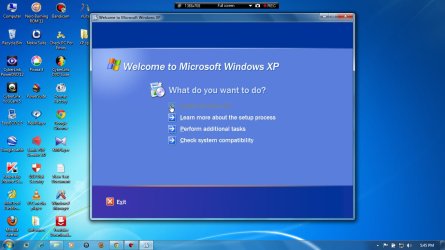
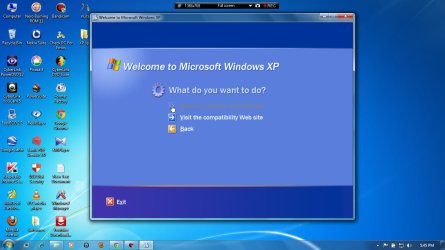
Solved Having problem with installing windows XP in pre-installed windows 7

dude143

New member
Local time
9:54 AM
Messages
25
Hi i am new to this site... i hope u will help me...

I have hp pavilion dv6 notebook pc with windows 7 home premium x64bit pre installed OS. now i want to use both windowsXP & 7 in my single pc

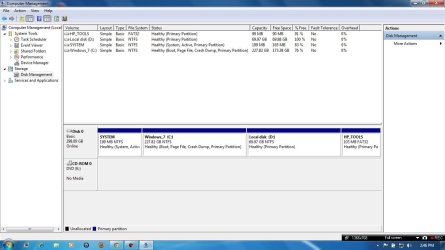
This is the screen shot of my Disk managment
I have 4 primary partitions in my 320GB HDD

1. SYSTEM
2. HP_TOOLS
3. Windows_7 (C:)
4. Local disk (D:)

Now i want to install windowsXP in Local Disk(D:) which is primary partition, but When i boot from windowsXP CD at startup it wont load setup files ie; automatically windows 7 will startup, then when i run setup directly from windows 7, 'Install windowsXP' option has disabled... so help me...

Please explain the steps briefly...
:sick::sick:

waiting for urs response...

thank you...
 

Attachments
  • bandicam 2012-11-13 14-46-53-350.jpg
    bandicam 2012-11-13 14-46-53-350.jpg
    88.9 KB · Views: 18

My Computer My Computer

Computer type
Laptop
Computer Manufacturer/Model Number
HP Pavilion dv6-3120tx
OS
Windows 7 Home Premium x64bit
CPU
Intel(R) Core(TM) i3 CPU M370 @ 2.40Ghz
Motherboard
HP Pavilion dv6 Notebook PC
Memory
3GB
Graphics Card(s)
ATI Mobility radeon(TM) Premium Graphics HD 5470
Sound Card
IDT High Definition audio codec & ATI HD audio device
Screen Resolution
1366*768
Hard Drives
Hitachi 320GB

My Computer My Computer

Computer type
PC/Desktop
OS
Microsoft Windows 7 Home Premium 64-bit 7601 Multiprocessor Free Service Pack 1
CPU
Intel(R) Core(TM) i7-3770 CPU @ 3.40GHz
Motherboard
ASUSTeK COMPUTER INC. P8H77-M
Memory
8.00 GB
Graphics Card(s)
Intel(R) HD Graphics 4000
Sound Card
On Board
Monitor(s) Displays
Dell 24"
Screen Resolution
1920 x 1080
Hard Drives
(1) INTEL SSDSC2CT180A3 ATA Device (2) ST500DM002-1BD142 ATA Device (3) WDC WD3200AAKS-75L9A0 ATA Device (4) Generic- Compact Flash USB Device (5) Generic- MS/MS-Pro USB Device (6) Generic- SD/MMC USB Device (7) Generic- SM/xD-Picture USB
PSU
500w Corsair
Case
Cooler Master
Cooling
3 Fans
Keyboard
Logitech MK300
Mouse
Logitech WOM
Internet Speed
75Mb
Antivirus
Norton 360
Browser
Firefox, Opera, IE
Can i install directly windows xp service pack3...?
 

My Computer My Computer

Computer type
Laptop
Computer Manufacturer/Model Number
HP Pavilion dv6-3120tx
OS
Windows 7 Home Premium x64bit
CPU
Intel(R) Core(TM) i3 CPU M370 @ 2.40Ghz
Motherboard
HP Pavilion dv6 Notebook PC
Memory
3GB
Graphics Card(s)
ATI Mobility radeon(TM) Premium Graphics HD 5470
Sound Card
IDT High Definition audio codec & ATI HD audio device
Screen Resolution
1366*768
Hard Drives
Hitachi 320GB
What installation disc do you have?
 

My Computer My Computer

Computer type
PC/Desktop
OS
Microsoft Windows 7 Home Premium 64-bit 7601 Multiprocessor Free Service Pack 1
CPU
Intel(R) Core(TM) i7-3770 CPU @ 3.40GHz
Motherboard
ASUSTeK COMPUTER INC. P8H77-M
Memory
8.00 GB
Graphics Card(s)
Intel(R) HD Graphics 4000
Sound Card
On Board
Monitor(s) Displays
Dell 24"
Screen Resolution
1920 x 1080
Hard Drives
(1) INTEL SSDSC2CT180A3 ATA Device (2) ST500DM002-1BD142 ATA Device (3) WDC WD3200AAKS-75L9A0 ATA Device (4) Generic- Compact Flash USB Device (5) Generic- MS/MS-Pro USB Device (6) Generic- SD/MMC USB Device (7) Generic- SM/xD-Picture USB
PSU
500w Corsair
Case
Cooler Master
Cooling
3 Fans
Keyboard
Logitech MK300
Mouse
Logitech WOM
Internet Speed
75Mb
Antivirus
Norton 360
Browser
Firefox, Opera, IE

Attachments

  • bandicam 2012-11-13 17-45-01-711.jpg
    bandicam 2012-11-13 17-45-01-711.jpg
    95.3 KB · Views: 17
  • bandicam 2012-11-13 17-45-10-235.jpg
    bandicam 2012-11-13 17-45-10-235.jpg
    91.4 KB · Views: 14

My Computer My Computer

Computer type
Laptop
Computer Manufacturer/Model Number
HP Pavilion dv6-3120tx
OS
Windows 7 Home Premium x64bit
CPU
Intel(R) Core(TM) i3 CPU M370 @ 2.40Ghz
Motherboard
HP Pavilion dv6 Notebook PC
Memory
3GB
Graphics Card(s)
ATI Mobility radeon(TM) Premium Graphics HD 5470
Sound Card
IDT High Definition audio codec & ATI HD audio device
Screen Resolution
1366*768
Hard Drives
Hitachi 320GB

My Computer My Computer

Computer type
Laptop
Computer Manufacturer/Model Number
HP Pavilion dv6-3120tx
OS
Windows 7 Home Premium x64bit
CPU
Intel(R) Core(TM) i3 CPU M370 @ 2.40Ghz
Motherboard
HP Pavilion dv6 Notebook PC
Memory
3GB
Graphics Card(s)
ATI Mobility radeon(TM) Premium Graphics HD 5470
Sound Card
IDT High Definition audio codec & ATI HD audio device
Screen Resolution
1366*768
Hard Drives
Hitachi 320GB
How far have you got with the installation? Please also reply to my question in Post no 4 above.
 

My Computer My Computer

Computer type
PC/Desktop
OS
Microsoft Windows 7 Home Premium 64-bit 7601 Multiprocessor Free Service Pack 1
CPU
Intel(R) Core(TM) i7-3770 CPU @ 3.40GHz
Motherboard
ASUSTeK COMPUTER INC. P8H77-M
Memory
8.00 GB
Graphics Card(s)
Intel(R) HD Graphics 4000
Sound Card
On Board
Monitor(s) Displays
Dell 24"
Screen Resolution
1920 x 1080
Hard Drives
(1) INTEL SSDSC2CT180A3 ATA Device (2) ST500DM002-1BD142 ATA Device (3) WDC WD3200AAKS-75L9A0 ATA Device (4) Generic- Compact Flash USB Device (5) Generic- MS/MS-Pro USB Device (6) Generic- SD/MMC USB Device (7) Generic- SM/xD-Picture USB
PSU
500w Corsair
Case
Cooler Master
Cooling
3 Fans
Keyboard
Logitech MK300
Mouse
Logitech WOM
Internet Speed
75Mb
Antivirus
Norton 360
Browser
Firefox, Opera, IE
i have both windowsXP sp2 & sp3
 

My Computer My Computer

Computer type
Laptop
Computer Manufacturer/Model Number
HP Pavilion dv6-3120tx
OS
Windows 7 Home Premium x64bit
CPU
Intel(R) Core(TM) i3 CPU M370 @ 2.40Ghz
Motherboard
HP Pavilion dv6 Notebook PC
Memory
3GB
Graphics Card(s)
ATI Mobility radeon(TM) Premium Graphics HD 5470
Sound Card
IDT High Definition audio codec & ATI HD audio device
Screen Resolution
1366*768
Hard Drives
Hitachi 320GB
when i boot from windowsXP cd on startup, it wont ask me to "press any key to continue setup" ( i cant run setup during bootup)... directly windows 7 will start... i think is there any problem with winXP installation CD's...?
 

My Computer My Computer

Computer type
Laptop
Computer Manufacturer/Model Number
HP Pavilion dv6-3120tx
OS
Windows 7 Home Premium x64bit
CPU
Intel(R) Core(TM) i3 CPU M370 @ 2.40Ghz
Motherboard
HP Pavilion dv6 Notebook PC
Memory
3GB
Graphics Card(s)
ATI Mobility radeon(TM) Premium Graphics HD 5470
Sound Card
IDT High Definition audio codec & ATI HD audio device
Screen Resolution
1366*768
Hard Drives
Hitachi 320GB
Actually my WindowsXP installation disks are 32bits, can i install 32bits OS in my 64bits machine...?

I think problem is due to these 32bit disks
 

My Computer My Computer

Computer type
Laptop
Computer Manufacturer/Model Number
HP Pavilion dv6-3120tx
OS
Windows 7 Home Premium x64bit
CPU
Intel(R) Core(TM) i3 CPU M370 @ 2.40Ghz
Motherboard
HP Pavilion dv6 Notebook PC
Memory
3GB
Graphics Card(s)
ATI Mobility radeon(TM) Premium Graphics HD 5470
Sound Card
IDT High Definition audio codec & ATI HD audio device
Screen Resolution
1366*768
Hard Drives
Hitachi 320GB
Actually my WindowsXP installation disks are 32bits, can i install 32bits OS in my 64bits machine...?

I think problem is due to these 32bit disks
You might have Windows 7 64bit installed but that doesn't make your machine "a 64bit machine" There is no reason why you cannot install Windows XP 32bit. Where did these installation discs come from? What does it say on the label? Are they OEM discs?
 

My Computer My Computer

Computer type
PC/Desktop
OS
Microsoft Windows 7 Home Premium 64-bit 7601 Multiprocessor Free Service Pack 1
CPU
Intel(R) Core(TM) i7-3770 CPU @ 3.40GHz
Motherboard
ASUSTeK COMPUTER INC. P8H77-M
Memory
8.00 GB
Graphics Card(s)
Intel(R) HD Graphics 4000
Sound Card
On Board
Monitor(s) Displays
Dell 24"
Screen Resolution
1920 x 1080
Hard Drives
(1) INTEL SSDSC2CT180A3 ATA Device (2) ST500DM002-1BD142 ATA Device (3) WDC WD3200AAKS-75L9A0 ATA Device (4) Generic- Compact Flash USB Device (5) Generic- MS/MS-Pro USB Device (6) Generic- SD/MMC USB Device (7) Generic- SM/xD-Picture USB
PSU
500w Corsair
Case
Cooler Master
Cooling
3 Fans
Keyboard
Logitech MK300
Mouse
Logitech WOM
Internet Speed
75Mb
Antivirus
Norton 360
Browser
Firefox, Opera, IE
Hi i am new to this site... i hope u will help me...

I have hp pavilion dv6 notebook pc with windows 7 home premium x64bit pre installed OS. now i want to use both windowsXP & 7 in my single pc

This is the screen shot of my Disk managment
I have 4 primary partitions in my 320GB HDD

1. SYSTEM
2. HP_TOOLS
3. Windows_7 (C:)
4. Local disk (D:)

Now i want to install windowsXP in Local Disk(D:) which is primary partition, but When i boot from windowsXP CD at startup it wont load setup files ie; automatically windows 7 will startup, then when i run setup directly from windows 7, 'Install windowsXP' option has disabled... so help me...

Please explain the steps briefly...
:sick::sick:

waiting for urs response...

thank you...

In order to boot from the XP disk, you need to change the boot order in your BIOS.
See the following article for details;

http://helpdeskgeek.com/how-to/change-boot-order-xp-vista/

I would suggest you have a knowledgeable friend help you with the process to avoid issues with drive letter assignment, RAID setup, SATA drive issues and the like.

HTH
 

My Computer My Computer

Computer type
PC/Desktop
Computer Manufacturer/Model Number
Custom Built
OS
Windows 7 Professional x64
CPU
Intel i5 quad processor
Motherboard
DP67BG
Memory
16 GB
Graphics Card(s)
Radeon HD 5770
Sound Card
Realtek High Definition Audio
Monitor(s) Displays
Samsung SyncMaster
Screen Resolution
1920X1080
Hard Drives
WD 2TB (SATA Internal)
WD 1TB (USB External)
PSU
Corsair GS800
Case
Tower (Generic)
Cooling
3 Internal Fans
Keyboard
MS Wireless
Mouse
MS Optical Wired
Internet Speed
54 mbps
Antivirus
Emsisoft
Browser
IE-Version 9, Palemoon-Version 24.2.0
In order to boot from the XP disk, you need to change the boot order in your BIOS.
That's why i asked how far he had got with the tutorial as this is covered in Item #2 of that tut.
 

My Computer My Computer

Computer type
PC/Desktop
OS
Microsoft Windows 7 Home Premium 64-bit 7601 Multiprocessor Free Service Pack 1
CPU
Intel(R) Core(TM) i7-3770 CPU @ 3.40GHz
Motherboard
ASUSTeK COMPUTER INC. P8H77-M
Memory
8.00 GB
Graphics Card(s)
Intel(R) HD Graphics 4000
Sound Card
On Board
Monitor(s) Displays
Dell 24"
Screen Resolution
1920 x 1080
Hard Drives
(1) INTEL SSDSC2CT180A3 ATA Device (2) ST500DM002-1BD142 ATA Device (3) WDC WD3200AAKS-75L9A0 ATA Device (4) Generic- Compact Flash USB Device (5) Generic- MS/MS-Pro USB Device (6) Generic- SD/MMC USB Device (7) Generic- SM/xD-Picture USB
PSU
500w Corsair
Case
Cooler Master
Cooling
3 Fans
Keyboard
Logitech MK300
Mouse
Logitech WOM
Internet Speed
75Mb
Antivirus
Norton 360
Browser
Firefox, Opera, IE
In order to boot from the XP disk, you need to change the boot order in your BIOS.
That's why i asked how far he had got with the tutorial as this is covered in Item #2 of that tut.

I was trying to put a bit of a "highlight" on the issue, in case the OP had missed it.:)
 

My Computer My Computer

Computer type
PC/Desktop
Computer Manufacturer/Model Number
Custom Built
OS
Windows 7 Professional x64
CPU
Intel i5 quad processor
Motherboard
DP67BG
Memory
16 GB
Graphics Card(s)
Radeon HD 5770
Sound Card
Realtek High Definition Audio
Monitor(s) Displays
Samsung SyncMaster
Screen Resolution
1920X1080
Hard Drives
WD 2TB (SATA Internal)
WD 1TB (USB External)
PSU
Corsair GS800
Case
Tower (Generic)
Cooling
3 Internal Fans
Keyboard
MS Wireless
Mouse
MS Optical Wired
Internet Speed
54 mbps
Antivirus
Emsisoft
Browser
IE-Version 9, Palemoon-Version 24.2.0
I see you deleted your HP Recovery partition so I hope you made your disks first so you have path back to factory condition. If not save a WIn7 backup image externally now. You still have bootable Diagnostics via the BIOS Boot menu key if you keep the OEM partition.

If when booted XP installer won't see the HD it means your hardware is too new and you'll have provide SATA Drivers - Slipstream into Windows XP CD
 
Actually my WindowsXP installation disks are 32bits, can i install 32bits OS in my 64bits machine...?

I think problem is due to these 32bit disks
You might have Windows 7 64bit installed but that doesn't make your machine "a 64bit machine" There is no reason why you cannot install Windows XP 32bit. Where did these installation discs come from? What does it say on the label? Are they OEM discs?


I got these installation disks from my friend, but i dont know from where he got those from, but now i am downloading new windowsXP sp2 w2k3sp2_3959_usa_x64fre_spcd.iso image from microsoft website, & is this right ISO file for my PC( file name mentioned with bold fonts) & is this will works? if i burn to cd and use this disk during bootup...?
 

My Computer My Computer

Computer type
Laptop
Computer Manufacturer/Model Number
HP Pavilion dv6-3120tx
OS
Windows 7 Home Premium x64bit
CPU
Intel(R) Core(TM) i3 CPU M370 @ 2.40Ghz
Motherboard
HP Pavilion dv6 Notebook PC
Memory
3GB
Graphics Card(s)
ATI Mobility radeon(TM) Premium Graphics HD 5470
Sound Card
IDT High Definition audio codec & ATI HD audio device
Screen Resolution
1366*768
Hard Drives
Hitachi 320GB
I see you deleted your HP Recovery partition so I hope you made your disks first so you have path back to factory condition. If not save a WIn7 backup image externally now. You still have bootable Diagnostics via the BIOS Boot menu key if you keep the OEM partition.

If when booted XP installer won't see the HD it means your hardware is too new and you'll have provide SATA Drivers - Slipstream into Windows XP CD


Yes i have created recovery disks and deleted recovery partition to create a primary partition for installing windowsXP, actually i dont wanted to use recovery option in my PC, i want multiboot. and where i can find SATA driver in my HP Pavilion dv6-3120tx notebook PC to integrate into XP cd... :huh:
 

My Computer My Computer

Computer type
Laptop
Computer Manufacturer/Model Number
HP Pavilion dv6-3120tx
OS
Windows 7 Home Premium x64bit
CPU
Intel(R) Core(TM) i3 CPU M370 @ 2.40Ghz
Motherboard
HP Pavilion dv6 Notebook PC
Memory
3GB
Graphics Card(s)
ATI Mobility radeon(TM) Premium Graphics HD 5470
Sound Card
IDT High Definition audio codec & ATI HD audio device
Screen Resolution
1366*768
Hard Drives
Hitachi 320GB
Last edited:

My Computer My Computer

Computer type
Laptop
Computer Manufacturer/Model Number
HP Pavilion dv6-3120tx
OS
Windows 7 Home Premium x64bit
CPU
Intel(R) Core(TM) i3 CPU M370 @ 2.40Ghz
Motherboard
HP Pavilion dv6 Notebook PC
Memory
3GB
Graphics Card(s)
ATI Mobility radeon(TM) Premium Graphics HD 5470
Sound Card
IDT High Definition audio codec & ATI HD audio device
Screen Resolution
1366*768
Hard Drives
Hitachi 320GB
Back
Top