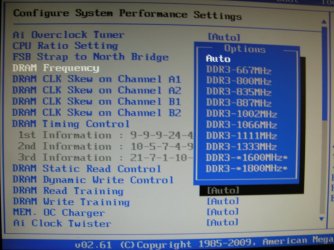
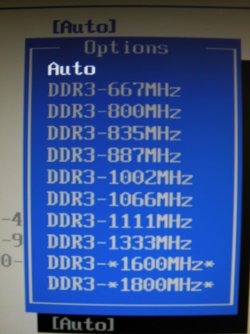
Having problems getting 1600Mhz with 2x2 gigs

mikejbrod

New member
Member
Local time
8:23 PM
Messages
36
Location
Exmouth
Hi all

1st off I have been told to ask here by a really helpfull guy on forums named dave76,
He has helped me get my system running stable with 4gigs by bumping up the Northbridge Voltage to 1.20v

I am running a ASUS P5P43 TD PRO Board ASUSTeK Computer Inc.

Geil 2GB X 2 PC3 12800 1600mhz Play.com (UK) - Free Delivery - Computing (cant get to run stable at this speed currently 1332mhz interleaved mode.)

This ram is supposed to be compatable (its listed it mobo manual and that why I bought it.)

Currently I am running my Bios as below
FSB Strap to Nbridge 400mhz

Dram Freq 1332mhz

Dram Timing 8-8-8-28

mem over voltage 1.9volts

all other settings are left alone (most are [AUTO])

I am not that up to speed on bios settings like these and usally leave this area alone so please give advise as if you were talking to a 4year old!!! :D

I would love to be able to run the memory at full speed, I have been able to get it to post @ 1600mhz but this results in hanging during post and or boot.

Hope someone here will hellp solve this very annoying problem

Thanks

Mike
 

My Computer My Computer

OS
Windows 7 Pro
CPU
Intel Core 2 Quad Q8300 @ 2.5HGz
Motherboard
ASUS P5P43TD PRO
Memory
Geil DDRIII Dual Channel Kit 2x 2gig PC3 12800 1600MHz
Graphics Card(s)
NVIDIA GeForce 9800 GTX+ XFX Black Edition 512MB GDDRIII
Sound Card
Onboard
Monitor(s) Displays
EIZO 17"
Anyone?
 

My Computer My Computer

OS
Windows 7 Pro
CPU
Intel Core 2 Quad Q8300 @ 2.5HGz
Motherboard
ASUS P5P43TD PRO
Memory
Geil DDRIII Dual Channel Kit 2x 2gig PC3 12800 1600MHz
Graphics Card(s)
NVIDIA GeForce 9800 GTX+ XFX Black Edition 512MB GDDRIII
Sound Card
Onboard
Monitor(s) Displays
EIZO 17"
The memory voltage seems a little high for DDR3, but I didn't go to the manufacturer's website to check the maximum voltage.

It sounds like you might have a stability problem. You could try to loosen the RAM timings a little to say 9-9-9-28, and see if you can push the RAM clock up after you do that. If you're overclocking, you can try reducing the FSB and changing the divide ratio for your memory. As long as your motherboard has that feature. Not all RAM will run at its advertised timings on every board.

Please post back and let us know if you have any luck. :)
 

My Computer My Computer

Computer type
PC/Desktop
Computer Manufacturer/Model Number
Mellon Labs (custom build)
OS
Win 7 Pro x64/Win 10 Pro x64 dual boot
CPU
AMD FX 8350 Vishera @ 4200
Motherboard
ASUS M5A97 R2.0
Memory
16 GB Mushkin Blackline DDR3-2400 @ 1866 (9-10-10-10-31)
Graphics Card(s)
XFX Radeon R9 280 Double D Black Edition
Sound Card
Realtek HD Audio on MB. Sounds great.
Monitor(s) Displays
Acer 24", Acer 22"
Screen Resolution
3840 x 1080
Hard Drives
1 x Mushkin Chronos 120 GB SSD (Win 10)
1 x Samsung 850 EVO 250 GB SSD (Win 7)
1 x WD 1TB SATA Blue
1 x WD 1TB SATA Green
PSU
Corsair TX-750
Case
CoolerMaster HAF 912+
Cooling
Coolermaster Seidon 240M Liquid AIO. 6 case fans
Keyboard
Logitech G710+
Mouse
Logitech G500s
Internet Speed
Much better since I got fiber, but still way overpriced.
Antivirus
MSE, Malware Bytes for scanning
Browser
Firefox
Other Info
Corsair VOID USB headphones.

A Mellon Labs X-1 - LCD Smartie driven system status display.

Brought to you by the letter E
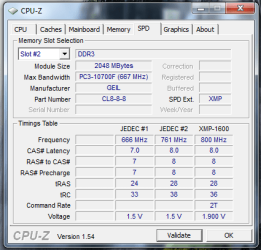
As per your RAM SPD,

cpu-z spd RAM GEIL.png


The timings should be 7-7-7-24 and 1.5v at 667MHz (DRAM Frequency 1333MHz)


Edit:
These were the results when you previously had everything set to Auto in BIOS, same settings as listed above.

Hope you can get the RAM set to 1600MHz like you prefer.
 
Last edited:

My Computer My Computer

Computer type
PC/Desktop
Computer Manufacturer/Model Number
76~2.0
OS
Windows 7 Ult x64 - SP1/ Windows 8 Pro x64
CPU
Intel Core i5-3570K 4.6GHz
Motherboard
Gigabyte GA-Z77X UD3H, f18
Memory
8GB (2X4GB) DDR3 1600 Corsair Vengeance CL8 1.5v
Graphics Card(s)
Sapphire HD 7770 Vapor-X OC 1GB DDR5
Sound Card
Onboard VIA VT2021
Monitor(s) Displays
22" LCD Dell
Screen Resolution
1680x1050
Hard Drives
Samsung 840Pro 128GB SSD,
Seagate Barracuda 500GB SATA2 7200rpm 32MB cache, Seagate Barracuda 1TB SATA2 7200rpm 32MB cache,
PSU
Corsair HX650W
Case
Cooler Master Storm Scout
Cooling
Corsair H80 2x12cm Noctua NF P12 , 2x14cm case fans
Keyboard
Logitech Wave
Mouse
CM Sentinel
Internet Speed
Dismal
Antivirus
Avast
Browser
Opera Next
Other Info
Haswell laptop: HP Envy 17t-j, i7-4700MQ, GeForce 740M 2GB DDR3, 17.3" Full HD 1920x1080, 16GB RAM, Samsung 840 Pro 128GB, 1TB Hitachi 7200 HDD,
Desktop: eSATA ports,
External eSATA Seagate 500GB SATA2 7200rpm,
External WD USB 500GB
OK,
1st item. Your memory Voltage is meant to be 4GB(2GBx2): 1.6/1.9V not just 1.9,

2nd, Have you put the sticks in the correct slots. IE the orange and black, If correct you should have them in the black ones and then orange empty.

3rd. Put all your bios too Auto, Get a digi cam and take a pic. ill show mine and see if its different.

BRB. lol


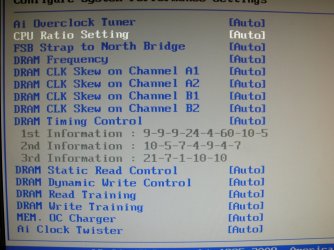
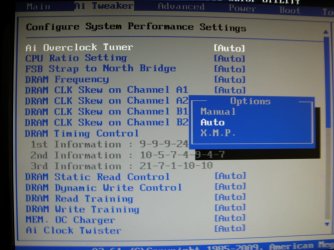
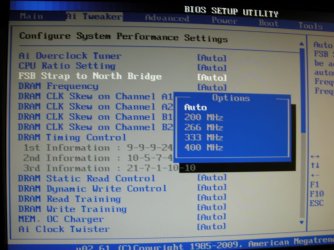
Ok, So I got Asus P5Q3 and here is my Bios Pics in the Ai Boost area. Do you have the same items.
 

Attachments

  • DSCN7011.JPG
    DSCN7011.JPG
    170.7 KB · Views: 2
  • DSCN7012.JPG
    DSCN7012.JPG
    149.1 KB · Views: 2
  • DSCN7013.JPG
    DSCN7013.JPG
    150.8 KB · Views: 2
  • DSCN7015.JPG
    DSCN7015.JPG
    156.3 KB · Views: 2
  • DSCN7016.JPG
    DSCN7016.JPG
    162.5 KB · Views: 2
  • DSCN7018.JPG
    DSCN7018.JPG
    110.7 KB · Views: 4
Last edited:

My Computer My Computer

Computer Manufacturer/Model Number
Home Build.
OS
Windows 7 Home Pre
CPU
Q8200 Intell 2.333
Motherboard
Asus P5Q3 Delux
Memory
DDR3 1333 4gig
Graphics Card(s)
Ati HD4870
Sound Card
Onboard Soundmax. 7.1
Monitor(s) Displays
1, 20" Samsung
Screen Resolution
1600/900
PSU
Good enough
Case
Le Shark
Cooling
FAN FAN FAN FAN, Thermaltake Minitype 90 with speed fan 4.
Keyboard
Standard, Gaming Wolfking
Mouse
Cm-storm-inferno-wired-gaming-mouse
Internet Speed
Sky Crappy upto 20meg I get a whapping 5.8mbs.
Hey Mr Demon,

Yes your Bios looks the same as mine

Any ideas?

I am flat out of any :cry:

So fed up with running @ 1333 / 1332Mhz

Mike
 

My Computer My Computer

OS
Windows 7 Pro
CPU
Intel Core 2 Quad Q8300 @ 2.5HGz
Motherboard
ASUS P5P43TD PRO
Memory
Geil DDRIII Dual Channel Kit 2x 2gig PC3 12800 1600MHz
Graphics Card(s)
NVIDIA GeForce 9800 GTX+ XFX Black Edition 512MB GDDRIII
Sound Card
Onboard
Monitor(s) Displays
EIZO 17"
If your PC gets stuck at post or boot when you try to get it to 1600MHz, just try increase the NB voltage a bit more like I had to set my NB to 1.3v to get consistent boots with my CPU at 3.4GHz. Anything lower and there will be times where it will either boot successfully or get stuck in POST. 1.9v is more than enough for the RAM. Try not to leave any voltage settings on "auto", set as many as you can yourself (just the things like CPU voltage, RAM voltage, NB voltage).

Could you try post a photo of your current BIOS settings?
 

My Computer My Computer

Computer type
PC/Desktop
Computer Manufacturer/Model Number
Custom Built
OS
Windows 8.1 Pro x64
CPU
Intel Core i7 4790k
Motherboard
MSI Z97S Krait Edition
Memory
8GB Corsair Dominator 1600MHz
Graphics Card(s)
MSI TwinFrozr GeForce GTX770
Sound Card
ASUS Xonar DX/XD 7.1
Monitor(s) Displays
Dell 24" S2409W + Dell 20" E207WFP
Screen Resolution
1920x1080 + 1680x1050
Hard Drives
1x 120GB OCZ Agility 3, 1x 750GB Western Digital Caviar Black, 1x 1TB Western Digital Caviar Blue
PSU
Corsair HX850 modular
Case
Fractal Design Define R4
Cooling
Corsair H60 w/ twin Corsair SP120 fans
Keyboard
Logitech G510S Keyboard
Mouse
Logitech G500S Laser Mouse
Internet Speed
40Mbps
Antivirus
Microsoft Security Essentials
Browser
Google Chrome
Other Info
LG Blu-Ray player
Back
Top