Having problems with graphics card in windows 7 help

Wicker

New member
Local time
7:02 PM
Messages
12
hey guys please help
ive installed windows 7 in c drive i deleted the hard drive first before i installed it. now my mouse keeps freezing every so often but when i press a button it refreshes for a few seconds before freezing again ive updated as much as i can i put in a old graphics card and windows seemed to run a little better although not by much i have a navidia 9800gtx+ gigabyte and have no idea what to do i have spent lots of hours looking for a solution on threads to this problem but to no avail if anyone could help it would be much appreciated.
 

My Computer My Computer

OS
windows 7
CPU
3.2ghz dual core
Motherboard
p5n32-sli premium
Memory
2gb
Graphics Card(s)
gigabyte Geforce 9800gtx+
Sound Card
n/a
Monitor(s) Displays
1600x1080
Hard Drives
c-1tb
d-250gb
e-250gb
f-250gb
Case
thermaltake
as well i downloaded from nvdia the supposed update for win7 and has made my computer not even start up properly it just makes a high pitched noise keeps running but doesnt show anything on the screen have no idea whats going on please help
 

My Computer My Computer

OS
windows 7
CPU
3.2ghz dual core
Motherboard
p5n32-sli premium
Memory
2gb
Graphics Card(s)
gigabyte Geforce 9800gtx+
Sound Card
n/a
Monitor(s) Displays
1600x1080
Hard Drives
c-1tb
d-250gb
e-250gb
f-250gb
Case
thermaltake
hey guys please help
ive installed windows 7 in c drive i deleted the hard drive first before i installed it. now my mouse keeps freezing every so often but when i press a button it refreshes for a few seconds before freezing again ive updated as much as i can i put in a old graphics card and windows seemed to run a little better although not by much i have a navidia 9800gtx+ gigabyte and have no idea what to do i have spent lots of hours looking for a solution on threads to this problem but to no avail if anyone could help it would be much appreciated.

Wicker

Hi and welcome to sevenforums

Could you do a couple of things for us

First go into device manager (type device manager in search) and see if there are any unknown drivers (yellow triangle on them). If so those need to have their drivers updated.

Second could you go into event viewer (yep type event viewer in search) and see if there are any errors in the "app" tab relating to this

If there are unknown devices, or errors could you use the built in snipping tool to take screenshots and upload them to us using the attachment (shaped like a paperclip) Icon in your reply

Thanks\

Ken
 

My Computer My Computer

Computer Manufacturer/Model Number
HP Pavillion dv-7 1005 Tx
OS
Win 8 Release candidate 8400
CPU
[email protected]
Memory
4 gigs
Graphics Card(s)
Nvidia 9600M
Sound Card
HD built-in
Monitor(s) Displays
17" Wxga
Screen Resolution
1440x900
Cooling
none
Internet Speed
45Mb down 5Mb up
ok um im just reinstalled windows 7 im talking to u from my laptop and i had to put in my old graphics card as with my new one the computer doesnt even show a screen with the old one it boots and says that there was an error and i have to reinstall windows again when installing windows will it make a difference which graphics card i have in and each time i have tried to install it a black screen occurs when it has done those percentages installed so i have pressed the power button for 10 sec to turn it off then on again as the screen stays black i think forever as once i let it run for a while any clues in that respect thanks for a quick reply
 

My Computer My Computer

OS
windows 7
CPU
3.2ghz dual core
Motherboard
p5n32-sli premium
Memory
2gb
Graphics Card(s)
gigabyte Geforce 9800gtx+
Sound Card
n/a
Monitor(s) Displays
1600x1080
Hard Drives
c-1tb
d-250gb
e-250gb
f-250gb
Case
thermaltake
ok um im just reinstalled windows 7 im talking to u from my laptop and i had to put in my old graphics card as with my new one the computer doesnt even show a screen with the old one it boots and says that there was an error and i have to reinstall windows again when installing windows will it make a difference which graphics card i have in and each time i have tried to install it a black screen occurs when it has done those percentages installed so i have pressed the power button for 10 sec to turn it off then on again as the screen stays black i think forever as once i let it run for a while any clues in that respect thanks for a quick reply

Ok do you have a win 7 dvd? if so boot from it. decide which graphics card you want to use and stay with it.

Ken
 

My Computer My Computer

Computer Manufacturer/Model Number
HP Pavillion dv-7 1005 Tx
OS
Win 8 Release candidate 8400
CPU
[email protected]
Memory
4 gigs
Graphics Card(s)
Nvidia 9600M
Sound Card
HD built-in
Monitor(s) Displays
17" Wxga
Screen Resolution
1440x900
Cooling
none
Internet Speed
45Mb down 5Mb up
Hello Wicker,

When updating your drivers, the screen flicker is normal, but it shouldn't last any more then 5-10 seconds.

If you could, could you go into device manager and check if there are any Yellow Indications next to your drivers, and take a screenshot?
 

My Computer My Computer

Computer Manufacturer/Model Number
Compaq SR5210NX
OS
Windows Vista SP1
CPU
Intel Celeron 420 @ 1.6GHz
Motherboard
Intel board of some sort.
Memory
1.5GB
Graphics Card(s)
Nvidia 9800GT
Sound Card
Realtek HD Audio
Monitor(s) Displays
Compaq MV640
Screen Resolution
1280 x 1024
Hard Drives
Seagate 120GB Internal
Seagate 500GB External Desktop Drive
PSU
200w
Case
Compaq SR5210NX
Cooling
N/A
Keyboard
Compaq Standard v6.8
Mouse
Logitech
Internet Speed
10MBps Verizon FiOS
DJ

Hi and welcome to seven forums

I asked him to do that already.

Ken
 

My Computer My Computer

Computer Manufacturer/Model Number
HP Pavillion dv-7 1005 Tx
OS
Win 8 Release candidate 8400
CPU
[email protected]
Memory
4 gigs
Graphics Card(s)
Nvidia 9600M
Sound Card
HD built-in
Monitor(s) Displays
17" Wxga
Screen Resolution
1440x900
Cooling
none
Internet Speed
45Mb down 5Mb up
ok thanks guys for helping me out

im currently installing windows 7 from a dvd again. Ive got my good grapics card in there now after it goes through the installation process the screen goes black but doesnt restart itself is that normal and should i restart manually? now ive found after that, the computer with my new graphics card can only get up to the bit where those different colour balls make up the windows logo then the screen goes black and thats it, although safe mode does work though and if i put in my old graphics card it works normally though the mouse freezing still occurs once i have reinstalled it i dont think safe mode will allow me to use the ethernet ports so should i put the old graphics card in there so i can come online with the desktop to do that stuff u said
 

My Computer My Computer

OS
windows 7
CPU
3.2ghz dual core
Motherboard
p5n32-sli premium
Memory
2gb
Graphics Card(s)
gigabyte Geforce 9800gtx+
Sound Card
n/a
Monitor(s) Displays
1600x1080
Hard Drives
c-1tb
d-250gb
e-250gb
f-250gb
Case
thermaltake
Try installing with only one memory stick. also are you doing any overclocking ?
 

My Computer My Computer

Computer type
PC/Desktop
Computer Manufacturer/Model Number
Built them myself, Science Experiments !
OS
Win7 Enterprise, Win7 x86 (Ult 7600), Win7 x64 Ult 7600, TechNet RTM on AMD x64 (2.8Ghz)
CPU
AMD fx8350 4ghz, AMD-32 2400mhz, AMD-64 3200mhz, AMDx64 2.8G
Motherboard
SIS 755, ECS-K8M890M-M (Ult 7600), GigaByte & others
Memory
2gb, 4gb on the Ult 7600, 4gb on Technet RTM, 32gb on FX8350
Graphics Card(s)
Draw my own Graphics, several nVidia cards
Sound Card
on motherboard
Monitor(s) Displays
19" flat scr, 28" I-Inc widescr,22" Emprex Widescr, 23" Acer
Screen Resolution
1280 x 1024, 1440 x 900, 1920 x 1080
Hard Drives
6 pata Ide HD's & 2 Sata HD's
added 80gb external on Ult 7600 computer,
numerous extra 1tb, 2TB, 3Tb SATA HD's
A collection of ext HD Docks w/ HDs
PSU
430w, 550w, 600w, 700, 800, etc
Case
All Generic Full Towers
Cooling
Open Air & a few fans, some w/ colored LEDs
Keyboard
Compaq & Dell recycled from GoodWill
Mouse
Made in China Optical Wired Mouse
Internet Speed
Fast Cable InterNet
Antivirus
AVG Free on 24 different Desktops, NO Problems!
Browser
IE 8 is preferred, but use FireFox sometimes
Other Info
Linksys Routers, switches, & Hubs
Too Many USB Flash Drives to count, Biggest is 64GB !
Eight computers in my home network.
Sixteen computers at my business network.
Linked via TeamViewer !
Lots of old used spare computer parts everywhere!
um yeah i dont understand y this is but i only have one 2gb ram in there i think my motherboard is really stupid as it doesnt let me have more then 2gb of ram and it doesnt work right anymore like i put a 1 gb ram in there and it doesnt work even though thats what i originally had in my computer so i dont know whats going on im not overcloking either

cheers for the help
 

My Computer My Computer

OS
windows 7
CPU
3.2ghz dual core
Motherboard
p5n32-sli premium
Memory
2gb
Graphics Card(s)
gigabyte Geforce 9800gtx+
Sound Card
n/a
Monitor(s) Displays
1600x1080
Hard Drives
c-1tb
d-250gb
e-250gb
f-250gb
Case
thermaltake
Argggh So difficult

ok so im going to explain step by step what i have done so maybe there will be some hint to someone as to the problem

First i used a dvd for windows 7 to install it on a fresh hard drive, now the dvd wont let me install win7 period using my new graphics card (geforec gigabyte 9800gtx+) so i used my old series 7 dont know specifically what it is and it actually allows win 7 to install so when i finished installing it the mouse freezes every few seconds and if i press a key on the keyboard the the mouse refreshes so i can use the mouse for a few more seconds before freezing again (sigh) a note that throughout the whole installation process the same thing occurs with the mouse freezing

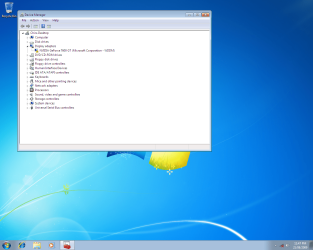
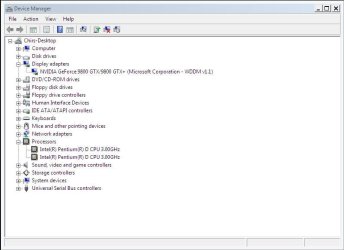
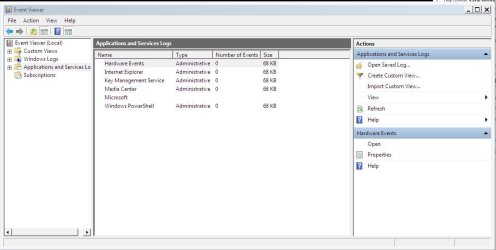
i took screenshoots of the device manager and the event viewer with the old graphics card as shown i also downloaded some updates as well as installed a navidia driver that i downloaded which is supposed to work for win 7

old graphics card device manager.png

event viewer.JPG

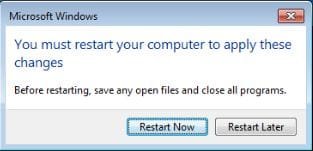
so then i turned off my computer put in the new one and then it booted up and worked strangly enough once booted it comes up with this message

Capture.JPG

once i restart it only gets to the loading windows screen then goes black and thats it although the computer does work in safe mode so i did that

safe mode new gc.JPG

Capturesafe mode new gc event view.JPG

also when i was installing the navidia driver it said something about audio device failed or something but everything else worked fine

any help that can be given in this will be much appriciated
 

My Computer My Computer

OS
windows 7
CPU
3.2ghz dual core
Motherboard
p5n32-sli premium
Memory
2gb
Graphics Card(s)
gigabyte Geforce 9800gtx+
Sound Card
n/a
Monitor(s) Displays
1600x1080
Hard Drives
c-1tb
d-250gb
e-250gb
f-250gb
Case
thermaltake
wicker

The screen shots look like you installed with one video card got it working then couldn't boot so you changed to another video card which didnt have a working driver. Am I right?

I really think you need to do this one step at a time or you are just going to get yourself in deeper and deeper.

Where ever you are now try to safe mode boot. if it is the video driver it will boot in safe mode. If it doesn't then its something else.

My basic assumtions
The win 7 dvd is from microsoft and was burned at a slow speed.
It was a clean install not an upgrade
The install was a success

Lets try the safe mode boot

Ken
 

My Computer My Computer

Computer Manufacturer/Model Number
HP Pavillion dv-7 1005 Tx
OS
Win 8 Release candidate 8400
CPU
[email protected]
Memory
4 gigs
Graphics Card(s)
Nvidia 9600M
Sound Card
HD built-in
Monitor(s) Displays
17" Wxga
Screen Resolution
1440x900
Cooling
none
Internet Speed
45Mb down 5Mb up
yeah so i installed it with my crappy graphics card then i put in my new one and it just goes to a black screen but i have been able to go into safe mode with the good one so from what u have said it is the graphics card
 

My Computer My Computer

OS
windows 7
CPU
3.2ghz dual core
Motherboard
p5n32-sli premium
Memory
2gb
Graphics Card(s)
gigabyte Geforce 9800gtx+
Sound Card
n/a
Monitor(s) Displays
1600x1080
Hard Drives
c-1tb
d-250gb
e-250gb
f-250gb
Case
thermaltake
yeah so i installed it with my crappy graphics card then i put in my new one and it just goes to a black screen but i have been able to go into safe mode with the good one so from what u have said it is the graphics card

W

probably not a graphics card but more likely a driver. Try to find the driver for that card

Ken
 

My Computer My Computer

Computer Manufacturer/Model Number
HP Pavillion dv-7 1005 Tx
OS
Win 8 Release candidate 8400
CPU
[email protected]
Memory
4 gigs
Graphics Card(s)
Nvidia 9600M
Sound Card
HD built-in
Monitor(s) Displays
17" Wxga
Screen Resolution
1440x900
Cooling
none
Internet Speed
45Mb down 5Mb up
well i downloaded a driver for it and installed it but hasnt done anything
 

My Computer My Computer

OS
windows 7
CPU
3.2ghz dual core
Motherboard
p5n32-sli premium
Memory
2gb
Graphics Card(s)
gigabyte Geforce 9800gtx+
Sound Card
n/a
Monitor(s) Displays
1600x1080
Hard Drives
c-1tb
d-250gb
e-250gb
f-250gb
Case
thermaltake
so the problem facing me is that windows 7 wont load properly with my new graphics card so i cant use my windows 7 boot cd to upgrade it fresh install doesnt work either i downloaded the driver from nvdia as my installation cd driver for my graphics card wont work on win7 here is the link i got the driver NVIDIA DRIVERS 190.62 WHQL
really cant figure out why nothings working
 

My Computer My Computer

OS
windows 7
CPU
3.2ghz dual core
Motherboard
p5n32-sli premium
Memory
2gb
Graphics Card(s)
gigabyte Geforce 9800gtx+
Sound Card
n/a
Monitor(s) Displays
1600x1080
Hard Drives
c-1tb
d-250gb
e-250gb
f-250gb
Case
thermaltake
i'm no expert, but from some of your first posts you said you heard a high pitch noise and were getting a black screen or whatever. i can't seem to find the manual right now, but when i was troubleshooting my nvidia card, iirc i read that a high pitch squeal meant that the card wasn't getting enough power. just sayin..

ps- ummmmm ;)
 

My Computer My Computer

OS
Windows 7 Ultimate x64 7600
CPU
intel core i7 920
Motherboard
asus p6t deluxe v2
Memory
6gb ddr3 corsair dominator
Graphics Card(s)
evga nvidia geforce gts 250
Hard Drives
seagate 1.0TB 1.5TB 1.5TB
PSU
650w
Case
antec nine hundred
Cooling
thermal take cpu fan
ah thanks for the help i just installed vista the same thing is happening but not as frequently it was working perfectly before i installed windows 7 i have been changing the graphics card over frequently if that is the problem got any ideas as i havnt installed any new hardware
 

My Computer My Computer

OS
windows 7
CPU
3.2ghz dual core
Motherboard
p5n32-sli premium
Memory
2gb
Graphics Card(s)
gigabyte Geforce 9800gtx+
Sound Card
n/a
Monitor(s) Displays
1600x1080
Hard Drives
c-1tb
d-250gb
e-250gb
f-250gb
Case
thermaltake
updates?
 

My Computer My Computer

OS
Windows 7 Ultimate x64 7600
CPU
intel core i7 920
Motherboard
asus p6t deluxe v2
Memory
6gb ddr3 corsair dominator
Graphics Card(s)
evga nvidia geforce gts 250
Hard Drives
seagate 1.0TB 1.5TB 1.5TB
PSU
650w
Case
antec nine hundred
Cooling
thermal take cpu fan
well simultaneously i stuffed up my good graphics card so it makes a noise at the start when i turn on my computer because i believe that the pci-e is not giving it power im assuming that the graphics card is the problem not power supply and that it might have short circuited. second thing that happened i think is that my mother board stuffed up which is causing the mouse problem. Assessment im screwed beyond all help the biggest problem now is i dont know for sure whether im right so if i do replace the graphics card and motherboard it may not fix the problem
 

My Computer My Computer

OS
windows 7
CPU
3.2ghz dual core
Motherboard
p5n32-sli premium
Memory
2gb
Graphics Card(s)
gigabyte Geforce 9800gtx+
Sound Card
n/a
Monitor(s) Displays
1600x1080
Hard Drives
c-1tb
d-250gb
e-250gb
f-250gb
Case
thermaltake
Back
Top