Having trouble setting up multiple monitors - Laptop + external monito

Lindaw1954

New member
Local time
3:10 PM
Messages
30
I have a Sony laptop with Windows 7, and recently purchased a new LCD monitor. I know it is supposed to be easy to use both monitors, but so far I have been unsuccessful. It seems like I can only duplicate, and not really extend the monitors, so I see the same on both screens. Also, when I try to close the lid on my laptop, the external monitor goes to sleep. I am obviously doing something wrong, but cannot figure out what it is. Thanks for any assistance you can provide.
 

My Computer My Computer

At a glance

Windows 7 64 bitIntel Core i34mg
Computer Manufacturer/Model Number
Sony Electronics
OS
Windows 7 64 bit
CPU
Intel Core i3
Memory
4mg
Hi Landaw,

Not sure what type of Sony you have but try changing the view by holding down Fn (down next to you windows button) and press F7 then press enter to keep the view.

Good Luck
 

My Computer My Computer

At a glance

Windows 7 Professional x64
Computer type
Laptop
Computer Manufacturer/Model Number
HP
OS
Windows 7 Professional x64
I'm sorry, but that did not work. When I extend the display, I get a blank screen with the windows background but no icons on the external monitor, and all the icons are on the laptop monitor. I want to be able to use both monitors, having different views on each.
 

My Computer My Computer

At a glance

Windows 7 64 bitIntel Core i34mg
Computer Manufacturer/Model Number
Sony Electronics
OS
Windows 7 64 bit
CPU
Intel Core i3
Memory
4mg
I'm sorry, but that did not work. When I extend the display, I get a blank screen with the windows background but no icons on the external monitor, and all the icons are on the laptop monitor. I want to be able to use both monitors, having different views on each.

Dear Linda, that is how extended desktop works! According to your description, all is fine and you have no issues.

Extended desktop means both displays are independent, showing different content as instructed by user. When first set up, the secondary display has nothing to show hence it's only showing the desktop background.

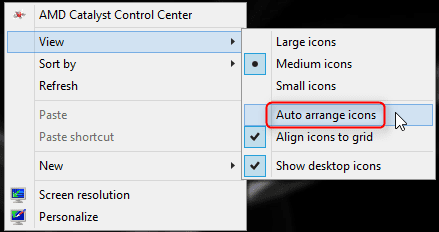
If you have selected Auto arrange icons (desktop context menu), all icons will be located to display 1 (laptop display by default); to place some of them to secondary display you have to first disable auto arrange.

2014-05-19_00h43_44.png

You can freely move application, explorer and browser windows between displays and (subject to auto arrange being disabled) create shortcuts on both.

Kari
 

My Computer My Computer

At a glance

Windows 10 Pro x64 EN-GB1.6 GHz Intel Core i7-720QM Processor6 GBATI Mobility Radeon HD 5850 Graphics
Computer type
Laptop
Computer Manufacturer/Model Number
HP ENVY 17-1150eg
OS
Windows 10 Pro x64 EN-GB
CPU
1.6 GHz Intel Core i7-720QM Processor
Memory
6 GB
Graphics Card(s)
ATI Mobility Radeon HD 5850 Graphics
Sound Card
Beats sound system with integrated subwoofer
Monitor(s) Displays
17" laptop display, 22" LED and 32" Full HD TV through HDMI
Screen Resolution
1600*900 (1), 1920*1080 (2&3)
Hard Drives
Internal: 2 x 500 GB SATA Hard Disk Drive 7200 rpm
External: 2TB for backups, 3TB USB3 network drive for media
Cooling
As Envy runs a bit warm, I have it on a Cooler Master pad
Keyboard
Logitech diNovo Media Desktop Laser (bluetooth)
Mouse
Logitech Performance Mouse MX
Internet Speed
50/10 Mbps VDSL
Antivirus
Windows Defender 4.3.9431.0
Browser
Maxthon 3.5.2., IE11
Thanks for the info, but I don't think I am being clear, or perhaps, I can't do what I envision. For instance, I want to have a website on one monitor, and a Word document on the other monitor. Should I be using something intead of extend displays? I have seen other people being able to open something, and then drag it from one monitor to another.

Thanks for your help.
 

My Computer My Computer

At a glance

Windows 7 64 bitIntel Core i34mg
Computer Manufacturer/Model Number
Sony Electronics
OS
Windows 7 64 bit
CPU
Intel Core i3
Memory
4mg
You described a totally working and normal extended display in your previous post: display one (laptop) showing the icons, display 2 (external) showing nothing but an empty desktop.

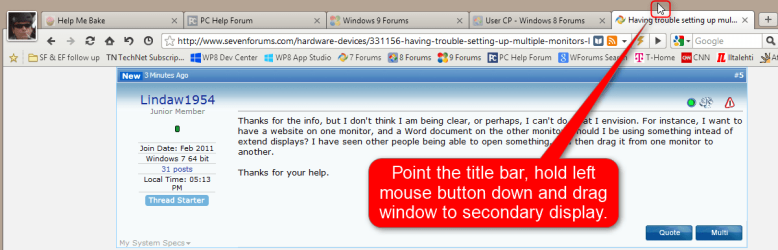
You move a window to another display by dragging it (hold left mouse button down) from the title bar:

2014-05-19_01h19_04.png

Kari
 

My Computer My Computer

At a glance

Windows 10 Pro x64 EN-GB1.6 GHz Intel Core i7-720QM Processor6 GBATI Mobility Radeon HD 5850 Graphics
Computer type
Laptop
Computer Manufacturer/Model Number
HP ENVY 17-1150eg
OS
Windows 10 Pro x64 EN-GB
CPU
1.6 GHz Intel Core i7-720QM Processor
Memory
6 GB
Graphics Card(s)
ATI Mobility Radeon HD 5850 Graphics
Sound Card
Beats sound system with integrated subwoofer
Monitor(s) Displays
17" laptop display, 22" LED and 32" Full HD TV through HDMI
Screen Resolution
1600*900 (1), 1920*1080 (2&3)
Hard Drives
Internal: 2 x 500 GB SATA Hard Disk Drive 7200 rpm
External: 2TB for backups, 3TB USB3 network drive for media
Cooling
As Envy runs a bit warm, I have it on a Cooler Master pad
Keyboard
Logitech diNovo Media Desktop Laser (bluetooth)
Mouse
Logitech Performance Mouse MX
Internet Speed
50/10 Mbps VDSL
Antivirus
Windows Defender 4.3.9431.0
Browser
Maxthon 3.5.2., IE11
Back
Top