Having trouble with multi card reader.

pbandy34

New member
Local time
2:40 AM
Messages
1
I've installed 2 multi card readers to my desktop. The drives are listed under "computer" and the icon changes when I insert the SD card from my camera, but when I try to explore (either by double clicking or by clicking "explore"), it tells me to insert a disk. Has anyone seen this before? IS there something I have to change to get these to work? I'm assuming it's a Windows problem because it is the 2nd card reader I've installed. The first one gave me the same problem, I thought it was the card reader, so I bought I new one.
 

My Computer

OS
Windows 7 Ultimate x64
CPU
AMD Athlon X4 630
Motherboard
ASUS M4A78T-E
Memory
12 GB DDR3 RAM
Hello pbhandy34, welcome to the forum.

I have seen a similar problem where each slot of a multi card reader shows up as a drive,, even when no card is inserted :confused: clicking on all, but the drive with a card will produce the same message you have. unfortunately I know of no fix for this :(
You could try inserting the card before you attach the device, or insert the card before starting the PC. (It maybe enough to just log off/on after inserting card) depending if your reader is USB or built in.

I hope this helps you
 

My Computer

Computer Manufacturer/Model Number
Something I threw together
OS
Windows 7 Ultimate x64
CPU
Intel Core i7-2600K
Motherboard
Asus P8P67
Memory
16 GB G Skill F3-10666 CL9D-4GBRL
Graphics Card(s)
ATI Radeon HD 6870
Sound Card
ATI Radeon HDMI / Realtek ALC892
Monitor(s) Displays
2 x 22" standard monitors / LG32LC56v TV to watch films
Screen Resolution
1920 x1080
Hard Drives
2 x OCZ Vertex2 111.79GB
3 x Samsung103SJ
1 x Samsung103UJ
1 x WD3200BEVT
1 x Hitachi5K320-160
PSU
Thermaltake Toughpower Cable Management 750W
Case
Antec 300
Cooling
Noctua NH-U12P SE2 and 5 120mm Case fans
Keyboard
Microsoft Comfort Curve Keyboard 2000
Mouse
Hama M3110 / Logitech M305
Internet Speed
16000
Other Info
I have also used Fedora, Suse, Ubuntu Linux
And all other Windows from 95 to date except ME
Media Card Problem

Thank you Pooch. Because my machine is only 11 months old, I contacted Dell (the makers) and afte an exchange of strong words from myself their technical support chap took remote control of my machine and carried out some work. He downoladed a driver in an attemt to rectify the problem.

At the moment, sometimes the reader recognises a card and sometimes it doesn't. I checked all my cards on my pals computer and they worked well with no problems. Dell are phoning back on Monday to see how the testing went.

One thing I would suggest is that it might better not to buy a Dell tower computer. I have two new motherboards in a year and countless other little minor problems too. Sometimes I wish I had never seen Dell.

Regards,
RonBin79
 

My Computer

Computer Manufacturer/Model Number
Dell XP8300
OS
Windows Seven Premium
CPU
Intel Core i5-2300
Motherboard
Unknown
Memory
8GB
Graphics Card(s)
1GB ATI Raedon HD 5450
Sound Card
Integrated 7.1 with THX TrueStudio
Monitor(s) Displays
Dell 17"
Hard Drives
1 Terrabyte Serial ATA
Case
Dell (Metal)
Cooling
None
Keyboard
Dell
Mouse
Dell Laser
Internet Speed
2.8Gb
It could be that your Dell is having a problem reading the card, rather than a problem with the card reader itself.

Are you able to transfer images from your camera to your computer if the camera is switched on and connected to your computer with the camera's USB lead?

Have you considered updating your chipset drivers?

Is your card reader recognised in Device Manager? If so, is there any indication that a driver is required?
 

My Computer

Computer Manufacturer/Model Number
HP Pavilion Elite 495UK
OS
Windows 7 Ultimate SP1 64-Bit
CPU
Intel Core i7 870 @ 2.93GHz
Motherboard
MSI 2A9C (CPU1)
Memory
8Gb Dual-Channel DDR3 @ 664MHz
Graphics Card(s)
nVidia GeForce GTX 460 1024MB dedicated RAM
Sound Card
Realtek HD Audio
Monitor(s) Displays
HP2310i
Screen Resolution
1920 x 1080
Hard Drives
1x1954GB Hitachi HDS22020ALA 330 (RAID), 1x1954GB Hitachi External for backup and storage
PSU
460W
Case
HP Elite
Cooling
Air cooled
Keyboard
Logitech K750 solar-powered keyboard
Mouse
Logitech Wireless M180 mouse
Internet Speed
2Mb
Other Info
Pure Avanti Flow Internet Radio with iPod Dock, 64Gb iPod, HP USB Speakers, Sony MDR-V500 Headphones, Sony Vaio F-Series Laptop
Media Card problems

I have discovered that my on board reader will not read two Sandisk 8mb CF cards but it will read other 2mb ones. The external card reader will read all the cards so the problems seems to be with just the two 8mb cards.

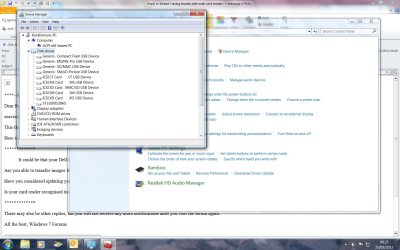
I have attached a screen shot of the Hardware Media manager and you will see the reader is showing there. I can of course connect my Olympus E30 direct to the computer and download my pictures to Photoshop for processing if needs be however, I bought the computer primarily for photographic work and feel that if I have paid good money for it, I should get good results from it.

I will buy a couple of 4gb Exteme cards to replace the non working 8gb ones and wait and see what Mr Dell has to say on Monday.

Cheers,

RonBin79
 

Attachments

  • Device Manager.jpg
    Device Manager.jpg
    159.2 KB · Views: 19

My Computer

Computer Manufacturer/Model Number
Dell XP8300
OS
Windows Seven Premium
CPU
Intel Core i5-2300
Motherboard
Unknown
Memory
8GB
Graphics Card(s)
1GB ATI Raedon HD 5450
Sound Card
Integrated 7.1 with THX TrueStudio
Monitor(s) Displays
Dell 17"
Hard Drives
1 Terrabyte Serial ATA
Case
Dell (Metal)
Cooling
None
Keyboard
Dell
Mouse
Dell Laser
Internet Speed
2.8Gb

My Computer

Computer Manufacturer/Model Number
HP Pavilion Elite 495UK
OS
Windows 7 Ultimate SP1 64-Bit
CPU
Intel Core i7 870 @ 2.93GHz
Motherboard
MSI 2A9C (CPU1)
Memory
8Gb Dual-Channel DDR3 @ 664MHz
Graphics Card(s)
nVidia GeForce GTX 460 1024MB dedicated RAM
Sound Card
Realtek HD Audio
Monitor(s) Displays
HP2310i
Screen Resolution
1920 x 1080
Hard Drives
1x1954GB Hitachi HDS22020ALA 330 (RAID), 1x1954GB Hitachi External for backup and storage
PSU
460W
Case
HP Elite
Cooling
Air cooled
Keyboard
Logitech K750 solar-powered keyboard
Mouse
Logitech Wireless M180 mouse
Internet Speed
2Mb
Other Info
Pure Avanti Flow Internet Radio with iPod Dock, 64Gb iPod, HP USB Speakers, Sony MDR-V500 Headphones, Sony Vaio F-Series Laptop
Back
Top