Solved HD failing need to move os to new bigger HD

LogicBomb

New member
Local time
3:56 PM
Messages
8
Location
USA
This question may have been posted and answered at an earlier date but I am experiencing some complications that I am unsure how to address. My desktops Hd recently started failing and so today I ordered a new one that is 250gb larger. I understand how to back up most of my files and have an external to do so but I do not have install disk for the windows 7 os as my computer came with it installed. My product key for my os is still on the sticker on the side of the tower but as this new Hd is 100% blank i need to move the os somehow and I am unsure as to how I am supposed to do this. I have read alot about cloning a Hd but am wondering if this is my best option. ANY information on this problem would be greatly appreciated but please keep in mind i am no computer genius, Thank you all for any and all help.
 

My Computer My Computer

At a glance

Windows 7 HP
OS
Windows 7 HP
   Information
We always assume you have made your Recovery Disks using the OEM manufacturer's Recovery Media Creator app the first day you had your new PC.
& made the Startup Repair CD.
startup repair disc-create


Did you make the OEM manufacturer's Recovery Disks?

Have a look at those tutorials:
Best to backup to a external HDD.
http://www.sevenforums.com/tutorials/675-system-image-recovery.html?ltr=S
http://www.sevenforums.com/tutorials/663-backup-complete-computer-create-image-backup.html
http://www.sevenforums.com/tutorials/648-restore-backup-user-system-files.html


http://www.sevenforums.com/tutorials/149969-ssd-install-transfer-operating-system.html
 

My Computer My Computer

At a glance

ME/XP/Vista/Win7
OS
ME/XP/Vista/Win7
i have never created a backup or recovery disk but the old hard drive is still accessible atm. My problem is I do not have windows seven installation disk so if I follow the steps in the Backup Complete Computer tut you linked me to i do not know how to make the created backup run on my new and empty hard drive. Unless the backup is already bootable?
 

My Computer My Computer

At a glance

Windows 7 HP
OS
Windows 7 HP
Thats what I was just reading into lol, My concern was that it says a repair disk cannot install windows seven only repair it. Once I create the back up and save it to my external do I just install the blank hd pop in the repair disk and point the clone or, backup rather, to the empty drive?
 

My Computer My Computer

At a glance

Windows 7 HP
OS
Windows 7 HP
right but the repair disk itself wont have the os on it will it? Sorry im so confused lol. I thought I was creating 1. A back up of my c drive and then 2. A repair disk.
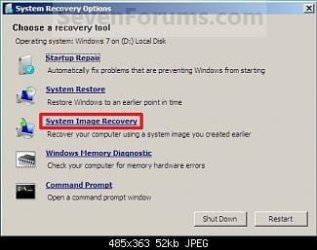
After I boot the repair disk I thought I would need to locate the back up files and move them to the new hd by clicking system image recovery
 

My Computer My Computer

At a glance

Windows 7 HP
OS
Windows 7 HP

My Computer My Computer

At a glance

ME/XP/Vista/Win7
OS
ME/XP/Vista/Win7
yes thats what I thought lol and image can be saved to an external correct
 

My Computer My Computer

At a glance

Windows 7 HP
OS
Windows 7 HP
Yes, Best to backup to a external HDD.
 

My Computer My Computer

At a glance

ME/XP/Vista/Win7
OS
ME/XP/Vista/Win7
thank you for all your help
 

My Computer My Computer

At a glance

Windows 7 HP
OS
Windows 7 HP
Back
Top