HD Radeon 7750 Gaming issue; Freezes

Heliomega1

New member
Local time
5:38 AM
Messages
1
Hello all,

I want to preface that I'm not very computer literate. I know the basics, and was able to build my current computer (with someone's help), but sometimes stuff can go over my head so bear with me.

Backstory: I have a computer I built about 3 years ago, a friend of mine picked out some parts based on what I "wanted," really the extent of what I knew about my computer was that I have 8 GB Ram, 4 cores, etc. That and I had a gigabyte HD Radeon 5570 that more or less ran everything I wanted it to perfectly. I had and still have Windows x64 Ultimate. The card died about a month ago, I bought a new one (an Asus 7750) and I got my visual back. I had uninstalled the old card's drivers and decided to do a clean install of Windows (Sort of an impulsive idea, I just wanted a "fresh start"). I then Installed the latest release from AMD for my new card. (Granted, I BELIEVE I uninstalled the old drivers. What's the easiest way to check?)

I'm a big gamer so my new game I was playing after the switch was Dead Space 3. After a while I noticed that if I was doing something in game that involved a lot of movement (doors closing, screen shaking), the game would freeze. The game would stop and the visuals would be frozen, but sound would continue. It didn't crash to desktop, just hung there. I tried uninstalling and reinstalling different drivers and older, more stable catalyst suites, nothing seemed to work. I went back to the latest and just swallowed my pride: I finished the entire game just restarting the times it would stop, maybe 2 dozen total. It bothered me that the problem seemed "random;" even if I noticed that it would mostly happen in high action sequences, sometimes I would make it through an area without a freeze, sometimes not. As you can tell, I'm pretty bad at troubleshooting. I just assumed it was local to that game's having, I don't know, poor coding and my Frankenstein of a computer didn't like it. Yeah, not exactly scientific.

Anyway, now I'm trying out the new Bioshock Infinite, with the latest drivers, and just an hour in the exact same thing happened. Visual freeze, game stop, hang unless I stop the process. This time I checked the catalyst suite's provided information as I was running it, and I didn't notice any obvious overheating or fatal errors despite the game failing. This second occurrence makes me think it's not a problem that will just go away, as childish as that sounds.

I know it's not a lot of information to go on, I was hoping maybe someone had a similar issue, perhaps with the Radeon 7750 card. I'm hoping that I didn't get a bad card (I ordered all the parts for this machine, past and present, from newegg.com). I can figure out all the other components I've got if need be, but I'm hoping that since the only big change is the new card that the problem lies there.

Thanks for listening, though.
 

My Computer My Computer

At a glance

Windows 7 x64 Ultimate
Computer type
PC/Desktop
OS
Windows 7 x64 Ultimate
Hello and welcome Helio mate some system specs would be handy and the card you say is an
Asus 7750 now not being terribly up on GPU's - an Asus ??????7750 so cannot look up any drivers for it.

Would also like to know what the temps you are running too .

Get the specs and temps with Speccy - download from piriform
Speccy - Download


As for the old drivers they would have been cleared by the fresh install - it was from scratch fresh clean install?

The other thing I am thinking too is the PSU you could try checking the power output (volts) on that too. http://www.sevenforums.com/vip/257690-psu-how-test.html#post2130086
 

My Computer My Computer

At a glance

Desk1 7 Home Prem / Desk2 10 Pro / Main lap A...Desk1 i5 3750K / Laptop i7 GTX 860M / Desk2 i...Desk1 8GB (1866) / Desk2 16GB (1333) / Laptop...Desk 1& 2NVidia GTX 650 & Laptops on board Intel
Computer type
PC/Desktop
Computer Manufacturer/Model Number
Own build (new) Desk1 / Asus ROG Win 7 / Desk2 1st build
OS
Desk1 7 Home Prem / Desk2 10 Pro / Main lap Asus ROG 10 Pro 2 laptop Toshiba 7 Pro Asus P2520 7 & 10
CPU
Desk1 i5 3750K / Laptop i7 GTX 860M / Desk2 i5 2500
Motherboard
Desk1 Asus P877-V / Desk2 Gigabyte H67 UD3H / Laptop ?
Memory
Desk1 8GB (1866) / Desk2 16GB (1333) / Laptop 8Gb DDR3
Graphics Card(s)
Desk 1& 2NVidia GTX 650 & Laptops on board Intel
Sound Card
Desk 1 & 2 -XONAR DG Realtek High Def audio Laptop
Monitor(s) Displays
Desk 1 Benq HD 2450 / Desk2 Philips 24" / Laptop 17.5"
Screen Resolution
1920x1080 D1 & D2 & Laptop 1
Hard Drives
Desk1 Samsung 120GB 830 SSD
Asus ROG 256GB 850 Pro SSD
Desk2 Samsung 840 256 SSD
Toshiba 120GB EVO
PSU
Desk 1 Corsair HX 1050/ Laptop ? / Desk 2 Corsair HX 650
Case
Desk 1 Cooler HAF XM ? Toshiba laptop / Desk2 Coolermaster
Cooling
Fans on all Desk1 -2 Desk2 - all Coolermasters 5 Laptop ?
Keyboard
Desk 1 MS Sidewinder X6 Desk 2 MS Sidewinder X 4
Mouse
Desk 1&2 - Gigabyte MS 900 gamer - laptop - Logitec wireless
Internet Speed
ADSL2+
Other Info
One other Desktop (tester) and spare Toshba laptop both with SSD's
Running Kaspersky 2016 ISS on all machines config'd identically
Logitec audio stereo systems on each machine (x3)
Canon MG5250MFC
Router/modem TP-Link running WPA2SK
i dont want to hijack gour thread :-)
i am also having ati hd 7750 (msi), there are random freezes and audio will get stutter continously and video will get stuck and finally screen turns to white
so i have to end task
and ati control centre shows drivers stopped working and recovered successfully
although for me it happens only in prototype 2 and deux human revolution (to the extent almost unplayable)
 

My Computer My Computer

At a glance

Windows 7 Ultimate 64 biti3 21004gb ddr3ati hd7750
Computer type
PC/Desktop
Computer Manufacturer/Model Number
custom build
OS
Windows 7 Ultimate 64 bit
CPU
i3 2100
Motherboard
dh67bl
Memory
4gb ddr3
Graphics Card(s)
ati hd7750
Sound Card
Integrated
Monitor(s) Displays
samsung 22 inch led
Screen Resolution
1920 * 1080
Hard Drives
500gb wd
500gb seagate
PSU
350w cooler master
Case
i ball(dont remeber the model)
Cooling
stock fans
Internet Speed
512kbps
Antivirus
mse
Browser
firefox,chrome
sapphire 7750 freezing

I know this not much help but having same issue with this card since I got it. Constant game freezes white screen. Can only play on ultra low settings. Been through many forums tried a lot of things with no success. Make sure you got sp1 installed. I am wondering if it is the power management dropping you into idle and causing freeze.
 

My Computer My Computer

At a glance

win7 32 sp1
Computer type
PC/Desktop
OS
win7 32 sp1
v12.1 drivers were one of the most stable drivers ever released. Try them: Previous AMD Catalyst

Newer drivers doesn't always mean good.

ICit2lol said:
...an Asus ??????7750 so cannot look up any drivers for it.

Me neither.
If you look mate it states Asus 7750 in the first post!!.

As for the driver it isn't listed on the ATI site as far as I can tell for Windows 7 and the Asus is here

https://www.asus.com/Graphics_Cards/HD77501GD5/#support_Download_30
 

My Computer My Computer

At a glance

Desk1 7 Home Prem / Desk2 10 Pro / Main lap A...Desk1 i5 3750K / Laptop i7 GTX 860M / Desk2 i...Desk1 8GB (1866) / Desk2 16GB (1333) / Laptop...Desk 1& 2NVidia GTX 650 & Laptops on board Intel
Computer type
PC/Desktop
Computer Manufacturer/Model Number
Own build (new) Desk1 / Asus ROG Win 7 / Desk2 1st build
OS
Desk1 7 Home Prem / Desk2 10 Pro / Main lap Asus ROG 10 Pro 2 laptop Toshiba 7 Pro Asus P2520 7 & 10
CPU
Desk1 i5 3750K / Laptop i7 GTX 860M / Desk2 i5 2500
Motherboard
Desk1 Asus P877-V / Desk2 Gigabyte H67 UD3H / Laptop ?
Memory
Desk1 8GB (1866) / Desk2 16GB (1333) / Laptop 8Gb DDR3
Graphics Card(s)
Desk 1& 2NVidia GTX 650 & Laptops on board Intel
Sound Card
Desk 1 & 2 -XONAR DG Realtek High Def audio Laptop
Monitor(s) Displays
Desk 1 Benq HD 2450 / Desk2 Philips 24" / Laptop 17.5"
Screen Resolution
1920x1080 D1 & D2 & Laptop 1
Hard Drives
Desk1 Samsung 120GB 830 SSD
Asus ROG 256GB 850 Pro SSD
Desk2 Samsung 840 256 SSD
Toshiba 120GB EVO
PSU
Desk 1 Corsair HX 1050/ Laptop ? / Desk 2 Corsair HX 650
Case
Desk 1 Cooler HAF XM ? Toshiba laptop / Desk2 Coolermaster
Cooling
Fans on all Desk1 -2 Desk2 - all Coolermasters 5 Laptop ?
Keyboard
Desk 1 MS Sidewinder X6 Desk 2 MS Sidewinder X 4
Mouse
Desk 1&2 - Gigabyte MS 900 gamer - laptop - Logitec wireless
Internet Speed
ADSL2+
Other Info
One other Desktop (tester) and spare Toshba laptop both with SSD's
Running Kaspersky 2016 ISS on all machines config'd identically
Logitec audio stereo systems on each machine (x3)
Canon MG5250MFC
Router/modem TP-Link running WPA2SK
Hello all,

I want to preface that I'm not very computer literate. I know the basics, and was able to build my current computer (with someone's help), but sometimes stuff can go over my head so bear with me.

Backstory: I have a computer I built about 3 years ago, a friend of mine picked out some parts based on what I "wanted," really the extent of what I knew about my computer was that I have 8 GB Ram, 4 cores, etc. That and I had a gigabyte HD Radeon 5570 that more or less ran everything I wanted it to perfectly. I had and still have Windows x64 Ultimate. The card died about a month ago, I bought a new one (an Asus 7750) and I got my visual back. I had uninstalled the old card's drivers and decided to do a clean install of Windows (Sort of an impulsive idea, I just wanted a "fresh start"). I then Installed the latest release from AMD for my new card. (Granted, I BELIEVE I uninstalled the old drivers. What's the easiest way to check?)

I'm a big gamer so my new game I was playing after the switch was Dead Space 3. After a while I noticed that if I was doing something in game that involved a lot of movement (doors closing, screen shaking), the game would freeze. The game would stop and the visuals would be frozen, but sound would continue. It didn't crash to desktop, just hung there. I tried uninstalling and reinstalling different drivers and older, more stable catalyst suites, nothing seemed to work. I went back to the latest and just swallowed my pride: I finished the entire game just restarting the times it would stop, maybe 2 dozen total. It bothered me that the problem seemed "random;" even if I noticed that it would mostly happen in high action sequences, sometimes I would make it through an area without a freeze, sometimes not. As you can tell, I'm pretty bad at troubleshooting. I just assumed it was local to that game's having, I don't know, poor coding and my Frankenstein of a computer didn't like it. Yeah, not exactly scientific.

Anyway, now I'm trying out the new Bioshock Infinite, with the latest drivers, and just an hour in the exact same thing happened. Visual freeze, game stop, hang unless I stop the process. This time I checked the catalyst suite's provided information as I was running it, and I didn't notice any obvious overheating or fatal errors despite the game failing. This second occurrence makes me think it's not a problem that will just go away, as childish as that sounds.

I know it's not a lot of information to go on, I was hoping maybe someone had a similar issue, perhaps with the Radeon 7750 card. I'm hoping that I didn't get a bad card (I ordered all the parts for this machine, past and present, from newegg.com). I can figure out all the other components I've got if need be, but I'm hoping that since the only big change is the new card that the problem lies there.

Thanks for listening, though.
Now Heliomega try looking for the drivers with Revo Download Revo Uninstaller Freeware - Free and Full Download - Uninstall software, remove programs, solve uninstall problems you might have to try the trial pro version for a really full on readout

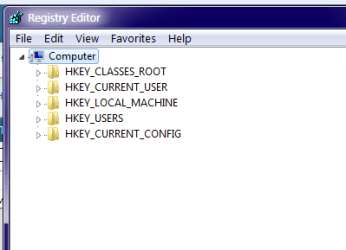
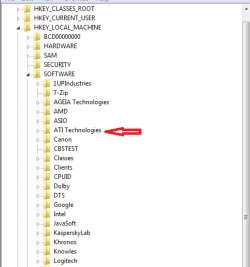
or you can go to the Start > type regedit > right click on the blue ref and run as admin > go to both HKEY_LOCAL_MACHINE & HKEY_CURRENT_USER

open them out by click on on the small triangle go to Software and look down the lists
see my pic for a view somewhere down there should be a ref to ATi but don't touch anything until you have posted back with what you have found.
 

Attachments

  • SNIP1.PNG
    SNIP1.PNG
    6 KB · Views: 5
  • SNIP2.PNG
    SNIP2.PNG
    7.2 KB · Views: 5

My Computer My Computer

At a glance

Desk1 7 Home Prem / Desk2 10 Pro / Main lap A...Desk1 i5 3750K / Laptop i7 GTX 860M / Desk2 i...Desk1 8GB (1866) / Desk2 16GB (1333) / Laptop...Desk 1& 2NVidia GTX 650 & Laptops on board Intel
Computer type
PC/Desktop
Computer Manufacturer/Model Number
Own build (new) Desk1 / Asus ROG Win 7 / Desk2 1st build
OS
Desk1 7 Home Prem / Desk2 10 Pro / Main lap Asus ROG 10 Pro 2 laptop Toshiba 7 Pro Asus P2520 7 & 10
CPU
Desk1 i5 3750K / Laptop i7 GTX 860M / Desk2 i5 2500
Motherboard
Desk1 Asus P877-V / Desk2 Gigabyte H67 UD3H / Laptop ?
Memory
Desk1 8GB (1866) / Desk2 16GB (1333) / Laptop 8Gb DDR3
Graphics Card(s)
Desk 1& 2NVidia GTX 650 & Laptops on board Intel
Sound Card
Desk 1 & 2 -XONAR DG Realtek High Def audio Laptop
Monitor(s) Displays
Desk 1 Benq HD 2450 / Desk2 Philips 24" / Laptop 17.5"
Screen Resolution
1920x1080 D1 & D2 & Laptop 1
Hard Drives
Desk1 Samsung 120GB 830 SSD
Asus ROG 256GB 850 Pro SSD
Desk2 Samsung 840 256 SSD
Toshiba 120GB EVO
PSU
Desk 1 Corsair HX 1050/ Laptop ? / Desk 2 Corsair HX 650
Case
Desk 1 Cooler HAF XM ? Toshiba laptop / Desk2 Coolermaster
Cooling
Fans on all Desk1 -2 Desk2 - all Coolermasters 5 Laptop ?
Keyboard
Desk 1 MS Sidewinder X6 Desk 2 MS Sidewinder X 4
Mouse
Desk 1&2 - Gigabyte MS 900 gamer - laptop - Logitec wireless
Internet Speed
ADSL2+
Other Info
One other Desktop (tester) and spare Toshba laptop both with SSD's
Running Kaspersky 2016 ISS on all machines config'd identically
Logitec audio stereo systems on each machine (x3)
Canon MG5250MFC
Router/modem TP-Link running WPA2SK
Back
Top