HD sound keeping CPU usage at 100%

Gamer1238

New member
Power User
Local time
6:10 PM
Messages
135
Location
Australia
Hi all this might be a hard one to solve but here is the problem...

when I plug in my speakers into the back of my computer my computer's CPU hits 100% when i have the HD sound enabled.... for the moment i am using AC'97 sound on my Asus P5KPL-CM (its on board sound).

Thats the only way I can have sound... and I can only use the front plug in port as well.

If you can solve this problem I will be ever so greatful if you need anymore info on the problem please let me know.

Cheers

Gamer1238

P.S I had this problem when I was running Vista as well.... I don't know if its the motherboard itself or a driver problem
 

My Computer

Computer Manufacturer/Model Number
Custom Built
OS
Windows 7 Professional (64 Bit)
CPU
Intel Core i5 2400 @ 3.10GHz
Motherboard
ASRock Z68 Extreme4
Memory
8.00 GB Dual-Channel DDR3
Graphics Card(s)
Nvidia GeForce GTX 460
Sound Card
On Board
Monitor(s) Displays
E2260 LG 21"
Screen Resolution
1920x1080
Hard Drives
3 drives

ST3750640AS Seagate 700Gb

ST3500418AS Seagate 500Gb

ST2000DL003-9VT166 ATA Device Seagate 2Tb
PSU
Shaw 860 Watt
Case
Antec NINE-HUNDRED
Cooling
Fans
Keyboard
Logitech G110
Mouse
Logitech Revolution VX
Internet Speed
1.5Mb/s
Hi all this might be a hard one to solve but here is the problem...

when I plug in my speakers into the back of my computer my computer's CPU hits 100% when i have the HD sound enabled.... for the moment i am using AC'97 sound on my Asus P5KPL-CM (its on board sound).

Thats the only way I can have sound... and I can only use the front plug in port as well.

If you can solve this problem I will be ever so greatful if you need anymore info on the problem please let me know.

Cheers

Gamer1238

P.S I had this problem when I was running Vista as well.... I don't know if its the motherboard itself or a driver problem

Hi and welcome to sevenforums

Lets start with info about your computer. make, model, sound chipset.
 

My Computer

Computer Manufacturer/Model Number
HP Pavillion dv-7 1005 Tx
OS
Win 8 Release candidate 8400
CPU
[email protected]
Memory
4 gigs
Graphics Card(s)
Nvidia 9600M
Sound Card
HD built-in
Monitor(s) Displays
17" Wxga
Screen Resolution
1440x900
Cooling
none
Internet Speed
45Mb down 5Mb up
1. Current config - AC97, connected at front. CPU usage normal. YES or NO
2. Current config - AC97, connected at BACK. CPU usage normal. YES or NO

3. FRONT port wired for HD sound support, HD enabled, speakers connected at front, CPU usage is high or normal?
 
Hi all this might be a hard one to solve but here is the problem...

when I plug in my speakers into the back of my computer my computer's CPU hits 100% when i have the HD sound enabled.... for the moment i am using AC'97 sound on my Asus P5KPL-CM (its on board sound).

Thats the only way I can have sound... and I can only use the front plug in port as well.

If you can solve this problem I will be ever so greatful if you need anymore info on the problem please let me know.

Cheers

Gamer1238

P.S I had this problem when I was running Vista as well.... I don't know if its the motherboard itself or a driver problem

Hi and welcome to sevenforums

Lets start with info about your computer. make, model, sound chipset.

Its a custom Built job which I did myself :)

Motherboard is a Asus P5KPL-CM

VIA VT1708B 8 -Channel High-Definition Audio CODEC (not sure about chipset how would i find that would that be in Device Manger??)
 

My Computer

Computer Manufacturer/Model Number
Custom Built
OS
Windows 7 Professional (64 Bit)
CPU
Intel Core i5 2400 @ 3.10GHz
Motherboard
ASRock Z68 Extreme4
Memory
8.00 GB Dual-Channel DDR3
Graphics Card(s)
Nvidia GeForce GTX 460
Sound Card
On Board
Monitor(s) Displays
E2260 LG 21"
Screen Resolution
1920x1080
Hard Drives
3 drives

ST3750640AS Seagate 700Gb

ST3500418AS Seagate 500Gb

ST2000DL003-9VT166 ATA Device Seagate 2Tb
PSU
Shaw 860 Watt
Case
Antec NINE-HUNDRED
Cooling
Fans
Keyboard
Logitech G110
Mouse
Logitech Revolution VX
Internet Speed
1.5Mb/s
1. Current config - AC97, connected at front. CPU usage normal. YES or NO
2. Current config - AC97, connected at BACK. CPU usage normal. YES or NO

3. FRONT port wired for HD sound support, HD enabled, speakers connected at front, CPU usage is high or normal?


1. Normal at the front yes

not sure about the other too
 

My Computer

Computer Manufacturer/Model Number
Custom Built
OS
Windows 7 Professional (64 Bit)
CPU
Intel Core i5 2400 @ 3.10GHz
Motherboard
ASRock Z68 Extreme4
Memory
8.00 GB Dual-Channel DDR3
Graphics Card(s)
Nvidia GeForce GTX 460
Sound Card
On Board
Monitor(s) Displays
E2260 LG 21"
Screen Resolution
1920x1080
Hard Drives
3 drives

ST3750640AS Seagate 700Gb

ST3500418AS Seagate 500Gb

ST2000DL003-9VT166 ATA Device Seagate 2Tb
PSU
Shaw 860 Watt
Case
Antec NINE-HUNDRED
Cooling
Fans
Keyboard
Logitech G110
Mouse
Logitech Revolution VX
Internet Speed
1.5Mb/s
1. Current config - AC97, connected at front. CPU usage normal. YES or NO
2. Current config - AC97, connected at BACK. CPU usage normal. YES or NO

3. FRONT port wired for HD sound support, HD enabled, speakers connected at front, CPU usage is high or normal?

Normal at the front... when i plug the speakers in the back it switches to HD I think I'm not to sure... I'll try plugging in the speakers in the back and see what happens...
 

My Computer

Computer Manufacturer/Model Number
Custom Built
OS
Windows 7 Professional (64 Bit)
CPU
Intel Core i5 2400 @ 3.10GHz
Motherboard
ASRock Z68 Extreme4
Memory
8.00 GB Dual-Channel DDR3
Graphics Card(s)
Nvidia GeForce GTX 460
Sound Card
On Board
Monitor(s) Displays
E2260 LG 21"
Screen Resolution
1920x1080
Hard Drives
3 drives

ST3750640AS Seagate 700Gb

ST3500418AS Seagate 500Gb

ST2000DL003-9VT166 ATA Device Seagate 2Tb
PSU
Shaw 860 Watt
Case
Antec NINE-HUNDRED
Cooling
Fans
Keyboard
Logitech G110
Mouse
Logitech Revolution VX
Internet Speed
1.5Mb/s
also got latest audio driver installed too (VIA Audio Driver V6.0.1.7400 for Windows 32/64bit XP & 32/64bit Vista & 32/64bit Windows 7)
 

My Computer

Computer Manufacturer/Model Number
Custom Built
OS
Windows 7 Professional (64 Bit)
CPU
Intel Core i5 2400 @ 3.10GHz
Motherboard
ASRock Z68 Extreme4
Memory
8.00 GB Dual-Channel DDR3
Graphics Card(s)
Nvidia GeForce GTX 460
Sound Card
On Board
Monitor(s) Displays
E2260 LG 21"
Screen Resolution
1920x1080
Hard Drives
3 drives

ST3750640AS Seagate 700Gb

ST3500418AS Seagate 500Gb

ST2000DL003-9VT166 ATA Device Seagate 2Tb
PSU
Shaw 860 Watt
Case
Antec NINE-HUNDRED
Cooling
Fans
Keyboard
Logitech G110
Mouse
Logitech Revolution VX
Internet Speed
1.5Mb/s

My Computer

Computer Manufacturer/Model Number
Custom Built
OS
Windows 7 Professional (64 Bit)
CPU
Intel Core i5 2400 @ 3.10GHz
Motherboard
ASRock Z68 Extreme4
Memory
8.00 GB Dual-Channel DDR3
Graphics Card(s)
Nvidia GeForce GTX 460
Sound Card
On Board
Monitor(s) Displays
E2260 LG 21"
Screen Resolution
1920x1080
Hard Drives
3 drives

ST3750640AS Seagate 700Gb

ST3500418AS Seagate 500Gb

ST2000DL003-9VT166 ATA Device Seagate 2Tb
PSU
Shaw 860 Watt
Case
Antec NINE-HUNDRED
Cooling
Fans
Keyboard
Logitech G110
Mouse
Logitech Revolution VX
Internet Speed
1.5Mb/s
Gamer

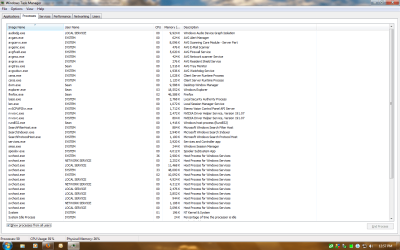
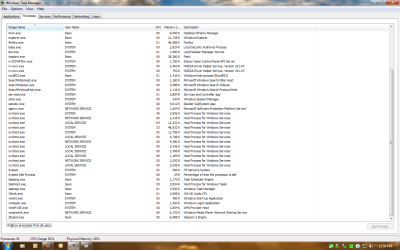
so you know your chipset and have the right driver. can you take a screenshot of the task manager when its pegged at 100%. we need the Process tab
 

My Computer

Computer Manufacturer/Model Number
HP Pavillion dv-7 1005 Tx
OS
Win 8 Release candidate 8400
CPU
[email protected]
Memory
4 gigs
Graphics Card(s)
Nvidia 9600M
Sound Card
HD built-in
Monitor(s) Displays
17" Wxga
Screen Resolution
1440x900
Cooling
none
Internet Speed
45Mb down 5Mb up
Gamer

so you know your chipset and have the right driver. can you take a screenshot of the task manager when its pegged at 100%. we need the Process tab

Ok no problem give me a sec to change it to HD sound and i'll plug in my sound
 

My Computer

Computer Manufacturer/Model Number
Custom Built
OS
Windows 7 Professional (64 Bit)
CPU
Intel Core i5 2400 @ 3.10GHz
Motherboard
ASRock Z68 Extreme4
Memory
8.00 GB Dual-Channel DDR3
Graphics Card(s)
Nvidia GeForce GTX 460
Sound Card
On Board
Monitor(s) Displays
E2260 LG 21"
Screen Resolution
1920x1080
Hard Drives
3 drives

ST3750640AS Seagate 700Gb

ST3500418AS Seagate 500Gb

ST2000DL003-9VT166 ATA Device Seagate 2Tb
PSU
Shaw 860 Watt
Case
Antec NINE-HUNDRED
Cooling
Fans
Keyboard
Logitech G110
Mouse
Logitech Revolution VX
Internet Speed
1.5Mb/s

Attachments

  • pegged.png
    pegged.png
    54.2 KB · Views: 58
  • pegged2.png
    pegged2.png
    56.2 KB · Views: 32

My Computer

Computer Manufacturer/Model Number
Custom Built
OS
Windows 7 Professional (64 Bit)
CPU
Intel Core i5 2400 @ 3.10GHz
Motherboard
ASRock Z68 Extreme4
Memory
8.00 GB Dual-Channel DDR3
Graphics Card(s)
Nvidia GeForce GTX 460
Sound Card
On Board
Monitor(s) Displays
E2260 LG 21"
Screen Resolution
1920x1080
Hard Drives
3 drives

ST3750640AS Seagate 700Gb

ST3500418AS Seagate 500Gb

ST2000DL003-9VT166 ATA Device Seagate 2Tb
PSU
Shaw 860 Watt
Case
Antec NINE-HUNDRED
Cooling
Fans
Keyboard
Logitech G110
Mouse
Logitech Revolution VX
Internet Speed
1.5Mb/s

My Computer

Computer Manufacturer/Model Number
HP Pavillion dv-7 1005 Tx
OS
Win 8 Release candidate 8400
CPU
[email protected]
Memory
4 gigs
Graphics Card(s)
Nvidia 9600M
Sound Card
HD built-in
Monitor(s) Displays
17" Wxga
Screen Resolution
1440x900
Cooling
none
Internet Speed
45Mb down 5Mb up

My Computer

Computer Manufacturer/Model Number
Custom Built
OS
Windows 7 Professional (64 Bit)
CPU
Intel Core i5 2400 @ 3.10GHz
Motherboard
ASRock Z68 Extreme4
Memory
8.00 GB Dual-Channel DDR3
Graphics Card(s)
Nvidia GeForce GTX 460
Sound Card
On Board
Monitor(s) Displays
E2260 LG 21"
Screen Resolution
1920x1080
Hard Drives
3 drives

ST3750640AS Seagate 700Gb

ST3500418AS Seagate 500Gb

ST2000DL003-9VT166 ATA Device Seagate 2Tb
PSU
Shaw 860 Watt
Case
Antec NINE-HUNDRED
Cooling
Fans
Keyboard
Logitech G110
Mouse
Logitech Revolution VX
Internet Speed
1.5Mb/s
here we go fingers crossed
 

My Computer

Computer Manufacturer/Model Number
Custom Built
OS
Windows 7 Professional (64 Bit)
CPU
Intel Core i5 2400 @ 3.10GHz
Motherboard
ASRock Z68 Extreme4
Memory
8.00 GB Dual-Channel DDR3
Graphics Card(s)
Nvidia GeForce GTX 460
Sound Card
On Board
Monitor(s) Displays
E2260 LG 21"
Screen Resolution
1920x1080
Hard Drives
3 drives

ST3750640AS Seagate 700Gb

ST3500418AS Seagate 500Gb

ST2000DL003-9VT166 ATA Device Seagate 2Tb
PSU
Shaw 860 Watt
Case
Antec NINE-HUNDRED
Cooling
Fans
Keyboard
Logitech G110
Mouse
Logitech Revolution VX
Internet Speed
1.5Mb/s
Gamer

Great its a comman problem and there is a page that explains how to find it and fix it. its here Windows Vista 100% CPU Usage Problems Due to Svchost.exe at Instant Registry Fixes

Let me know if that doesn't help. I have another question if you just unplug the speakers leaving the rest of the system the same does the cpu go down?

Not good tried all the service 2 of them i can't stop cause they are need by other sevices to run and they are AudioEndPointBuilder and wudfscv
 

My Computer

Computer Manufacturer/Model Number
Custom Built
OS
Windows 7 Professional (64 Bit)
CPU
Intel Core i5 2400 @ 3.10GHz
Motherboard
ASRock Z68 Extreme4
Memory
8.00 GB Dual-Channel DDR3
Graphics Card(s)
Nvidia GeForce GTX 460
Sound Card
On Board
Monitor(s) Displays
E2260 LG 21"
Screen Resolution
1920x1080
Hard Drives
3 drives

ST3750640AS Seagate 700Gb

ST3500418AS Seagate 500Gb

ST2000DL003-9VT166 ATA Device Seagate 2Tb
PSU
Shaw 860 Watt
Case
Antec NINE-HUNDRED
Cooling
Fans
Keyboard
Logitech G110
Mouse
Logitech Revolution VX
Internet Speed
1.5Mb/s
Back
Top