HDCP

spyknee

Banned
Local time
4:24 PM
Messages
382
Location
NYC
High Definition Control Protocol,

I do not fully understand, but if you are having sound issues with the newer equipment, it might not be a driver problem! Whomever has started applying control mechanisms to content. Be it TV manufacturers or Vid card manufacturers.
This I know, my older computer with no HDCP parts will allow me to connect to HDTV, DVI>HDMI for video and mini stereo plug>rcs splitter for sound, and I get sound. My new puter which has HDCP compliant vid cards will not give me sound with same type connections???????????????????
Any one more clear about this stuff and can illuminate me?
Is there such a thing as a Realtek HDMI driver?
 

My Computer

Computer Manufacturer/Model Number
DIY #3, #2
OS
W7 Ulti/64, XP Pro/32
CPU
INTEL i7 920 DO, Core2 Duo 6400
Motherboard
GIGABYTE EX58 UD3R-SLI, EP45-UD3R
Memory
KINGSTON DDR3 1333MHz, CORSAIR DDR2 800MHz
Graphics Card(s)
EVGA GTX 260 x2, 8800 GTX
Sound Card
REALTEK HD onboard, ditto
Monitor(s) Displays
SONY 40" BRAVIA LCD
Screen Resolution
1360 X 768
Hard Drives
OCZ VERTEX/RAID0 -3, Vertex 30GB
PSU
COOLERMASTER 900W, ENERMAX 850W
Case
COOLERMASTER HAF 932 x2
Cooling
stock
Keyboard
MS
Mouse
MS
Internet Speed
ADSL 3MB/768KBs
Other Info
amateur enthusiast
High Definition Control Protocol,

I do not fully understand, but if you are having sound issues with the newer equipment, it might not be a driver problem! Whomever has started applying control mechanisms to content. Be it TV manufacturers or Vid card manufacturers.
This I know, my older computer with no HDCP parts will allow me to connect to HDTV, DVI>HDMI for video and mini stereo plug>rcs splitter for sound, and I get sound. My new puter which has HDCP compliant vid cards will not give me sound with same type connections???????????????????
Any one more clear about this stuff and can illuminate me?
Is there such a thing as a Realtek HDMI driver?

I use an ASROCK ion 330 as my HTPC... Yes it has a separate HDMI Audio driver that has to be installed before you hear sound from the TV set.... I have no idea how common this is but I can confirm it does exist.
 

My Computer

Computer Manufacturer/Model Number
Homebrew
OS
XP Pro SP3 X86 / Win7 Pro X86
CPU
Amd 64 x2 4200 (2.4ghz)
Motherboard
Asus M2N-MX SE Plus
Memory
Kingston DDR2 800 2gb
Graphics Card(s)
Nvidia GF-8400
Sound Card
Realtek on Motherboard
Monitor(s) Displays
Acer x-193bw
Screen Resolution
1440 x 900
Hard Drives
Western Digital 500g
PSU
350watt In-Win
Case
In-Win
Cooling
Air
Keyboard
yes
Mouse
yes
Internet Speed
5mpbs
Other Info
Also ASRock ION 330 as HTPC (on XP).
Acer Aspire as GP netbook (on XP).
I'm certainly not any more clear about it but do have a couple of observations.
At the bottom of Realtek download page is an ATI HDMI Audio Device. This tells me that in some cases HDMI audio is handled by the Graphics card. ??

Realtek

The other option would be to check any hidden output devices.

Right click on the Microsoft speaker icon, select playback devices.

Next, right click almost anywhere in the middle of the window that opens and select both "show disabled devices" and "show disconnected devices".

What devices are showing and which device is set as the Default Output?

Ap
 

My Computer

Computer Manufacturer/Model Number
Assembled in my workshop
OS
Windows 7 Home Premium
CPU
Intel Core 2 Duo @ 3.00gHz
Motherboard
Gigabyte GA-P35-S3G
Memory
4 GB
Graphics Card(s)
ATI Radeon HD 2600 XT
Sound Card
RME 24/96 Card, Realtek Internal Audio PreSonus FireStudio
Monitor(s) Displays
Acer 1917 (x2)
Screen Resolution
1280 x 1024 on both monitors
Hard Drives
Three 250GB Seagate SATA Barracuda 7200rpm
PSU
Rosewill 500-watt
Case
Rosewill mid-tower
Cooling
Noctua NH-U9B (CPU), PwrSupply fan + single large case Fan
Keyboard
Macally w/2/USB ports.
Mouse
Trackman Wheel
Other Info
Event 20/20 bas studio monitors, Yamaha sub.
Rackmount Korg/Roland/Yamaha synthesizers,
Cubase MIDI/audio recording. Sony Soundforge audio/mastering software. CD Architect Mastering. RME & Presonus audio interfaces.
I'm certainly not any more clear about it but do have a couple of observations.
At the bottom of Realtek download page is an ATI HDMI Audio Device. This tells me that in some cases HDMI audio is handled by the Graphics card. ??

Realtek

There's one on the NVidia page for their chipsets as well...
 

My Computer

Computer Manufacturer/Model Number
Homebrew
OS
XP Pro SP3 X86 / Win7 Pro X86
CPU
Amd 64 x2 4200 (2.4ghz)
Motherboard
Asus M2N-MX SE Plus
Memory
Kingston DDR2 800 2gb
Graphics Card(s)
Nvidia GF-8400
Sound Card
Realtek on Motherboard
Monitor(s) Displays
Acer x-193bw
Screen Resolution
1440 x 900
Hard Drives
Western Digital 500g
PSU
350watt In-Win
Case
In-Win
Cooling
Air
Keyboard
yes
Mouse
yes
Internet Speed
5mpbs
Other Info
Also ASRock ION 330 as HTPC (on XP).
Acer Aspire as GP netbook (on XP).
I know that I installed a 2 wire jumper from 1 of my video cards, theres 2 in SLI, to the mobos onboard s/pdif header. I only ever used the standard stereo plug out, tho.
My LCD's HDMI input also has a left/right rca input.
The puter has two styles of s/pdif outputs. 1 optical, square, and 1 rca looking. I tried the rca output to a rca splitter, but no sound.
As I metioned above the older puter worked and gave me sound, not the new one, except with the PC input.
nVidia based cards, not ATI.
What am I missing,here?
 

My Computer

Computer Manufacturer/Model Number
DIY #3, #2
OS
W7 Ulti/64, XP Pro/32
CPU
INTEL i7 920 DO, Core2 Duo 6400
Motherboard
GIGABYTE EX58 UD3R-SLI, EP45-UD3R
Memory
KINGSTON DDR3 1333MHz, CORSAIR DDR2 800MHz
Graphics Card(s)
EVGA GTX 260 x2, 8800 GTX
Sound Card
REALTEK HD onboard, ditto
Monitor(s) Displays
SONY 40" BRAVIA LCD
Screen Resolution
1360 X 768
Hard Drives
OCZ VERTEX/RAID0 -3, Vertex 30GB
PSU
COOLERMASTER 900W, ENERMAX 850W
Case
COOLERMASTER HAF 932 x2
Cooling
stock
Keyboard
MS
Mouse
MS
Internet Speed
ADSL 3MB/768KBs
Other Info
amateur enthusiast
[/QUOTE]

There's one on the NVidia page for their chipsets as well...[/QUOTE]


This probably for an nVidia chipset mobo, mines an Intel chipset. I saw something surfing about HTPC systems. Home Theatre PC mobos by nVidia.
 

My Computer

Computer Manufacturer/Model Number
DIY #3, #2
OS
W7 Ulti/64, XP Pro/32
CPU
INTEL i7 920 DO, Core2 Duo 6400
Motherboard
GIGABYTE EX58 UD3R-SLI, EP45-UD3R
Memory
KINGSTON DDR3 1333MHz, CORSAIR DDR2 800MHz
Graphics Card(s)
EVGA GTX 260 x2, 8800 GTX
Sound Card
REALTEK HD onboard, ditto
Monitor(s) Displays
SONY 40" BRAVIA LCD
Screen Resolution
1360 X 768
Hard Drives
OCZ VERTEX/RAID0 -3, Vertex 30GB
PSU
COOLERMASTER 900W, ENERMAX 850W
Case
COOLERMASTER HAF 932 x2
Cooling
stock
Keyboard
MS
Mouse
MS
Internet Speed
ADSL 3MB/768KBs
Other Info
amateur enthusiast

My Computer

Computer type
PC/Desktop
Computer Manufacturer/Model Number
Custom built by me.
OS
Windows 10 Pro
CPU
Intel Core i7-4770K (3.5Ghz)
Motherboard
Gigabyte G1 Sniper 5 (F10 Bios)
Memory
32 gig Corsair Dominator Platinum (4x8Gig)
Graphics Card(s)
Sapphire Tri-X R9 Fury
Sound Card
Soundblaster ZXR
Monitor(s) Displays
NEC PA242W 24" LCD Monitor
Screen Resolution
1920 x 1200
Hard Drives
Primary - Samsung 850 Pro (512gig), Samsung 840 Pro (256gig), 2TB WD Caviar Black.
PSU
EVGA Supernova 1000 G2
Case
Cooler Master HAF X
Cooling
Corsair H100i with Corsair Air Series SP120 Quiet Fans
Keyboard
Logitech Wireless Wave
Mouse
Logitech Performance MX
Internet Speed
High Speed Cable
Antivirus
Norton Security
Browser
IE11
Other Info
Memory Timings - 1866MHz @ 9-9-9-27-1T @ 1.5 volts
[/QUOTE]This probably for an nVidia chipset mobo, mines an Intel chipset. I saw something surfing about HTPC systems. Home Theatre PC mobos by nVidia.[/QUOTE]

I would think the nVidea HDMI driver is for your graphics card and probably enables all of the audio options.

Other possibilities, look at your graphics card control panel and see if there's an option to route HDMI audio out to your audio card. Sound like the RCA (coaxial) s/pdif output might work for you if the monitor has an RCA -digital input-.

Ap
 

My Computer

Computer Manufacturer/Model Number
Assembled in my workshop
OS
Windows 7 Home Premium
CPU
Intel Core 2 Duo @ 3.00gHz
Motherboard
Gigabyte GA-P35-S3G
Memory
4 GB
Graphics Card(s)
ATI Radeon HD 2600 XT
Sound Card
RME 24/96 Card, Realtek Internal Audio PreSonus FireStudio
Monitor(s) Displays
Acer 1917 (x2)
Screen Resolution
1280 x 1024 on both monitors
Hard Drives
Three 250GB Seagate SATA Barracuda 7200rpm
PSU
Rosewill 500-watt
Case
Rosewill mid-tower
Cooling
Noctua NH-U9B (CPU), PwrSupply fan + single large case Fan
Keyboard
Macally w/2/USB ports.
Mouse
Trackman Wheel
Other Info
Event 20/20 bas studio monitors, Yamaha sub.
Rackmount Korg/Roland/Yamaha synthesizers,
Cubase MIDI/audio recording. Sony Soundforge audio/mastering software. CD Architect Mastering. RME & Presonus audio interfaces.
I'm certainly not any more clear about it but do have a couple of observations.
At the bottom of Realtek download page is an ATI HDMI Audio Device. This tells me that in some cases HDMI audio is handled by the Graphics card. ??

Yes.

ATI Radeon? HD 4000 Graphics Family

HDMI with 7.1 digital surround sound support and integrated DisplayPort technology5 with audio

Yes ATI cards since the HD 2xxx series have all had a Realtek audio chip on them hence the download link for ATI HDMI Audio, and all are cabable of outputting audio over HDMI either using a native HDMI port or a special DVI-HDMI adapter that came with the cards (or came with most that didn't come with a HDMI port).

I would think the nVidea HDMI driver is for your graphics card and probably enables all of the audio options.
There are very few Nvidia cards with their own built in audio. Not sure if any of the new GT 2xx or GT 3xx re-brands do, but pretty sure that nothing from the 8xxx series up to the GTX 295 has one. In fact to get audio over HDMI out of any of them you have to do this,

Guide: 8800GT/9800GT/9800GTX Sound over HDMI (Now including Creative cards) - Overclock.net - Overclocking.net

All it basically is is plain old SPDIF passthrough, and then it is hit and miss with the lower model 8xxx and 9xxx series of cards as to whether they have the required SPDIF connector on the card.
 

My Computer

Computer type
PC/Desktop
Computer Manufacturer/Model Number
Me
OS
Win 7 Ultimate x64
CPU
FX-8350 @ 4.6 GHz so far
Motherboard
Asus M5A97 EVO
Memory
ADATA XPG V1 Series Black 8GB DDR3 1600
Graphics Card(s)
Sapphire R9 270x Dual-X
Sound Card
Xonar DGX w/ Corsair Vengence 1300
Monitor(s) Displays
Acer S232HL Abid
Screen Resolution
1920x1080
Hard Drives
120 GB OCZ Vertex 3
500 GB Seagate 7200.12
PSU
Antec Earthwatts 650W Green
Case
Antec Three Hundred
Cooling
Cooler Master 212 EVO
Keyboard
Logitech G510
Mouse
Logitech G500s
Internet Speed
35000/3000
So,
It looks like I have to buy a DVI/spdif>HDMI converter if I want the true digital audio experience. From there I'd have to use the HDTV's spdif optical out and connect to receiver and all the surround sound speakers. That ain't happening cuz the receivers to old and has no optical in. Too much to spend. Thats an $80 converter and a new modern receiver, easially $300+.
So then, how do I get the new puters analog out, to work with the HDTV's HDMI input, like the older puter will? bleeping bS
Sound works for PC input but not HDMI input. HDMI input has a left/right analog input with it???????? bleep
 

My Computer

Computer Manufacturer/Model Number
DIY #3, #2
OS
W7 Ulti/64, XP Pro/32
CPU
INTEL i7 920 DO, Core2 Duo 6400
Motherboard
GIGABYTE EX58 UD3R-SLI, EP45-UD3R
Memory
KINGSTON DDR3 1333MHz, CORSAIR DDR2 800MHz
Graphics Card(s)
EVGA GTX 260 x2, 8800 GTX
Sound Card
REALTEK HD onboard, ditto
Monitor(s) Displays
SONY 40" BRAVIA LCD
Screen Resolution
1360 X 768
Hard Drives
OCZ VERTEX/RAID0 -3, Vertex 30GB
PSU
COOLERMASTER 900W, ENERMAX 850W
Case
COOLERMASTER HAF 932 x2
Cooling
stock
Keyboard
MS
Mouse
MS
Internet Speed
ADSL 3MB/768KBs
Other Info
amateur enthusiast
So then, how do I get the new puters analog out, to work with the HDTV's HDMI input, like the older puter will? bleeping bS
Sound works for PC input but not HDMI input. HDMI input has a left/right analog input with it???????? bleep

If your video card doesn't do HDMI, you can use the computers soundcard to ouput the sound - use RCA cables/SPDIF/Digital cable. As for the video card, since it doesnt do HDMI, use a DVI to HDMI cable (around $30-40 bucks). There are a multitude of options, you just need to look through your instructions for your TV.

Good luck
 

My Computer

Computer type
PC/Desktop
Computer Manufacturer/Model Number
Custom built by me.
OS
Windows 10 Pro
CPU
Intel Core i7-4770K (3.5Ghz)
Motherboard
Gigabyte G1 Sniper 5 (F10 Bios)
Memory
32 gig Corsair Dominator Platinum (4x8Gig)
Graphics Card(s)
Sapphire Tri-X R9 Fury
Sound Card
Soundblaster ZXR
Monitor(s) Displays
NEC PA242W 24" LCD Monitor
Screen Resolution
1920 x 1200
Hard Drives
Primary - Samsung 850 Pro (512gig), Samsung 840 Pro (256gig), 2TB WD Caviar Black.
PSU
EVGA Supernova 1000 G2
Case
Cooler Master HAF X
Cooling
Corsair H100i with Corsair Air Series SP120 Quiet Fans
Keyboard
Logitech Wireless Wave
Mouse
Logitech Performance MX
Internet Speed
High Speed Cable
Antivirus
Norton Security
Browser
IE11
Other Info
Memory Timings - 1866MHz @ 9-9-9-27-1T @ 1.5 volts
These your cards?

Newegg.com - EVGA 896-P3-1257-AR GeForce GTX 260 Core 216 Superclocked Edition 896MB 448-bit GDDR3 PCI Express 2.0 x16 HDCP Ready SLI Supported Video Card - Desktop Graphics / Video Cards

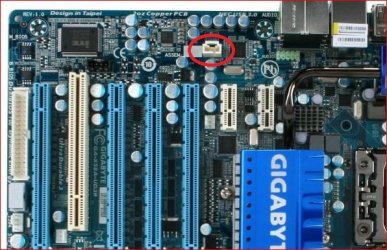
If so from looking at the pictures of it it should have come with both the DVI-HDMI adapter, and the SPDIF cable that needs to be connected to the SPDIF jumper on the card and the SPDIF connector on the motherboard; which on yours is here,

spdif3.JPG

If you have the cable and the adapter, then once it is all connected properly and I believe set to SPDIF out in the Realtek controls (may have to wait for someone that uses it this way to conform), you should have both audio and video out over HDMI from the card.
 

My Computer

Computer type
PC/Desktop
Computer Manufacturer/Model Number
Me
OS
Win 7 Ultimate x64
CPU
FX-8350 @ 4.6 GHz so far
Motherboard
Asus M5A97 EVO
Memory
ADATA XPG V1 Series Black 8GB DDR3 1600
Graphics Card(s)
Sapphire R9 270x Dual-X
Sound Card
Xonar DGX w/ Corsair Vengence 1300
Monitor(s) Displays
Acer S232HL Abid
Screen Resolution
1920x1080
Hard Drives
120 GB OCZ Vertex 3
500 GB Seagate 7200.12
PSU
Antec Earthwatts 650W Green
Case
Antec Three Hundred
Cooling
Cooler Master 212 EVO
Keyboard
Logitech G510
Mouse
Logitech G500s
Internet Speed
35000/3000
These your cards?

Newegg.com - EVGA 896-P3-1257-AR GeForce GTX 260 Core 216 Superclocked Edition 896MB 448-bit GDDR3 PCI Express 2.0 x16 HDCP Ready SLI Supported Video Card - Desktop Graphics / Video Cards

If so from looking at the pictures of it it should have come with both the DVI-HDMI adapter, and the SPDIF cable that needs to be connected to the SPDIF jumper on the card and the SPDIF connector on the motherboard; which on yours is here,

View attachment 64669

If you have the cable and the adapter, then once it is all connected properly and I believe set to SPDIF out in the Realtek controls (may have to wait for someone that uses it this way to conform), you should have both audio and video out over HDMI from the card.

Hi Stormy, unless I'm missing something, there's no SPDIF connection on that video card.

It's not going to work that way. Either the Video card will output the entire signal (audio & video) or it will only output the video portion. Hooking up the MB's SPDIF cable has nothing to do with this.
 

My Computer

Computer type
PC/Desktop
Computer Manufacturer/Model Number
Custom built by me.
OS
Windows 10 Pro
CPU
Intel Core i7-4770K (3.5Ghz)
Motherboard
Gigabyte G1 Sniper 5 (F10 Bios)
Memory
32 gig Corsair Dominator Platinum (4x8Gig)
Graphics Card(s)
Sapphire Tri-X R9 Fury
Sound Card
Soundblaster ZXR
Monitor(s) Displays
NEC PA242W 24" LCD Monitor
Screen Resolution
1920 x 1200
Hard Drives
Primary - Samsung 850 Pro (512gig), Samsung 840 Pro (256gig), 2TB WD Caviar Black.
PSU
EVGA Supernova 1000 G2
Case
Cooler Master HAF X
Cooling
Corsair H100i with Corsair Air Series SP120 Quiet Fans
Keyboard
Logitech Wireless Wave
Mouse
Logitech Performance MX
Internet Speed
High Speed Cable
Antivirus
Norton Security
Browser
IE11
Other Info
Memory Timings - 1866MHz @ 9-9-9-27-1T @ 1.5 volts
Unless I'm missing something, there's no SPDIF on the video card.

It's not going to work that way. Either the Video card will output the entire signal (audio & video) or it will only output the video portion. Hooking up the MB's SPDIF cable has nothing to do with this.

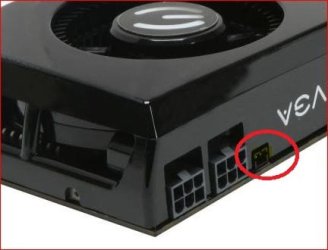
You are, that is how Nvidia did it. If you follow the link I posted previously it show how to connect it up with the 8800 and 9800 series cards. The GTX 260 isn't any different and unless it is in a different location than the one listed on Newegg the SPDIF in port on the card is here,

spdif4.JPG

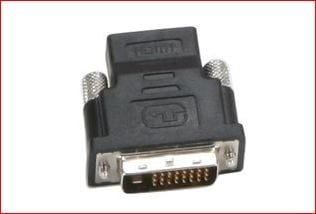
The card should have come with one of these adapters (look close enough you can see HDMI along the top of it),

hdmidviadapter.JPG

and a cable like this,

asusspdif.JPG

to connect between the SPDIF header on the motherboard or sound card and the one one the video card. Then when used with the above DVI-HDMI adapter allows for audio over HDMI with Nvidia cards.
 

My Computer

Computer type
PC/Desktop
Computer Manufacturer/Model Number
Me
OS
Win 7 Ultimate x64
CPU
FX-8350 @ 4.6 GHz so far
Motherboard
Asus M5A97 EVO
Memory
ADATA XPG V1 Series Black 8GB DDR3 1600
Graphics Card(s)
Sapphire R9 270x Dual-X
Sound Card
Xonar DGX w/ Corsair Vengence 1300
Monitor(s) Displays
Acer S232HL Abid
Screen Resolution
1920x1080
Hard Drives
120 GB OCZ Vertex 3
500 GB Seagate 7200.12
PSU
Antec Earthwatts 650W Green
Case
Antec Three Hundred
Cooling
Cooler Master 212 EVO
Keyboard
Logitech G510
Mouse
Logitech G500s
Internet Speed
35000/3000
So then, how do I get the new puters analog out, to work with the HDTV's HDMI input, like the older puter will? bleeping bS
Sound works for PC input but not HDMI input. HDMI input has a left/right analog input with it???????? bleep


Seems like this should be possible.

I posted this before, have you tried it?

Check any hidden output devices.
Right click on the Microsoft speaker icon, select playback devices.
Next, right click almost anywhere in the middle of the window that opens and select both "show disabled devices" and "show disconnected devices".

What devices are showing and which device is set as the Default Output?

Ap
 

My Computer

Computer Manufacturer/Model Number
Assembled in my workshop
OS
Windows 7 Home Premium
CPU
Intel Core 2 Duo @ 3.00gHz
Motherboard
Gigabyte GA-P35-S3G
Memory
4 GB
Graphics Card(s)
ATI Radeon HD 2600 XT
Sound Card
RME 24/96 Card, Realtek Internal Audio PreSonus FireStudio
Monitor(s) Displays
Acer 1917 (x2)
Screen Resolution
1280 x 1024 on both monitors
Hard Drives
Three 250GB Seagate SATA Barracuda 7200rpm
PSU
Rosewill 500-watt
Case
Rosewill mid-tower
Cooling
Noctua NH-U9B (CPU), PwrSupply fan + single large case Fan
Keyboard
Macally w/2/USB ports.
Mouse
Trackman Wheel
Other Info
Event 20/20 bas studio monitors, Yamaha sub.
Rackmount Korg/Roland/Yamaha synthesizers,
Cubase MIDI/audio recording. Sony Soundforge audio/mastering software. CD Architect Mastering. RME & Presonus audio interfaces.
Ok, you got me on that one...I see you can do it that way. However, Nvidia might call that an SPDIF connection, but it's not in the true sense.

S/PDIF - Wikipedia, the free encyclopedia

A common use for the S/PDIF interface is to carry compressed digital audio as defined by the standard IEC 61937. This mode is used to connect the output of a DVD player to a home theater receiver that supports Dolby Digital or DTS surround sound. Another common use is to carry uncompressed digital audio from a CD player to a receiver. This specification also allows for the coupling of personal computer digital sound (if equipped) via optical or coax to Dolby or DTS capable receivers. This only supports stereo sound, unless the personal computer supports Dolby Digital Live or DTS Connect

At any rate, will this solution allow 7.1? I've searched high and low but can't really find an answer, unlike ATI's solution which does do 7.1 and is stated.

I'm a stereo enthusist and use SPDIF Cables all the time.

At any rate, your solution does work. Sorry :o
 
Last edited:

My Computer

Computer type
PC/Desktop
Computer Manufacturer/Model Number
Custom built by me.
OS
Windows 10 Pro
CPU
Intel Core i7-4770K (3.5Ghz)
Motherboard
Gigabyte G1 Sniper 5 (F10 Bios)
Memory
32 gig Corsair Dominator Platinum (4x8Gig)
Graphics Card(s)
Sapphire Tri-X R9 Fury
Sound Card
Soundblaster ZXR
Monitor(s) Displays
NEC PA242W 24" LCD Monitor
Screen Resolution
1920 x 1200
Hard Drives
Primary - Samsung 850 Pro (512gig), Samsung 840 Pro (256gig), 2TB WD Caviar Black.
PSU
EVGA Supernova 1000 G2
Case
Cooler Master HAF X
Cooling
Corsair H100i with Corsair Air Series SP120 Quiet Fans
Keyboard
Logitech Wireless Wave
Mouse
Logitech Performance MX
Internet Speed
High Speed Cable
Antivirus
Norton Security
Browser
IE11
Other Info
Memory Timings - 1866MHz @ 9-9-9-27-1T @ 1.5 volts
If your video card doesn't do HDMI, you can use the computers soundcard to ouput the sound - use RCA cables/SPDIF/Digital cable. As for the video card, since it doesnt do HDMI, use a DVI to HDMI cable (around $30-40 bucks). There are a multitude of options, you just need to look through your instructions for your TV.

Good luck

My friend, done it, did it, past that, way far down the road,
Tommorrow I intend on uninstalling the Realtek audio drivers and software. See what W7 stock drivers do.
 

My Computer

Computer Manufacturer/Model Number
DIY #3, #2
OS
W7 Ulti/64, XP Pro/32
CPU
INTEL i7 920 DO, Core2 Duo 6400
Motherboard
GIGABYTE EX58 UD3R-SLI, EP45-UD3R
Memory
KINGSTON DDR3 1333MHz, CORSAIR DDR2 800MHz
Graphics Card(s)
EVGA GTX 260 x2, 8800 GTX
Sound Card
REALTEK HD onboard, ditto
Monitor(s) Displays
SONY 40" BRAVIA LCD
Screen Resolution
1360 X 768
Hard Drives
OCZ VERTEX/RAID0 -3, Vertex 30GB
PSU
COOLERMASTER 900W, ENERMAX 850W
Case
COOLERMASTER HAF 932 x2
Cooling
stock
Keyboard
MS
Mouse
MS
Internet Speed
ADSL 3MB/768KBs
Other Info
amateur enthusiast
Good luck :)
 

My Computer

Computer type
PC/Desktop
Computer Manufacturer/Model Number
Custom built by me.
OS
Windows 10 Pro
CPU
Intel Core i7-4770K (3.5Ghz)
Motherboard
Gigabyte G1 Sniper 5 (F10 Bios)
Memory
32 gig Corsair Dominator Platinum (4x8Gig)
Graphics Card(s)
Sapphire Tri-X R9 Fury
Sound Card
Soundblaster ZXR
Monitor(s) Displays
NEC PA242W 24" LCD Monitor
Screen Resolution
1920 x 1200
Hard Drives
Primary - Samsung 850 Pro (512gig), Samsung 840 Pro (256gig), 2TB WD Caviar Black.
PSU
EVGA Supernova 1000 G2
Case
Cooler Master HAF X
Cooling
Corsair H100i with Corsair Air Series SP120 Quiet Fans
Keyboard
Logitech Wireless Wave
Mouse
Logitech Performance MX
Internet Speed
High Speed Cable
Antivirus
Norton Security
Browser
IE11
Other Info
Memory Timings - 1866MHz @ 9-9-9-27-1T @ 1.5 volts
Unless I'm missing something, there's no SPDIF on the video card.

It's not going to work that way. Either the Video card will output the entire signal (audio & video) or it will only output the video portion. Hooking up the MB's SPDIF cable has nothing to do with this.

You are, that is how Nvidia did it. If you follow the link I posted previously it show how to connect it up with the 8800 and 9800 series cards. The GTX 260 isn't any different and unless it is in a different location than the one listed on Newegg the SPDIF in port on the card is here,

View attachment 64673

The card should have come with one of these adapters (look close enough you can see HDMI along the top of it),

View attachment 64674

and a cable like this,

View attachment 64675

to connect between the SPDIF header on the motherboard or sound card and the one one the video card. Then when used with the above DVI-HDMI adapter allows for audio over HDMI with Nvidia cards.

Did this at build,
1) DVI has no copper for sound, so the DVI>HDMI dongle will not pass sound.
2) the coax out will not work with just a left/right RCA splitter, to much impedance. Needs some kind of amplifier or converter.
If a mini stereo jack split to left/right rca works for older puter connected to HDMI input, and new puter with the PC input. Whats the difference?
 

My Computer

Computer Manufacturer/Model Number
DIY #3, #2
OS
W7 Ulti/64, XP Pro/32
CPU
INTEL i7 920 DO, Core2 Duo 6400
Motherboard
GIGABYTE EX58 UD3R-SLI, EP45-UD3R
Memory
KINGSTON DDR3 1333MHz, CORSAIR DDR2 800MHz
Graphics Card(s)
EVGA GTX 260 x2, 8800 GTX
Sound Card
REALTEK HD onboard, ditto
Monitor(s) Displays
SONY 40" BRAVIA LCD
Screen Resolution
1360 X 768
Hard Drives
OCZ VERTEX/RAID0 -3, Vertex 30GB
PSU
COOLERMASTER 900W, ENERMAX 850W
Case
COOLERMASTER HAF 932 x2
Cooling
stock
Keyboard
MS
Mouse
MS
Internet Speed
ADSL 3MB/768KBs
Other Info
amateur enthusiast

My Computer

Computer type
PC/Desktop
Computer Manufacturer/Model Number
Me
OS
Win 7 Ultimate x64
CPU
FX-8350 @ 4.6 GHz so far
Motherboard
Asus M5A97 EVO
Memory
ADATA XPG V1 Series Black 8GB DDR3 1600
Graphics Card(s)
Sapphire R9 270x Dual-X
Sound Card
Xonar DGX w/ Corsair Vengence 1300
Monitor(s) Displays
Acer S232HL Abid
Screen Resolution
1920x1080
Hard Drives
120 GB OCZ Vertex 3
500 GB Seagate 7200.12
PSU
Antec Earthwatts 650W Green
Case
Antec Three Hundred
Cooling
Cooler Master 212 EVO
Keyboard
Logitech G510
Mouse
Logitech G500s
Internet Speed
35000/3000
Back
Top