HDD 2Tb Unallocated, how to retrieved all data

OK, let it complete. What I see is it is reading/trying to read the MFT ( Master File Table) to reconstruct the NTFS Boot Sector at 2048.. If finds the MFT and the MFT is OK , it should be successful. But if it cannot find the MFT or the MFT is also corrupted then the result will be negative. We shall wait and see what comes out.

How to save and Restore the sectors is explained here: You must have already seen this post. http://www.sevenforums.com/hardware-devices/310295-lost-partitions.html#post2584426

You may also read these at your leisure:
http://www.sevenforums.com/performa...ary-mbr-logical-partitions-3.html#post2693984

http://www.sevenforums.com/performa...ary-mbr-logical-partitions-3.html#post2694875

What is the MBR code and where is the partition table in Sector 0:

http://www.sevenforums.com/hardware...-initialize-drive-isnt-there.html#post2841509
 

My Computer My Computer

At a glance

Windows 7 Home Premium 32 bit
OS
Windows 7 Home Premium 32 bit
Hi Jumanji,
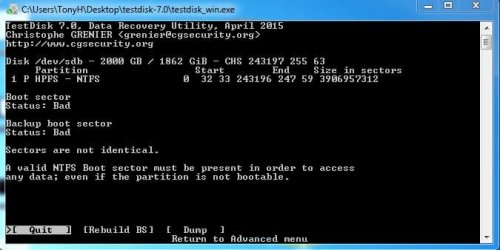
it takes more than 2 days for complete to rebuild BS. here is the result.
testdisk_6_after.JPG
haven't tried the recovery tool, still waiting new HDD to arrived.
 

My Computer My Computer

At a glance

Windows 7 ultimate x64i5
Computer type
Laptop
Computer Manufacturer/Model Number
Acer
OS
Windows 7 ultimate x64
CPU
i5
So Rebuild BS is not successful. First try Getdataback simple Free Trial version to see whether it shows all your files. Read all documentation on the web page to know how to use it. You can also play around with it to know how it works. It only scans your drive and does not write to your drive whatever you do. So absolutely safe.

Then go to PhotoRec.
 

My Computer My Computer

At a glance

Windows 7 Home Premium 32 bit
OS
Windows 7 Home Premium 32 bit
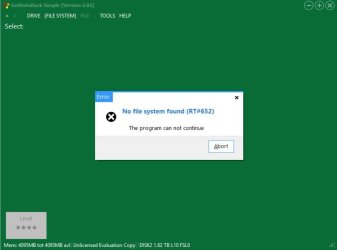
tries more than 1, same result from running getdataback.
getdata_1.JPG

next will try PhotoRec.
 

My Computer My Computer

At a glance

Windows 7 ultimate x64i5
Computer type
Laptop
Computer Manufacturer/Model Number
Acer
OS
Windows 7 ultimate x64
CPU
i5
Yep, PhotoRec is the only option now. If PhotoRec also fails to retrieve the data in some shape, gates closed.
 

My Computer My Computer

At a glance

Windows 7 Home Premium 32 bit
OS
Windows 7 Home Premium 32 bit
HI Jumanji,
today i tried Photorec by following this guide "http://www.sevenforums.com/software/193467-guide-using-photorec-recovery-software.html". :)
but at the preparation section, there is step to reformatted the disk and the result for reformatted at step 4.

this is screen capture for my current state.
Photorec_1.JPG
can i just skip the reformatted and continue to step 5 ?
 

My Computer My Computer

At a glance

Windows 7 ultimate x64i5
Computer type
Laptop
Computer Manufacturer/Model Number
Acer
OS
Windows 7 ultimate x64
CPU
i5
In my post#16 I have said "A rudimentary guide on using PhotoRec is here written by one jumanji :). Guide to using PhotoRec recovery software. . Straightaway go to the topic under Recovery ( Do not format your drive) Note: You should have another formatted external drive with adequate space plugged in to copy the files recovered by PhotoRec."

( In that trial I formatted the drive just to show how PhotoRec can recover data even from an accidentally formatted drive.You will skip the preparation section and straightaway go to the topic under the heading Recovery)

In the screenshot you should go to [File Opt]ions and select the formats you need to recover.
 

My Computer My Computer

At a glance

Windows 7 Home Premium 32 bit
OS
Windows 7 Home Premium 32 bit
Hi Jumanji,
I See, Noted.
will update the result soon.
Thanks.
 

My Computer My Computer

At a glance

Windows 7 ultimate x64i5
Computer type
Laptop
Computer Manufacturer/Model Number
Acer
OS
Windows 7 ultimate x64
CPU
i5
Hi Jumanji,
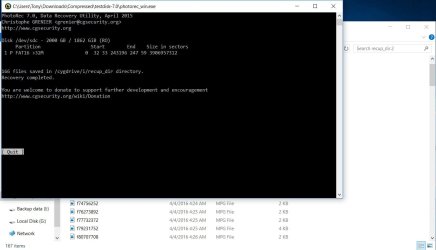
i think this week is not my good days.
Photorec_2.JPG
Thanks for your time and support.
i have learnt that next time i must more carefull to do something about data.
really appreciate your help. Thanks again :)
 

My Computer My Computer

At a glance

Windows 7 ultimate x64i5
Computer type
Laptop
Computer Manufacturer/Model Number
Acer
OS
Windows 7 ultimate x64
CPU
i5
Well, Prevention is always better than cure, which can be elusive. Always backup your important data.

I never bother about HDD failures and data loss.. Once in a week or as soon as I enter some important data like my tax returns or make changes to the existing data, I switch on/plug in my two external HDDs and back it up. Rest of the time these externals remain off/plugged out and never moved. These external drives are exclusively for data backup and I sleep peacefully :).
 

Attachments

  • 04-04-2016 22-33-40.jpg
    04-04-2016 22-33-40.jpg
    50.7 KB · Views: 0
Last edited:

My Computer My Computer

At a glance

Windows 7 Home Premium 32 bit
OS
Windows 7 Home Premium 32 bit
Ok Noted.
will try this tool for backup my data.
Thanks

so how to close this thread ? or just leave like as is ?
 

My Computer My Computer

At a glance

Windows 7 ultimate x64i5
Computer type
Laptop
Computer Manufacturer/Model Number
Acer
OS
Windows 7 ultimate x64
CPU
i5
There is no option to close the thread from your side. Just leave it open.
 
Last edited:

My Computer My Computer

At a glance

Windows 7 Home Premium 32 bit
OS
Windows 7 Home Premium 32 bit
Back
Top