HDD Data lost, Diskpart Clean and Create Partition Primary Commands

alexalget

New member
Local time
10:29 AM
Messages
6
Good day, afternoon, night.
As the title explains I was trying to create a new primary partition in my Hard Disk Samsung HM500JI that I use as External Disk with an Acteck Enclosure USB 2.0 and with DISKPART I selected the Small Partition recently created and used the command "clean" (thinking that, that command would clean the partition and not the entire disk :confused:, and then I used "create partition primary" until I got advised that the entire disk was cleaned.

I found this thread and I think it could help me a lot with my problem but due all the programs are very powerful tools I don't want to delete my data

I had not put anything on the disk I just ran the Quick Scan and Deeper Scan from TestDisk with no lucky of recovery (I didn't take any SS of those scans). Now finished the Quick Scan of Partition Recovery in Partition Wizard with no lucky of any useful partition, just the last partition I did.

366141d1437108461-hdd-data-lost-diskpart-clean-create-partition-primary-commands-quick-scan-pw.png


I will do the full scan of Partition Wizard and I will put the SS here.

It was only "Clean" command and "Create Partition Primary". Not "Clean All", so If the PW doesn't works I think the only tool that could help me is DMDE.

http://www.sevenforums.com/backup-restore/333571-recover-data-diskpart-clean-command.html

And this ^ thread contains a lot of info from I take recently and I haven't made any other modify in the Hard disk since the DiskPart.
Hope all the info helps to help me:D and sorry about my English I'm from Mexico.

Edit:
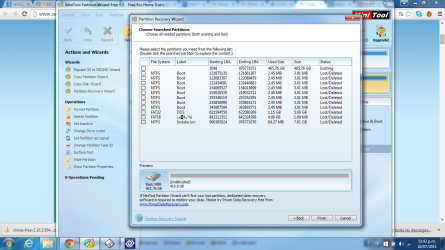
I finished the Full Scan and as the Quick found the same useless partitions. Here is the SS.
366199d1437146907-hdd-data-lost-diskpart-clean-create-partition-primary-commands-full-scan-pw.png


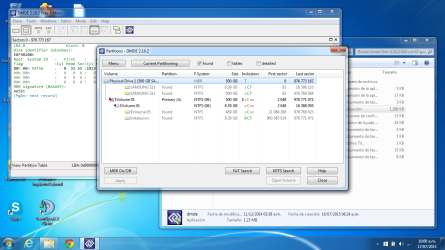
and I made a Partition Scan with DMDE and it found this:
366200d1437146907-hdd-data-lost-diskpart-clean-create-partition-primary-commands-dmde-partition-search.png


then I'm making a NTFS Search with DMDE in the whole disk.
 

Attachments
  • Quick Scan PW.png
    Quick Scan PW.png
    172.3 KB · Views: 26
  • Full Scan PW.png
    Full Scan PW.png
    225.3 KB · Views: 21
  • DMDE Partition Search.png
    DMDE Partition Search.png
    127.2 KB · Views: 21
Last edited:

My Computer

Computer type
PC/Desktop
Computer Manufacturer/Model Number
Acer
OS
Windows 7 Home Premium x64bit
CPU
AMD Processor C-50
Memory
3 GB DDR3
Antivirus
Norton
Browser
Google Chrome
Hi alexalget,

I am still trying to reconstruct what you have done leading to this problem. Please answer each question point by point for my understanding.

1. You had put a 500GB HDD into an external casing. When you put it in the very first time, was that HDD a new one or it already had data in it?

2.Have you been using this setup, reading and writing into the drive since the time you put that 500GB drive in it, without changing the disk structure? In other words did you wipe / format it and started with a clean 500GB HDD inside?

3. If you were already using the drive, you will not be able to create a new volume unless you delete the existing volume. Did you delete the existing volume, before you created a new small volume of 8 GB?

4. Did you use Windows Disk Management to create this new 8GB volume?

5. Also post a screenshot of how your drive looks now in Windows Disk Management as well as Partition Wizard -the very first screen that appears when you launch PW.

( I know you had read the other thread by lonewolf, where Anshad Edavana had done an excellent work reconstructing the MBR, partition table and the NTFS boot sector. But your case is different - you seem to have done multiple operations rather than just a diskpart clean as in that case - and I am not sure whether you should follow that.)
 
Last edited:

My Computer

OS
Windows 7 Home Premium 32 bit
OK, going through the other thread I find you had gone upto completing the write boot sector with Rebuild BS using TestDisk.

But I am wondering whether you had done the right thing as I had pointed out in the last post.

Anyway, if it was wrong, we have no way of undoing what has already been written into.

Please answer all the questions and post the screenshots.

We have to consider this as new problem due to wrong application, if my apprehensions that it was a wrong application to your original problem turns out to be true.

( The problem in your case as I saw it was whether your boot sector just before you meddled with the partitions/created new volume was at 63 or 2048. We did have to decide it on the other thread and after a lot of deliberations and fact finding troubleshoot/analysis we came to the conclusion that it was sector 63 and the rest followed.He hadn't meddled with the drive structure anytime in its history.)
 

My Computer

OS
Windows 7 Home Premium 32 bit
When I started to use the Hard Disk it had a lot of data but I just maked a quick format and started using it. Then 3 weeks ago I backed up the entire 260 gb and formatted to NTFS the Drive because it didn't let me put any file larger than 4gb. And 10 minutes before I used the clean command I used Disk Management to reduce the volume of the main partition and created the new one of 8gb.
I'm writing this because If someone would have the same problem I think it could help them. So, I already have solved the problem with help of that thread and my "little knowledge" of the entire system of Hard Disks.
Let me tell you what I've done.
I ran all the Scans in TestDisk and Partition Wizard with any luck of found partitions. Then I used DM Disk Editor and Data Recovey where I found my structure of files with NTFS Search with a lot of MFT files and I thought that I could continue with the same process as lonewolf because we had a closer results of the scans. The difference was that I have used create partition primary command and he don't. But by my own risk I continued, I downloaded Partition Guru and deleted all the existing partitions (Fat16 Raw). I created a new partition with NTFS with align to integral multiples of sectors uncheked, in advanced options with beggining sector as 63. Clicked Saved all, take the changes to the Disk and No to formatting and close Partition Guru. Next I compared the LBA0 to the lonewolf one, it was very closer and the LBA63 too. So I continued with TestDisk.
I opened TestDisk and made a Rebuild the Boot Sector because the program tells that boot sector backup was OK I kept going. Next I did go to Elevated Command Prompt and make Chkdsk x: /F and at the beggining of it came error: unspecified error (766f6c756d652e63 3f1).
Closer to give up I made a quick and deeper search in TestDisk but because I wasn't sure of Write the single partition that appeared (before appeared 3 or 4) with any kind of hope that partition wasn't able to recover by TestDisk.
I made my final research of that problem in Chkdsk. I found about that problem appears in Windows 7 x64bit and I connected the Hard Disk to another Windows 7 32bit and I did make the chkdsk with the very good news about that error disappeared and it recovered my entire data.����������������.
Hope I haven't made you lost your time trying to help me. I hope this help someone's clean command victim��
Thank You.
If you don't understand anything, try to take a look to the other thread. That could be useful.
 

My Computer

Computer type
PC/Desktop
Computer Manufacturer/Model Number
Acer
OS
Windows 7 Home Premium x64bit
CPU
AMD Processor C-50
Memory
3 GB DDR3
Antivirus
Norton
Browser
Google Chrome
So then it is celebration time for you. Enjoy.

I would think that since you had last formatted your HDD at a later stage using Windows Disk Management. Your boot sector was in sector 2048. So whatever rejig you did using Partition Guru, you had now written it into sector 63 whereas you should have written it to sector 2048.

If you don't understand anything, try to take a look to the other thread. That could be useful.

Don't chirp too much. You read the other thread carefully from start to finish, each and every post and also read this thread. http://www.sevenforums.com/general-discussion/335701-diskpart-clean-zeros-lba-0-lba-2047-a.html That should help you also in future now that you have the boot sector at 63.

You did make a mistake in spite of DMDE showing Sector 2048 as the boot sector.

And then again Check disk not running on your Windows 64 was a correctable anamoly in your system. The Windows 32 bit did not have that anamoly. You make it sound as if running it on Windows 32 System resolved the issue. Check Disk would have run on other Windows 64 Systems too that do not have that anamoly . Post hoc ergo propter hoc - that is your logic.
 
Last edited:

My Computer

OS
Windows 7 Home Premium 32 bit
Back
Top