Help! Disk clean and create partition primary recovery

icygolem

New member
Local time
4:39 AM
Messages
4
Hi all I need some urgent help, hopefully i can get some advice.

I accidentally used the cmd prompt and clean and created partition primary wrongly on the wrong disk. Can i know is there any way to recover the data inside? please help... this is what i did below...
Please advise me how do i get back my data and also label it as d drive.

I have downloaded active file recovery and i am currently running super scan on it.


DISKPART> clean

DiskPart succeeded in cleaning the disk.

DISKPART> create partition primary

DiskPart succeeded in creating the specified partition.

DISKPART> exit
__________________
 

My Computer My Computer

Computer type
PC/Desktop
Computer Manufacturer/Model Number
OEM
OS
windows 7 home premium 64 bit
Hope that Jumanji can step in here and help you.

I would NOT try to recover the files as a first choice.

I would think in terms of recovering the partition--rather than the files.

The best single tool is probably Partition Wizard. It would try to recover the partition, and if successful, your files may be intact.

Don't do anything that writes to the disc.
 

My Computer My Computer

Computer type
PC/Desktop
Computer Manufacturer/Model Number
Ignatz Special; 4 speed manual gearbox; factory air conditioning; one of one
OS
Windows 7 Home Premium SP1, 64-bit
CPU
Intel Skylake i5-6600K, not overclocked
Motherboard
AsRock Z170M Extreme 4, micro ATX
Memory
8 GB HyperX DDR4-2666 (2 x 4 GB)
Graphics Card(s)
none; graphics are integrated on CPU
Sound Card
onboard: Realtek ALC1150; external: USB Behringer UF0-202
Monitor(s) Displays
Dell S2340M 23 inch IPS
Screen Resolution
1600 x 900
Hard Drives
System: Crucial MX100 series SSD, 128 GB;
Data: Samsung Spinpoint 103SJ, 1 TB;
Backup: WD Caviar Green WD30EZRX-00D8PB0, 3 TB
PSU
Rosewill SilentNight 500 watt fanless, semi-modular
Case
Antec Solo II
Cooling
Noctua NH-U12S; Noctua F12 intake, Noctua S12A exhaust
Keyboard
Microsoft 200 6JH-00001 USB
Mouse
Dell or Microsoft optical wired; USB
Antivirus
Microsoft Security Essentials and Malwarebytes Premium
Browser
Pale Moon
Other Info
All fans PWM; speeds at idle: CPU circa 500 rpm; intake circa 600 rpm; exhaust circa 600 rpm; CPU temps 27 idle and 47 C load in a warm room (27 C/81 F) when running Intel Extreme Tuning Utility stress test.
hi thank you for your reply.
I'm eagerly waiting for the replies and the steps to recover as well as to assign back my HDD

hope you guys can advise me step by step as I'm not very IT savvy
 

My Computer My Computer

Computer type
PC/Desktop
Computer Manufacturer/Model Number
OEM
OS
windows 7 home premium 64 bit
Hi guys

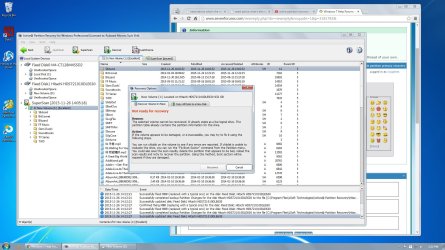
I have run a super scan and found the partition however it appears that i cannot recover it.
Any advice? Screenshot is as shown
 

Attachments

  • partition.jpg
    partition.jpg
    265.3 KB · Views: 6

My Computer My Computer

Computer type
PC/Desktop
Computer Manufacturer/Model Number
OEM
OS
windows 7 home premium 64 bit
Hi there

is anyone able to help me? thank you in advance..
 

My Computer My Computer

Computer type
PC/Desktop
Computer Manufacturer/Model Number
OEM
OS
windows 7 home premium 64 bit
While waiting, using another computer, download portable MiniTool Power Data Recovery [it includes a partition recovery module], intall onto either USB stick or DVD; run it according to either Jumanji or NoelDP. I have that tool, however, I do not have the experience yet to be comfortable guiding you through it. Later, but not yet.
 

My Computer My Computer

Computer type
PC/Desktop
Computer Manufacturer/Model Number
Antec desktop; Acer Aspire laptops
OS
Windows 7 Professional 64-bit
CPU
Desktop i5; Acers i5 & i7
Memory
desktop 16GB; 1 Acer 8GB & 1 Acer 16GB
Hard Drives
1TB split into 2 equal partitions [OS and data] usable by RJS
Internet Speed
AT&T DSL
Browser
FF, GChrome, msIE
Other Info
Windows 7 Firewall, Emsisoft AM/AV, MSE [scan-only], SpywareBlaster, Ruiware/BillP combine
Hi icygolem,

No partition recovery is possible in your case since you have quick formatted it. That has written a new partition table in sector 0 (which incidentally may be the same as your previous partition table) and that shouldn't matter. But what matters is it has written a new NTFS file system overwriting the previous file system. That is what formatting does.

Data is still there but since the previous MFT ( Master File Table) is lost, you can only recover the data using a file carving utility like PhotoRec (free) and Zero Assumption Recovery (Paid) which rebuild the files based on their signature and attributes. You can get most of the file formats recovered but you can't get the folder structure and file names since lost with MFT.

As a first step, try the trial version of GetDataBack Simple Data Recovery https://www.runtime.org/data-recovery-software.htm and scan your drive. If it can show you all the files complete with the original folder structure and file names - it is supposed to do that provided the original MFT is intact and not overwritten by the new MFT -grab it for a price and copy to another drive. ( You can preview the folders/files , open and see that the data is intact. Buy it only if it shows your original folder structure and file names and file integrity is intact)

Otherwise use TestDisk's PhotoRec to recover and copy your files to another external drive.( No original folder structure and file names) http://www.sevenforums.com/software/193467-guide-using-photorec-recovery-software.html

( I normally do not visit this subforum and saw your post only today by accident. Accidents do happen once in a while :D)

Edit: BTW I have heard good things about Active @ Partition Recovery. Did you try the other Tab "Copy All Data to a New Disk" in the screenshot ?
 
Last edited:

My Computer My Computer

OS
Windows 7 Home Premium 32 bit
Back
Top