Solved Diskpart clean done accidently...Please help!!

Meenakshi

New member
Local time
3:16 AM
Messages
37
Location
India
Hello There,

As I read through other diskpart clean discussions... I also have done the same and I run a scan with partition recovery wizard and it is showing my data..but I don't know how to recover it.

I contacted with minitool partition recovery wizard help, They said to do a scan with data recovery tool and when i have done it was not showing that drive data which I extremely need.

Please help me getting out of this problem!!

Thank you,
Meenakshi
 

My Computer

Computer type
PC/Desktop
OS
64 bit
What exactly did you accidentally do with diskpart clean? Reason for asking: whatever was accidentally, exactly, done will govern wha the recovery process will be. Deleting folders/files not quite as damaging as formatting.
 

My Computer

Computer type
PC/Desktop
Computer Manufacturer/Model Number
Antec desktop; Acer Aspire laptops
OS
Windows 7 Professional 64-bit
CPU
Desktop i5; Acers i5 & i7
Memory
desktop 16GB; 1 Acer 8GB & 1 Acer 16GB
Hard Drives
1TB split into 2 equal partitions [OS and data] usable by RJS
Internet Speed
AT&T DSL
Browser
FF, GChrome, msIE
Other Info
Windows 7 Firewall, Emsisoft AM/AV, MSE [scan-only], SpywareBlaster, Ruiware/BillP combine
Hi RolandJS,

Thanks for your reply! I was trying to Converting disk partitions MBR to GPT to install window 10 using diskpart in cmd prompt, Where It need to clean to convert into gpt. I was trying to select one partition and clean and it cleaned all my partitions. All my partitions merged and were showing as an unallocated space.

Then I have given to a shop where they tried with some software and was not able to found any usable file. Now I installled myself a window as I know it will overwrite some data But as hoping can recover which is remained. I tried partition recovery wizard it was showing my data. Can I recover it from that sectors It was showing?

Thank you!
 

My Computer

Computer type
PC/Desktop
OS
64 bit
Why is your local time showing the time in Houston? Are you in Texas or along the line up or down? :)

Anyway you landed here a little bit late. You shouldn't have installed Windows on the drive to be recovered.

Again anyway, Run Partition Wizard again. Are you running it on the same drive where you have installed Windows afresh?

Whatever, run it and post a screenshot of how your drive appears as soon as you launch PW. That is the first screenshot you will post.Then Click on Partition Recovery Wizard in the Left Pane > Select your drive to be recovered >Next > Full Disk > Next > Quick Scan > Next. Post a screenshot that shows the found partitions but don't do anything further. After you post these two screenshots, click on Cancel and then close PW. Let me examine those shots and we shall proceed further.

Also post a screenshot of Windows Disk Management. So totally you will be posting three screenshots and then keep quiet till I see those and return ( which may take sometime. Already time to retire and hit the sack.)

Snipping Tool: How to Use the Snipping Tool in Vista

Disk Management:http://www.sevenforums.com/tutorials/274797-disk-management-post-screen-capture-image.html

Screenshots: http://www.sevenforums.com/tutorials/9733-screenshots-files-upload-post-seven-forums.html

You have enough to read. Take your own time as I will do.

Its going to be a long process - especially if you are in the other side of the world.. Be patient.
 

My Computer

OS
Windows 7 Home Premium 32 bit
Folder/file recovery can be like watching grass grow and snails racing by
 

My Computer

Computer type
PC/Desktop
Computer Manufacturer/Model Number
Antec desktop; Acer Aspire laptops
OS
Windows 7 Professional 64-bit
CPU
Desktop i5; Acers i5 & i7
Memory
desktop 16GB; 1 Acer 8GB & 1 Acer 16GB
Hard Drives
1TB split into 2 equal partitions [OS and data] usable by RJS
Internet Speed
AT&T DSL
Browser
FF, GChrome, msIE
Other Info
Windows 7 Firewall, Emsisoft AM/AV, MSE [scan-only], SpywareBlaster, Ruiware/BillP combine
Hi Jumanji,

I'm from India (GMT+5.30). I don't know why its showing Houston.

I'm in some hurry if you can help I will be very thankful to you :(. I know I'm showing impatience now but I think If you will take a look you can tell what can be done now.
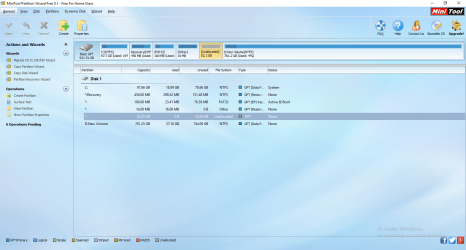
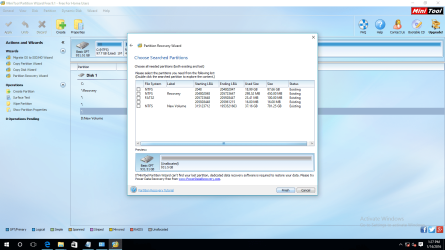
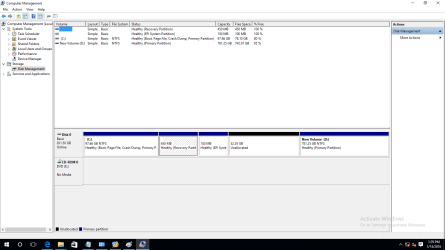
I'm pasting three screenshots as you were saying in last message.
 

Attachments

  • 1.png
    1.png
    503.8 KB · Views: 11
  • 2.png
    2.png
    449.9 KB · Views: 11
  • 3.png
    3.png
    71.8 KB · Views: 9

My Computer

Computer type
PC/Desktop
OS
64 bit
In quick scan its not listing that drives which contains my data. I tried two times the full scan, first time it was showing my half of data and second time it was showing another data also. So I thought there seems chances of recovery!

If you will say I will also post the full scan screenshots.
 

My Computer

Computer type
PC/Desktop
OS
64 bit
Quick scan is only showing the existing partitions.

OK, run a full scan and show me the partitions shown.

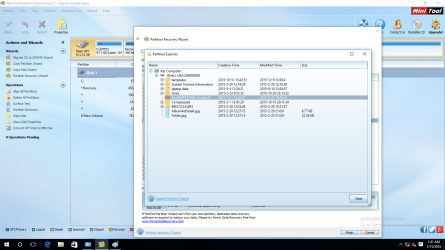
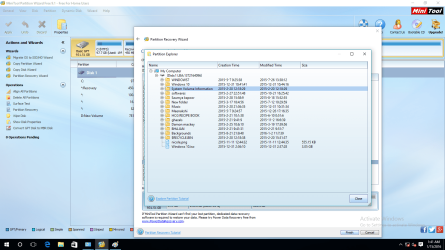
Which are the partitions that show your files that you want to recover? Just double click on those and show me the files. You have to show me the partition selected and the files shown when double clicked.So you will have two screenshots for each partition selected.

I am not going to hurry up.Haste makes waste. Now you may keep awake but I can't.
I shall see your screenshots tom morning.
 

My Computer

OS
Windows 7 Home Premium 32 bit
Haste not only makes waste it also does this.

Diskpart clean done accidently...Please help!!
 

My Computer

Computer type
PC/Desktop
Computer Manufacturer/Model Number
Home made Desktop
OS
Windows 10 Pro. 64/ version 1709 Windows 7 Pro/64
CPU
Intel i7-6800K @ 4.3
Motherboard
ASUS X-99 Deluxe II
Memory
Corsair Platinum 16 gig @2400
Graphics Card(s)
EVGA GTX 1070 OC
Monitor(s) Displays
Asus 27" LED LCD/VE278Q
Screen Resolution
1920-1080 or 1280-720 HDMI
Hard Drives
INTEL SSD 730-240 Gb Sata 3.0/
PSU
EVGA Platium 1200W
Case
Phanteks Luxe Tempered Glass 8 fans/ one radiator
Cooling
XSPC/ Water Cooled CPU
Keyboard
Das 4 Professional
Mouse
Logitech M705/MX Anywhere 2-S
Internet Speed
100 mbits
Antivirus
Microsoft Security Essentials/ Malwarebytes Premium 3.0/ SAS
Browser
I.E. 11 default/Firefox/ ISP Time Warner Cable/Spectrum
Other Info
LG BluRay Burner/
Sound system-KLipsch-THX/
Icy Dock ssd Hot Swap bays.
Hello Jumanji,

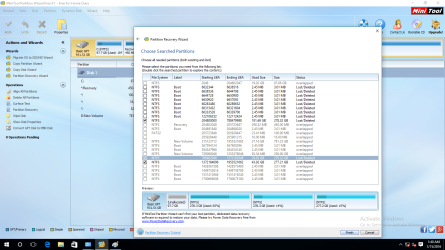
Sorry for late responding. The full scan had taken time. Please check the screenshots below. In first you can see the selected drives which contains my data and other are with containing folders in them.
 

Attachments

  • recovery drives.png
    recovery drives.png
    376.4 KB · Views: 7
  • drive 1.png
    drive 1.png
    349.4 KB · Views: 7
  • drive 2.png
    drive 2.png
    120.9 KB · Views: 7
  • drive 3.png
    drive 3.png
    381.2 KB · Views: 7

My Computer

Computer type
PC/Desktop
OS
64 bit
Hi Layback Bear,

I know its my fault. We should not work with the things we don't know. But sometimes we cant stop our destiny or hands doing these accidents. But we learn from these accidents also. I have kept patience from three weeks as its my main PC. My work is all delaying but hope of getting my data back is helping to keep this patience alive.
 

My Computer

Computer type
PC/Desktop
OS
64 bit
Immediately after doing diskpart clean if you had come here, we could have easily retrieved your system drive intoto running the bootable Partition Wizzard.

Now you had converted it into a GPT and have installed Windows on it. Once the original partition structure has been overwritten with another partition structure (GPT in this case), it is impossible to retrieve and restore the original partitions and that too running PW on the same drive to be restored.

But yet I wanted you to run Full Scan and post the results of found partitions only to see what information it gives. With the three major partitions selected 1. 278.3GB (65%used) 2. 278.3GB(14%used) and 3. 277..2GB (15% used) you do seem to have most of the files. Please confirm whether you had three partitions on your MBR drive originally.

However to retrieve and copy the files we have to run TestDisk from a pendrive and try. You must also have an external drive with adequate space to copy all the files, say a 1TB external drive.

When you are ready, let me know and then I shall let you know how to proceed. ( Don't try to Use TestDisk on your own without guidance. You will only muck up the drive further.)

As I said its going to be a long process. There is no shortcut or quick fix neither the results are guaranteed.
 

My Computer

OS
Windows 7 Home Premium 32 bit
When that was happen I wasn't know of this support so I gave to the shop to recover. But when they were not able to do I tried to find out the programs and google it came to know about this forum.

For the drives yes I was have three drives D, E, F. I did not remember how much exact data was there. In the third drive I can see there are not many folders which I were have before . I extremely need that first drive with 65% data which contains my work.

I Understood your TestDisk instruction but I do not have 1 TB external drive yet. Is there any other option??? If not I will try If I can manage. I will be back with my reply soon!

Thank you!
 

My Computer

Computer type
PC/Desktop
OS
64 bit
In my opinion, there is no other go or option.. Wait to see if someone else has any ideas.
 

My Computer

OS
Windows 7 Home Premium 32 bit
I concur. There is no other alternative.
 

My Computer

Computer type
PC/Desktop
Computer Manufacturer/Model Number
Golden Mk. I.4
OS
Windows 10 Pro x64 ; Xubuntu x64
CPU
Intel i7 860 @ 2.80 GHz O/C'ed to 4.0GHz
Motherboard
Gigabyte P55A-UD3R Rev.1. Award BIOS F13
Memory
16GB Corsair Vengance DDR3 @ 661 MHz Dual Channel (9-9-9-24)
Graphics Card(s)
EVGA NVidia GTX 560 1024MB
Sound Card
Realtek Integrated
Monitor(s) Displays
Dual Samsung SyncMaster 2494HS
Screen Resolution
1920*1080 and 1920*1080
Hard Drives
1*Samsung 840 EVO 120GB SSD;
1*OCZ Vertex 2 60GB SSD;
2*Samsung F3 SpinPoint 1TB in RAID0;
1*Samsung F1 SpinPoint 1TB;
2*Western Digital 1TB External USB 3.0
1*Western Digital 500GB External USB 3.0
1*Seagate 500GB External USB 2.0
PSU
Thermaltake ToughPower QFan 750W
Case
Thermaltake Element S VK60001W2Z
Cooling
Corsair H60 Water Cooling, 2*230mm and 2*80mm case fans
Keyboard
Logitech G110
Mouse
Logitech MX518
How much time you guys think, The data will take in recover? It is about 250GB in 1TB drive.
 

My Computer

Computer type
PC/Desktop
OS
64 bit
Approx. four to eight hours plus or minus. Much will depend upon your processor speed and the read/write speeds of your source drive and destination drive. But you need not worry about it. You may leave it to run overnight.
 

My Computer

OS
Windows 7 Home Premium 32 bit
Hello Jumanji,

Just bought a new HDD Today. Now all is ready please tell me how to proceed?

Thank you
 

My Computer

Computer type
PC/Desktop
OS
64 bit
Essentially, you will be running DOS from a bootable DOS pendrive, boot withit and run TestDisk,exe.
(You should have an empty pendrive of 1GB or more. If you have any data on the pendrive back it up on another drive since you will lose all that when creating the DOS pendrive)

Download Rufus 2.6 (847KB) from https://rufus.akeo.ie/ It is just one rufus-2.6.exe file. Plug in your empty pendrive and click on that *.exe file. Check that your empty pendrive is the one selected. In "Create a bootable disk using" select MS-DOS in the dropdown arrow and then click on Start. When completed close Rufus. That is it. Your bootable DOS pendrive is ready. Screenshot below:

15-01-2016 19-43-33.jpg

Keep your pendrive plugged in. Now download TestDisk for "Dos/Win9x" from TestDisk Download - CGSecurity It will be testdisk-7.0.dos.zip file. Extract it to your C: drive. You will now have a folder testdisk-7.0 in C: Open that folder, select all files (12) in it and copy those to the pendrive. You are now ready to run TestDisk from the pendrive.

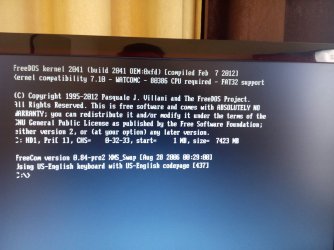
Shut down your PC and with the pendrive plugged in reboot. When BIOS starts invoke the onetime boot menu and boot from the pendrive.( On my computer I press F12. The boot Menu key will usually be shown at the bottom of the boot start screen.) Check you get into DOS prompt C:>

You can do upto this and report.

To get into Windows again, press the reset button on your PC. Your PC will reboot into Windows.

If you have any problems report.

I shall take sometime to post the next set of instructions on running TestDisk since I have to do a mock run and prepare myself for that :). In the meanwhile you can just acquaint with TestDisk reading this. http://www.sevenforums.com/software/190430-regain-lost-drive-using-test-disk-illustrated-guide.html
Just read it so that you get an idea of what to expect.

OFF TOPIC: You have a mention here http://www.sevenforums.com/chillout-room/346929-what-you-listening-10-a-97.html#post3202813 :).
 

My Computer

OS
Windows 7 Home Premium 32 bit
Here is the screenshot below what it is showing. Do I also have to plugged in the HDD?
 

Attachments

  • IMG_20160120_160751.jpg
    IMG_20160120_160751.jpg
    577.7 KB · Views: 4

My Computer

Computer type
PC/Desktop
OS
64 bit
Back
Top