Solved HDD offline not accessable

Pauly

An error has occured
Guru
Gold Member
Local time
12:28 AM
Messages
2,435
Location
England
Hi all hope you can help

I have two 1TB hdd partioned into two raid 0 drives
I was looking in disk management at the drives namely C & D and i right clicked over the drive designation box of drive D (bottom pane left side of graphical view) and instead of clicking properties i accidently clicked the offline entry above it :o since that mouse click my D drive has vanished

Both drives are listed in my raid bios and both drives are showing in device manager but the D drive is gone from My Computer and the disk management window.

Anyone know how to bring it back online cause i got a lot of data on there (500gb+) that id rather not lose if poss
 

My Computer

Computer type
PC/Desktop
Computer Manufacturer/Model Number
Pauly Special
OS
Win7 Ultimate X64
CPU
Intel i5 3570K
Motherboard
Gigabyte Z77X-DS3H
Memory
8GB DDR3 1600
Graphics Card(s)
Onboard
Sound Card
Onboard
Screen Resolution
1280x1024
Hard Drives
Samsung 840 Evo SSD (OS)
1TB Spinner (Data)
PSU
800W Arctic
Case
Cooler Master
Cooling
3x120mm Fans
Keyboard
MS Wireless
Mouse
MS Wireless
Internet Speed
20M
Hi all hope you can help

I have two 1TB hdd partioned into two raid 0 drives
I was looking in disk management at the drives namely C & D and i right clicked over the drive designation box of drive D (bottom pane left side of graphical view) and instead of clicking properties i accidently clicked the offline entry above it :o since that mouse click my D drive has vanished

Both drives are listed in my raid bios and both drives are showing in device manager but the D drive is gone from My Computer and the disk management window.

Anyone know how to bring it back online cause i got a lot of data on there (500gb+) that id rather not lose if poss

Hi Pauly,

You rightclicked in that left pane.
Isn't there an option to reactivate when you rightclick there again?

If not I will give you the command line options to reactivate it.

Greetings.
 

My Computer

OS
Win7 Build 7600 x86
CPU
Pentium II 300MHz
Motherboard
Asus
Memory
32mb EDO RAM
Graphics Card(s)
Diamond Viper
Sound Card
Soundblaster 16
Monitor(s) Displays
14" AOC CRT 16K color
Screen Resolution
800x600
Hard Drives
300mb Quantum fireball
PSU
110 Watts
Cooling
Passive
Keyboard
Trust Ergonomic
Mouse
Generic
Internet Speed
256K u 128K d
could u post the command line, a friend of mine has the same problem.
 

My Computer

Computer Manufacturer/Model Number
HP
OS
XP
CPU
AMD Athlon 3500+ Venice Socket 939
Motherboard
MSI Albacore RS480
Memory
3 GB PC3200 DDR SDRAM
Graphics Card(s)
nVIDIA GeForce 9600GT 512MB
Sound Card
Realtek AC97
Monitor(s) Displays
HP vs17
Screen Resolution
1280x1024
Hard Drives
Seagate ST3250823AS 250 GB 7200 RPM SATA 8MB Cache
Samsung HD103SJ Spinpoint F3 1 TB 7200 RPM SATA 32MB Cache
PSU
Antec TruePower 500W
Keyboard
Standard HP Keyboard
Mouse
Logitech MX518
could u post the command line, a friend of mine has the same problem.

Hi mn9500,

Here it is:

   Information

1. Open an elevated command prompt:
2. type diskpart. (this will switch to the DISKPART prompt)
3. at the DISKPART prompt, type list disk.
4. Make note of the disk number of the missing or offline disk
(offline disks are numbered 0, 1, 2, etc..)
(Missing disks are numbered M0, M1, M2, etc..)
5. At the DISKPART prompt, type select disk and disknumber and then enter.
example: select disk 0 and enter.
6. You should see "Disk ... is now the selected disk.
7. now type online and enter.


this should bring the disk back online.

Greetings,

Michel
 

My Computer

OS
Win7 Build 7600 x86
CPU
Pentium II 300MHz
Motherboard
Asus
Memory
32mb EDO RAM
Graphics Card(s)
Diamond Viper
Sound Card
Soundblaster 16
Monitor(s) Displays
14" AOC CRT 16K color
Screen Resolution
800x600
Hard Drives
300mb Quantum fireball
PSU
110 Watts
Cooling
Passive
Keyboard
Trust Ergonomic
Mouse
Generic
Internet Speed
256K u 128K d
Hi Squonk thanx for the info

Did as you said disk is back online & visible in disk management but only in bottom graphical view left hand side and is listed as error and has no drive letter assigned, it doesnt even recognise the size, heres what i got at the command prompt

Microsoft Windows [Version 6.1.7100]
Copyright (c) 2009 Microsoft Corporation. All rights reserved.
C:\Windows\system32>diskpart
Microsoft DiskPart version 6.1.7100
Copyright (C) 1999-2008 Microsoft Corporation.
On computer: PAUL-PC
DISKPART> list disk
Disk ### Status Size Free Dyn Gpt
-------- ------------- ------- ------- --- ---
Disk 0 Online 500 GB 0 B
Disk 1 Offline 1363 GB 0 B *
Disk 2 Online 232 GB 0 B
DISKPART> select disk 1
Disk 1 is now the selected disk.
DISKPART> online
Microsoft DiskPart version 6.1.7100
DISK - Online a disk that is currently marked as offline.
VOLUME - Online a volume that is currently marked as offline.
DISKPART> online disk
DiskPart successfully onlined the selected disk.
DISKPART> list disk
Disk ### Status Size Free Dyn Gpt
-------- ------------- ------- ------- --- ---
Disk 0 Online 500 GB 0 B
* Disk 1 Errors 1363 GB 0 B *
Disk 2 Online 232 GB 0 B


Cannot do anything to disk other than access properties, disk is still not listed in My Computer
 

My Computer

Computer type
PC/Desktop
Computer Manufacturer/Model Number
Pauly Special
OS
Win7 Ultimate X64
CPU
Intel i5 3570K
Motherboard
Gigabyte Z77X-DS3H
Memory
8GB DDR3 1600
Graphics Card(s)
Onboard
Sound Card
Onboard
Screen Resolution
1280x1024
Hard Drives
Samsung 840 Evo SSD (OS)
1TB Spinner (Data)
PSU
800W Arctic
Case
Cooler Master
Cooling
3x120mm Fans
Keyboard
MS Wireless
Mouse
MS Wireless
Internet Speed
20M
Dont know if this helps heres a screen shot of disk management

BTW have changed top view from volume list to disk list as drive does not show & just to clarify i also have a 250Gb IDE backup drive that i did not mention earlier
 

Attachments

  • Untitled.png
    Untitled.png
    31 KB · Views: 269

My Computer

Computer type
PC/Desktop
Computer Manufacturer/Model Number
Pauly Special
OS
Win7 Ultimate X64
CPU
Intel i5 3570K
Motherboard
Gigabyte Z77X-DS3H
Memory
8GB DDR3 1600
Graphics Card(s)
Onboard
Sound Card
Onboard
Screen Resolution
1280x1024
Hard Drives
Samsung 840 Evo SSD (OS)
1TB Spinner (Data)
PSU
800W Arctic
Case
Cooler Master
Cooling
3x120mm Fans
Keyboard
MS Wireless
Mouse
MS Wireless
Internet Speed
20M
could u post the command line, a friend of mine has the same problem.

Hi mn9500,

Here it is:

   Information

1. Open an elevated command prompt:
2. type diskpart. (this will switch to the DISKPART prompt)
3. at the DISKPART prompt, type list disk.
4. Make note of the disk number of the missing or offline disk
(offline disks are numbered 0, 1, 2, etc..)
(Missing disks are numbered M0, M1, M2, etc..)
5. At the DISKPART prompt, type select disk and disknumber and then enter.
example: select disk 0 and enter.
6. You should see "Disk ... is now the selected disk.
7. now type online and enter.


this should bring the disk back online.

Greetings,

Michel
can you do the same thing on windows xp?
 

My Computer

Computer Manufacturer/Model Number
HP
OS
XP
CPU
AMD Athlon 3500+ Venice Socket 939
Motherboard
MSI Albacore RS480
Memory
3 GB PC3200 DDR SDRAM
Graphics Card(s)
nVIDIA GeForce 9600GT 512MB
Sound Card
Realtek AC97
Monitor(s) Displays
HP vs17
Screen Resolution
1280x1024
Hard Drives
Seagate ST3250823AS 250 GB 7200 RPM SATA 8MB Cache
Samsung HD103SJ Spinpoint F3 1 TB 7200 RPM SATA 32MB Cache
PSU
Antec TruePower 500W
Keyboard
Standard HP Keyboard
Mouse
Logitech MX518
When you right click on the part where the exclamation is,
can you chose import?
 

My Computer

OS
Win7 Build 7600 x86
CPU
Pentium II 300MHz
Motherboard
Asus
Memory
32mb EDO RAM
Graphics Card(s)
Diamond Viper
Sound Card
Soundblaster 16
Monitor(s) Displays
14" AOC CRT 16K color
Screen Resolution
800x600
Hard Drives
300mb Quantum fireball
PSU
110 Watts
Cooling
Passive
Keyboard
Trust Ergonomic
Mouse
Generic
Internet Speed
256K u 128K d
When you right click on the part where the exclamation is,
can you chose import?

No only options are offline or properties or help

All others are shaded ie remove disk, reactivate disk etc
 

My Computer

Computer type
PC/Desktop
Computer Manufacturer/Model Number
Pauly Special
OS
Win7 Ultimate X64
CPU
Intel i5 3570K
Motherboard
Gigabyte Z77X-DS3H
Memory
8GB DDR3 1600
Graphics Card(s)
Onboard
Sound Card
Onboard
Screen Resolution
1280x1024
Hard Drives
Samsung 840 Evo SSD (OS)
1TB Spinner (Data)
PSU
800W Arctic
Case
Cooler Master
Cooling
3x120mm Fans
Keyboard
MS Wireless
Mouse
MS Wireless
Internet Speed
20M
When you right click on the part where the exclamation is,
can you chose import?

No only options are offline or properties or help

All others are shaded ie remove disk, reactivate disk etc

Hi Pauly,

Can you tell me a bit more about the history?

You said they were in raid 0, but did you create that in Win7?
Or did you have it under XP already and upgraded to Win7?

Did it work ok at some point under Win7?
Or was it not working the reason you messed with it in the first place?

I do hope you made backups in the past, because you have to be prepared to accept your loss if we won't be able to restore it.

Greetings,

Michel
 

My Computer

OS
Win7 Build 7600 x86
CPU
Pentium II 300MHz
Motherboard
Asus
Memory
32mb EDO RAM
Graphics Card(s)
Diamond Viper
Sound Card
Soundblaster 16
Monitor(s) Displays
14" AOC CRT 16K color
Screen Resolution
800x600
Hard Drives
300mb Quantum fireball
PSU
110 Watts
Cooling
Passive
Keyboard
Trust Ergonomic
Mouse
Generic
Internet Speed
256K u 128K d
It is new build pc, clean install, bios raid setup, but i overlooked the system restore function, just went back a few days and everythings back as it should be. Feel a bit stupid should have tried that first.

But a big thankyou Squonk for your time and expertise its much appreciated :D
 

My Computer

Computer type
PC/Desktop
Computer Manufacturer/Model Number
Pauly Special
OS
Win7 Ultimate X64
CPU
Intel i5 3570K
Motherboard
Gigabyte Z77X-DS3H
Memory
8GB DDR3 1600
Graphics Card(s)
Onboard
Sound Card
Onboard
Screen Resolution
1280x1024
Hard Drives
Samsung 840 Evo SSD (OS)
1TB Spinner (Data)
PSU
800W Arctic
Case
Cooler Master
Cooling
3x120mm Fans
Keyboard
MS Wireless
Mouse
MS Wireless
Internet Speed
20M
It is new build pc, clean install, bios raid setup, but i overlooked the system restore function, just went back a few days and everythings back as it should be. Feel a bit stupid should have tried that first.

But a big thankyou Squonk for your time and expertise its much appreciated :D

Hi Pauly,

I'm glad you have it working again.

There's nothing worse in computing than losing data.

This was a reminder for you to make those backups in the future.
A disk can die on you any day.

Buy a dedicated disk for your backups and make sure you have everything at least doubled on different physical media.

You can backup your system drive with W7's own backup or 3rd party.
That will create a single file.
You can use incremental or differential backups.
That will only backup the files that have been changed,
and not the whole system disk every time.

I recommend not to backup user files into a single backup file,
because when that file is corrupted you lose everything.
Just copy the user files to the backup disk.

Good luck,

Greetings,

Michel
 

My Computer

OS
Win7 Build 7600 x86
CPU
Pentium II 300MHz
Motherboard
Asus
Memory
32mb EDO RAM
Graphics Card(s)
Diamond Viper
Sound Card
Soundblaster 16
Monitor(s) Displays
14" AOC CRT 16K color
Screen Resolution
800x600
Hard Drives
300mb Quantum fireball
PSU
110 Watts
Cooling
Passive
Keyboard
Trust Ergonomic
Mouse
Generic
Internet Speed
256K u 128K d
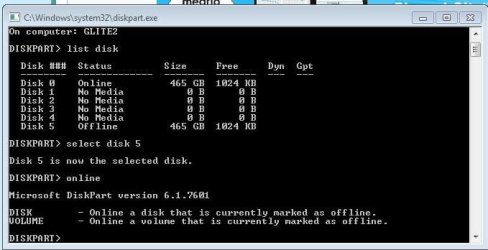
i also have the same issue
i tried the command promt but its not working
this is what i got (see pic)

so i got a virus
i removed the hdd and installed it as an external hhd on another computer and was able to read it no problem
i reinstalled windows on a new hdd on the computer that got the virus
i connected the hdd that got the virus on the computer that originally got the virus
but now it says the hdd is offline
i need files off the drive

hope that make sense
 

Attachments

  • Capture.JPG
    Capture.JPG
    50.2 KB · Views: 6

My Computer

Computer type
PC/Desktop
Computer Manufacturer/Model Number
custom
OS
w7 ult 64b
Browser
ff
Back
Top