HDD Partition Problem

BIG RED

New member
Member
Local time
6:50 PM
Messages
31
hey everyone! so ive been having some problem with partitioning my hdd. the reason why i was hoping to do this was because i also have linux ubuntu installed on my pc through dual bootup (not virtualization) and was hoping to free up more space for ubuntu. although this may seem to deal more with a different os, it's actually more of a problem with windows 7. ive tried partitioning the hdd through both ubuntu and windows 7 and neither method worked out. i have defragmented my hdd through windows. when i run the partitioner in ubuntu, im given the message that i need to run check disk in windows before it can partition the hdd. when i try to run check disk in windows however, it tells me it will do the operation on the next start-up. however, it never actually initializes the check disk. ive tried both rebooting my pc and shutting it down and ive also run the check disk as an administrator. any help would be greatly appreciated!!
 

My Computer

OS
Windows 7 Home Premium
Boot up on your Ubuntu CD in Live mode and make the changes. Since the OS's are using the drive they cannot make the changes.
 

My Computer

Computer type
PC/Desktop
Computer Manufacturer/Model Number
Dell OP7010
OS
Windows 7 Enterprise (x64); Windows Server 2008 R2 (x64)
Memory
16GB
Monitor(s) Displays
4 Dell 24" LCD
Screen Resolution
1280x1024
Keyboard
Dell
Mouse
Dell Optical
Internet Speed
40meg
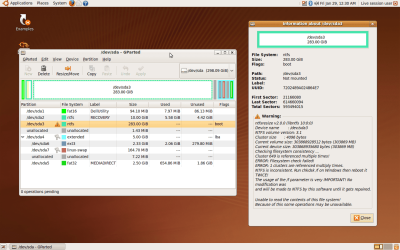
i just tried the live disk and. . . it still gave me the same message. it allows me to resize the hdd where windows 7 is installed but only by .0001 of a mb (or something along those lines). ive attached an image file to what i see on my screen and it again tells me to run chk dsk /F on windows. also, the partition that i have highlighted on the left hand side of the screen is the drive i need to partition, and the message on the right is what i see when i click on the exclamation point to the left of that partition.
 

Attachments

  • Screenshot.png
    Screenshot.png
    162.7 KB · Views: 32

My Computer

OS
Windows 7 Home Premium
With the live Ubuntu cd you have to turn the swap off to adjust partitions at times. I have heard that repartitioning W7 is better done from the MS side though.
 

My Computer

Computer Manufacturer/Model Number
ACER aspire one
OS
XP/W7/Lucid/Arch
Memory
2 gigs
So let me get this right you want to reduce /dev/sda3 and then give the freed space to the Ubuntu partitions?
 

My Computer

Computer type
PC/Desktop
Computer Manufacturer/Model Number
Dell OP7010
OS
Windows 7 Enterprise (x64); Windows Server 2008 R2 (x64)
Memory
16GB
Monitor(s) Displays
4 Dell 24" LCD
Screen Resolution
1280x1024
Keyboard
Dell
Mouse
Dell Optical
Internet Speed
40meg
So let me get this right you want to reduce /dev/sda3 and then give the freed space to the Ubuntu partitions?
yes thats exactly what i was hoping to do!
 

My Computer

OS
Windows 7 Home Premium
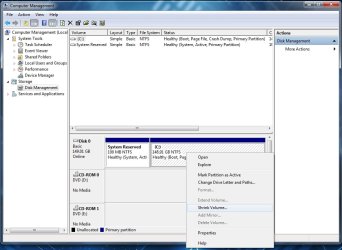
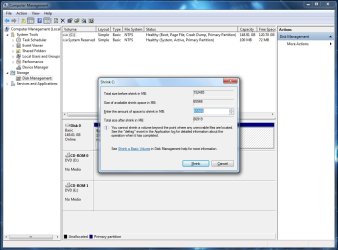
When you try to Shrink the volume in Windows 7 in Computer Manager > Disk Management it will not let you? Or does it give you an error?
 

Attachments

  • ShrinkWindows7Volume2.jpg
    ShrinkWindows7Volume2.jpg
    74.6 KB · Views: 13
  • ShrinkWindows7Volume.jpg
    ShrinkWindows7Volume.jpg
    89.9 KB · Views: 9

My Computer

Computer type
PC/Desktop
Computer Manufacturer/Model Number
Dell OP7010
OS
Windows 7 Enterprise (x64); Windows Server 2008 R2 (x64)
Memory
16GB
Monitor(s) Displays
4 Dell 24" LCD
Screen Resolution
1280x1024
Keyboard
Dell
Mouse
Dell Optical
Internet Speed
40meg
have you tried defragmenting the drive from within windows first?
then use disk management like WindowsStar says
(Start -> right-click on computer -> manage -> disk management)
Try booting from your windows install disk (if you have one) and run the repair disk thing
 

My Computer

Computer type
PC/Desktop
Computer Manufacturer/Model Number
Apple 17" iMac MA199LL (Early 2006)
OS
Windows 8 Pro (32-bit)
CPU
1.83GHz Intel Core Duo
Memory
2GB 667MHz DDR2 SDRAM (PC2-5300) (upgrade)
Graphics Card(s)
ATI Radeon X1600 with 128MB GDDR3 memory
Monitor(s) Displays
17-inch TFT active-matrix LCD, millions of colors
Screen Resolution
1440 x 900
Hard Drives
Hitachi 320GB HDT721032SLA360 7200RPM SATA II (upgrade)
Keyboard
Microsoft Wired Keyboard 600
Mouse
Microsoft Basic Optical Mouse v2.0
Internet Speed
4 Mbps
Antivirus
Microsoft Security Essentials
Browser
Google Chrome
Other Info
WEI:
Base Score: 3.9 Processor: 4.4 Memory 4.7
Graphics: 3.9 Gaming Graphics: 4.1 Primary HD: 5.9
When you try to Shrink the volume in Windows 7 in Computer Manager > Disk Management it will not let you? Or does it give you an error?
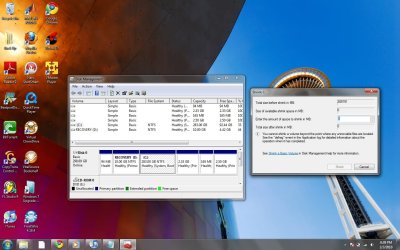
hey everyone, sorry for the delay in the responses. windows in fact DOES allow me to shrink the volume (its not grayed out), but i cant give it an amount to shrink the volume by. all that i have is a zero in the space where i can put in the value for how much to shrink it by, but the arrows to increase/decrease are grayed out. ive attached an image as to what i see on my screen to make this more clear. also, in response to the defragmenting option, i had forgotten to mention that i had already done that before i tried shrinking the volume.
 

Attachments

  • defrag.jpg
    defrag.jpg
    151.7 KB · Views: 18

My Computer

OS
Windows 7 Home Premium
I would clean install 7, and then virtualize Ubuntu.
 

My Computer

Computer Manufacturer/Model Number
Sony Vaio Z46GDU
OS
Windows 7 Ultimate x86-64
CPU
[email protected] 1066MHz FSB
Motherboard
Sony branded
Memory
6GB DDR3 1066MHz
Graphics Card(s)
9300M GS 256MB Dedicated (Speed) + Intel4500MHD (Stamina)
Sound Card
Realtek HD Audio
Monitor(s) Displays
13.1' WXGA
Screen Resolution
1600x900
Hard Drives
320GB 7200RPM w/ 16MB cache
Internet Speed
1MB/s
I would clean install 7, and then virtualize Ubuntu.
although that is one way of doing it, i would prefer to have ubuntu installed, not virtualized. nothing against the idea, its just a nit-picky preference of mine.
 

My Computer

OS
Windows 7 Home Premium
try a wubi install. it installs ubuntu as a folder on your windows 7 partition iirc.
 

My Computer

Computer type
PC/Desktop
Computer Manufacturer/Model Number
Apple 17" iMac MA199LL (Early 2006)
OS
Windows 8 Pro (32-bit)
CPU
1.83GHz Intel Core Duo
Memory
2GB 667MHz DDR2 SDRAM (PC2-5300) (upgrade)
Graphics Card(s)
ATI Radeon X1600 with 128MB GDDR3 memory
Monitor(s) Displays
17-inch TFT active-matrix LCD, millions of colors
Screen Resolution
1440 x 900
Hard Drives
Hitachi 320GB HDT721032SLA360 7200RPM SATA II (upgrade)
Keyboard
Microsoft Wired Keyboard 600
Mouse
Microsoft Basic Optical Mouse v2.0
Internet Speed
4 Mbps
Antivirus
Microsoft Security Essentials
Browser
Google Chrome
Other Info
WEI:
Base Score: 3.9 Processor: 4.4 Memory 4.7
Graphics: 3.9 Gaming Graphics: 4.1 Primary HD: 5.9
to be honest, i still think that the problem has something to do with the chk dsk not initializing. if thats not working the way its supposed to and it's what ubuntu tells me to run in windows in order to get the partition manager to work correctly, then something must be wrong on the windows part of the deal.
 

My Computer

OS
Windows 7 Home Premium
Have you tried Partition Wizard, or Paragon Partition Manager?
 

My Computer

Computer Manufacturer/Model Number
DIY
OS
W7x64 Pro, SuSe 12.1/** W7 x64 Pro, XP MCE
CPU
Phenom II 1090T w/Noctua NH-D14 /**4400+ X2 w/CM Hyper TX 3
Motherboard
ASRock 890FX Deluxe 4/**A8N-SLI
Memory
2 x 2GB Patriot PGS34g1600LLKA/**4x1GB Corsair VS
Graphics Card(s)
EVGA GTX460 SC/**EVGA 8800GTS
Sound Card
Asus Xonar D2X/**Xonar D1
Monitor(s) Displays
Acer X233H, Dell E152FPc /**LG M237-WD
Screen Resolution
1920x1080 & 1024x768/**1980x1080
Hard Drives
WDC 2TB, 1.5TB, 1TB, 500GB,Seagate 500GB , Maxtor 80GB /**500GB Seagate & WDC 1TB Black
PSU
CM RS600 w/ APC BX1000G/**Antec 500 TP w/ APC BX1000
Case
HAF922/**Antec 1040IIB
Cooling
3x200mm, 1x140 and 1x120mm/**5x80mm fans
Keyboard
Logitech Media USB/**Saitek Eclipse
Mouse
Cordless Trackman Wheel/**Ditto
Internet Speed
3.3Mbps
Other Info
SB 560 5.1 w/ Sennheiser RS140/**Creative T20 speakers, Dvico FusionHDTV7 Gold RT, Cisco E3000, HP 5510V AIO, Linksys E3000, Belkin F5U237 hub and **F5D8055 adapter
(** = 2nd rig)
Have you tried Partition Wizard, or Paragon Partition Manager?
would you suggest one more over the other? paragon seems to only offer a demo version whereas partition wizard is for free.
 

My Computer

OS
Windows 7 Home Premium
Paragon does have a free version:

Free Partition Manager Express - Leading partitioning software! | PARAGON Software Group - free partition software, resize partition

As far as which to use...it's a matter of preference. Paragon is an installable program, thus accessible at desktop, whereas Partition Wizard is an ISO, which needs to be burned to a disk, and used at boot. Sometimes, it is necessary to reboot to perform a partitioning function, sometimes not. Toss a coin, or do as I do, and get both.
 

My Computer

Computer Manufacturer/Model Number
DIY
OS
W7x64 Pro, SuSe 12.1/** W7 x64 Pro, XP MCE
CPU
Phenom II 1090T w/Noctua NH-D14 /**4400+ X2 w/CM Hyper TX 3
Motherboard
ASRock 890FX Deluxe 4/**A8N-SLI
Memory
2 x 2GB Patriot PGS34g1600LLKA/**4x1GB Corsair VS
Graphics Card(s)
EVGA GTX460 SC/**EVGA 8800GTS
Sound Card
Asus Xonar D2X/**Xonar D1
Monitor(s) Displays
Acer X233H, Dell E152FPc /**LG M237-WD
Screen Resolution
1920x1080 & 1024x768/**1980x1080
Hard Drives
WDC 2TB, 1.5TB, 1TB, 500GB,Seagate 500GB , Maxtor 80GB /**500GB Seagate & WDC 1TB Black
PSU
CM RS600 w/ APC BX1000G/**Antec 500 TP w/ APC BX1000
Case
HAF922/**Antec 1040IIB
Cooling
3x200mm, 1x140 and 1x120mm/**5x80mm fans
Keyboard
Logitech Media USB/**Saitek Eclipse
Mouse
Cordless Trackman Wheel/**Ditto
Internet Speed
3.3Mbps
Other Info
SB 560 5.1 w/ Sennheiser RS140/**Creative T20 speakers, Dvico FusionHDTV7 Gold RT, Cisco E3000, HP 5510V AIO, Linksys E3000, Belkin F5U237 hub and **F5D8055 adapter
(** = 2nd rig)
Paragon does have a free version:

Free Partition Manager Express - Leading partitioning software! | PARAGON Software Group - free partition software, resize partition

As far as which to use...it's a matter of preference. Paragon is an installable program, thus accessible at desktop, whereas Partition Wizard is an ISO, which needs to be burned to a disk, and used at boot. Sometimes, it is necessary to reboot to perform a partitioning function, sometimes not. Toss a coin, or do as I do, and get both.

okay is there anything i should be aware of before i do this partition? the only reason why im asking is because now im going to be doing a hdd partition using third party software. . . which makes me skeptical. i figured it was a pretty safe bet to do a hdd partition through windows'/linux's own partition manager, since they would handle their own file systems in their own way. hdd partitioning can be a really scary thing if its done wrong where it can possibly go to the extreme of wiping out your entire hard drive. obviously, im going to be backing up all of my data onto an external hdd before ill be going through with this nonetheless.
 

My Computer

OS
Windows 7 Home Premium
The number one cause of problems is operator error, either in the installation or use of a program, but that doesn't mean that it isn't possible for something to go awry, no matter how careful that you may be. Thus, the idea of making a backup is the best defense to take.

If I recall, the original goal was to resize a partition? Before doing so, it is a good idea to defrag the drive first. To best accomplish that, disabling hibernation, disabling the pagefile and disabling Shadow Copy will unlock the files on the harddrive, permiting the defragger to better consolidate the files leaving a greater amount of free space for the purpose of resizing.

EDIT: Another step that might be useful, especially if you haven't done it before, is to delete trash in the Recycle Bin, empty temp folders, etc. A program useful in facilitating this is CCleaner.
 

My Computer

Computer Manufacturer/Model Number
DIY
OS
W7x64 Pro, SuSe 12.1/** W7 x64 Pro, XP MCE
CPU
Phenom II 1090T w/Noctua NH-D14 /**4400+ X2 w/CM Hyper TX 3
Motherboard
ASRock 890FX Deluxe 4/**A8N-SLI
Memory
2 x 2GB Patriot PGS34g1600LLKA/**4x1GB Corsair VS
Graphics Card(s)
EVGA GTX460 SC/**EVGA 8800GTS
Sound Card
Asus Xonar D2X/**Xonar D1
Monitor(s) Displays
Acer X233H, Dell E152FPc /**LG M237-WD
Screen Resolution
1920x1080 & 1024x768/**1980x1080
Hard Drives
WDC 2TB, 1.5TB, 1TB, 500GB,Seagate 500GB , Maxtor 80GB /**500GB Seagate & WDC 1TB Black
PSU
CM RS600 w/ APC BX1000G/**Antec 500 TP w/ APC BX1000
Case
HAF922/**Antec 1040IIB
Cooling
3x200mm, 1x140 and 1x120mm/**5x80mm fans
Keyboard
Logitech Media USB/**Saitek Eclipse
Mouse
Cordless Trackman Wheel/**Ditto
Internet Speed
3.3Mbps
Other Info
SB 560 5.1 w/ Sennheiser RS140/**Creative T20 speakers, Dvico FusionHDTV7 Gold RT, Cisco E3000, HP 5510V AIO, Linksys E3000, Belkin F5U237 hub and **F5D8055 adapter
(** = 2nd rig)

My Computers

System One System Two

  • Computer type
    PC/Desktop
    Computer Manufacturer/Model Number
    ChillBlast - Custom to my design
    OS
    Windows 11 Pro x64 [Latest Release and Release Preview]
    CPU
    Ryzen 9 5950X, 3.8 - 5.2 MHz
    Motherboard
    Asus Prime X570-Pro
    Memory
    64GB [2 x 32GB] DDR4 3200MHz
    Graphics Card(s)
    4GB NVIDIA GEFORCE GTX 1650 Ti
    Sound Card
    On-board SPDIF to 5.1 System + HDMI [5.1 system]
    Monitor(s) Displays
    32" UHD 32 Bit HDR Monitor + 43" UHD 4K 32Bit HDR TV
    Screen Resolution
    2 x 3840 x 2160 @60Hz
    Hard Drives
    1TB M2 SSD OS, 500GB Fast Access SSD, 2 x 8TB Data + Various Externals from 1TB to 4TB, 10TB NAS
    PSU
    NZXT C750 80 PLUS Gold 750W Modular PSU
    Case
    Workstation Case [Matt Black]
    Cooling
    NZXT Kraken X63 280mm CPU Cooler +2x Quiet Case fans
    Keyboard
    Logitech Wireless MX Keys & K400 + others
    Mouse
    Logitech Wireless MX Master 3S
    Internet Speed
    920 MB Down 50 MB Up
    Antivirus
    BitDefender Total Security Pro
    Browser
    Chrome (always run latest Non-Beta)
    Other Info
    Also run ...
    Laptop - Quad 8GB - Windows 10 Pro x64
    Nexus 7 Android tablet x2
    Samsung 10.2" tablet
    Blackview TAB 8 4G Android Tablet c/w Keyboard
    Wacom Intuos Pro Medium Pen Pad
    Wacom Intuos Pro Small Pen Pad
    Wacom Expresskeys Remote
    Loopdeck+ Graphics Controller
    Shuttle Pro v2 Control
  • Computer type
    Laptop
    System Manufacturer/Model Number
    Dell XPS 17 10750H
    OS
    Windows 11 Pro x64 Latest RP
    CPU
    Intel I7 10750H 5.0GHz
    Motherboard
    Dell XPS
    Memory
    32GB [2x16GB] DDR4 2933 MHz
    Graphics Card(s)
    nVidia GTX1650Ti 4 GB GDDR6
    Sound Card
    Stock [Realtek] 4 Speaker
    Monitor(s) Displays
    17" IPS UHD+ Infinity Edge Touchscreen
    Screen Resolution
    3840 x 2400
    Hard Drives
    2TB M2 NVMe, 4TB External + various 500GB & 1TB External NVMe (also have access to spinner HDD from
    PSU
    Stock
    Case
    Stock XPS Aluminium & Carbon Fibre
    Cooling
    Stock - Active Fan Control
    Keyboard
    Backlit + Various Logitech
    Mouse
    Stock Track Pad + Logitech MX Trackball
    Internet Speed
    72 MB Down 18MB Up
    Browser
    Chrome
    Other Info
    Also run ...
    Laptop - Quad 8GB - Windows 10 Pro x64
    Nexus 7 Android tablet x2
    10.2" tablet
    Sony Z3 Android Smartphone
    Wacom Intuos Pro Medium Pen Pad
    Wacom Intuos Pro Small Pen Pad
    Wacom Expresskeys Remote
    Loopdeck+ Graphics Controller
    Shuttle Pro v2 Control Pad
    10TB NAS
alright sooo i believe ive gotten myself into some serious trouble now with this one. i went with trying to resize the windows partition with partition wizard. once it had finished and i rebooted the computer, something bad happened. when i was about to get to the screen for me to select which operating system i wanted to run, i was given the following message:
GRUB Loading stage 1.5.
GRUB loading, please wait...
Error 17
i googled it and it seems that it seems to be an issue with linux ubuntu since the GRUB (w/e it is, i wasnt quite sure to begin with) is linux based. therefore, i decided to rerun partition wizard and it turns out that the partition that held all of my data for ubuntu was completely wiped out. the actual partition itself wasnt removed, but there isnt anything in the partition (it has 0Mb used). therefore, since that particular partition doesnt have anything in it and the GRUB interface is linux based in the first place, am i best off wiping that parition using partition wizard? if i wipe that partition, would that space that it had previously occupied be considered free space afterwards? also, if i am to wipe that partition, which method is best for this case? i am given the following options in partition wizard:
-fill sectors with zero
-fill sectors with one
-fill sectors with zero and one
-DoD 5220.22-M (3-passes)
-DoD 5220.28-STD (7-passes)
before i go through with this, is this the best method to take? my windows partition has been apparently unaffected by this (it has the same amount of data in it before i resized it). however, either way, i am unable to run windows because of the error in GRUB. any help would be greatly appreciated!!
 

My Computer

OS
Windows 7 Home Premium
Back
Top