HDD

will 7200 rpm consume more power?
 

My Computer My Computer

At a glance

Windows 8 Professional x64core 2 duo T55504 GBGMA X3100
Computer Manufacturer/Model Number
aspire 5920
OS
Windows 8 Professional x64
CPU
core 2 duo T5550
Memory
4 GB
Graphics Card(s)
GMA X3100
Hard Drives
160 GB + 320 GB
Internet Speed
2 mbps
Im not sure, as I am not that familiar with power usage of HDs in laptops.
 

My Computer My Computer

At a glance

Windows 7 Home Premium 64bitIntel Core i7 2700k8GB Mushkin Redline Ridgebacks @1866EVGA GTX570 SC
Computer Manufacturer/Model Number
Custom (Self Build)
OS
Windows 7 Home Premium 64bit
CPU
Intel Core i7 2700k
Motherboard
eVGA P67 SLI
Memory
8GB Mushkin Redline Ridgebacks @1866
Graphics Card(s)
EVGA GTX570 SC
Sound Card
XiFi Titanium HD
Monitor(s) Displays
LG W2453V
Screen Resolution
1920x1080
Hard Drives
Intel 320 80GB -- Intel X25-V 40GB --WD Black 1TB x2 -- WD Blue 640GB
PSU
Seasonic x750
Case
Corsair 600T SE White
Cooling
eVGA Superclocked CPU Cooler
Keyboard
Saitek Cyborg
Antivirus
Kaspersky
Browser
IE
Other Info
LG BD/DVD
I just checked for electrical requirements..I noticed that 7200 RPM drives consume a bit less power than 5400 RPM one..IS it okay?
 

My Computer My Computer

At a glance

Windows 8 Professional x64core 2 duo T55504 GBGMA X3100
Computer Manufacturer/Model Number
aspire 5920
OS
Windows 8 Professional x64
CPU
core 2 duo T5550
Memory
4 GB
Graphics Card(s)
GMA X3100
Hard Drives
160 GB + 320 GB
Internet Speed
2 mbps
It might be the new models use less power, so it's possible.


@Wishmaster,

Newegg standard price for the X25-V is $99 now, the 25nm's are coming....
 

My Computer My Computer

At a glance

Windows 7 Ult x64 - SP1/ Windows 8 Pro x64Intel Core i5-3570K 4.6GHz8GB (2X4GB) DDR3 1600 Corsair Vengeance CL8 1.5vSapphire HD 7770 Vapor-X OC 1GB DDR5
Computer type
PC/Desktop
Computer Manufacturer/Model Number
76~2.0
OS
Windows 7 Ult x64 - SP1/ Windows 8 Pro x64
CPU
Intel Core i5-3570K 4.6GHz
Motherboard
Gigabyte GA-Z77X UD3H, f18
Memory
8GB (2X4GB) DDR3 1600 Corsair Vengeance CL8 1.5v
Graphics Card(s)
Sapphire HD 7770 Vapor-X OC 1GB DDR5
Sound Card
Onboard VIA VT2021
Monitor(s) Displays
22" LCD Dell
Screen Resolution
1680x1050
Hard Drives
Samsung 840Pro 128GB SSD,
Seagate Barracuda 500GB SATA2 7200rpm 32MB cache, Seagate Barracuda 1TB SATA2 7200rpm 32MB cache,
PSU
Corsair HX650W
Case
Cooler Master Storm Scout
Cooling
Corsair H80 2x12cm Noctua NF P12 , 2x14cm case fans
Keyboard
Logitech Wave
Mouse
CM Sentinel
Internet Speed
Dismal
Antivirus
Avast
Browser
Opera Next
Other Info
Haswell laptop: HP Envy 17t-j, i7-4700MQ, GeForce 740M 2GB DDR3, 17.3" Full HD 1920x1080, 16GB RAM, Samsung 840 Pro 128GB, 1TB Hitachi 7200 HDD,
Desktop: eSATA ports,
External eSATA Seagate 500GB SATA2 7200rpm,
External WD USB 500GB
should I consider 5400 or 7200?
 

My Computer My Computer

At a glance

Windows 8 Professional x64core 2 duo T55504 GBGMA X3100
Computer Manufacturer/Model Number
aspire 5920
OS
Windows 8 Professional x64
CPU
core 2 duo T5550
Memory
4 GB
Graphics Card(s)
GMA X3100
Hard Drives
160 GB + 320 GB
Internet Speed
2 mbps
High Speed HDs means slightly better access time, especially with regards to larger capacity. However, at higher speeds, there is a chance of it being hotter.

However, it has been a while since I actually looked and tested drives for laptops and seeing the results for the thermal part of it. I am pretty sure that higher RPM HDs will have better access times though.
 

My Computer My Computer

At a glance

Windows 7 Ultimate x64 and Home Premium x64Intel i7 960 (3.2 GHz Quad Core)12 Gigs (Triple Channel)Alienware OEM nVidia GTX 560 Ti (1.25 Gig)
Computer Manufacturer/Model Number
Alienware Area 51 Desktop and Dell Inspirion 17R (N7010)
OS
Windows 7 Ultimate x64 and Home Premium x64
CPU
Intel i7 960 (3.2 GHz Quad Core)
Motherboard
Alienware Intel based X58
Memory
12 Gigs (Triple Channel)
Graphics Card(s)
Alienware OEM nVidia GTX 560 Ti (1.25 Gig)
Sound Card
Creative Labs X-Fi Titanium
Monitor(s) Displays
Samsung PX2370 LED 23" Monitor
Screen Resolution
1920x1080
Hard Drives
2 320 Gig SATA in Raid 1 Configuration (System/App)
1 1 Tera SATA (Games)
1 1 Tera SATA (Data/Music/Videos)
PSU
750 Watt Power Supply
Case
Alienware Area 51 Desktop
Cooling
Liquid Cooled
Keyboard
Logitech G510
Mouse
Microsoft Trackball Explorer
Internet Speed
Cable
That and the fact most (like the one I linked for example) will have a large cache as well. :)
Looked like many of the 5200RPM laptop drives had a 8MB cache, as opposed to the 16MB on the 7200s. This will help with performance slightly.


Dave I was thinking the $99 was just a sale :) And thats a good price for those SSDs. Even though its a value drive, they are great performers.

I want another one, but think Ill wait just a bit longer to see how these next ones look.
 

My Computer My Computer

At a glance

Windows 7 Home Premium 64bitIntel Core i7 2700k8GB Mushkin Redline Ridgebacks @1866EVGA GTX570 SC
Computer Manufacturer/Model Number
Custom (Self Build)
OS
Windows 7 Home Premium 64bit
CPU
Intel Core i7 2700k
Motherboard
eVGA P67 SLI
Memory
8GB Mushkin Redline Ridgebacks @1866
Graphics Card(s)
EVGA GTX570 SC
Sound Card
XiFi Titanium HD
Monitor(s) Displays
LG W2453V
Screen Resolution
1920x1080
Hard Drives
Intel 320 80GB -- Intel X25-V 40GB --WD Black 1TB x2 -- WD Blue 640GB
PSU
Seasonic x750
Case
Corsair 600T SE White
Cooling
eVGA Superclocked CPU Cooler
Keyboard
Saitek Cyborg
Antivirus
Kaspersky
Browser
IE
Other Info
LG BD/DVD
So do u suggest me to go for 7200 RPM?
 

My Computer My Computer

At a glance

Windows 8 Professional x64core 2 duo T55504 GBGMA X3100
Computer Manufacturer/Model Number
aspire 5920
OS
Windows 8 Professional x64
CPU
core 2 duo T5550
Memory
4 GB
Graphics Card(s)
GMA X3100
Hard Drives
160 GB + 320 GB
Internet Speed
2 mbps
That strictly depends on you.

Does it need to be 'fast' or just usable. 5400 RPM is fine if you don't give a hoot on disk access speeds. How heavy of data use are you going to be using the drive or how much you willing to spend. SSD would be idea if you want performance, as there is no worry about spindle speed to deal with data, but it is overkill if the laptop is just doing simple word processing and web browsing. It's like buying a porche to do sunday driving around the block.
 

My Computer My Computer

At a glance

Windows 7 Ultimate x64 and Home Premium x64Intel i7 960 (3.2 GHz Quad Core)12 Gigs (Triple Channel)Alienware OEM nVidia GTX 560 Ti (1.25 Gig)
Computer Manufacturer/Model Number
Alienware Area 51 Desktop and Dell Inspirion 17R (N7010)
OS
Windows 7 Ultimate x64 and Home Premium x64
CPU
Intel i7 960 (3.2 GHz Quad Core)
Motherboard
Alienware Intel based X58
Memory
12 Gigs (Triple Channel)
Graphics Card(s)
Alienware OEM nVidia GTX 560 Ti (1.25 Gig)
Sound Card
Creative Labs X-Fi Titanium
Monitor(s) Displays
Samsung PX2370 LED 23" Monitor
Screen Resolution
1920x1080
Hard Drives
2 320 Gig SATA in Raid 1 Configuration (System/App)
1 1 Tera SATA (Games)
1 1 Tera SATA (Data/Music/Videos)
PSU
750 Watt Power Supply
Case
Alienware Area 51 Desktop
Cooling
Liquid Cooled
Keyboard
Logitech G510
Mouse
Microsoft Trackball Explorer
Internet Speed
Cable
I only use it for browsing and for lite games..So can I go for 640 GB 5400 RPM drive?
 

My Computer My Computer

At a glance

Windows 8 Professional x64core 2 duo T55504 GBGMA X3100
Computer Manufacturer/Model Number
aspire 5920
OS
Windows 8 Professional x64
CPU
core 2 duo T5550
Memory
4 GB
Graphics Card(s)
GMA X3100
Hard Drives
160 GB + 320 GB
Internet Speed
2 mbps
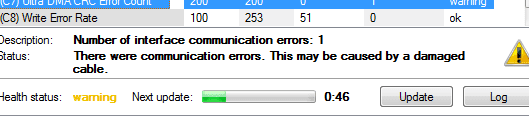
I checked about my HDD in HD tune pro.I was shocked to see this..Is the cable really damaged?
 

Attachments

  • hdd1.PNG
    hdd1.PNG
    4.8 KB · Views: 7

My Computer My Computer

At a glance

Windows 8 Professional x64core 2 duo T55504 GBGMA X3100
Computer Manufacturer/Model Number
aspire 5920
OS
Windows 8 Professional x64
CPU
core 2 duo T5550
Memory
4 GB
Graphics Card(s)
GMA X3100
Hard Drives
160 GB + 320 GB
Internet Speed
2 mbps
Hard to say on the drive issue, as I was under the impression this is a Laptop. You would hardly have access to the cable in general.

As for the drive, 640 gig 5400 RPM is fine for general web browsing and non-high performance gaming.
 

My Computer My Computer

At a glance

Windows 7 Ultimate x64 and Home Premium x64Intel i7 960 (3.2 GHz Quad Core)12 Gigs (Triple Channel)Alienware OEM nVidia GTX 560 Ti (1.25 Gig)
Computer Manufacturer/Model Number
Alienware Area 51 Desktop and Dell Inspirion 17R (N7010)
OS
Windows 7 Ultimate x64 and Home Premium x64
CPU
Intel i7 960 (3.2 GHz Quad Core)
Motherboard
Alienware Intel based X58
Memory
12 Gigs (Triple Channel)
Graphics Card(s)
Alienware OEM nVidia GTX 560 Ti (1.25 Gig)
Sound Card
Creative Labs X-Fi Titanium
Monitor(s) Displays
Samsung PX2370 LED 23" Monitor
Screen Resolution
1920x1080
Hard Drives
2 320 Gig SATA in Raid 1 Configuration (System/App)
1 1 Tera SATA (Games)
1 1 Tera SATA (Data/Music/Videos)
PSU
750 Watt Power Supply
Case
Alienware Area 51 Desktop
Cooling
Liquid Cooled
Keyboard
Logitech G510
Mouse
Microsoft Trackball Explorer
Internet Speed
Cable
this is my 160 GB drive..I have never accessed the hard drive cable..how did it get damaged?I am not experiencing any problems.
 

My Computer My Computer

At a glance

Windows 8 Professional x64core 2 duo T55504 GBGMA X3100
Computer Manufacturer/Model Number
aspire 5920
OS
Windows 8 Professional x64
CPU
core 2 duo T5550
Memory
4 GB
Graphics Card(s)
GMA X3100
Hard Drives
160 GB + 320 GB
Internet Speed
2 mbps
I asked the laptop dealer and he told to upgrade to 500 GB rather than 640 GB..he told core 2 duo is old processor and processor can`t handle such massive disks..How cum processor is involved?
 

My Computer My Computer

At a glance

Windows 8 Professional x64core 2 duo T55504 GBGMA X3100
Computer Manufacturer/Model Number
aspire 5920
OS
Windows 8 Professional x64
CPU
core 2 duo T5550
Memory
4 GB
Graphics Card(s)
GMA X3100
Hard Drives
160 GB + 320 GB
Internet Speed
2 mbps
I asked the laptop dealer and he told to upgrade to 500 GB rather than 640 GB..he told core 2 duo is old processor and processor can`t handle such massive disks..How cum processor is involved?
I would dump that dealer because he doesn't know what he's talking about. By today's standards a 640G HDD is NOT considered a "massive" drive. The fact that it's a core 2 duo doesn't matter as the processor doesn't know or care how big the drive is. The question really should be "How large of a drive do you need?" If you need to carry that much data around in your laptop, then go for the larger drive. Personally, the largest drive I've ever had in a laptop is 320G and have never come close to filling that. Your needs may be different.

If I was doing the upgrade, I would go for the 7200rpm drive but it's your money and your computer so if you feel the 5400rpm drive is best then go for it. Either will work fine.

I wouldn't worry about a single "Interface Communication Error" as reported by HDTune. If you were getting many errors I would be concerned. Regardless, do regular data backups and you never have to worry about losing data.
 

My Computer My Computer

At a glance

W10 Pro desktop, W11 laptop, W11 Pro tablet (...3.7Ghz 8700K i7, i7-11800H, i7-1065G716G desktop, 16G laptop, 4G tabletAMD Radeon RX580, RTX 3060, Intel Iris Plus
Computer type
PC/Desktop
Computer Manufacturer/Model Number
Home Built desktop, Dell G15 5511 Gaming laptop,MS Surface Pro 7 tablet
OS
W10 Pro desktop, W11 laptop, W11 Pro tablet (all 64-bit)
CPU
3.7Ghz 8700K i7, i7-11800H, i7-1065G7
Motherboard
ASUS TUF Z370-Pro Gaming in desktop
Memory
16G desktop, 16G laptop, 4G tablet
Graphics Card(s)
AMD Radeon RX580, RTX 3060, Intel Iris Plus
Sound Card
High Definition Audio (Built-in to mobo)
Monitor(s) Displays
Samsung U32J59 32" (2x), 15.6", 12"
Screen Resolution
3840x2160, 3840x2160, 1920x1080, 2160x1440
Hard Drives
500G SSD for OS; 2T, 10T & 15T HDDs for Data on Desktop, 1TB SSD laptop, 128G SSD tablet.
PSU
Corsair CX 750M
Case
Antec 100
Cooling
CM 212+
Keyboard
IBM Model M - used continuously since 1986
Mouse
Microsoft Pro IntelliMouse
Internet Speed
400M down 8M up
Antivirus
Windows Defender
Browser
FireFox
Other Info
Built my first computer (8Mhz 8088cpu, 640K RAM, 20MB HDD, 2 360K floppy drives) in 1985 and have been building them for myself, relatives and friends ever since.
I already knew that 640 GB could be easily handled by the computer.And about the HD tune only one error is displayed as mentioned above...So the sata cable is not damaged rite?
 

My Computer My Computer

At a glance

Windows 8 Professional x64core 2 duo T55504 GBGMA X3100
Computer Manufacturer/Model Number
aspire 5920
OS
Windows 8 Professional x64
CPU
core 2 duo T5550
Memory
4 GB
Graphics Card(s)
GMA X3100
Hard Drives
160 GB + 320 GB
Internet Speed
2 mbps
If the SATA connection (there probably isn't a cable) were damaged you would see many/constant errors. A single error is nothing to be concerned about.

Most likely there is a compartment on the underside of your laptop where the HDD is housed. With the power off, open the compartment, pull the HDD and then re-insert it. That will make sure you don't have any issues due to dirty contacts on the SATA connector. However, as I said before, I wouldn't worry about a single error.
 

My Computer My Computer

At a glance

W10 Pro desktop, W11 laptop, W11 Pro tablet (...3.7Ghz 8700K i7, i7-11800H, i7-1065G716G desktop, 16G laptop, 4G tabletAMD Radeon RX580, RTX 3060, Intel Iris Plus
Computer type
PC/Desktop
Computer Manufacturer/Model Number
Home Built desktop, Dell G15 5511 Gaming laptop,MS Surface Pro 7 tablet
OS
W10 Pro desktop, W11 laptop, W11 Pro tablet (all 64-bit)
CPU
3.7Ghz 8700K i7, i7-11800H, i7-1065G7
Motherboard
ASUS TUF Z370-Pro Gaming in desktop
Memory
16G desktop, 16G laptop, 4G tablet
Graphics Card(s)
AMD Radeon RX580, RTX 3060, Intel Iris Plus
Sound Card
High Definition Audio (Built-in to mobo)
Monitor(s) Displays
Samsung U32J59 32" (2x), 15.6", 12"
Screen Resolution
3840x2160, 3840x2160, 1920x1080, 2160x1440
Hard Drives
500G SSD for OS; 2T, 10T & 15T HDDs for Data on Desktop, 1TB SSD laptop, 128G SSD tablet.
PSU
Corsair CX 750M
Case
Antec 100
Cooling
CM 212+
Keyboard
IBM Model M - used continuously since 1986
Mouse
Microsoft Pro IntelliMouse
Internet Speed
400M down 8M up
Antivirus
Windows Defender
Browser
FireFox
Other Info
Built my first computer (8Mhz 8088cpu, 640K RAM, 20MB HDD, 2 360K floppy drives) in 1985 and have been building them for myself, relatives and friends ever since.
And one more thing that I asked the dealer was which company HDD with which he would upgrade,he just told that which is recommended by acer..I was very insistent to use seagate but he did not answer..
 

My Computer My Computer

At a glance

Windows 8 Professional x64core 2 duo T55504 GBGMA X3100
Computer Manufacturer/Model Number
aspire 5920
OS
Windows 8 Professional x64
CPU
core 2 duo T5550
Memory
4 GB
Graphics Card(s)
GMA X3100
Hard Drives
160 GB + 320 GB
Internet Speed
2 mbps
Will changing the hard disk reduce the life span of my laptop?
 

My Computer My Computer

At a glance

Windows 8 Professional x64core 2 duo T55504 GBGMA X3100
Computer Manufacturer/Model Number
aspire 5920
OS
Windows 8 Professional x64
CPU
core 2 duo T5550
Memory
4 GB
Graphics Card(s)
GMA X3100
Hard Drives
160 GB + 320 GB
Internet Speed
2 mbps
Not at all. In fact if you are already seeing errors with the one you have.. not changing the HDD will reduce the life span of the laptop.
 
Back
Top