

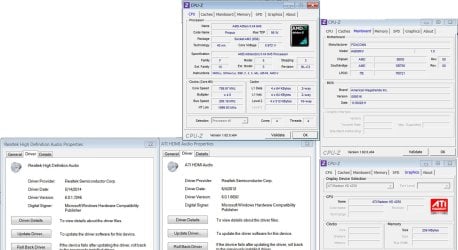
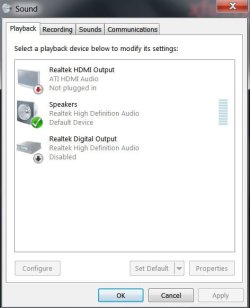
Ever since the World Cup started I have been watching the matches via comcast stream from my PC (see images for specs)to my 32" Dynex LCD (DX-32L100A13) but getting the HDMI audio was a PITA for sure. I have had luck with work-arounds when the audio decides not to work but this is getting out of hand and annoying to say the least.
Below, in the images you will find my specs (this is the office PC), the usual/normal error and the drivers I have and here's what I have done so far... as far as I can remember of course

Of course that only lasted for a day or two and then, the issue came back... sometimes turning the TV on/off solves it and I am back, some other times, I have to restart the PC and that works, other times, I have to go as far as TV on/OFF and restart at the same time, sometimes twice is the charm and today... no matter what I did, I have not been able to get it to work
I have not done anything, no windows update, nothing and the drivers were updated a couple of weeks ago.
I saw there was another similar tread but it was from 2012 and I did not want to resuscitate it.
Thanks for any help or advice
Below, in the images you will find my specs (this is the office PC), the usual/normal error and the drivers I have and here's what I have done so far... as far as I can remember of course
- I started by installing the HDMI ATI drivers but as I had never really installed any (I thought they came with the normal drivers) but that did not solved or accomplished anything... issue was still visible
- It dawned on me to uninstall all the drivers and then install fresh copies of both drivers (regular audio and HDMI)... can't really tell you what the correct way of doing this is because I forgot but, if you install HDMI first and then Regular drivers second and that does not work, uninstall and try the reverse method.
Of course that only lasted for a day or two and then, the issue came back... sometimes turning the TV on/off solves it and I am back, some other times, I have to restart the PC and that works, other times, I have to go as far as TV on/OFF and restart at the same time, sometimes twice is the charm and today... no matter what I did, I have not been able to get it to work
I have not done anything, no windows update, nothing and the drivers were updated a couple of weeks ago.
I saw there was another similar tread but it was from 2012 and I did not want to resuscitate it.
Thanks for any help or advice
Attachments
My Computer
At a glance
Windows 7 x64 (Ultimate)Intel i5-4670K8GBs Ripjaws 2133MhzAsus GTX660 (2GBs)
- Computer type
- PC/Desktop
- Computer Manufacturer/Model Number
- Custom Built... Intel/Nvidia/ASRock
- OS
- Windows 7 x64 (Ultimate)
- CPU
- Intel i5-4670K
- Motherboard
- ASRock Z87 Extreme 6
- Memory
- 8GBs Ripjaws 2133Mhz
- Graphics Card(s)
- Asus GTX660 (2GBs)
- Sound Card
- Onboard Realtek HD
- Monitor(s) Displays
- Acer AL2216W
- Screen Resolution
- 1680 x 1050
- Hard Drives
- Samsung 840 SSD 120GBs
Samsung 750GB 32MB cache
1.5 TB
- PSU
- PC Cooling 750w Silencer
- Case
- Thermaltake Spedo Advance
- Cooling
- Std Cooler
- Keyboard
- Logitech G15
- Mouse
- Logitech G9
- Internet Speed
- Comcast 20Mbit
- Antivirus
- Avast
- Browser
- Firefox
