hdmi audio/std. speakers switching

trdkamuri51o

New member
Local time
8:40 AM
Messages
2
ok to uncomplicate things ive read thru the forums and could not find anything concrete on this problem of mine..

i have a gigabyte mobo/amd cpu w/onboard hdmi

my issue is sound switching right now as it stands, i need to manually switch on my pc between the HDMI audio as my main device and my PC speakers as my main device... on my laptops this is not a problem, it can automatically detect if hdmi is plugged in and switch sound over..

the main reason is its a slight pain to keep going over after a movie and switch over, nor do i want to disconnect a hdmi cable every time..

any suggestions how to automate this problem???
 

My Computer

Computer Manufacturer/Model Number
my own
OS
windows 7
CPU
amd phenon II x4 965 black
Motherboard
gigabyte ga-ma785gmt-ud2h
Memory
corsair ddr3 1600mhz
Graphics Card(s)
bfg 8800gts 320mb oc
Sound Card
onboard
Monitor(s) Displays
panasonic TV nec monitor
PSU
xpro
Laptops have built in speakers and probably the reason the laptop has the needed hardware (and/or software) to accomplish this. On a desktop, speakers are not an "internal" device and probably the reason for this. I see the same issue posted on the Dell users forum.
 

My Computer

Computer type
PC/Desktop
Computer Manufacturer/Model Number
My Own Build
OS
Windows 10 64 bit
CPU
Intel i7 6700K
Motherboard
ASUS ROG Maximus VIII Hero
Memory
16GB Corsair Dominator
Graphics Card(s)
Intel CPU Graphics
Sound Card
RealTek
Monitor(s) Displays
27" Dell S2719dgf
Screen Resolution
2560X1440
Hard Drives
1 TB Samsung 850 EVO SSD for Win 10 Pro
500GB Samsung 850 EVO SSD for Win 10 Insider
2 TB drive for backup
PSU
EVGA Supernova 750G2
Case
BeQuiet Silent Base 600
Cooling
Deepcool Captain 120EX
Keyboard
Microsoft Wireless 2000
Mouse
Microsoft wireless
Internet Speed
100 MB/sec (Cable)
Antivirus
Microsoft Defender and Malwarebytes
Browser
Edge/Firefox
Other Info
Cakewalk (Sonar) by BandLab and Studio One 4.1 Pro recording studio software. MOTU 896Mk3 Hybrid recording interface, Frontier Tranzport wireless control unit, Behringer X-Touch Control Surface.
Five USB connected optical drives for CD Audio production using Nero BurningROM
i know that its an issue, however im looking for an automated solution....

i wonder if i can forward this issue to microsoft itself... it sure would be nice to run it all in one on a desktop....
 

My Computer

Computer Manufacturer/Model Number
my own
OS
windows 7
CPU
amd phenon II x4 965 black
Motherboard
gigabyte ga-ma785gmt-ud2h
Memory
corsair ddr3 1600mhz
Graphics Card(s)
bfg 8800gts 320mb oc
Sound Card
onboard
Monitor(s) Displays
panasonic TV nec monitor
PSU
xpro
Realtek audio switching speakers/HDMI

Did anybody come up with an answer to this annoyance? At the moment we have to set default device to either HDMI or speakers. We would like to transmit audio to both.
Thanking you in advance, Fred
 

My Computer

Computer Manufacturer/Model Number
Cooler Master
OS
Windows 7 Home Premium 32bit.
CPU
i3
Motherboard
Gigabyte with HDMI output
Memory
4G
Graphics Card(s)
none, on motherboard
Sound Card
Real HD Audio
Monitor(s) Displays
MAG 24"
Hard Drives
500 GB
PSU
400W
Case
CoolerMaster
Hello and welcome to SevenForums.

Here's a possible work-around you can play with.

I can listen to two audio outputs at the same time, but the audio is a bit out of sync between the two.
That may or may not matter to you depending on what you are listening to and how.

i.e. If listening to music in two different rooms, it may not matter that they are not in sync.

I never figured out how to sync them or if it's possible, but i never pursued that.

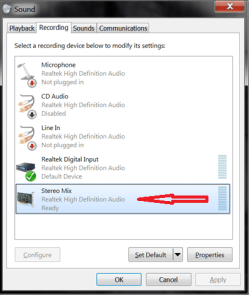
In Sounds / Recording enable "Stereo Mix"
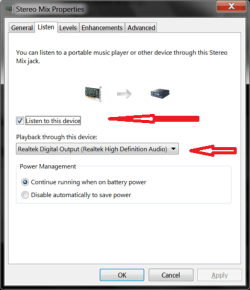
In "Stereo Mix" properties:

  • Check "Listen to this device"
  • For "Playback through this device" select the 2nd audio device you want to use.
Sound Dual screenprint 01.png

Sound Dual screenprint 02.png

Sound Dual screenprint 03.png

hope this helps.
david
 

My Computer

Computer type
PC/Desktop
Computer Manufacturer/Model Number
home built
OS
Multi-Boot W7_Pro_x64 W8.1_Pro_x64 W10_Pro_x64 +Linux_VMs +Chromium_VM
CPU
AMD Athlon II x4 620
Motherboard
Gigabyte GA-MA785G-UD3H
Memory
6GB GSkill DDR2 800
Graphics Card(s)
AMD 4670 GPU + AMD 4200 IGP
Sound Card
on board Realtek ALC889A
Monitor(s) Displays
RCA 40" LCD TV, Insignia 32" LCD TV, HP 15" LCD monitor
Screen Resolution
1680 x 1050
Hard Drives
OCZ Vertex 3 120GB,
Samsung F3 1TB (3),
Several others - WD, Seagate, Hitachi, ...
PSU
Corsair 500 W
Case
Rosewill mid tower
Cooling
CM 90mm rifle
Keyboard
Gyration wireless, Logitech wireless, Dell USB wired
Mouse
Gyration wireless, Logitech wireless, V7 USB wired
Internet Speed
Spectrum - 100Mbps D / 10Mbps U
Antivirus
Avast, MBAM3, EMET, WinPatrol
Browser
Pale Moon, Firefox, IE
Other Info
2 multi-boot PC's
Mainly HTPC/Office/Gen purpose (no gaming).
Trendnet USB KVM.
LG DVD burner/Blue Ray Player.
Tray system for removable SATA backup drives.

Not currently OCd, under-volted.
I use Hybrid sleep, rarely re-boot or shutdown.

Hauppauge HD-PVR, Avermedia PCIe TV Tuner, Hauppauge PCI TV Tuner.
Back
Top