HDMI Video connection disables soundcard

Breydel

New member
Local time
10:39 PM
Messages
9
Hi,

Windows driver assignment disables Soundmax HD sound drivers for Asus X-FI Sound card, when a HDMI video cable is plugged in, and instead loads another for the screen speakers.
Unplugging the cable, and then do a "Scan for hardware changes" in device manager, still only finds the wrong one.
Video card is Ati HD5850 (that features sound streaming through HDMI)
Screen is Acer GD245HQ that has no build in speakers.
Sound drivers AD1988_AB_AUDIO_V6585 Win 7-64bit (that used to work)
Reinstalling the SoundMax drivers is not possible, as the installer can't find the X-FI card, any more.
Any idea how to fix this ?
 

My Computer My Computer

At a glance

windows 7 Home Premium 64 bit
OS
windows 7 Home Premium 64 bit
Breydel, welcome to the Seven Forums.

You left out one rather important bit of info from the specs you listed, the make and model of the motherboard. Judging from the fact that it is the SupremeFX X-Fi (which is not a X-Fi at all by the way; it also isn't an actual sound card but just a riser card that contains the onboard audio), it is an Asus motherboard.

Now with that said double check in the bios and make sure that the onboard audio is set to enabled and not auto if available, as it sounds like the bios is auto disabling the onboard when it detects the audio built into the video card.

P.S. If this only happens when using the HDMI connection on the video card and you are not sending audio to the monitor, then the quick and easy fix would be to use the DVI connection instead.
 

My Computer My Computer

At a glance

Win 7 Ultimate x64FX-8350 @ 4.6 GHz so farADATA XPG V1 Series Black 8GB DDR3 1600Sapphire R9 270x Dual-X
Computer type
PC/Desktop
Computer Manufacturer/Model Number
Me
OS
Win 7 Ultimate x64
CPU
FX-8350 @ 4.6 GHz so far
Motherboard
Asus M5A97 EVO
Memory
ADATA XPG V1 Series Black 8GB DDR3 1600
Graphics Card(s)
Sapphire R9 270x Dual-X
Sound Card
Xonar DGX w/ Corsair Vengence 1300
Monitor(s) Displays
Acer S232HL Abid
Screen Resolution
1920x1080
Hard Drives
120 GB OCZ Vertex 3
500 GB Seagate 7200.12
PSU
Antec Earthwatts 650W Green
Case
Antec Three Hundred
Cooling
Cooler Master 212 EVO
Keyboard
Logitech G510
Mouse
Logitech G500s
Internet Speed
35000/3000
The MB is an Asus P5E (same as Maximus II) with separate sound card X-FI included. (not the Supreme X-FI) but a downgraded identical.
Bios is set to enable HD-Audio. Only other possibility is "Disabled"
I was using a DVI cable, and everything worked fine, until i plugged in the HDMI Cable in.
The screen and Videocard is designed to run both at the same time, with a swich on the screen to choose from.
The thing is that once the ATI (HDMI) driver is loaded, it crashes windows driver search, or tells it to prior the HDMI connection. The Sound is gone, also using only the DVI.
 

My Computer My Computer

At a glance

windows 7 Home Premium 64 bit
OS
windows 7 Home Premium 64 bit
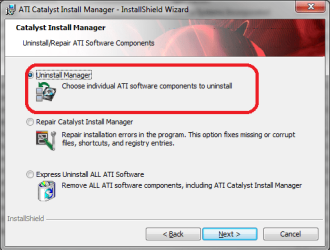
Let's start with uninstalling only the ATI audio driver. In Control panel open Programs and Features and select the ATI Catalyst Install Manager. Once it comes up select Uninstall Manager,

catuninstall.png

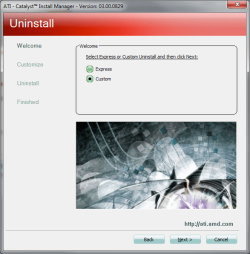
In the nest window select Custom,

catuninstall1.png

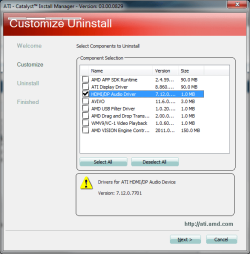
and then in the next select to only uninstall the audio driver,

catuninstall2.png

Once that is done then try re-installing the ADI driver.
 

My Computer My Computer

At a glance

Win 7 Ultimate x64FX-8350 @ 4.6 GHz so farADATA XPG V1 Series Black 8GB DDR3 1600Sapphire R9 270x Dual-X
Computer type
PC/Desktop
Computer Manufacturer/Model Number
Me
OS
Win 7 Ultimate x64
CPU
FX-8350 @ 4.6 GHz so far
Motherboard
Asus M5A97 EVO
Memory
ADATA XPG V1 Series Black 8GB DDR3 1600
Graphics Card(s)
Sapphire R9 270x Dual-X
Sound Card
Xonar DGX w/ Corsair Vengence 1300
Monitor(s) Displays
Acer S232HL Abid
Screen Resolution
1920x1080
Hard Drives
120 GB OCZ Vertex 3
500 GB Seagate 7200.12
PSU
Antec Earthwatts 650W Green
Case
Antec Three Hundred
Cooling
Cooler Master 212 EVO
Keyboard
Logitech G510
Mouse
Logitech G500s
Internet Speed
35000/3000
Didn't work

Looking up device manager, the driver now loaded, is Windows standard "High definition audio device. Disableing or deleating the driver (In device manager) only reloads it, at a new "search for hardware changes".
 

My Computer My Computer

At a glance

windows 7 Home Premium 64 bit
OS
windows 7 Home Premium 64 bit
Disableing or deleating the driver (In device manager) only reloads it

All that does is reload the default Windows driver.

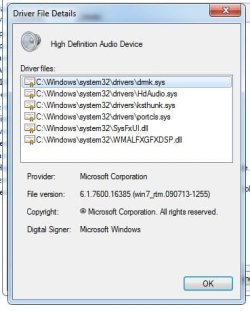
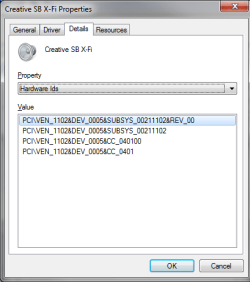
Back in Device Manager open the properties for the HD audio device, click on the Details tab and from the drop down locate the Hardware IDs and post back what it shows. Need to determine if it is the onboard or the built in AMD audio.
 

My Computer My Computer

At a glance

Win 7 Ultimate x64FX-8350 @ 4.6 GHz so farADATA XPG V1 Series Black 8GB DDR3 1600Sapphire R9 270x Dual-X
Computer type
PC/Desktop
Computer Manufacturer/Model Number
Me
OS
Win 7 Ultimate x64
CPU
FX-8350 @ 4.6 GHz so far
Motherboard
Asus M5A97 EVO
Memory
ADATA XPG V1 Series Black 8GB DDR3 1600
Graphics Card(s)
Sapphire R9 270x Dual-X
Sound Card
Xonar DGX w/ Corsair Vengence 1300
Monitor(s) Displays
Acer S232HL Abid
Screen Resolution
1920x1080
Hard Drives
120 GB OCZ Vertex 3
500 GB Seagate 7200.12
PSU
Antec Earthwatts 650W Green
Case
Antec Three Hundred
Cooling
Cooler Master 212 EVO
Keyboard
Logitech G510
Mouse
Logitech G500s
Internet Speed
35000/3000
Clipboard01.jpg
 

My Computer My Computer

At a glance

windows 7 Home Premium 64 bit
OS
windows 7 Home Premium 64 bit
You probably have but if not try a different HDMI cable. Doubt if it matters but I noticed lately that there are 1.3 and 1.4 HDMI cable as well as the basic type. Also when I was building my HTPC I remember reading somewhere that there are HDMI cables that do not carry the audio just the video. Go figure?
 

My Computer My Computer

At a glance

W7x64 Ult.i7 97512GB Corsair DomEvga GTX285
Computer Manufacturer/Model Number
HB
OS
W7x64 Ult.
CPU
i7 975
Motherboard
P6T7 SC
Memory
12GB Corsair Dom
Graphics Card(s)
Evga GTX285
Sound Card
OB
Monitor(s) Displays
HP LP2475
Screen Resolution
1920x1200
Hard Drives
Velociraptors Raid0 BU
Crucial M4 OS
WD RE4 Data
PSU
PC Power & Cooling 950
Case
Chieftec Bravo
Cooling
Air 6 GentleTyphoon
Keyboard
Logitech Illuminated
Mouse
Logitech MX518
Wrong details. Like this,

hardwareids.png
 

My Computer My Computer

At a glance

Win 7 Ultimate x64FX-8350 @ 4.6 GHz so farADATA XPG V1 Series Black 8GB DDR3 1600Sapphire R9 270x Dual-X
Computer type
PC/Desktop
Computer Manufacturer/Model Number
Me
OS
Win 7 Ultimate x64
CPU
FX-8350 @ 4.6 GHz so far
Motherboard
Asus M5A97 EVO
Memory
ADATA XPG V1 Series Black 8GB DDR3 1600
Graphics Card(s)
Sapphire R9 270x Dual-X
Sound Card
Xonar DGX w/ Corsair Vengence 1300
Monitor(s) Displays
Acer S232HL Abid
Screen Resolution
1920x1080
Hard Drives
120 GB OCZ Vertex 3
500 GB Seagate 7200.12
PSU
Antec Earthwatts 650W Green
Case
Antec Three Hundred
Cooling
Cooler Master 212 EVO
Keyboard
Logitech G510
Mouse
Logitech G500s
Internet Speed
35000/3000
Outlander

As far as i know the difference from 1.3 and 1.4 is a 4 times higher resolution and sound-feedback.
Anyway either videocard or the screen supports HDMI 1.4, but yes that is tryed too :(
 

My Computer My Computer

At a glance

windows 7 Home Premium 64 bit
OS
windows 7 Home Premium 64 bit
Stormy13

That one, is the one windows will not load.
It was there until the HDMI Cable caused windows to unload it for the ATI-screen driver
 

My Computer My Computer

At a glance

windows 7 Home Premium 64 bit
OS
windows 7 Home Premium 64 bit
Stormy13

That one, is the one windows will not load.
It was there until the HDMI Cable caused windows to unload it for the ATI-screen driver
 
Last edited:

My Computer My Computer

At a glance

windows 7 Home Premium 64 bit
OS
windows 7 Home Premium 64 bit
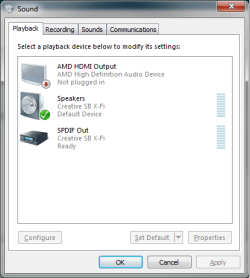
That shouldn't have happened. At most it should have changed the default playback device to the HDMI audio once connected, which should then just be a matter of opening the Windows playback properties,

save.png

back to the onboard as the default device.
 

My Computer My Computer

At a glance

Win 7 Ultimate x64FX-8350 @ 4.6 GHz so farADATA XPG V1 Series Black 8GB DDR3 1600Sapphire R9 270x Dual-X
Computer type
PC/Desktop
Computer Manufacturer/Model Number
Me
OS
Win 7 Ultimate x64
CPU
FX-8350 @ 4.6 GHz so far
Motherboard
Asus M5A97 EVO
Memory
ADATA XPG V1 Series Black 8GB DDR3 1600
Graphics Card(s)
Sapphire R9 270x Dual-X
Sound Card
Xonar DGX w/ Corsair Vengence 1300
Monitor(s) Displays
Acer S232HL Abid
Screen Resolution
1920x1080
Hard Drives
120 GB OCZ Vertex 3
500 GB Seagate 7200.12
PSU
Antec Earthwatts 650W Green
Case
Antec Three Hundred
Cooling
Cooler Master 212 EVO
Keyboard
Logitech G510
Mouse
Logitech G500s
Internet Speed
35000/3000
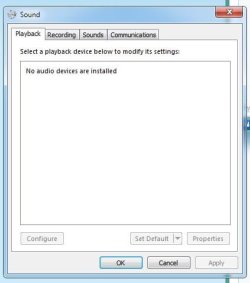
Clipboard01.jpg

it's not even listed.
Do you think there is a bug with windows ?
 

My Computer My Computer

At a glance

windows 7 Home Premium 64 bit
OS
windows 7 Home Premium 64 bit
Something to consider.
The Screen is 3D running at 120HZ. with Dual-Link and HDMI 1.3
As HDMI 1.3 will only carry 60HZ X2. a Dual-Link DVI Cable was provided to support full
120HZ at both left and right. (3D)
Now if windows thinks of HDMI as the latest, and therefore the best, (in this case reading sound included) that could be the problem.
Windows should detect though, that also a sound card is present. But at the time windows 7 were developed, these issues didn't exist.
Any comments on this ?
 

My Computer My Computer

At a glance

windows 7 Home Premium 64 bit
OS
windows 7 Home Premium 64 bit
Back
Top