Headset not showing up as playback device

Deadly Virus

New member
Local time
10:50 AM
Messages
2
I recently got a new laptop and my headset doesn't seem to work on it. I've identified that the laptop is recognising it, but it doesn't appear as a playback device and so I can't set it as the default one. There's definitely not a problem with the headset as it works fine on my computer, just not this laptop. It appears as a recording device, so I know that it's being recognised. But I can't find any way to set it as the playback device. I'd appreciate it if anyone could help me with this, I much prefer using headphones rather than the speakers.
 

My Computer My Computer

OS
Windows 7 64 bit
Are you sure you did not plug it into "Line in" rather than "Line out".
 

My Computer My Computer

Computer Manufacturer/Model Number
HP, Dell, Gateway, Toshiba - 4 laptops and 2 desktops
OS
Vista, Windows7, Mint Mate, Zorin, Windows 8
CPU
from 1.6GHz Duo to i7
Monitor(s) Displays
2x HP w2207
Hard Drives
5x HDD, 7x SSD, 12x Externals
Keyboard
with trackball - no mices
Mouse
Trackball mice
Internet Speed
DSL 6000
Are you sure you did not plug it into "Line in" rather than "Line out".
Well, it does say it's plugged into the line in thing. I had always assumed that was the right one, and it's the only place I can plug the headphones into...
 

My Computer My Computer

OS
Windows 7 64 bit
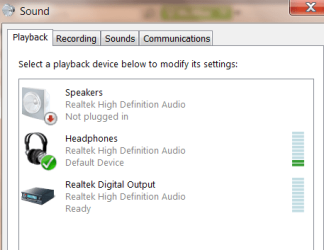
What made me think that it appears as a recording device. That is the place for a mic. On most systems thase two 3.5mm ports are close together. Maybe you want to double check in the specs. There is no reason it should not show up in Playback Devices when properly wired. Here is e.g. how mine looks:
 

Attachments

  • 2010-11-13_2041.png
    2010-11-13_2041.png
    13.1 KB · Views: 79

My Computer My Computer

Computer Manufacturer/Model Number
HP, Dell, Gateway, Toshiba - 4 laptops and 2 desktops
OS
Vista, Windows7, Mint Mate, Zorin, Windows 8
CPU
from 1.6GHz Duo to i7
Monitor(s) Displays
2x HP w2207
Hard Drives
5x HDD, 7x SSD, 12x Externals
Keyboard
with trackball - no mices
Mouse
Trackball mice
Internet Speed
DSL 6000
I am having the exact same problem. I am not 100% sure, but I think my problem may be related to the fact that I only reboot my machine periodically. When I leave work to go home or home to go to work, I Hybernate the machine, instead of rebooting because it takes so long to boot.

Please let me know if anyone has a solution to this problem.
 

My Computer My Computer

OS
Windows 7 Professional x64
Back
Top