
Health of my hard drive

levinikee

New member
Local time
7:15 AM
Messages
1
My laptop's battery just broke down a few weeks ago, and I haven't gotten around to replacing it, yet. Which leads me to rely on my wall charger. But that, too, is faulty now (I'm really lazy when it comes to replacing stuff.) Just a little movement, and my laptop dies. And my laptop has died a lot these past few weeks.

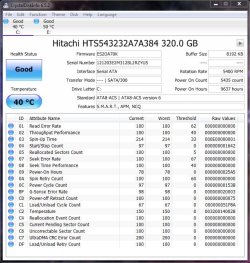
I hear this is bad for the hard drive, so I would like to know the current health of mine. I used Crystal Disk Info to see, but I couldn't understand the values that were there. I was hoping you guys could help me.

Thank you!
HDD.JPG
 

My Computer My Computer

At a glance

Windows 7 Ultimate 32bit
Computer type
Laptop
Computer Manufacturer/Model Number
Toshiba NB510
OS
Windows 7 Ultimate 32bit
Hi and welcome to SevenForums,
Beside the Good status showing just how old is the drive ?

I would seriously consider a backup battery to connect the charger into
1 is ups backup batteries also provide surge protection spikes which is pretty common in the u.s. and is probably just as damaging as power outages on equipment.
 

My Computer My Computer

At a glance

Win-7-Pro64bit 7-H-Prem-64biti7-5930K 2nd i9-9940x both water blocked VRM'...Trident-z 3200C14 2nd Trident-z 3600C16EVGA 1080ti ftw3 2nd Titan Xp both water blocked
Computer type
PC/Desktop
Computer Manufacturer/Model Number
Custom assembled by me :}
OS
Win-7-Pro64bit 7-H-Prem-64bit
CPU
i7-5930K 2nd i9-9940x both water blocked VRM's too
Motherboard
ASUS SABERTOOTH X99 2nd ASUS x299 Apex
Memory
Trident-z 3200C14 2nd Trident-z 3600C16
Graphics Card(s)
EVGA 1080ti ftw3 2nd Titan Xp both water blocked
Sound Card
Built-in Realtek
Monitor(s) Displays
1-AOC G2460PG 24"G-Sync 144Hz/ 2nd 1-ASUS VG248QE 24" 144Hz
Screen Resolution
1920 x 1080 144Hz
Hard Drives
2-Samsung M.2 Evo & Evo Plus
2-Samsung 850 EVO 500GB SSD's/ 3-2.5 W.D. Black 1tb-&3-1tb/3-3.5 WD Black 1tb hdd's
PSU
EVGA SuperNOVA 1000-P2 2nd 1200-P2
Case
2-Corsair Obsidian Series 450D Black ATX Mid Tower
Cooling
Custom water loops
Keyboard
Logitech G710+/ 2nd Logitech G910
Mouse
2-RedDragon M901 Perdition 16400 dpi Gaming mouse = wired
Internet Speed
Comcast Ping 19ms 89.31mbps download speed 6.12mbps upload
Antivirus
Malwarebytes Pro/ Superantispyware Pro
Browser
FireFox & Pale moon
Other Info
2nd ASUS X299 Apex/Intel i9-9940x with Custom water loop/7H-Prem-x64/Corsair 450D case/Ram Trident-z 3600C16 4x8gb / Samsung970Evo plus 500gb SSD/Dual ssd EZ swap evo/PSU EVGA SuperNova 1200w-P2 80+Platinum/GPU Titan Xp /8-ML-140 on push-pull on 2-280GTX rads
Hello levinikee!

This is not healthy at all for your HDD or any other parts in your laptop.

First thing you need to do is supply your laptop with a battery or at least a stable power connection. For now your HDD SMART attributes appear healthy, still you could check the drive's health using the manufacturer's tool, when such, or use a third party program for that. Make sure you have regular back ups, as well. Check for bad sectors and defrag, if needed. At any time, if the drive starts to experience performance issues, lags, freezes, BSOD's, reboots, low transfer speeds, know it will most likely be needed to be replaced.

Cheers! :)

CK_WD
 

My Computer My Computer

At a glance

Windows 7 Home Premium x64
Computer type
PC/Desktop
OS
Windows 7 Home Premium x64
Back
Top