[Help] 8 Gigs Pen Drive.

ak070

New member
Local time
5:38 PM
Messages
12
Hi peeps, I'm newbie here.... I'm facing a problem with an 8 Gigs Moser Beer Pen Drive.

I was copying some file to my pd & computer hung... So I removed the pd without safe ejecting. So next time I connected it to the PC, obviously it asked me to 'Scan For Errors' but I continued without scanning. Did my copying thing without any problem. Safely Ejected.
And the problems started here : Again when I connected pd to PC, it showed nothing inside!! It said this folder is empty. I tried unhiding and found that there was a Folder with name FOUND.0000. Inside of that folder, there were 10000 .chk files but I didn't find any of MY DATA in there!! So I tried some utilities to recover my data. Getdataback, etc.
It partially recovered my data. My rest data was backed up. So I successfully recovered my data.
Now I'm facing another problem here ... I CAN'T COPY A THING ON MY PD. So I tried to Format the PD as I had my data back. And voila : 'Windows was unable to complete the format'. So again I tried removing write protection, tried formatting from cmd, tried other PCs. Nothing works.

Now only thing I want to do is format the PD. I don't care about the data inside it. Please help me!!

P.S: At the time of formatting, right after it says it was unable to format, PD ejects and connects automatically.... :banghead:
 
Last edited:

My Computer My Computer

OS
Windows 7 Home Basic x64
Format with a third party app like Partition Wizard.
partitionwizard.com/download

Download, install, open. Right click your drive > Format

And from now on keep out from any windows formatting algorithms.. One of my USB drives is suffering because of it, at the moment.

And be kind to your drive next time, by safely removing :)
 
Last edited:

My Computer My Computer

Computer Manufacturer/Model Number
Asus N53SN
OS
Win 8 duals Win 7 64bit
CPU
2.90GHz with Intel TurboBoost
Memory
4 GB
Graphics Card(s)
Nvidia GForce GT 550M Cuda 2GB
Sound Card
Realtek
Screen Resolution
1366x768
Hard Drives
640 GB SATA Internal
1 TB Samsung External
Internet Speed
9.2 Mbit
You could try going to Disk Management and deleting the partition on the thumb drive. Then create a new partition and see if you can then format it.
 

My Computer My Computer

Computer type
PC/Desktop
Computer Manufacturer/Model Number
Home Built
OS
Windows 10 Education 64 bit
CPU
AMD Phenom II X4 980 Black Edition Deneb 3.7GHz
Motherboard
Asus M4N68T-M V2 µATX Motherboard
Memory
8GB 4GBx2 Kingston PC10600 DDR3 1333 Memory
Graphics Card(s)
Zotac NVIDIA Geforce GT640 2 Gig DDR3 PCIe
Sound Card
VIA VT1708s High Definition Audio 8-channel Onboard
Monitor(s) Displays
22" LG E2242 1080p and 2 19" I-INC AG191D
Screen Resolution
1280x1024 - 1920x1080 - 1280x1024
Hard Drives
Crucial M100 256 GB SSD and 500 GB WD Blue SATA
PSU
Thermaltake TR 620
Case
Power Up Black ATX Mid-Tower Case
Cooling
Stock heatsink and fan
Keyboard
Logitech Wireless K350 Wave
Mouse
Logitech Wireless M570 Trackman Wheel
Internet Speed
80 Mbps Down 30 Mbps Up
Antivirus
Windows Defender
Browser
Internet Explorer 11
Other Info
HP DVD1040e Lightscribe - External USB2
You could try going to Disk Management and deleting the partition on the thumb drive. Then create a new partition and see if you can then format it.

Could you elaborate more???
 

My Computer My Computer

OS
Windows 7 Home Basic x64

Attachments

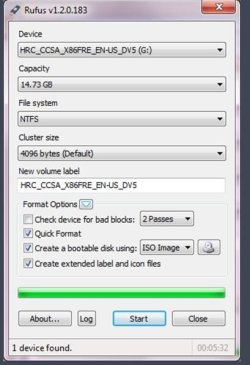
  • Rufus_format.JPG
    Rufus_format.JPG
    40.4 KB · Views: 11

My Computer My Computer

Computer type
PC/Desktop
Computer Manufacturer/Model Number
Built them myself, Science Experiments !
OS
Win7 Enterprise, Win7 x86 (Ult 7600), Win7 x64 Ult 7600, TechNet RTM on AMD x64 (2.8Ghz)
CPU
AMD fx8350 4ghz, AMD-32 2400mhz, AMD-64 3200mhz, AMDx64 2.8G
Motherboard
SIS 755, ECS-K8M890M-M (Ult 7600), GigaByte & others
Memory
2gb, 4gb on the Ult 7600, 4gb on Technet RTM, 32gb on FX8350
Graphics Card(s)
Draw my own Graphics, several nVidia cards
Sound Card
on motherboard
Monitor(s) Displays
19" flat scr, 28" I-Inc widescr,22" Emprex Widescr, 23" Acer
Screen Resolution
1280 x 1024, 1440 x 900, 1920 x 1080
Hard Drives
6 pata Ide HD's & 2 Sata HD's
added 80gb external on Ult 7600 computer,
numerous extra 1tb, 2TB, 3Tb SATA HD's
A collection of ext HD Docks w/ HDs
PSU
430w, 550w, 600w, 700, 800, etc
Case
All Generic Full Towers
Cooling
Open Air & a few fans, some w/ colored LEDs
Keyboard
Compaq & Dell recycled from GoodWill
Mouse
Made in China Optical Wired Mouse
Internet Speed
Fast Cable InterNet
Antivirus
AVG Free on 24 different Desktops, NO Problems!
Browser
IE 8 is preferred, but use FireFox sometimes
Other Info
Linksys Routers, switches, & Hubs
Too Many USB Flash Drives to count, Biggest is 64GB !
Eight computers in my home network.
Sixteen computers at my business network.
Linked via TeamViewer !
Lots of old used spare computer parts everywhere!
You might try this Freeware Utility USB program Rufus

:ar: Rufus - Create bootable USB drives the easy way


Trying.... Please wait.

Rufus version 1.3.1.220
Found drive 'USB Device'
Found drive 'SIT Mass Storage USB Device'
Ignoring autorun.inf label for drive F: No media
2 devices found.
Cylinders: 983, TracksPerCylinder: 255, SectorsPerTrack: 63, BytesPerSector: 512
Partition 1:
Type: Small FAT16 (0x04)
Size: 7.5 GB
Boot: No
Recognized: Yes
Hidden Sectors: 0
Partition type: MBR, NB Partitions: 1
Checking for Rufus updates...
Checking release channel...
No new release version found.
Caution: Opened \\.\PHYSICALDRIVE2 drive for write access
Unknown boot record
Clearing MBR...
write_sectors: Write error - [0x0000045D] The request could not be performed because of an I/O device error.
Wrote: 0, Expected: 65536
StartSector:0, nSectors:0, SectorSize:1
unable to zero MBR
Found drive 'USB Device'
Found drive 'SIT Mass Storage USB Device'
Ignoring autorun.inf label for drive F: No media
2 devices found.
Cylinders: 983, TracksPerCylinder: 255, SectorsPerTrack: 63, BytesPerSector: 512
Partition 1:
Type: Small FAT16 (0x04)
Size: 7.5 GB
Boot: No
Recognized: Yes
Hidden Sectors: 0
Partition type: MBR, NB Partitions: 1


:cry:
 

My Computer My Computer

OS
Windows 7 Home Basic x64
Format with a third party app like Partition Wizard.
partitionwizard.com/download

Download, install, open. Right click your drive > Format

And from now on keep out from any windows formatting algorithms.. One of my USB drives is suffering because of it, at the moment.

And be kind to your drive next time, by safely removing :)

Nope.... Doesnt work..... :cry:
 

My Computer My Computer

OS
Windows 7 Home Basic x64
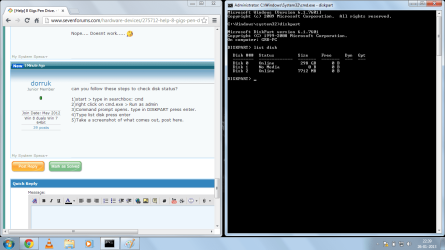
can you follow these steps to check disk status?

1)start > type in searchbox: cmd
2)right click on cmd.exe > Run as admin
3)Command prompt opens. type in DISKPART press enter.
4)Type list disk press enter
5)Take a screenshot of what comes out, post here.
 

My Computer My Computer

Computer Manufacturer/Model Number
Asus N53SN
OS
Win 8 duals Win 7 64bit
CPU
2.90GHz with Intel TurboBoost
Memory
4 GB
Graphics Card(s)
Nvidia GForce GT 550M Cuda 2GB
Sound Card
Realtek
Screen Resolution
1366x768
Hard Drives
640 GB SATA Internal
1 TB Samsung External
Internet Speed
9.2 Mbit
Here it is....
 

Attachments

  • Diskpart.png
    Diskpart.png
    51.9 KB · Views: 17

My Computer My Computer

OS
Windows 7 Home Basic x64

My Computer My Computer

Computer Manufacturer/Model Number
Asus N53SN
OS
Win 8 duals Win 7 64bit
CPU
2.90GHz with Intel TurboBoost
Memory
4 GB
Graphics Card(s)
Nvidia GForce GT 550M Cuda 2GB
Sound Card
Realtek
Screen Resolution
1366x768
Hard Drives
640 GB SATA Internal
1 TB Samsung External
Internet Speed
9.2 Mbit
Can we merge the topics or sth?
 

My Computer My Computer

Computer Manufacturer/Model Number
Asus N53SN
OS
Win 8 duals Win 7 64bit
CPU
2.90GHz with Intel TurboBoost
Memory
4 GB
Graphics Card(s)
Nvidia GForce GT 550M Cuda 2GB
Sound Card
Realtek
Screen Resolution
1366x768
Hard Drives
640 GB SATA Internal
1 TB Samsung External
Internet Speed
9.2 Mbit
Can we merge the topics or sth?

No friend that No Media Drive is my Memory Card Reader of My Internet Dongle. It doesn't show any data unless you insert a card in it.... The below 'Disk Drive 2' (G:/) is my pen drive....
 

My Computer My Computer

OS
Windows 7 Home Basic x64
Your problem looks serious than mine though.....

Anyway.... A problem is always serious to the one who is facing it....
 

My Computer My Computer

OS
Windows 7 Home Basic x64
You could try going to Disk Management and deleting the partition on the thumb drive. Then create a new partition and see if you can then format it.

Could you elaborate more???

Click your start orb then right click "Computer" and select Manage. In the window that opens select "Disk Management" under Storage on the left. Then look and see if the thumb drive shows up. If it does you can then right click it for more options like format, etc.
 

My Computer My Computer

Computer type
PC/Desktop
Computer Manufacturer/Model Number
Home Built
OS
Windows 10 Education 64 bit
CPU
AMD Phenom II X4 980 Black Edition Deneb 3.7GHz
Motherboard
Asus M4N68T-M V2 µATX Motherboard
Memory
8GB 4GBx2 Kingston PC10600 DDR3 1333 Memory
Graphics Card(s)
Zotac NVIDIA Geforce GT640 2 Gig DDR3 PCIe
Sound Card
VIA VT1708s High Definition Audio 8-channel Onboard
Monitor(s) Displays
22" LG E2242 1080p and 2 19" I-INC AG191D
Screen Resolution
1280x1024 - 1920x1080 - 1280x1024
Hard Drives
Crucial M100 256 GB SSD and 500 GB WD Blue SATA
PSU
Thermaltake TR 620
Case
Power Up Black ATX Mid-Tower Case
Cooling
Stock heatsink and fan
Keyboard
Logitech Wireless K350 Wave
Mouse
Logitech Wireless M570 Trackman Wheel
Internet Speed
80 Mbps Down 30 Mbps Up
Antivirus
Windows Defender
Browser
Internet Explorer 11
Other Info
HP DVD1040e Lightscribe - External USB2
In that case, alphanumeric's advice should work. But Windows' format utility caused my USB to corrupt, so if I were you, I wouldn't format using the Windows algorithms.

I suggest you use TestDisk. It automatically rewrites partition tables and a good MBR. TestDisk Download - CGSecurity
 

My Computer My Computer

Computer Manufacturer/Model Number
Asus N53SN
OS
Win 8 duals Win 7 64bit
CPU
2.90GHz with Intel TurboBoost
Memory
4 GB
Graphics Card(s)
Nvidia GForce GT 550M Cuda 2GB
Sound Card
Realtek
Screen Resolution
1366x768
Hard Drives
640 GB SATA Internal
1 TB Samsung External
Internet Speed
9.2 Mbit
1)start > type in searchbox: cmd
2)right click on cmd.exe > Run as admin
3)Command prompt opens. type in DISKPART press enter.
4)Type select disk 2 press enter (This should be your 8gb pendrive)
5)Type clean all press enter (Wait a few minutes for it to complete)
6)Type format FS=NTFS press enter
7)Take a screenshot of what comes out, post here.
 

My Computer My Computer

Computer type
PC/Desktop
Computer Manufacturer/Model Number
Built them myself, Science Experiments !
OS
Win7 Enterprise, Win7 x86 (Ult 7600), Win7 x64 Ult 7600, TechNet RTM on AMD x64 (2.8Ghz)
CPU
AMD fx8350 4ghz, AMD-32 2400mhz, AMD-64 3200mhz, AMDx64 2.8G
Motherboard
SIS 755, ECS-K8M890M-M (Ult 7600), GigaByte & others
Memory
2gb, 4gb on the Ult 7600, 4gb on Technet RTM, 32gb on FX8350
Graphics Card(s)
Draw my own Graphics, several nVidia cards
Sound Card
on motherboard
Monitor(s) Displays
19" flat scr, 28" I-Inc widescr,22" Emprex Widescr, 23" Acer
Screen Resolution
1280 x 1024, 1440 x 900, 1920 x 1080
Hard Drives
6 pata Ide HD's & 2 Sata HD's
added 80gb external on Ult 7600 computer,
numerous extra 1tb, 2TB, 3Tb SATA HD's
A collection of ext HD Docks w/ HDs
PSU
430w, 550w, 600w, 700, 800, etc
Case
All Generic Full Towers
Cooling
Open Air & a few fans, some w/ colored LEDs
Keyboard
Compaq & Dell recycled from GoodWill
Mouse
Made in China Optical Wired Mouse
Internet Speed
Fast Cable InterNet
Antivirus
AVG Free on 24 different Desktops, NO Problems!
Browser
IE 8 is preferred, but use FireFox sometimes
Other Info
Linksys Routers, switches, & Hubs
Too Many USB Flash Drives to count, Biggest is 64GB !
Eight computers in my home network.
Sixteen computers at my business network.
Linked via TeamViewer !
Lots of old used spare computer parts everywhere!
1)start > type in searchbox: cmd
2)right click on cmd.exe > Run as admin
3)Command prompt opens. type in DISKPART press enter.
4)Type select disk 2 press enter (This should be your 8gb pendrive)
5)Type clean all press enter (Wait a few minutes for it to complete)
6)Type format FS=NTFS press enter
7)Take a screenshot of what comes out, post here.


I'm sorry I'm unable to post results right now because it is quarter to one right now & I'm in half sleep..... So I'll post results tomorrow morning... Stay In touch though.... I desperately need your help.
 

My Computer My Computer

OS
Windows 7 Home Basic x64
1)start > type in searchbox: cmd
2)right click on cmd.exe > Run as admin
3)Command prompt opens. type in DISKPART press enter.
4)Type select disk 2 press enter (This should be your 8gb pendrive)
5)Type clean all press enter (Wait a few minutes for it to complete)
6)Type format FS=NTFS press enter
7)Take a screenshot of what comes out, post here.


I'm sorry I'm unable to post results right now because it is quarter to one right now & I'm in half sleep..... So I'll post results tomorrow morning... Stay In touch though.... I desperately need your help.

Just make sure when you get to step 4 that you select the correct disk number. If you have more than one hard drive installed your thumb drive could end up being disk 3 or disk 4. You don't want to run the clean all on the wrong drive.
 

My Computer My Computer

Computer type
PC/Desktop
Computer Manufacturer/Model Number
Home Built
OS
Windows 10 Education 64 bit
CPU
AMD Phenom II X4 980 Black Edition Deneb 3.7GHz
Motherboard
Asus M4N68T-M V2 µATX Motherboard
Memory
8GB 4GBx2 Kingston PC10600 DDR3 1333 Memory
Graphics Card(s)
Zotac NVIDIA Geforce GT640 2 Gig DDR3 PCIe
Sound Card
VIA VT1708s High Definition Audio 8-channel Onboard
Monitor(s) Displays
22" LG E2242 1080p and 2 19" I-INC AG191D
Screen Resolution
1280x1024 - 1920x1080 - 1280x1024
Hard Drives
Crucial M100 256 GB SSD and 500 GB WD Blue SATA
PSU
Thermaltake TR 620
Case
Power Up Black ATX Mid-Tower Case
Cooling
Stock heatsink and fan
Keyboard
Logitech Wireless K350 Wave
Mouse
Logitech Wireless M570 Trackman Wheel
Internet Speed
80 Mbps Down 30 Mbps Up
Antivirus
Windows Defender
Browser
Internet Explorer 11
Other Info
HP DVD1040e Lightscribe - External USB2
1)start > type in searchbox: cmd
2)right click on cmd.exe > Run as admin
3)Command prompt opens. type in DISKPART press enter.
4)Type select disk 2 press enter (This should be your 8gb pendrive)
5)Type clean all press enter (Wait a few minutes for it to complete)
6)Type format FS=NTFS press enter
7)Take a screenshot of what comes out, post here.


It says, "DiskPart has encountered an error: The request could not be performed because of an I/O device error."

Please tell me.... what do I do now?? :(
 

My Computer My Computer

OS
Windows 7 Home Basic x64
Back
Top