Help - All my files have disappeared!

runedog

New member
Power User
VIP
Local time
3:31 AM
Messages
190
Hope someone can help please!

I just went to open one of the websites I update for a friend and I find all the files on my 2TB D drive have disappeared and the drive letter has been changed from D to J? I have tried system restore but to no avail.

The only thing I have done different was to backup the drive two days ago using Casper?

All input/help very much appreciated.

Graham
 

My Computer My Computer

Computer type
PC/Desktop
Computer Manufacturer/Model Number
Arbico
OS
Windows 7 Professional x64
CPU
Intel Core i7 950 CPU (3.06Ghz Quad Core)
Motherboard
Asus P6X58D-E motherboard with SATA III support
Memory
12 gig
Graphics Card(s)
ATI HD 5970 2GB PCI Express Graphics card
Sound Card
Creative XFi Xtreme Audio 7.1 channel sound card
Monitor(s) Displays
Samsung 24" inch
Hard Drives
250gig SSD
2TB
PSU
Quiet Coolermaster 1000W Quad PCI-E PSU
Case
Quiet Coolermaster Cosmos Case
Cooling
Water cooled with multiple fans
Antivirus
Kaspersky Internet Security 2012
Browser
Firefox
Hi Graham
Once this problem is resolved I would recommend that you give the drive a dedicated letter well up the alphabet like "X". If you leave Windows to give the drive a letter then if you put a card in the card reader or put another drive into a USB port that will alter the drive letter of the drive in question. Certainly if you are in the habit of creating an image of the drive or cloning it you should do this!
In the meantime lets try to get your files to show. I am assuming they are all data files , pictures music, videos etc?
Right click on the drive in "Computer" and then click "properties" How much space is used and how much is spare?
 

My Computer My Computer

Computer type
PC/Desktop
OS
Microsoft Windows 7 Home Premium 64-bit 7601 Multiprocessor Free Service Pack 1
CPU
Intel(R) Core(TM) i7-3770 CPU @ 3.40GHz
Motherboard
ASUSTeK COMPUTER INC. P8H77-M
Memory
8.00 GB
Graphics Card(s)
Intel(R) HD Graphics 4000
Sound Card
On Board
Monitor(s) Displays
Dell 24"
Screen Resolution
1920 x 1080
Hard Drives
(1) INTEL SSDSC2CT180A3 ATA Device (2) ST500DM002-1BD142 ATA Device (3) WDC WD3200AAKS-75L9A0 ATA Device (4) Generic- Compact Flash USB Device (5) Generic- MS/MS-Pro USB Device (6) Generic- SD/MMC USB Device (7) Generic- SM/xD-Picture USB
PSU
500w Corsair
Case
Cooler Master
Cooling
3 Fans
Keyboard
Logitech MK300
Mouse
Logitech WOM
Internet Speed
75Mb
Antivirus
Norton 360
Browser
Firefox, Opera, IE
Thank you so much for getting back.

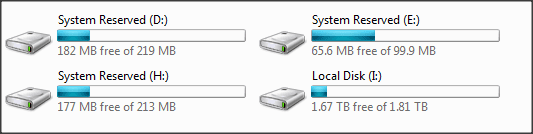
The drive shows 1.67TB of 1.81 free.

Thanks again
Graham
 

My Computer My Computer

Computer type
PC/Desktop
Computer Manufacturer/Model Number
Arbico
OS
Windows 7 Professional x64
CPU
Intel Core i7 950 CPU (3.06Ghz Quad Core)
Motherboard
Asus P6X58D-E motherboard with SATA III support
Memory
12 gig
Graphics Card(s)
ATI HD 5970 2GB PCI Express Graphics card
Sound Card
Creative XFi Xtreme Audio 7.1 channel sound card
Monitor(s) Displays
Samsung 24" inch
Hard Drives
250gig SSD
2TB
PSU
Quiet Coolermaster 1000W Quad PCI-E PSU
Case
Quiet Coolermaster Cosmos Case
Cooling
Water cooled with multiple fans
Antivirus
Kaspersky Internet Security 2012
Browser
Firefox
You can change the drive letter assignments in Computer Management, Disk Management for all drives EXCEPT the one the OS is installed in which is usually C:. As mentioned you can use any letter not already in use but starting with WinXP the assignment of NAS/Network Attached Storage drives start with Z: and work back up the alphabet. Also, if your Optical drive has changed to D: you may have to change that to a different letter if you want to free up D: as you say was previously used so you can use it again. Using Disk Management will also let you know if there's any data, good or bad, on the drive or partition on a drive. The hierchy of drives is the floppies at A: and B: [if used], OS/boot drive is C: and Optical drives follow that. A second HDD would be D: and Optical drive/s after that.
 

My Computer My Computer

Computer type
PC/Desktop
Computer Manufacturer/Model Number
Customs, Dell, Gateway, HP, Toshiba, Acer, ASUS
OS
Windows 7 Ultimate 64-bit, Windows 8.1 64-bit, Mac OS X 10.10, Linux Mint 17, Windows 10 Pro TP
Keyboard
Microsoft
Mouse
Microsoft
Hi Berton, thanks for your input. I have no problem changing drive letters its just the disappearing files I'm worried about.

Thank you again
Graham
 

My Computer My Computer

Computer type
PC/Desktop
Computer Manufacturer/Model Number
Arbico
OS
Windows 7 Professional x64
CPU
Intel Core i7 950 CPU (3.06Ghz Quad Core)
Motherboard
Asus P6X58D-E motherboard with SATA III support
Memory
12 gig
Graphics Card(s)
ATI HD 5970 2GB PCI Express Graphics card
Sound Card
Creative XFi Xtreme Audio 7.1 channel sound card
Monitor(s) Displays
Samsung 24" inch
Hard Drives
250gig SSD
2TB
PSU
Quiet Coolermaster 1000W Quad PCI-E PSU
Case
Quiet Coolermaster Cosmos Case
Cooling
Water cooled with multiple fans
Antivirus
Kaspersky Internet Security 2012
Browser
Firefox
I have no problem changing drive letters its just the disappearing files I'm worried about.

Before you do anything, get a copy of Recuva from the people that make CCleaner. Use that to see what may still be reclaimable from the drive.
 

My Computer My Computer

OS
Win7 Starter
Thank you CarvedDuck. I do have Recuva but should I hold-off using it until I hear back from Mitchel65?
 

My Computer My Computer

Computer type
PC/Desktop
Computer Manufacturer/Model Number
Arbico
OS
Windows 7 Professional x64
CPU
Intel Core i7 950 CPU (3.06Ghz Quad Core)
Motherboard
Asus P6X58D-E motherboard with SATA III support
Memory
12 gig
Graphics Card(s)
ATI HD 5970 2GB PCI Express Graphics card
Sound Card
Creative XFi Xtreme Audio 7.1 channel sound card
Monitor(s) Displays
Samsung 24" inch
Hard Drives
250gig SSD
2TB
PSU
Quiet Coolermaster 1000W Quad PCI-E PSU
Case
Quiet Coolermaster Cosmos Case
Cooling
Water cooled with multiple fans
Antivirus
Kaspersky Internet Security 2012
Browser
Firefox
Hi first try to unhide the files.

Start >All Programs > Accessories > Command prompt

Type E: [ENTER] Replace E with the actual drive letter which you want to unhide

Once in that drive type attrib -s -h /s /d *.* [ENTER]

That should unhide all the files that must have been hidden most probably by a virus.

You also have to check your comp for any virus affliction and clean up.
 

My Computer My Computer

OS
Windows 7 Home Premium 32 bit
Hi Graham
Once this problem is resolved I would recommend that you give the drive a dedicated letter well up the alphabet like "X". If you leave Windows to give the drive a letter then if you put a card in the card reader or put another drive into a USB port that will alter the drive letter of the drive in question. Certainly if you are in the habit of creating an image of the drive or cloning it you should do this!
In the meantime lets try to get your files to show. I am assuming they are all data files , pictures music, videos etc?
Right click on the drive in "Computer" and then click "properties" How much space is used and how much is spare?

if inserting a memory card into a card reader or a flash drive into a usb port changes the drive letters there is something wrong with the computer. unless you disconnect the one drive then insert the other media your drive letter will not change.
 

My Computer My Computer

Computer type
PC/Desktop
Computer Manufacturer/Model Number
Custom Built
OS
Win 7 Ultimate 64 Bit
CPU
Core2Duo E8400
Motherboard
Asus Rampage Formula
Memory
4 gigs DDR2 6400
Graphics Card(s)
EVGA nVidia 8800 CTS
Sound Card
Creative X-Fi
Monitor(s) Displays
HP W2371d 1920x1080
Screen Resolution
1920x1080
PSU
650 Watt
Cooling
Thermal-Electric
Internet Speed
50 MBPS
Antivirus
Bitdefender 2015 Beta
Browser
Cyberfox
Thank you Jumanji, I did as you suggested but the only files showing are the same as on my C drive ???

The Nude Dude: I cannot think why there is anything wrong with the PC? I did connect an external USB drive for backup purposes but this is the first time this has happened!

Thanks guys
Graham
 

My Computer My Computer

Computer type
PC/Desktop
Computer Manufacturer/Model Number
Arbico
OS
Windows 7 Professional x64
CPU
Intel Core i7 950 CPU (3.06Ghz Quad Core)
Motherboard
Asus P6X58D-E motherboard with SATA III support
Memory
12 gig
Graphics Card(s)
ATI HD 5970 2GB PCI Express Graphics card
Sound Card
Creative XFi Xtreme Audio 7.1 channel sound card
Monitor(s) Displays
Samsung 24" inch
Hard Drives
250gig SSD
2TB
PSU
Quiet Coolermaster 1000W Quad PCI-E PSU
Case
Quiet Coolermaster Cosmos Case
Cooling
Water cooled with multiple fans
Antivirus
Kaspersky Internet Security 2012
Browser
Firefox
The drive that has changed letters and has the missing/wrong files is an internal drive. The drive I used for backup (now switched off) is an external drive.

Graham
 

My Computer My Computer

Computer type
PC/Desktop
Computer Manufacturer/Model Number
Arbico
OS
Windows 7 Professional x64
CPU
Intel Core i7 950 CPU (3.06Ghz Quad Core)
Motherboard
Asus P6X58D-E motherboard with SATA III support
Memory
12 gig
Graphics Card(s)
ATI HD 5970 2GB PCI Express Graphics card
Sound Card
Creative XFi Xtreme Audio 7.1 channel sound card
Monitor(s) Displays
Samsung 24" inch
Hard Drives
250gig SSD
2TB
PSU
Quiet Coolermaster 1000W Quad PCI-E PSU
Case
Quiet Coolermaster Cosmos Case
Cooling
Water cooled with multiple fans
Antivirus
Kaspersky Internet Security 2012
Browser
Firefox
OK, runedog , let us see what is cooking.

Download and run your bit version of WinRAR . Navigate to your drive and check all the files are shown. (WinRAR can show you all the hidden and superhidden files)

Just see the screenshot here (only the screenshot.:)) http://www.sevenforums.com/general-...-denied-system-volume-info-2.html#post2527312 Click/double click on the drive ( whether internal or external or whatever) to be explored that is what it shows.

If you can see the folders/files in that drive, you can select, copy to clipboard (Ctrl+C)and then paste it (Ctrl+V) to any other location.

Please see the screenshot here http://www.sevenforums.com/general-...-showing-hidden-files-folder.html#post2683865

Time for me to retire and I hope you could understand what I had told in a hurry.

Tom I have got to go and renew my driving licence and so may not come back for another 16hours.

So may be others can help you.
 

My Computer My Computer

OS
Windows 7 Home Premium 32 bit
Hi first try to unhide the files.

NOT good advice, but too late now. That Attrib command will change anything and everything in the FAT (File Allocation Table)

You should have run Recuva just to see what's there. It is never a good idea to start doing stuff until you understand what you have to work with. Always spend a lot of time just looking and understanding what you are working with.

Run Recuva and see what's there, then report back for more instructions. However, it may all be moot now.:(
 

My Computer My Computer

OS
Win7 Starter
I did run Recuva thank you but, did not find any of the files from when the drive was labelled D???

Thanks
Graham
 

My Computer My Computer

Computer type
PC/Desktop
Computer Manufacturer/Model Number
Arbico
OS
Windows 7 Professional x64
CPU
Intel Core i7 950 CPU (3.06Ghz Quad Core)
Motherboard
Asus P6X58D-E motherboard with SATA III support
Memory
12 gig
Graphics Card(s)
ATI HD 5970 2GB PCI Express Graphics card
Sound Card
Creative XFi Xtreme Audio 7.1 channel sound card
Monitor(s) Displays
Samsung 24" inch
Hard Drives
250gig SSD
2TB
PSU
Quiet Coolermaster 1000W Quad PCI-E PSU
Case
Quiet Coolermaster Cosmos Case
Cooling
Water cooled with multiple fans
Antivirus
Kaspersky Internet Security 2012
Browser
Firefox
Should I have three system reserved areas too? Please see screenshot. The disk labelled L: used to be my D: drive.

Hope this helps.
 

Attachments

  • Snap 2014-05-23 at 07.28.15.png
    Snap 2014-05-23 at 07.28.15.png
    3.8 KB · Views: 13

My Computer My Computer

Computer type
PC/Desktop
Computer Manufacturer/Model Number
Arbico
OS
Windows 7 Professional x64
CPU
Intel Core i7 950 CPU (3.06Ghz Quad Core)
Motherboard
Asus P6X58D-E motherboard with SATA III support
Memory
12 gig
Graphics Card(s)
ATI HD 5970 2GB PCI Express Graphics card
Sound Card
Creative XFi Xtreme Audio 7.1 channel sound card
Monitor(s) Displays
Samsung 24" inch
Hard Drives
250gig SSD
2TB
PSU
Quiet Coolermaster 1000W Quad PCI-E PSU
Case
Quiet Coolermaster Cosmos Case
Cooling
Water cooled with multiple fans
Antivirus
Kaspersky Internet Security 2012
Browser
Firefox
Hi first try to unhide the files.

......... That Attrib command will change anything and everything in the FAT (File Allocation Table.......

Please do not make such a sweeping and meaningless statement. Will it do anything?!!!!!!!! Does it do everything?..... OMG! I am ready to relearn . Please explain what that anything and what that everything that it does and in what way it could impact the folders/files and make them irrecoverable because of the execution of that command.
 

My Computer My Computer

OS
Windows 7 Home Premium 32 bit
Thank you Jumanji, here you go, here is the screenshot

Thanks
Graham
 

Attachments

  • Snap 2014-05-23 at 08.14.29.png
    Snap 2014-05-23 at 08.14.29.png
    6.1 KB · Views: 1

My Computer My Computer

Computer type
PC/Desktop
Computer Manufacturer/Model Number
Arbico
OS
Windows 7 Professional x64
CPU
Intel Core i7 950 CPU (3.06Ghz Quad Core)
Motherboard
Asus P6X58D-E motherboard with SATA III support
Memory
12 gig
Graphics Card(s)
ATI HD 5970 2GB PCI Express Graphics card
Sound Card
Creative XFi Xtreme Audio 7.1 channel sound card
Monitor(s) Displays
Samsung 24" inch
Hard Drives
250gig SSD
2TB
PSU
Quiet Coolermaster 1000W Quad PCI-E PSU
Case
Quiet Coolermaster Cosmos Case
Cooling
Water cooled with multiple fans
Antivirus
Kaspersky Internet Security 2012
Browser
Firefox
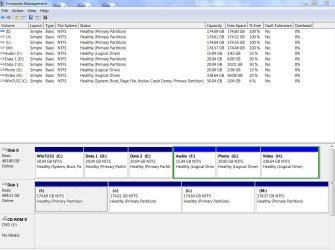
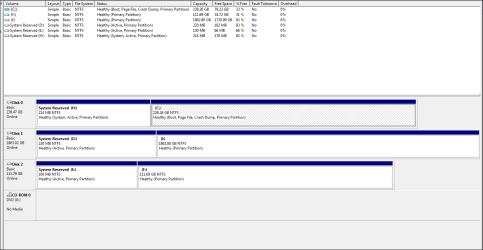
Please follow the tutorial in toto and post the full screenshot showing the disk map also.

Your screenshot should appear like this:

Capture.JPG
 

My Computer My Computer

OS
Windows 7 Home Premium 32 bit
Sorry, here you go :)

Many thanks
Graham
 

Attachments

  • Snap 2014-05-23 at 08.39.52.png
    Snap 2014-05-23 at 08.39.52.png
    17.8 KB · Views: 3

My Computer My Computer

Computer type
PC/Desktop
Computer Manufacturer/Model Number
Arbico
OS
Windows 7 Professional x64
CPU
Intel Core i7 950 CPU (3.06Ghz Quad Core)
Motherboard
Asus P6X58D-E motherboard with SATA III support
Memory
12 gig
Graphics Card(s)
ATI HD 5970 2GB PCI Express Graphics card
Sound Card
Creative XFi Xtreme Audio 7.1 channel sound card
Monitor(s) Displays
Samsung 24" inch
Hard Drives
250gig SSD
2TB
PSU
Quiet Coolermaster 1000W Quad PCI-E PSU
Case
Quiet Coolermaster Cosmos Case
Cooling
Water cooled with multiple fans
Antivirus
Kaspersky Internet Security 2012
Browser
Firefox
Back
Top