Solved help choosing a mbo ( upgrade)

mikezilla2

New member
Member
Local time
4:50 PM
Messages
57
well i recently decided its time to get a new case before i cook something

with that said i also decided on a cpu upgrade I7 3770k - current specs are in profile ( win 7 64 12 gbs of ram etc )

not noted iv also got a tv card and 2 cap cards sitting in the smaller pci slots ( pci 3 ?)

so with that i need to find a new mbo the old GA-X58A-UD3R just wont cut it im afraid

the case iv chosen is a thermal-take overseer


this isnt a water cooled set up so i guess im also wondering what extra fans i should get beyond that im looking at getting ether a BD reader or writer - now i konw most software players will bypass region coding how ever i was wondering if there is a drive i could buy that has the region flag set to all or has an easy way of doing so ?

thanks
 

My Computer

OS
Windows 7 Ultimate x64
CPU
I74770K
Motherboard
Z87
Graphics Card(s)
GTX960 4GB
Sound Card
bulit in -
Monitor(s) Displays
braiva KDL-40Z4500
Screen Resolution
1920X1080p

My Computer

OS
Windows 7 Ultimate x64
CPU
I74770K
Motherboard
Z87
Graphics Card(s)
GTX960 4GB
Sound Card
bulit in -
Monitor(s) Displays
braiva KDL-40Z4500
Screen Resolution
1920X1080p
When buying new parts, the first one you decide on is the Motherboard, not the last. Decide on the Motherboard and then get the CPU, memory and other things that will install on the MB.
 

My Computer

Computer type
PC/Desktop
Computer Manufacturer/Model Number
Custom Build
OS
Windows 7 Home Premium 32-Bit - Build 7600 SP1
CPU
Intel Core i3-2120 3.30Ghz
Motherboard
Asus P8Z68-V LX Intel Z68 Socket H2 ATX
Memory
Kingston 4 GB DDR3 1333 mhz
Graphics Card(s)
AMD Radeon HD6670
Sound Card
Sound Blaster Audigy SE 24-Bit
Monitor(s) Displays
Asus VE228
Screen Resolution
1440 X 900
Hard Drives
OCZ Vertex 3 120 GB Sata 3 SSD ==
Kingston SH103/S3 120 G Hyper X 120 GB SSD ==
Western Digital 500 GB Caviar Green 7200 RPM ==
PSU
Corsair CX600M == 600 Watt
Case
NZXT Apollo - Silver with Clear Side Panel
Cooling
Three 120 mm Fans
Keyboard
Microsoft Natural 4000
Mouse
Microsoft Custom Optical 3000
Internet Speed
AT&T Fiber Optic Wireless Network
Antivirus
Microsoft Security Essentials
Browser
Chrome
Other Info
120 mm Blue LED Fan -- Three Blue LED Lazer Light Sticks
When buying new parts, the first one you decide on is the Motherboard, not the last. Decide on the Motherboard and then get the CPU, memory and other things that will install on the MB.

sorry iv decided not bother buying any new parts - just a new case - hence my post refering to an overclock !
 

My Computer

OS
Windows 7 Ultimate x64
CPU
I74770K
Motherboard
Z87
Graphics Card(s)
GTX960 4GB
Sound Card
bulit in -
Monitor(s) Displays
braiva KDL-40Z4500
Screen Resolution
1920X1080p
sorry iv decided not bother buying any new parts - just a new case - hence my post refering to an overclock !

Not enough info.

Cases generally don't have a lot to do with overclocking.

Why do you think your current case is inadequate and why do you think this particular new case is an improvement?

Have you tried and failed to overclock what you have?

Generally--if I wanted to overclock, I'd try to do so with the current case. The cooling in the current case may be better than the replacement for all we know---and you may be able to improve cooling in the current case.

If you want to buy a new case for some reason other than your overclocking intentions, go ahead and do that.
 

My Computer

Computer type
PC/Desktop
Computer Manufacturer/Model Number
Ignatz Special; 4 speed manual gearbox; factory air conditioning; one of one
OS
Windows 7 Home Premium SP1, 64-bit
CPU
Intel Skylake i5-6600K, not overclocked
Motherboard
AsRock Z170M Extreme 4, micro ATX
Memory
8 GB HyperX DDR4-2666 (2 x 4 GB)
Graphics Card(s)
none; graphics are integrated on CPU
Sound Card
onboard: Realtek ALC1150; external: USB Behringer UF0-202
Monitor(s) Displays
Dell S2340M 23 inch IPS
Screen Resolution
1600 x 900
Hard Drives
System: Crucial MX100 series SSD, 128 GB;
Data: Samsung Spinpoint 103SJ, 1 TB;
Backup: WD Caviar Green WD30EZRX-00D8PB0, 3 TB
PSU
Rosewill SilentNight 500 watt fanless, semi-modular
Case
Antec Solo II
Cooling
Noctua NH-U12S; Noctua F12 intake, Noctua S12A exhaust
Keyboard
Microsoft 200 6JH-00001 USB
Mouse
Dell or Microsoft optical wired; USB
Antivirus
Microsoft Security Essentials and Malwarebytes Premium
Browser
Pale Moon
Other Info
All fans PWM; speeds at idle: CPU circa 500 rpm; intake circa 600 rpm; exhaust circa 600 rpm; CPU temps 27 idle and 47 C load in a warm room (27 C/81 F) when running Intel Extreme Tuning Utility stress test.
sorry iv decided not bother buying any new parts - just a new case - hence my post refering to an overclock !

Not enough info.

Cases generally don't have a lot to do with overclocking.

Why do you think your current case is inadequate and why do you think this particular new case is an improvement?

Have you tried and failed to overclock what you have?

Generally--if I wanted to overclock, I'd try to do so with the current case. The cooling in the current case may be better than the replacement for all we know---and you may be able to improve cooling in the current case.

If you want to buy a new case for some reason other than your overclocking intentions, go ahead and do that.

the current case is very very cramped that and iv been told that the air flow isnt very good i added an extra fan some time ago but yea , on top of that the usb ports on the front are busted ( broken) so the case as far as OCing gos is to improve the cooling that and its just a better case overall , iv not tried to overclock anything yet , i decided not to buy any new parts as i would have to replace the ram on top of the mbo , the point of my post was just to suss out what case i should be getting and just to get some help with ocing the currnt specs
 

My Computer

OS
Windows 7 Ultimate x64
CPU
I74770K
Motherboard
Z87
Graphics Card(s)
GTX960 4GB
Sound Card
bulit in -
Monitor(s) Displays
braiva KDL-40Z4500
Screen Resolution
1920X1080p
the current case is very very cramped that and iv been told that the air flow isnt very good i added an extra fan some time ago but yea , on top of that the usb ports on the front are busted ( broken) so the case as far as OCing gos is to improve the cooling that and its just a better case overall , iv not tried to overclock anything yet , i decided not to buy any new parts as i would have to replace the ram on top of the mbo , the point of my post was just to suss out what case i should be getting and just to get some help with ocing the currnt specs

What does "suss out" mean?

I'd probably start a thread in the overclocking section of these forums.

I'd at least try to overclock with the existing case, just to see how well it goes and to identify the shortcomings. If your CPU/motherboard combination doesn't overclock well, I wouldn't expect a new case to make a huge difference.

Cooling is a factor but a new case can't turn night into day. It may be that your current case can be cooled better than it is now, but we know nothing about that case. It remains unidentified.

Nor do we know anything about your CPU heatsink or fan setup---both of which are important for overclocking.
 

My Computer

Computer type
PC/Desktop
Computer Manufacturer/Model Number
Ignatz Special; 4 speed manual gearbox; factory air conditioning; one of one
OS
Windows 7 Home Premium SP1, 64-bit
CPU
Intel Skylake i5-6600K, not overclocked
Motherboard
AsRock Z170M Extreme 4, micro ATX
Memory
8 GB HyperX DDR4-2666 (2 x 4 GB)
Graphics Card(s)
none; graphics are integrated on CPU
Sound Card
onboard: Realtek ALC1150; external: USB Behringer UF0-202
Monitor(s) Displays
Dell S2340M 23 inch IPS
Screen Resolution
1600 x 900
Hard Drives
System: Crucial MX100 series SSD, 128 GB;
Data: Samsung Spinpoint 103SJ, 1 TB;
Backup: WD Caviar Green WD30EZRX-00D8PB0, 3 TB
PSU
Rosewill SilentNight 500 watt fanless, semi-modular
Case
Antec Solo II
Cooling
Noctua NH-U12S; Noctua F12 intake, Noctua S12A exhaust
Keyboard
Microsoft 200 6JH-00001 USB
Mouse
Dell or Microsoft optical wired; USB
Antivirus
Microsoft Security Essentials and Malwarebytes Premium
Browser
Pale Moon
Other Info
All fans PWM; speeds at idle: CPU circa 500 rpm; intake circa 600 rpm; exhaust circa 600 rpm; CPU temps 27 idle and 47 C load in a warm room (27 C/81 F) when running Intel Extreme Tuning Utility stress test.
I'm still trying to understand what iv is. If you want a new case I will give you the guide lines I use when buying a new case.
1. Well known brand with known quality.
2. Big enough to have ease of working inside the case now and in the future.
3. The ability of clean and neat wire and harness arrangement. Makes me feel better and I get better cooling.
4. Ease of access to the back of motherboard for cpu cooler attachment or replacement.
5. The ability of moving things around inside the case like hard drive mounting brackets and frames.
6. The ability to add fans and other cooling devices If I so choose to.
7. Power supply on the bottom with it's own intake and exhaust ports and hopefully a filter in the intake port.
8. All intake fans that come with the case have filters.
--------------------------------
Other than cooling a case has nothing to do with over clocking.
 

My Computer

Computer type
PC/Desktop
Computer Manufacturer/Model Number
Home made Desktop
OS
Windows 10 Pro. 64/ version 1709 Windows 7 Pro/64
CPU
Intel i7-6800K @ 4.3
Motherboard
ASUS X-99 Deluxe II
Memory
Corsair Platinum 16 gig @2400
Graphics Card(s)
EVGA GTX 1070 OC
Monitor(s) Displays
Asus 27" LED LCD/VE278Q
Screen Resolution
1920-1080 or 1280-720 HDMI
Hard Drives
INTEL SSD 730-240 Gb Sata 3.0/
PSU
EVGA Platium 1200W
Case
Phanteks Luxe Tempered Glass 8 fans/ one radiator
Cooling
XSPC/ Water Cooled CPU
Keyboard
Das 4 Professional
Mouse
Logitech M705/MX Anywhere 2-S
Internet Speed
100 mbits
Antivirus
Microsoft Security Essentials/ Malwarebytes Premium 3.0/ SAS
Browser
I.E. 11 default/Firefox/ ISP Time Warner Cable/Spectrum
Other Info
LG BluRay Burner/
Sound system-KLipsch-THX/
Icy Dock ssd Hot Swap bays.
the current case is very very cramped that and iv been told that the air flow isnt very good i added an extra fan some time ago but yea , on top of that the usb ports on the front are busted ( broken) so the case as far as OCing gos is to improve the cooling that and its just a better case overall , iv not tried to overclock anything yet , i decided not to buy any new parts as i would have to replace the ram on top of the mbo , the point of my post was just to suss out what case i should be getting and just to get some help with ocing the currnt specs

What does "suss out" mean?

I'd probably start a thread in the overclocking section of these forums.

I'd at least try to overclock with the existing case, just to see how well it goes and to identify the shortcomings. If your CPU/motherboard combination doesn't overclock well, I wouldn't expect a new case to make a huge difference.

Cooling is a factor but a new case can't turn night into day. It may be that your current case can be cooled better than it is now, but we know nothing about that case. It remains unidentified.

Nor do we know anything about your CPU heatsink or fan setup---both of which are important for overclocking.


i probbly will ,

thus is the case i have - everything else is pretty much set up as stock ie nothing fancy just what youd exspect from somone buliding there first computer -

you have no clue what suss out or suss means ?

Suss - Definition of Suss - English Slang Term Suss Defined

and "iv" is just short hand for " i have"

- thx bear , just trying to suss out(choose) what one i want

http://www.sevenforums.com/member.php?u=200371
those are my specs , i should probbly do a log
 

My Computer

OS
Windows 7 Ultimate x64
CPU
I74770K
Motherboard
Z87
Graphics Card(s)
GTX960 4GB
Sound Card
bulit in -
Monitor(s) Displays
braiva KDL-40Z4500
Screen Resolution
1920X1080p
Let us know what you come up with after you do your shopping. If you follow the guide lines I posted you should do well.
 

My Computer

Computer type
PC/Desktop
Computer Manufacturer/Model Number
Home made Desktop
OS
Windows 10 Pro. 64/ version 1709 Windows 7 Pro/64
CPU
Intel i7-6800K @ 4.3
Motherboard
ASUS X-99 Deluxe II
Memory
Corsair Platinum 16 gig @2400
Graphics Card(s)
EVGA GTX 1070 OC
Monitor(s) Displays
Asus 27" LED LCD/VE278Q
Screen Resolution
1920-1080 or 1280-720 HDMI
Hard Drives
INTEL SSD 730-240 Gb Sata 3.0/
PSU
EVGA Platium 1200W
Case
Phanteks Luxe Tempered Glass 8 fans/ one radiator
Cooling
XSPC/ Water Cooled CPU
Keyboard
Das 4 Professional
Mouse
Logitech M705/MX Anywhere 2-S
Internet Speed
100 mbits
Antivirus
Microsoft Security Essentials/ Malwarebytes Premium 3.0/ SAS
Browser
I.E. 11 default/Firefox/ ISP Time Warner Cable/Spectrum
Other Info
LG BluRay Burner/
Sound system-KLipsch-THX/
Icy Dock ssd Hot Swap bays.
well i brought a new case a few weeks ago , put it together with out the extra fans the cooling is better ( the readings are quite different) and with the extra fans things arnt to bad i just got add some new thermal paste and il be good then i guess it just comes down to playing with the clock speeds i guess , this is the case i got

Coolermaster CSCOSGC5000KKN1 CM STORM TROOPER SGC-5000-KKN1 BLK
 

My Computer

OS
Windows 7 Ultimate x64
CPU
I74770K
Motherboard
Z87
Graphics Card(s)
GTX960 4GB
Sound Card
bulit in -
Monitor(s) Displays
braiva KDL-40Z4500
Screen Resolution
1920X1080p
I just built out the new Coolermaster Stryker which is exactly the same only white a has a clear side as standard. The Storm Trooper is a topflight case with great features. As others have mentioned the case will have zero to do with overclocking.
 

My Computer

Computer type
PC/Desktop
Computer Manufacturer/Model Number
A blend of brains, brawn and dumb luck.
OS
Windows 7 Ultimate 64
CPU
i7 3770k OC'd 4.6 @ 1.17v, also FX 8120 & i5 miniITX
Motherboard
MSI P67A-GD80 b3
Memory
32 gb G.Skill Sniper DDR3 10-12-12-31 @ 2133
Graphics Card(s)
XFX Radeon 7870 2GB DDR5
Sound Card
Sound Blaster Z Series Card
Monitor(s) Displays
(2) LG LED 23" 1920 x 1080 2ms Monitors via mini d-port
Screen Resolution
1680 X 1050 p
Hard Drives
Samsung 256 gb 830 SSD sata III
(1) 1 tb WD Black
(2) 1 tb Hitachi deskmates/sata II
(2) 1 tb WD green/sata II
(2) 3 tb Seagate Barracuda
(1) 120 gb OCZ Vertex SS
(1) Drobo 5N w/5 Seagate 3tb
PSU
EVGA modular 1000G2 80% gold rating & APC 1200 RS
Case
CoolerMaster Storm Styker
Cooling
7 case fans 140mm & 120mm, NZXT Kraken X60
Keyboard
(2) Logitech Illuminated Keyboards (1) usb (1) wireless
Mouse
Logitech G700 & T-BC21 - nano nx for the laptop
Internet Speed
Basic 120mbps down
Antivirus
Trend Micro Titanium Max Security & Malwarebytes Premium
Browser
Chrome and IE 10
Other Info
5 Noctua case fans + 3 Noctua in p/p on NZXT cooler
Integrated hot swap drive bays for 2.5" Drives
(2) Lite-on dvd/cd/Blu Ray optical 22X
Integrated fan controller and led on/off
HP Officejet Pro 8630 all-n-one
Hot-swappable 3.5" hard drive bay
Netgear Nighthawk router
Asus USB 3 & sata 6 PCIe card
Vantec IDE to sata adptr./Ultra sata adptr
Lenovo L420 i5 lappy with m sata
Drobo 5N advanced NAS
I just built out the new Coolermaster Stryker which is exactly the same only white a has a clear side as standard. The Storm Trooper is a topflight case with great features. As others have mentioned the case will have zero to do with overclocking.


what makes you so sure about that ? in a sense yea but having both a system builder and engineer tell me that the air flow in that old case is no good was good enough for me.


point i was making is when you have a case that is running at 60c + idle and above in operation there is no way in hell i would be attempting to overclock , now that i switched cases , tidy ed up my cables , added a few more fans and improved a few other things everythings running smoothly apart from the fact that i need to add new thermal paste to get rid of the " run on side effect" iv got going on i guess if im looking for a decent walk/talk thro on how to make sure my ram timings and other fidly shit is spot on i wont find it here.
 

My Computer

OS
Windows 7 Ultimate x64
CPU
I74770K
Motherboard
Z87
Graphics Card(s)
GTX960 4GB
Sound Card
bulit in -
Monitor(s) Displays
braiva KDL-40Z4500
Screen Resolution
1920X1080p
The case design as it relates to installation of a premium cooler yes and stock fan performance in a better airflow case yes. But with any aggressive overclock it very quickly will come down to pure cooler performance and location and this was more my point. A better case air flow will always effect temps but when overclocking you must consider the cooler as an integral factor in that outcome. Good news is you have moved into one hell of a case with cooling options like mad.
 

My Computer

Computer type
PC/Desktop
Computer Manufacturer/Model Number
A blend of brains, brawn and dumb luck.
OS
Windows 7 Ultimate 64
CPU
i7 3770k OC'd 4.6 @ 1.17v, also FX 8120 & i5 miniITX
Motherboard
MSI P67A-GD80 b3
Memory
32 gb G.Skill Sniper DDR3 10-12-12-31 @ 2133
Graphics Card(s)
XFX Radeon 7870 2GB DDR5
Sound Card
Sound Blaster Z Series Card
Monitor(s) Displays
(2) LG LED 23" 1920 x 1080 2ms Monitors via mini d-port
Screen Resolution
1680 X 1050 p
Hard Drives
Samsung 256 gb 830 SSD sata III
(1) 1 tb WD Black
(2) 1 tb Hitachi deskmates/sata II
(2) 1 tb WD green/sata II
(2) 3 tb Seagate Barracuda
(1) 120 gb OCZ Vertex SS
(1) Drobo 5N w/5 Seagate 3tb
PSU
EVGA modular 1000G2 80% gold rating & APC 1200 RS
Case
CoolerMaster Storm Styker
Cooling
7 case fans 140mm & 120mm, NZXT Kraken X60
Keyboard
(2) Logitech Illuminated Keyboards (1) usb (1) wireless
Mouse
Logitech G700 & T-BC21 - nano nx for the laptop
Internet Speed
Basic 120mbps down
Antivirus
Trend Micro Titanium Max Security & Malwarebytes Premium
Browser
Chrome and IE 10
Other Info
5 Noctua case fans + 3 Noctua in p/p on NZXT cooler
Integrated hot swap drive bays for 2.5" Drives
(2) Lite-on dvd/cd/Blu Ray optical 22X
Integrated fan controller and led on/off
HP Officejet Pro 8630 all-n-one
Hot-swappable 3.5" hard drive bay
Netgear Nighthawk router
Asus USB 3 & sata 6 PCIe card
Vantec IDE to sata adptr./Ultra sata adptr
Lenovo L420 i5 lappy with m sata
Drobo 5N advanced NAS
I for sure overstated the zero effect as better air flow is always better. Did you ever make a mobo choice? Looks like with the 1366 socket your choices could be limited from what I'm finding, is that the same for you?
 

My Computer

Computer type
PC/Desktop
Computer Manufacturer/Model Number
A blend of brains, brawn and dumb luck.
OS
Windows 7 Ultimate 64
CPU
i7 3770k OC'd 4.6 @ 1.17v, also FX 8120 & i5 miniITX
Motherboard
MSI P67A-GD80 b3
Memory
32 gb G.Skill Sniper DDR3 10-12-12-31 @ 2133
Graphics Card(s)
XFX Radeon 7870 2GB DDR5
Sound Card
Sound Blaster Z Series Card
Monitor(s) Displays
(2) LG LED 23" 1920 x 1080 2ms Monitors via mini d-port
Screen Resolution
1680 X 1050 p
Hard Drives
Samsung 256 gb 830 SSD sata III
(1) 1 tb WD Black
(2) 1 tb Hitachi deskmates/sata II
(2) 1 tb WD green/sata II
(2) 3 tb Seagate Barracuda
(1) 120 gb OCZ Vertex SS
(1) Drobo 5N w/5 Seagate 3tb
PSU
EVGA modular 1000G2 80% gold rating & APC 1200 RS
Case
CoolerMaster Storm Styker
Cooling
7 case fans 140mm & 120mm, NZXT Kraken X60
Keyboard
(2) Logitech Illuminated Keyboards (1) usb (1) wireless
Mouse
Logitech G700 & T-BC21 - nano nx for the laptop
Internet Speed
Basic 120mbps down
Antivirus
Trend Micro Titanium Max Security & Malwarebytes Premium
Browser
Chrome and IE 10
Other Info
5 Noctua case fans + 3 Noctua in p/p on NZXT cooler
Integrated hot swap drive bays for 2.5" Drives
(2) Lite-on dvd/cd/Blu Ray optical 22X
Integrated fan controller and led on/off
HP Officejet Pro 8630 all-n-one
Hot-swappable 3.5" hard drive bay
Netgear Nighthawk router
Asus USB 3 & sata 6 PCIe card
Vantec IDE to sata adptr./Ultra sata adptr
Lenovo L420 i5 lappy with m sata
Drobo 5N advanced NAS
nah decided to just stick with the mobo i have due to the fact that i would rather not swap my ram out yet again - thats why i decided that i wanted to give overclocking a go ....
 

My Computer

OS
Windows 7 Ultimate x64
CPU
I74770K
Motherboard
Z87
Graphics Card(s)
GTX960 4GB
Sound Card
bulit in -
Monitor(s) Displays
braiva KDL-40Z4500
Screen Resolution
1920X1080p

My Computer

Computer type
PC/Desktop
Computer Manufacturer/Model Number
A blend of brains, brawn and dumb luck.
OS
Windows 7 Ultimate 64
CPU
i7 3770k OC'd 4.6 @ 1.17v, also FX 8120 & i5 miniITX
Motherboard
MSI P67A-GD80 b3
Memory
32 gb G.Skill Sniper DDR3 10-12-12-31 @ 2133
Graphics Card(s)
XFX Radeon 7870 2GB DDR5
Sound Card
Sound Blaster Z Series Card
Monitor(s) Displays
(2) LG LED 23" 1920 x 1080 2ms Monitors via mini d-port
Screen Resolution
1680 X 1050 p
Hard Drives
Samsung 256 gb 830 SSD sata III
(1) 1 tb WD Black
(2) 1 tb Hitachi deskmates/sata II
(2) 1 tb WD green/sata II
(2) 3 tb Seagate Barracuda
(1) 120 gb OCZ Vertex SS
(1) Drobo 5N w/5 Seagate 3tb
PSU
EVGA modular 1000G2 80% gold rating & APC 1200 RS
Case
CoolerMaster Storm Styker
Cooling
7 case fans 140mm & 120mm, NZXT Kraken X60
Keyboard
(2) Logitech Illuminated Keyboards (1) usb (1) wireless
Mouse
Logitech G700 & T-BC21 - nano nx for the laptop
Internet Speed
Basic 120mbps down
Antivirus
Trend Micro Titanium Max Security & Malwarebytes Premium
Browser
Chrome and IE 10
Other Info
5 Noctua case fans + 3 Noctua in p/p on NZXT cooler
Integrated hot swap drive bays for 2.5" Drives
(2) Lite-on dvd/cd/Blu Ray optical 22X
Integrated fan controller and led on/off
HP Officejet Pro 8630 all-n-one
Hot-swappable 3.5" hard drive bay
Netgear Nighthawk router
Asus USB 3 & sata 6 PCIe card
Vantec IDE to sata adptr./Ultra sata adptr
Lenovo L420 i5 lappy with m sata
Drobo 5N advanced NAS
i probably should but not from amazon - shipping would be huge
 

My Computer

OS
Windows 7 Ultimate x64
CPU
I74770K
Motherboard
Z87
Graphics Card(s)
GTX960 4GB
Sound Card
bulit in -
Monitor(s) Displays
braiva KDL-40Z4500
Screen Resolution
1920X1080p
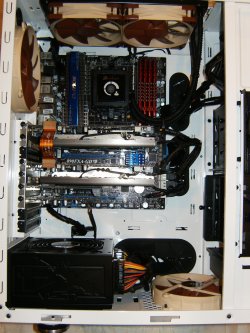
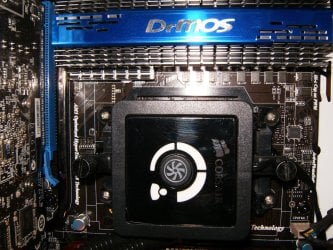
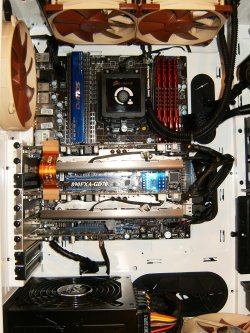
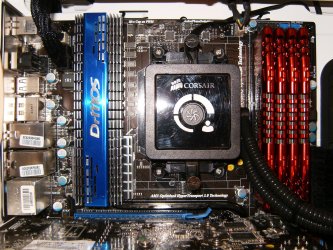
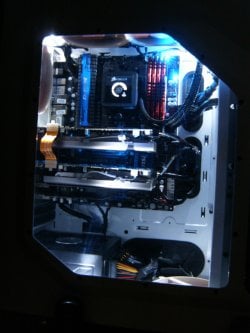
Check out these pictures out and imagine yours only all black ! Corsair H100 in top.
HPIM2417.jpg

HPIM2461.jpg

HPIM2418.jpg

HPIM2423.jpg

HPIM2493.jpg
 

My Computer

Computer type
PC/Desktop
Computer Manufacturer/Model Number
A blend of brains, brawn and dumb luck.
OS
Windows 7 Ultimate 64
CPU
i7 3770k OC'd 4.6 @ 1.17v, also FX 8120 & i5 miniITX
Motherboard
MSI P67A-GD80 b3
Memory
32 gb G.Skill Sniper DDR3 10-12-12-31 @ 2133
Graphics Card(s)
XFX Radeon 7870 2GB DDR5
Sound Card
Sound Blaster Z Series Card
Monitor(s) Displays
(2) LG LED 23" 1920 x 1080 2ms Monitors via mini d-port
Screen Resolution
1680 X 1050 p
Hard Drives
Samsung 256 gb 830 SSD sata III
(1) 1 tb WD Black
(2) 1 tb Hitachi deskmates/sata II
(2) 1 tb WD green/sata II
(2) 3 tb Seagate Barracuda
(1) 120 gb OCZ Vertex SS
(1) Drobo 5N w/5 Seagate 3tb
PSU
EVGA modular 1000G2 80% gold rating & APC 1200 RS
Case
CoolerMaster Storm Styker
Cooling
7 case fans 140mm & 120mm, NZXT Kraken X60
Keyboard
(2) Logitech Illuminated Keyboards (1) usb (1) wireless
Mouse
Logitech G700 & T-BC21 - nano nx for the laptop
Internet Speed
Basic 120mbps down
Antivirus
Trend Micro Titanium Max Security & Malwarebytes Premium
Browser
Chrome and IE 10
Other Info
5 Noctua case fans + 3 Noctua in p/p on NZXT cooler
Integrated hot swap drive bays for 2.5" Drives
(2) Lite-on dvd/cd/Blu Ray optical 22X
Integrated fan controller and led on/off
HP Officejet Pro 8630 all-n-one
Hot-swappable 3.5" hard drive bay
Netgear Nighthawk router
Asus USB 3 & sata 6 PCIe card
Vantec IDE to sata adptr./Ultra sata adptr
Lenovo L420 i5 lappy with m sata
Drobo 5N advanced NAS
the case i got already came with a pretty big fan in the top ....

i gotta say your cable management is alot better then mine
 

My Computer

OS
Windows 7 Ultimate x64
CPU
I74770K
Motherboard
Z87
Graphics Card(s)
GTX960 4GB
Sound Card
bulit in -
Monitor(s) Displays
braiva KDL-40Z4500
Screen Resolution
1920X1080p
Back
Top