Solved Help, Cloned drive not booting!!

Crewey

New member
Member
Local time
1:15 PM
Messages
45
Hi guys (and gals), I wonder if anybody could help me. I am running Windows 7 Pro. I cloned the drive yesterday with Macrium Reflect. The cloned drive wouldn't boot up (even though it appeared to be an exact copy), but my original would. I tried cloning the drive again and now neither of them will boot up! I have tried to repair them using a Windows 7 Pro disc, but it says that it's not compatible with this verion of Windows? I have put the drive in a caddy on my laptop and run FixMBR and Fixboot, but neither of the drives will still boot up. I have a lot of valuable stuff on the drive (which appears to still be there) so don't want to format it. I just need it to boot up! Any advice appreciated.
Thanks
Dave
 

My Computers My Computers

System One System Two

  • Computer type
    PC/Desktop
    Computer Manufacturer/Model Number
    Viglen
    OS
    Windows 7 Pro
    CPU
    i5
    Memory
    12Gig
  • Computer type
    PC/Desktop
have you got two separate disks attached internally via sata on the same machine?

You can borow my boot media :ar: 17514x64v30.iso

extract the .iso to create bootable stick using :ar: View attachment Usb7ice.zip


then boot that usb stick on the sick machine and post screenshots of disk management window and if you like, the other partition managers that are in the boot media. So we can see both the disks

there is a little camera icon on the desktop of the booted media. You can save screenshots onto the usb stick and post them up here
 

My Computers My Computers

System One System Two

  • Computer type
    PC/Desktop
    OS
    7 X64
    CPU
    i5 8400
    Motherboard
    gigabyte b365m ds3h
    Memory
    2x8gb 3200mhz
    Hard Drives
    various
    PSU
    pure power 11 400w cm
    Case
    Coolermaster
    Cooling
    cryorig m9i
  • Computer type
    PC/Desktop
    OS
    7x64
    CPU
    g5400
    Motherboard
    ga b365m ds3h
    Memory
    8gb ddr4 2400
    PSU
    xfx pro 450w
Thanks, I only have one SSD connected at a time. I will try your software and post the screenshots later. Much appreciated
Dave
 

My Computers My Computers

System One System Two

  • Computer type
    PC/Desktop
    Computer Manufacturer/Model Number
    Viglen
    OS
    Windows 7 Pro
    CPU
    i5
    Memory
    12Gig
  • Computer type
    PC/Desktop

My Computers My Computers

System One System Two

  • Computer type
    Laptop
    Computer Manufacturer/Model Number
    Toshiba satellite C650D
    OS
    Windows 7 Home Premium x64
    CPU
    AMD V120
    Memory
    4GB
    Internet Speed
    150 Mbps
    Antivirus
    MSE
    Browser
    IE11, Edge, Firefox
    Other Info
    I also have W7 Pro on my System Two, and several W7 Hyper-V VMs. My other machines run Windows 10/11. Their specs are in my Ten Forums & Eleven Forum profiles.
  • Computer type
    Laptop
    System Manufacturer/Model Number
    Lenovo Thinkpad T430
    OS
    Windows 7 Pro x64
    CPU
    Intel i5-3320M
    Memory
    8 GB
    Hard Drives
    250GB Samsung SSD 860 EVO
    Antivirus
    MSE
Hi,I have loaded the usb. Where do I find the Disc management screen?
Thanks

- - - Updated - - -

Screenshot 2.jpg

- - - Updated - - -

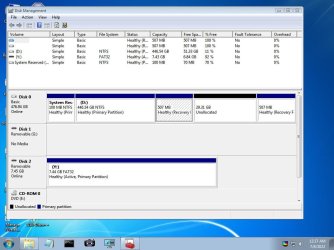
Disc 2 is just storage. Disc 0 is my main disc that won't boot.
 

My Computers My Computers

System One System Two

  • Computer type
    PC/Desktop
    Computer Manufacturer/Model Number
    Viglen
    OS
    Windows 7 Pro
    CPU
    i5
    Memory
    12Gig
  • Computer type
    PC/Desktop
Ideally, you need to pull it out to the right so we can see what it says in the status column.

Also you could check the partition style by rt clicking on the words Disk 0, select properties > volumes and it will tell you if it is mbr or gpt style.

It looks like mbr style from here.


Before doing the commands below :

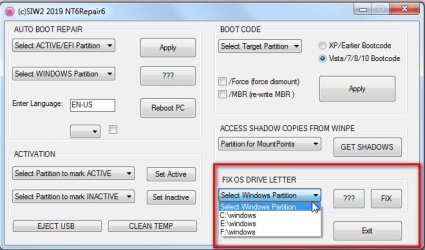
Use nt6repair ( which is on the booted media desktop ) to Fix the OS letter by selecting the windows partition in the dropdown and click FIX.

If there is only one windows partition on the machine, then there will only be one to choose in the dropdown.
If pnp enumerates the same as in your previous screenshot it will be D:\windows which you will also use in the bcdboot command later.

nt6repair6-FIXOSLETTER.jpg

then open cmd prompt and type:
diskpart
(then press enter)
sel dis 0
(then press enter)
sel par 1
(then press enter)
act
(then press enter)
ass letter=z
(then press enter)
exi
(then press enter)
bcdboot D:\windows /s Z: /f all
(then press enter)
 

My Computers My Computers

System One System Two

  • Computer type
    PC/Desktop
    OS
    7 X64
    CPU
    i5 8400
    Motherboard
    gigabyte b365m ds3h
    Memory
    2x8gb 3200mhz
    Hard Drives
    various
    PSU
    pure power 11 400w cm
    Case
    Coolermaster
    Cooling
    cryorig m9i
  • Computer type
    PC/Desktop
    OS
    7x64
    CPU
    g5400
    Motherboard
    ga b365m ds3h
    Memory
    8gb ddr4 2400
    PSU
    xfx pro 450w
Thanks, I followed the above, and it still didn't boot. I then created a rescue disc in Macrium and booted from this. The "Fix Boot Problems" wizard recognises the Windows 7 intallation, but can't find an active partition, so I can't proceed to the fix!! How do I make a partition "active"?

- - - Updated - - -

pic 2.jpgpic1.jpg
 

My Computers My Computers

System One System Two

  • Computer type
    PC/Desktop
    Computer Manufacturer/Model Number
    Viglen
    OS
    Windows 7 Pro
    CPU
    i5
    Memory
    12Gig
  • Computer type
    PC/Desktop
there should be an active partition on mbr disk if you followed the instructions in my previous post.

There is no volume command in what I posted

then open cmd prompt and type:
diskpart
(then press enter)
sel dis 0
(then press enter)
sel par 1
(then press enter)
act
(then press enter)
ass letter=z
(then press enter)
exi
(then press enter)
bcdboot D:\windows /s Z: /f all
(then press enter)
 

My Computers My Computers

System One System Two

  • Computer type
    PC/Desktop
    OS
    7 X64
    CPU
    i5 8400
    Motherboard
    gigabyte b365m ds3h
    Memory
    2x8gb 3200mhz
    Hard Drives
    various
    PSU
    pure power 11 400w cm
    Case
    Coolermaster
    Cooling
    cryorig m9i
  • Computer type
    PC/Desktop
    OS
    7x64
    CPU
    g5400
    Motherboard
    ga b365m ds3h
    Memory
    8gb ddr4 2400
    PSU
    xfx pro 450w
pic 3.jpg
 

My Computers My Computers

System One System Two

  • Computer type
    PC/Desktop
    Computer Manufacturer/Model Number
    Viglen
    OS
    Windows 7 Pro
    CPU
    i5
    Memory
    12Gig
  • Computer type
    PC/Desktop
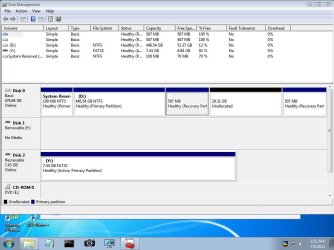
It is showing as gpt.

similar but slightly different for gpt

diskpart
sel dis 0
sel par 1
ass letter=z
exi
bcdboot D:\windows /s Z: /f all

BUT it is curious the 100 mb is not showing as esp partition type and that it is ntfs rather than the more usual fat32 .

Something strange seems to have happened during the clone process. Possibly the source was mbr and for unknown reasons the cloning process create gpt on target.

Unless your machine has a very flexible bios, you would first need to make that 100mb an esp fat32 partition.

and then do the commands listed above.
 

My Computers My Computers

System One System Two

  • Computer type
    PC/Desktop
    OS
    7 X64
    CPU
    i5 8400
    Motherboard
    gigabyte b365m ds3h
    Memory
    2x8gb 3200mhz
    Hard Drives
    various
    PSU
    pure power 11 400w cm
    Case
    Coolermaster
    Cooling
    cryorig m9i
  • Computer type
    PC/Desktop
    OS
    7x64
    CPU
    g5400
    Motherboard
    ga b365m ds3h
    Memory
    8gb ddr4 2400
    PSU
    xfx pro 450w
Thanks, but how do I make the 100mb partition into esp Fat32?

- - - Updated - - -

Ho do I make the 100mb partition into FAT32? Also, I don't think the BCDBOOT command is working. It just gives me an explanation of what it does each time I type in the command?
Thanks
Dave
 

My Computers My Computers

System One System Two

  • Computer type
    PC/Desktop
    Computer Manufacturer/Model Number
    Viglen
    OS
    Windows 7 Pro
    CPU
    i5
    Memory
    12Gig
  • Computer type
    PC/Desktop
Was the original disk mbr style?

One way is to delete the the 100 mb partition.
Then create an esp partition (100mb or larger).
Format it fat32.
Then create the boot files on it using bcdboot command.


If you want to use a gui to see what you are doing, you could use diskgenius to delete the 100mb partition. Rt click it and select Delete. Click Save All at top left.

Then in diskgenius main window rt click the 100mb unallocated space you have just created and select create esp/mbr.
If there is only 100 mb there wont be room for an msr partition as well , so untick that and create only the 100mb esp. It will ask if you want to format it immediately, say yes. Click Save All at top left.
 

My Computers My Computers

System One System Two

  • Computer type
    PC/Desktop
    OS
    7 X64
    CPU
    i5 8400
    Motherboard
    gigabyte b365m ds3h
    Memory
    2x8gb 3200mhz
    Hard Drives
    various
    PSU
    pure power 11 400w cm
    Case
    Coolermaster
    Cooling
    cryorig m9i
  • Computer type
    PC/Desktop
    OS
    7x64
    CPU
    g5400
    Motherboard
    ga b365m ds3h
    Memory
    8gb ddr4 2400
    PSU
    xfx pro 450w
Diskgenius isn't showing the 100mb partition? It shows one at 211mb (system reserved), one at 721mb(primary hidden) and then C: at 446GB.
 

My Computers My Computers

System One System Two

  • Computer type
    PC/Desktop
    Computer Manufacturer/Model Number
    Viglen
    OS
    Windows 7 Pro
    CPU
    i5
    Memory
    12Gig
  • Computer type
    PC/Desktop
1. post a screenshot of diskgenius window

2. also a screenshot of

at cmd prompt type:
diskpart
sel dis 0
lis par
(then to leave diskpart)
exi
 

My Computers My Computers

System One System Two

  • Computer type
    PC/Desktop
    OS
    7 X64
    CPU
    i5 8400
    Motherboard
    gigabyte b365m ds3h
    Memory
    2x8gb 3200mhz
    Hard Drives
    various
    PSU
    pure power 11 400w cm
    Case
    Coolermaster
    Cooling
    cryorig m9i
  • Computer type
    PC/Desktop
    OS
    7x64
    CPU
    g5400
    Motherboard
    ga b365m ds3h
    Memory
    8gb ddr4 2400
    PSU
    xfx pro 450w
Sorry, I was looking at the wrong drive. I have followed your instructions and now have a formatted ESP partition. Should I now follow your previous instructions for Diskpart etc?
 

My Computers My Computers

System One System Two

  • Computer type
    PC/Desktop
    Computer Manufacturer/Model Number
    Viglen
    OS
    Windows 7 Pro
    CPU
    i5
    Memory
    12Gig
  • Computer type
    PC/Desktop
If you now have an esp partition you can create the boot files on it.

EITHER

give the esp partion a drive letter e.g. Z

then at cmd prompt

bcdboot windowspartitionletter:\windows /s Z: /f all

example

bcdboot d:\windows /s z: /f all

OR

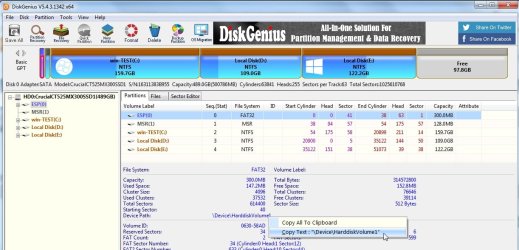
you could use the Device path of the esp partition instead of a drive letter. Which you can copy from diskgenius and paste into bcdboot command

dg-device-path.jpg


bcdboot windowspartitionletter:\windows /s ESPDEVICEPATH /f all

example

bcdboot d:\windows /s \Device\HarddiskVolume1 /f all
 

My Computers My Computers

System One System Two

  • Computer type
    PC/Desktop
    OS
    7 X64
    CPU
    i5 8400
    Motherboard
    gigabyte b365m ds3h
    Memory
    2x8gb 3200mhz
    Hard Drives
    various
    PSU
    pure power 11 400w cm
    Case
    Coolermaster
    Cooling
    cryorig m9i
  • Computer type
    PC/Desktop
    OS
    7x64
    CPU
    g5400
    Motherboard
    ga b365m ds3h
    Memory
    8gb ddr4 2400
    PSU
    xfx pro 450w
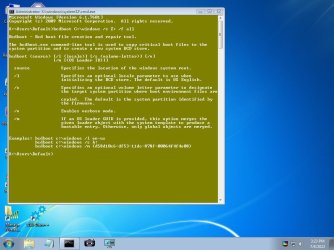
I have renamed the partition to Z and followed your indtructions for bcdboot, but it doesn't seem to do anything except show me options. See screenshot.pic 5.jpg
 

My Computers My Computers

System One System Two

  • Computer type
    PC/Desktop
    Computer Manufacturer/Model Number
    Viglen
    OS
    Windows 7 Pro
    CPU
    i5
    Memory
    12Gig
  • Computer type
    PC/Desktop
That is my mistake . I forgot to say the /f switch only works with win8 and higher bcdboot.exe.

I cant remember if I incuded a different version in that boot media.

have a look in the folder x:\dism and see if there is a copy of bcdboot in there.

It is possible to use win7 bcdboot.exe, but you need to boot the media in the same mode. In other words you need to boot the usb stick in efi mode then the command is the same but without the /f all
 

My Computers My Computers

System One System Two

  • Computer type
    PC/Desktop
    OS
    7 X64
    CPU
    i5 8400
    Motherboard
    gigabyte b365m ds3h
    Memory
    2x8gb 3200mhz
    Hard Drives
    various
    PSU
    pure power 11 400w cm
    Case
    Coolermaster
    Cooling
    cryorig m9i
  • Computer type
    PC/Desktop
    OS
    7x64
    CPU
    g5400
    Motherboard
    ga b365m ds3h
    Memory
    8gb ddr4 2400
    PSU
    xfx pro 450w
No copy of bcdboot in that folder.
 

My Computers My Computers

System One System Two

  • Computer type
    PC/Desktop
    Computer Manufacturer/Model Number
    Viglen
    OS
    Windows 7 Pro
    CPU
    i5
    Memory
    12Gig
  • Computer type
    PC/Desktop
It is possible to use win7 bcdboot.exe, but you need to boot the media in the same mode. In other words you need to boot the usb stick in efi mode then the command is the same but without the /f all

or i can post one up - win8 bcdboot .exe for example which you can copy into windows\system32 of the booted media ( overwriting the win7 version)

View attachment bcdboot-win8.1x64.zip

in case somebody needs the 32 bit version:

View attachment bcdboot-win8.1x86.zip
 

My Computers My Computers

System One System Two

  • Computer type
    PC/Desktop
    OS
    7 X64
    CPU
    i5 8400
    Motherboard
    gigabyte b365m ds3h
    Memory
    2x8gb 3200mhz
    Hard Drives
    various
    PSU
    pure power 11 400w cm
    Case
    Coolermaster
    Cooling
    cryorig m9i
  • Computer type
    PC/Desktop
    OS
    7x64
    CPU
    g5400
    Motherboard
    ga b365m ds3h
    Memory
    8gb ddr4 2400
    PSU
    xfx pro 450w
Back
Top