
help! computer disk hardware configuration problem

wewinjiggy

New member
Local time
4:03 AM
Messages
21
Location
Manila, Philippines
here's what happened...

i have windows7 and vista 64 on my SATA hd running perfectly until i re-installed xp sp2 on my spare IDE hd..

problem is when i boot my computer, it always runs on xp.. even if i change the boot sequence or try to manually boot the SATA from the boot menu.. it always boots the IDE hd..

i tried to disconnect the IDE drive hoping that this would leave the computer to boot the SATA hd.. instead i get this message on the screen..

"Windows could not start because of a computer disk hardware configuration problem.
Could not read from the selected boot disk. Check boot path and disk hardware.
Please check the documentation about hardware disk configuration and your hardware reference manuals for additional information."

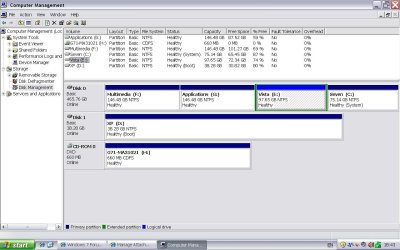
below is a screenshot of my disk management.. (taken from xp)

you can see in the image that the xp drive is the boot drive..

is there any procedure or steps i can do to be able to boot my SATA hd?

can anyone help please???

thanks in advance..
 

Attachments
  • disk management.JPG
    disk management.JPG
    116.9 KB · Views: 206

My Computer

OS
Windows 7 Ultimate, Windows 8 CP
CPU
Athlon X2 7750
Motherboard
MSI 780
Memory
3Gb 800Mhz
Hard Drives
Maxtor 40Gb IDE
Seagate Barracuda 500Gb Sata
PSU
Cougar RS550
Hello.


You will have to run 3 separate startup repairs as outlined in this tutorial at the link below to Windows 7 to recreate the boot files back to the Windows 7 partition and be sure to post back with any further questions you may have and to keep us informed.


Startup Repair - Run 3 Separate Times
 

My Computer

Computer Manufacturer/Model Number
* BFK Customs *
OS
W 7 64-bit Ultimate
CPU
Intel Q9550 Yorkfield
Motherboard
ASUS P5Q Pro
Memory
8GB Dominator 8500C5D
Graphics Card(s)
ATI : XFX 5870
Sound Card
Realtek HD Audio 7-1
Monitor(s) Displays
1x 47" LCD HDMI & 3x 26" LCD HDMI
Screen Resolution
1920x1080P & 1920x1200
Hard Drives
1x 80GB Intel X25-M G2 SSD : 1x 500GB & 1x 640GB WD Caviar Black(s)
PSU
Corsair 620HX
Case
Cooler Master RC-690
Cooling
Tuniq Tower 120, 2x 140mm and 3x 120mm case fans
Keyboard
Microsoft 500
Mouse
Razer Diamondback 3G
Internet Speed
14 Mb/s
Other Info
1x Koutech 3Gb/s SATA HDD Hot Swap Rack
thanks.. will keep you posted..
 

My Computer

OS
Windows 7 Ultimate, Windows 8 CP
CPU
Athlon X2 7750
Motherboard
MSI 780
Memory
3Gb 800Mhz
Hard Drives
Maxtor 40Gb IDE
Seagate Barracuda 500Gb Sata
PSU
Cougar RS550

My Computer

OS
ME/XP/Vista/Win7
Hello.


You will have to run 3 separate startup repairs as outlined in this tutorial at the link below to Windows 7 to recreate the boot files back to the Windows 7 partition and be sure to post back with any further questions you may have and to keep us informed.


Startup Repair - Run 3 Separate Times

barefootkid.. thanks so much.. those threads really made everything simple..
+rep for you..


IDE HD will always boot first.

You need add WinXP to your dual boot,
using EasyBCD, is best used in Windows 7.
Dual Boot Installation with Windows 7 and XP
Use EasyBCD 2.0 in Win 7
Download EasyBCD 2.0.2 - NeoSmart Technologies

A bit more reading.

System Restore Points - Stop XP Dual Boot Delete - Vista Forums

thanks theog.. i'll read more about this.. might be useful.. problem is i'm running 3 OSes in this system.. can it do 3?
and besides, i think i already have that dual boot function on startup.. previously i have xp and win7 on dual boot(when i replaced my vista with 7).. now i have the vista and windows 7 dual boot(this was when i replaced xp with vista; then installed xp again on my spare IDE; which messed up my startup). might be nice if there was winxp + vista + win7... coz now if i want to run xp im like, steady watchin, waitin for the screen to enter boot menu.. cant just leave the system to boot by itself..:) i thought its possible..

again, thanks guys..
 

My Computer

OS
Windows 7 Ultimate, Windows 8 CP
CPU
Athlon X2 7750
Motherboard
MSI 780
Memory
3Gb 800Mhz
Hard Drives
Maxtor 40Gb IDE
Seagate Barracuda 500Gb Sata
PSU
Cougar RS550
ok. i'll give it a try.. thanks.. :)
 

My Computer

OS
Windows 7 Ultimate, Windows 8 CP
CPU
Athlon X2 7750
Motherboard
MSI 780
Memory
3Gb 800Mhz
Hard Drives
Maxtor 40Gb IDE
Seagate Barracuda 500Gb Sata
PSU
Cougar RS550
definitely gonna give it a try.. i thought everythin was ok.. as it turns out, i cant use/boot my xp..
 

My Computer

OS
Windows 7 Ultimate, Windows 8 CP
CPU
Athlon X2 7750
Motherboard
MSI 780
Memory
3Gb 800Mhz
Hard Drives
Maxtor 40Gb IDE
Seagate Barracuda 500Gb Sata
PSU
Cougar RS550
yes.. windows 7 is ok.. i have already downloaded and installed EasyBCD.. should i still do the command prompt stuff even if i have booted okay in win7?
 

My Computer

OS
Windows 7 Ultimate, Windows 8 CP
CPU
Athlon X2 7750
Motherboard
MSI 780
Memory
3Gb 800Mhz
Hard Drives
Maxtor 40Gb IDE
Seagate Barracuda 500Gb Sata
PSU
Cougar RS550
okay it worked.. now i have just one more question.. :o i actually tried it twice.. the first didnt work.. what happened was i accidentally/stupidly pressed "add entry" twice.. so there were two entries of the XP on the multi boot menu which are not running.. i then repeated again the process "with more care" and, voila! here i am using my xp..

now, how can i remove those 2 error entries? any ideas? can i also do it from the EasyBCD?

much thanks...:party:
 

My Computer

OS
Windows 7 Ultimate, Windows 8 CP
CPU
Athlon X2 7750
Motherboard
MSI 780
Memory
3Gb 800Mhz
Hard Drives
Maxtor 40Gb IDE
Seagate Barracuda 500Gb Sata
PSU
Cougar RS550
ow, i found it already.. its done.. i sure would like to offer another rep thing.. but i already gave it to you earlier.. thanks again...
 

My Computer

OS
Windows 7 Ultimate, Windows 8 CP
CPU
Athlon X2 7750
Motherboard
MSI 780
Memory
3Gb 800Mhz
Hard Drives
Maxtor 40Gb IDE
Seagate Barracuda 500Gb Sata
PSU
Cougar RS550
Yes, you can remove in EasyBCD.

Click on Edit Boot Menu
 

My Computer

OS
ME/XP/Vista/Win7
Hello again, good to see you getting it sorted and thanks for keeping us updated.


When you have the time, you may find these tutorials of interest.

These 2 are completely separate methods; just remember the Windows 4 partition limit, trying to exceed that is a real nightmare to correct for.

Clean Install Windows 7 : Ahead of XP

Clean Install Windows 7 : Ahead of Vista


This one is for starting from scratch and is a little advanced but it is completely possible to boot multiple OSs from Extended / Logical drives using a single Primary partition.

System Reserved : Multi Boot from Logical Partitions
 

My Computer

Computer Manufacturer/Model Number
* BFK Customs *
OS
W 7 64-bit Ultimate
CPU
Intel Q9550 Yorkfield
Motherboard
ASUS P5Q Pro
Memory
8GB Dominator 8500C5D
Graphics Card(s)
ATI : XFX 5870
Sound Card
Realtek HD Audio 7-1
Monitor(s) Displays
1x 47" LCD HDMI & 3x 26" LCD HDMI
Screen Resolution
1920x1080P & 1920x1200
Hard Drives
1x 80GB Intel X25-M G2 SSD : 1x 500GB & 1x 640GB WD Caviar Black(s)
PSU
Corsair 620HX
Case
Cooler Master RC-690
Cooling
Tuniq Tower 120, 2x 140mm and 3x 120mm case fans
Keyboard
Microsoft 500
Mouse
Razer Diamondback 3G
Internet Speed
14 Mb/s
Other Info
1x Koutech 3Gb/s SATA HDD Hot Swap Rack
ow! thanks for those additional links.. i'll check on it in a bit.. cheers!
 

My Computer

OS
Windows 7 Ultimate, Windows 8 CP
CPU
Athlon X2 7750
Motherboard
MSI 780
Memory
3Gb 800Mhz
Hard Drives
Maxtor 40Gb IDE
Seagate Barracuda 500Gb Sata
PSU
Cougar RS550
You're welcome mate, be sure to keep us informed.
 

My Computer

Computer Manufacturer/Model Number
* BFK Customs *
OS
W 7 64-bit Ultimate
CPU
Intel Q9550 Yorkfield
Motherboard
ASUS P5Q Pro
Memory
8GB Dominator 8500C5D
Graphics Card(s)
ATI : XFX 5870
Sound Card
Realtek HD Audio 7-1
Monitor(s) Displays
1x 47" LCD HDMI & 3x 26" LCD HDMI
Screen Resolution
1920x1080P & 1920x1200
Hard Drives
1x 80GB Intel X25-M G2 SSD : 1x 500GB & 1x 640GB WD Caviar Black(s)
PSU
Corsair 620HX
Case
Cooler Master RC-690
Cooling
Tuniq Tower 120, 2x 140mm and 3x 120mm case fans
Keyboard
Microsoft 500
Mouse
Razer Diamondback 3G
Internet Speed
14 Mb/s
Other Info
1x Koutech 3Gb/s SATA HDD Hot Swap Rack
Back
Top