
wewinjiggy
New member
here's what happened...
i have windows7 and vista 64 on my SATA hd running perfectly until i re-installed xp sp2 on my spare IDE hd..
problem is when i boot my computer, it always runs on xp.. even if i change the boot sequence or try to manually boot the SATA from the boot menu.. it always boots the IDE hd..
i tried to disconnect the IDE drive hoping that this would leave the computer to boot the SATA hd.. instead i get this message on the screen..
"Windows could not start because of a computer disk hardware configuration problem.
Could not read from the selected boot disk. Check boot path and disk hardware.
Please check the documentation about hardware disk configuration and your hardware reference manuals for additional information."
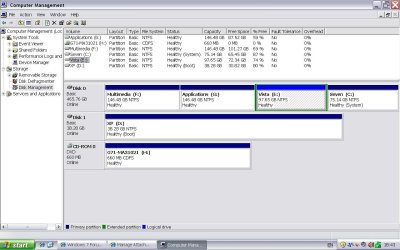
below is a screenshot of my disk management.. (taken from xp)
you can see in the image that the xp drive is the boot drive..
is there any procedure or steps i can do to be able to boot my SATA hd?
can anyone help please???
thanks in advance..
i have windows7 and vista 64 on my SATA hd running perfectly until i re-installed xp sp2 on my spare IDE hd..
problem is when i boot my computer, it always runs on xp.. even if i change the boot sequence or try to manually boot the SATA from the boot menu.. it always boots the IDE hd..
i tried to disconnect the IDE drive hoping that this would leave the computer to boot the SATA hd.. instead i get this message on the screen..
"Windows could not start because of a computer disk hardware configuration problem.
Could not read from the selected boot disk. Check boot path and disk hardware.
Please check the documentation about hardware disk configuration and your hardware reference manuals for additional information."
below is a screenshot of my disk management.. (taken from xp)
you can see in the image that the xp drive is the boot drive..
is there any procedure or steps i can do to be able to boot my SATA hd?
can anyone help please???
thanks in advance..
Attachments
My Computer
At a glance
Windows 7 Ultimate, Windows 8 CPAthlon X2 77503Gb 800Mhz
- OS
- Windows 7 Ultimate, Windows 8 CP
- CPU
- Athlon X2 7750
- Motherboard
- MSI 780
- Memory
- 3Gb 800Mhz
- Hard Drives
- Maxtor 40Gb IDE
Seagate Barracuda 500Gb Sata
- PSU
- Cougar RS550


 i thought its possible..
 i actually tried it twice.. the first didnt work.. what happened was i accidentally/stupidly pressed "add entry" twice.. so there were two entries of the XP on the multi boot menu which are not running.. i then repeated again the process "with more care" and, voila! here i am using my xp..


