
Help configuring 2007 Outlook Accounts

bsketlady

New member
Local time
10:54 AM
Messages
35
I have managed to create 2 Outlook accounts for myself and my husband. I have 2 desktop icons, and all is ok.

Problem is - when he opens his email, he will see my email unless I have already opened it.

I know this is a simple fix and it's driving me crazy. I changed the profiles to prompt for a profile when opening Outlook, and it doesn't ask me for which profile to use.

Thanks
 

My Computer My Computer

Computer type
PC/Desktop
Computer Manufacturer/Model Number
hp
OS
Microsoft Windows 7 Home Premium 64-bit 7601 Multiprocessor Free Service Pack 1
CPU
AMD A4-3400 APU with Radeon(tm) HD Graphics
Motherboard
PEGATRON CORPORATION 2ACF
Memory
4.00 GB
Graphics Card(s)
AMD Radeon HD 6410D Graphics
Sound Card
Realtek High Definition Audio
Screen Resolution
1680 x 1050 x 32 bits (4294967296 colors) @ 60 Hz
Hard Drives
(1) Hitachi HDS721010CLA632 SATA Disk Device (2) HP Officejet Pro 86 USB Device (3) Multiple Card Reader USB Device
really 143 views and no responses??? I thought this was a help forum
 

My Computer My Computer

Computer type
PC/Desktop
Computer Manufacturer/Model Number
hp
OS
Microsoft Windows 7 Home Premium 64-bit 7601 Multiprocessor Free Service Pack 1
CPU
AMD A4-3400 APU with Radeon(tm) HD Graphics
Motherboard
PEGATRON CORPORATION 2ACF
Memory
4.00 GB
Graphics Card(s)
AMD Radeon HD 6410D Graphics
Sound Card
Realtek High Definition Audio
Screen Resolution
1680 x 1050 x 32 bits (4294967296 colors) @ 60 Hz
Hard Drives
(1) Hitachi HDS721010CLA632 SATA Disk Device (2) HP Officejet Pro 86 USB Device (3) Multiple Card Reader USB Device
From the sounds of it you have both accounts using the same data file (.pst)

Open the Control Panel. If not already switch you view to Large or Small Icons.

Click on Mail

Click the button for Email Accounts.

Click on each account and at the bottom of the window see what folder/data file is being used.

If both are using the same one you need to create a new file for one of the accounts.

Highlight one of the accounts and then click the Change Folder Button.

The next window that opens up click on New Outlook Data File

Select Outlook Data File (.pst)

Name it what ever you want and click ok.

Now all email for that account will go into the new file. You can move/drag all previous email from the old files to the new one in outlook.
 

My Computer My Computer

Computer type
PC/Desktop
OS
Windows 7 Pro 64bit
that's just it... I have 2 different .pst files...both emails have the correct .pst file

I had this configured correctly on my computer awhile ago (2 different emails, same computer) and no problems

I know this is a simple something and I am just missing it...
 

My Computer My Computer

Computer type
PC/Desktop
Computer Manufacturer/Model Number
hp
OS
Microsoft Windows 7 Home Premium 64-bit 7601 Multiprocessor Free Service Pack 1
CPU
AMD A4-3400 APU with Radeon(tm) HD Graphics
Motherboard
PEGATRON CORPORATION 2ACF
Memory
4.00 GB
Graphics Card(s)
AMD Radeon HD 6410D Graphics
Sound Card
Realtek High Definition Audio
Screen Resolution
1680 x 1050 x 32 bits (4294967296 colors) @ 60 Hz
Hard Drives
(1) Hitachi HDS721010CLA632 SATA Disk Device (2) HP Officejet Pro 86 USB Device (3) Multiple Card Reader USB Device
Just so I get this right, when you open outlook you only want to see your email and when he open his he should only see his email. If that's the case you need separate profiles. Check this link, it will help you setup the profiles.

Switch to another Outlook e-mail profile - Outlook
 

My Computer My Computer

Computer type
PC/Desktop
OS
Windows 7 Pro 64bit
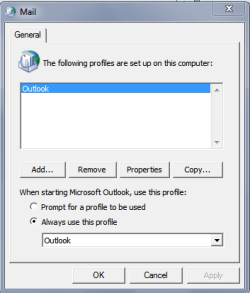
Got it... and I have it selected to prompt for profile, but I do not get asked which profile when opening the mail

when I email from his to me if I exit immediately after sending it will go to me...if I do not exit immediately it comes back to his email

I am ensure the data files point to the correct email account

I set the default for MY account....but when I look at the email accounts in outlook it shows his as the default
 

My Computer My Computer

Computer type
PC/Desktop
Computer Manufacturer/Model Number
hp
OS
Microsoft Windows 7 Home Premium 64-bit 7601 Multiprocessor Free Service Pack 1
CPU
AMD A4-3400 APU with Radeon(tm) HD Graphics
Motherboard
PEGATRON CORPORATION 2ACF
Memory
4.00 GB
Graphics Card(s)
AMD Radeon HD 6410D Graphics
Sound Card
Realtek High Definition Audio
Screen Resolution
1680 x 1050 x 32 bits (4294967296 colors) @ 60 Hz
Hard Drives
(1) Hitachi HDS721010CLA632 SATA Disk Device (2) HP Officejet Pro 86 USB Device (3) Multiple Card Reader USB Device
If he is getting the email that is meant for you it sounds like your account settings. Check the account setting for both accounts. It may require backing up your data files, deleting the accounts and setting them up again.
 

My Computer My Computer

Computer type
PC/Desktop
OS
Windows 7 Pro 64bit

My Computer My Computer

Computer type
PC/Desktop
Computer Manufacturer/Model Number
home built
OS
Multi-Boot W7_Pro_x64 W8.1_Pro_x64 W10_Pro_x64 +Linux_VMs +Chromium_VM
CPU
AMD Athlon II x4 620
Motherboard
Gigabyte GA-MA785G-UD3H
Memory
6GB GSkill DDR2 800
Graphics Card(s)
AMD 4670 GPU + AMD 4200 IGP
Sound Card
on board Realtek ALC889A
Monitor(s) Displays
RCA 40" LCD TV, Insignia 32" LCD TV, HP 15" LCD monitor
Screen Resolution
1680 x 1050
Hard Drives
OCZ Vertex 3 120GB,
Samsung F3 1TB (3),
Several others - WD, Seagate, Hitachi, ...
PSU
Corsair 500 W
Case
Rosewill mid tower
Cooling
CM 90mm rifle
Keyboard
Gyration wireless, Logitech wireless, Dell USB wired
Mouse
Gyration wireless, Logitech wireless, V7 USB wired
Internet Speed
Spectrum - 100Mbps D / 10Mbps U
Antivirus
Avast, MBAM3, EMET, WinPatrol
Browser
Pale Moon, Firefox, IE
Other Info
2 multi-boot PC's
Mainly HTPC/Office/Gen purpose (no gaming).
Trendnet USB KVM.
LG DVD burner/Blue Ray Player.
Tray system for removable SATA backup drives.

Not currently OCd, under-volted.
I use Hybrid sleep, rarely re-boot or shutdown.

Hauppauge HD-PVR, Avermedia PCIe TV Tuner, Hauppauge PCI TV Tuner.
thanks for helping..here's the screenshot, sorry I did not know how to add it to ,y post like you did yours

diagnostics did not have any problems
 

Attachments

My Computer My Computer

Computer type
PC/Desktop
Computer Manufacturer/Model Number
hp
OS
Microsoft Windows 7 Home Premium 64-bit 7601 Multiprocessor Free Service Pack 1
CPU
AMD A4-3400 APU with Radeon(tm) HD Graphics
Motherboard
PEGATRON CORPORATION 2ACF
Memory
4.00 GB
Graphics Card(s)
AMD Radeon HD 6410D Graphics
Sound Card
Realtek High Definition Audio
Screen Resolution
1680 x 1050 x 32 bits (4294967296 colors) @ 60 Hz
Hard Drives
(1) Hitachi HDS721010CLA632 SATA Disk Device (2) HP Officejet Pro 86 USB Device (3) Multiple Card Reader USB Device
Ok, you have 2 profiles.
Searching for this it seems others have this issue.
One possible cause is Outlook didn't close completely when you exit.
If it doesn't prompt after you boot the PC and the first time you start Outlook that doesn't seem likely ...
The other thing I read that might cause it is some Outlook addin.
You can try disabling addins and see if that helps.
Look at the last post in this thread.
Outlook Public. outlook won't prompt me for profile
 

My Computer My Computer

Computer type
PC/Desktop
Computer Manufacturer/Model Number
home built
OS
Multi-Boot W7_Pro_x64 W8.1_Pro_x64 W10_Pro_x64 +Linux_VMs +Chromium_VM
CPU
AMD Athlon II x4 620
Motherboard
Gigabyte GA-MA785G-UD3H
Memory
6GB GSkill DDR2 800
Graphics Card(s)
AMD 4670 GPU + AMD 4200 IGP
Sound Card
on board Realtek ALC889A
Monitor(s) Displays
RCA 40" LCD TV, Insignia 32" LCD TV, HP 15" LCD monitor
Screen Resolution
1680 x 1050
Hard Drives
OCZ Vertex 3 120GB,
Samsung F3 1TB (3),
Several others - WD, Seagate, Hitachi, ...
PSU
Corsair 500 W
Case
Rosewill mid tower
Cooling
CM 90mm rifle
Keyboard
Gyration wireless, Logitech wireless, Dell USB wired
Mouse
Gyration wireless, Logitech wireless, V7 USB wired
Internet Speed
Spectrum - 100Mbps D / 10Mbps U
Antivirus
Avast, MBAM3, EMET, WinPatrol
Browser
Pale Moon, Firefox, IE
Other Info
2 multi-boot PC's
Mainly HTPC/Office/Gen purpose (no gaming).
Trendnet USB KVM.
LG DVD burner/Blue Ray Player.
Tray system for removable SATA backup drives.

Not currently OCd, under-volted.
I use Hybrid sleep, rarely re-boot or shutdown.

Hauppauge HD-PVR, Avermedia PCIe TV Tuner, Hauppauge PCI TV Tuner.
I just disabled the add ins...same thing

it's weird because awhile ago I had this set up (2 accounts, 2 desktop icons, no crossover emails). now I cannot figure out how I did that!!

so frustrating...
 

My Computer My Computer

Computer type
PC/Desktop
Computer Manufacturer/Model Number
hp
OS
Microsoft Windows 7 Home Premium 64-bit 7601 Multiprocessor Free Service Pack 1
CPU
AMD A4-3400 APU with Radeon(tm) HD Graphics
Motherboard
PEGATRON CORPORATION 2ACF
Memory
4.00 GB
Graphics Card(s)
AMD Radeon HD 6410D Graphics
Sound Card
Realtek High Definition Audio
Screen Resolution
1680 x 1050 x 32 bits (4294967296 colors) @ 60 Hz
Hard Drives
(1) Hitachi HDS721010CLA632 SATA Disk Device (2) HP Officejet Pro 86 USB Device (3) Multiple Card Reader USB Device
Did you try the diagnostics/repair - link in post #8 ?
 

My Computer My Computer

Computer type
PC/Desktop
Computer Manufacturer/Model Number
home built
OS
Multi-Boot W7_Pro_x64 W8.1_Pro_x64 W10_Pro_x64 +Linux_VMs +Chromium_VM
CPU
AMD Athlon II x4 620
Motherboard
Gigabyte GA-MA785G-UD3H
Memory
6GB GSkill DDR2 800
Graphics Card(s)
AMD 4670 GPU + AMD 4200 IGP
Sound Card
on board Realtek ALC889A
Monitor(s) Displays
RCA 40" LCD TV, Insignia 32" LCD TV, HP 15" LCD monitor
Screen Resolution
1680 x 1050
Hard Drives
OCZ Vertex 3 120GB,
Samsung F3 1TB (3),
Several others - WD, Seagate, Hitachi, ...
PSU
Corsair 500 W
Case
Rosewill mid tower
Cooling
CM 90mm rifle
Keyboard
Gyration wireless, Logitech wireless, Dell USB wired
Mouse
Gyration wireless, Logitech wireless, V7 USB wired
Internet Speed
Spectrum - 100Mbps D / 10Mbps U
Antivirus
Avast, MBAM3, EMET, WinPatrol
Browser
Pale Moon, Firefox, IE
Other Info
2 multi-boot PC's
Mainly HTPC/Office/Gen purpose (no gaming).
Trendnet USB KVM.
LG DVD burner/Blue Ray Player.
Tray system for removable SATA backup drives.

Not currently OCd, under-volted.
I use Hybrid sleep, rarely re-boot or shutdown.

Hauppauge HD-PVR, Avermedia PCIe TV Tuner, Hauppauge PCI TV Tuner.
yes several posts back I posted that nothing was found
 

My Computer My Computer

Computer type
PC/Desktop
Computer Manufacturer/Model Number
hp
OS
Microsoft Windows 7 Home Premium 64-bit 7601 Multiprocessor Free Service Pack 1
CPU
AMD A4-3400 APU with Radeon(tm) HD Graphics
Motherboard
PEGATRON CORPORATION 2ACF
Memory
4.00 GB
Graphics Card(s)
AMD Radeon HD 6410D Graphics
Sound Card
Realtek High Definition Audio
Screen Resolution
1680 x 1050 x 32 bits (4294967296 colors) @ 60 Hz
Hard Drives
(1) Hitachi HDS721010CLA632 SATA Disk Device (2) HP Officejet Pro 86 USB Device (3) Multiple Card Reader USB Device

My Computer My Computer

Computer type
PC/Desktop
Computer Manufacturer/Model Number
home built
OS
Multi-Boot W7_Pro_x64 W8.1_Pro_x64 W10_Pro_x64 +Linux_VMs +Chromium_VM
CPU
AMD Athlon II x4 620
Motherboard
Gigabyte GA-MA785G-UD3H
Memory
6GB GSkill DDR2 800
Graphics Card(s)
AMD 4670 GPU + AMD 4200 IGP
Sound Card
on board Realtek ALC889A
Monitor(s) Displays
RCA 40" LCD TV, Insignia 32" LCD TV, HP 15" LCD monitor
Screen Resolution
1680 x 1050
Hard Drives
OCZ Vertex 3 120GB,
Samsung F3 1TB (3),
Several others - WD, Seagate, Hitachi, ...
PSU
Corsair 500 W
Case
Rosewill mid tower
Cooling
CM 90mm rifle
Keyboard
Gyration wireless, Logitech wireless, Dell USB wired
Mouse
Gyration wireless, Logitech wireless, V7 USB wired
Internet Speed
Spectrum - 100Mbps D / 10Mbps U
Antivirus
Avast, MBAM3, EMET, WinPatrol
Browser
Pale Moon, Firefox, IE
Other Info
2 multi-boot PC's
Mainly HTPC/Office/Gen purpose (no gaming).
Trendnet USB KVM.
LG DVD burner/Blue Ray Player.
Tray system for removable SATA backup drives.

Not currently OCd, under-volted.
I use Hybrid sleep, rarely re-boot or shutdown.

Hauppauge HD-PVR, Avermedia PCIe TV Tuner, Hauppauge PCI TV Tuner.
I disabled a few plugin and restarted...back and forth trying different things...still nothing

this is driving me nuts
 

My Computer My Computer

Computer type
PC/Desktop
Computer Manufacturer/Model Number
hp
OS
Microsoft Windows 7 Home Premium 64-bit 7601 Multiprocessor Free Service Pack 1
CPU
AMD A4-3400 APU with Radeon(tm) HD Graphics
Motherboard
PEGATRON CORPORATION 2ACF
Memory
4.00 GB
Graphics Card(s)
AMD Radeon HD 6410D Graphics
Sound Card
Realtek High Definition Audio
Screen Resolution
1680 x 1050 x 32 bits (4294967296 colors) @ 60 Hz
Hard Drives
(1) Hitachi HDS721010CLA632 SATA Disk Device (2) HP Officejet Pro 86 USB Device (3) Multiple Card Reader USB Device

My Computer My Computer

Computer type
PC/Desktop
Computer Manufacturer/Model Number
home built
OS
Multi-Boot W7_Pro_x64 W8.1_Pro_x64 W10_Pro_x64 +Linux_VMs +Chromium_VM
CPU
AMD Athlon II x4 620
Motherboard
Gigabyte GA-MA785G-UD3H
Memory
6GB GSkill DDR2 800
Graphics Card(s)
AMD 4670 GPU + AMD 4200 IGP
Sound Card
on board Realtek ALC889A
Monitor(s) Displays
RCA 40" LCD TV, Insignia 32" LCD TV, HP 15" LCD monitor
Screen Resolution
1680 x 1050
Hard Drives
OCZ Vertex 3 120GB,
Samsung F3 1TB (3),
Several others - WD, Seagate, Hitachi, ...
PSU
Corsair 500 W
Case
Rosewill mid tower
Cooling
CM 90mm rifle
Keyboard
Gyration wireless, Logitech wireless, Dell USB wired
Mouse
Gyration wireless, Logitech wireless, V7 USB wired
Internet Speed
Spectrum - 100Mbps D / 10Mbps U
Antivirus
Avast, MBAM3, EMET, WinPatrol
Browser
Pale Moon, Firefox, IE
Other Info
2 multi-boot PC's
Mainly HTPC/Office/Gen purpose (no gaming).
Trendnet USB KVM.
LG DVD burner/Blue Ray Player.
Tray system for removable SATA backup drives.

Not currently OCd, under-volted.
I use Hybrid sleep, rarely re-boot or shutdown.

Hauppauge HD-PVR, Avermedia PCIe TV Tuner, Hauppauge PCI TV Tuner.
it's weird because awhile ago I had this set up (2 accounts, 2 desktop icons, no crossover emails). now I cannot figure out how I did that!!

Can you explain what/why you did or happened that caused the previous (awhile ago) set up to stop working ?
- Did you re-install Windows, and all applications, including Office/Outlook ?
- Did you re-install Office/Outlook in the same installed OS ?
- Did it just stop working one day, with the same OS and Office/Outlook ?
- Did you have a problem and do something to attempt a fix ?
- Did Windows Update install new updates ?
- ???

Run a System File Check to make sure you don't have system file issues.
http://www.sevenforums.com/tutorials/1538-sfc-scannow-command-system-file-checker.html

fwiw
I added a profile to test this and set it to prompt.
It works, nothing else needed by me to get the prompt.
I added a profile with no email accounts ...
 
Last edited:

My Computer My Computer

Computer type
PC/Desktop
Computer Manufacturer/Model Number
home built
OS
Multi-Boot W7_Pro_x64 W8.1_Pro_x64 W10_Pro_x64 +Linux_VMs +Chromium_VM
CPU
AMD Athlon II x4 620
Motherboard
Gigabyte GA-MA785G-UD3H
Memory
6GB GSkill DDR2 800
Graphics Card(s)
AMD 4670 GPU + AMD 4200 IGP
Sound Card
on board Realtek ALC889A
Monitor(s) Displays
RCA 40" LCD TV, Insignia 32" LCD TV, HP 15" LCD monitor
Screen Resolution
1680 x 1050
Hard Drives
OCZ Vertex 3 120GB,
Samsung F3 1TB (3),
Several others - WD, Seagate, Hitachi, ...
PSU
Corsair 500 W
Case
Rosewill mid tower
Cooling
CM 90mm rifle
Keyboard
Gyration wireless, Logitech wireless, Dell USB wired
Mouse
Gyration wireless, Logitech wireless, V7 USB wired
Internet Speed
Spectrum - 100Mbps D / 10Mbps U
Antivirus
Avast, MBAM3, EMET, WinPatrol
Browser
Pale Moon, Firefox, IE
Other Info
2 multi-boot PC's
Mainly HTPC/Office/Gen purpose (no gaming).
Trendnet USB KVM.
LG DVD burner/Blue Ray Player.
Tray system for removable SATA backup drives.

Not currently OCd, under-volted.
I use Hybrid sleep, rarely re-boot or shutdown.

Hauppauge HD-PVR, Avermedia PCIe TV Tuner, Hauppauge PCI TV Tuner.
rebooted in safe mode same results
I did do a clean reinstall of windows/office a few weeks ago because of multiple errors

when I had this working the way I wanted it awhile ago, I did not use the "prompt for a profile" option and the proper mail went to the correct mailbox simply by clicking on the desktop icon

sfc / scannow - when I do this from the run command the screen blinks like the black command screen and disappears
 

My Computer My Computer

Computer type
PC/Desktop
Computer Manufacturer/Model Number
hp
OS
Microsoft Windows 7 Home Premium 64-bit 7601 Multiprocessor Free Service Pack 1
CPU
AMD A4-3400 APU with Radeon(tm) HD Graphics
Motherboard
PEGATRON CORPORATION 2ACF
Memory
4.00 GB
Graphics Card(s)
AMD Radeon HD 6410D Graphics
Sound Card
Realtek High Definition Audio
Screen Resolution
1680 x 1050 x 32 bits (4294967296 colors) @ 60 Hz
Hard Drives
(1) Hitachi HDS721010CLA632 SATA Disk Device (2) HP Officejet Pro 86 USB Device (3) Multiple Card Reader USB Device
WOW !

Your last answers have me more confused !
I thought you were using profiles based on Posts #8 to #10 ...
Now you're saying when it worked before, you DIDN'T use profiles, but now you are trying to use profiles and your desktop icons ...
Before it just worked with desktop icons, with one profile ?
Is that correct ?
Or, you had two profiles, but only used one by default, and opened Outlook "differently" from 2 desktop icons ?
:confused:

Can you post exactly what you have in your Outlook Desktop Icon(s) ?
I'm guessing these are shortcuts, so what you have in the target is important.

Can you run Outlook from the Taskbar Start Button / All Programs, and if so, does it prompt ?

I hate to make my post too complicated, but how did you re-install Windows ?
Did you follow instructions in a SF Tutorial, or what exactly did you do ?
 

My Computer My Computer

Computer type
PC/Desktop
Computer Manufacturer/Model Number
home built
OS
Multi-Boot W7_Pro_x64 W8.1_Pro_x64 W10_Pro_x64 +Linux_VMs +Chromium_VM
CPU
AMD Athlon II x4 620
Motherboard
Gigabyte GA-MA785G-UD3H
Memory
6GB GSkill DDR2 800
Graphics Card(s)
AMD 4670 GPU + AMD 4200 IGP
Sound Card
on board Realtek ALC889A
Monitor(s) Displays
RCA 40" LCD TV, Insignia 32" LCD TV, HP 15" LCD monitor
Screen Resolution
1680 x 1050
Hard Drives
OCZ Vertex 3 120GB,
Samsung F3 1TB (3),
Several others - WD, Seagate, Hitachi, ...
PSU
Corsair 500 W
Case
Rosewill mid tower
Cooling
CM 90mm rifle
Keyboard
Gyration wireless, Logitech wireless, Dell USB wired
Mouse
Gyration wireless, Logitech wireless, V7 USB wired
Internet Speed
Spectrum - 100Mbps D / 10Mbps U
Antivirus
Avast, MBAM3, EMET, WinPatrol
Browser
Pale Moon, Firefox, IE
Other Info
2 multi-boot PC's
Mainly HTPC/Office/Gen purpose (no gaming).
Trendnet USB KVM.
LG DVD burner/Blue Ray Player.
Tray system for removable SATA backup drives.

Not currently OCd, under-volted.
I use Hybrid sleep, rarely re-boot or shutdown.

Hauppauge HD-PVR, Avermedia PCIe TV Tuner, Hauppauge PCI TV Tuner.
ugh..this is so frustrating...

BEFORE I never had to use profiles (that I can remember), when I had 2 email accounts under outlook on the same computer and it worked fine...

Here's the target info for one account

"C:\Program Files (x86)\Microsoft Office\Office12\OUTLOOK.EXE" /profile Michael

here's the other

"C:\Program Files (x86)\Microsoft Office\Office12\OUTLOOK.EXE" /profile Outlook

which exactly states what my profiles state.

for the reinstall...I did it as the tutorial stated...

before it worked with 2 icons

running it from the start button opens the original outlook account (the one labeled Outlook above)
 

My Computer My Computer

Computer type
PC/Desktop
Computer Manufacturer/Model Number
hp
OS
Microsoft Windows 7 Home Premium 64-bit 7601 Multiprocessor Free Service Pack 1
CPU
AMD A4-3400 APU with Radeon(tm) HD Graphics
Motherboard
PEGATRON CORPORATION 2ACF
Memory
4.00 GB
Graphics Card(s)
AMD Radeon HD 6410D Graphics
Sound Card
Realtek High Definition Audio
Screen Resolution
1680 x 1050 x 32 bits (4294967296 colors) @ 60 Hz
Hard Drives
(1) Hitachi HDS721010CLA632 SATA Disk Device (2) HP Officejet Pro 86 USB Device (3) Multiple Card Reader USB Device
Back
Top