aliyousafzai
New member
- Local time
- 7:01 AM
- Messages
- 7
I have very little knowledge of networking. I have had configured my home network with the help of online guides and tutorial and mainly by hit and trial, last year and it performed successfully. It may not be perfect but it worked and this is how it has been working.
Setup1.
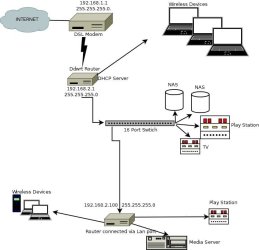
ADSLModem provided by ISP (PPOE 192.168.1.1 and subnet mask (255.255.255.0) DHCP enabled range (192.168.1.50 to 192.168.80) and default DNS by ISP. UPNP enabled (but nothing configured here and in NAT as well, as things were working fine so I never touched it) Wireless (OFF)
NOTE, I can't tell if my ISP registers Mac of this modem to authenticate the services)
Setup2
LinksysWTRG router with DDWRT 2.4 installed with auto 'configuration DHCP' (guess this enables connections from the SETUP1 for WAN, hence IP 192.168.1.50), subnet mask 255.255.255.0, gateway 192.168.1.1 and DNS 192.168.1.1. LAN setup; ip 192.168.2.1
Subnet 255.255.255.0, gateway 192.168.1.1. DNS by UnblockUs.com to access Hulu, Netflix etc outside U.S. NAT services and UPNP enabled with nothing specifically mentioned to forward the services to.
Wireless enabled. And DHCP Server enabled for LAN IP 192.168.2.100 to 192.168.2.130.
Setup3
16 port switch that is hosting Roku, Bravia LCD, 2 NAS and a windows seven Laptop wired. All the devices on the switch are connected to Setup 2 through wire and wireless, like iPhone, iPads etc.
Setup4
TpLinkRouter set on Dynamic Ip configuration with auto Ip for wan and 192.168.2.20 for LAN. With subnet 255.255.255.0. And DNS auto. Devices connected to this are PS3, WDTvLive and Windows 7 64 bit a Ultimate desktop and a couple of iPhones and an ipad.
Windows seven is hosting Plex media server, and utorrent like softwares and PS3 is obviously for online.
Please note I have always recived 'NAT' problem while playing online but speed has never become a problem. Plex media server hooked with Setup4 always connects to NAS on Setup3.
This way I have been able to watch any of my media at any corner of house on wire and wireless.
This whole setup worked pretty good for more than a year and now I am feeling bad that I broke it just to make Plex media server accessible to me on my trips to other cities. I read the articles from Plex support and encountered that I had a 'Double Nat' problem and thought I could fix it by trying to make a little changes. It's been three days and I am getting frustrated. Nothing is working. Good thing I have back up of all the router settings. But I want to fix this once for all.. If everything still fails by Sunday I am going back to my old setup and compromise accessing my media server outside my network. Huh.
Now the Setup looked like this
Setup1 [from LAN] to Setup2 [to WAN] to Setup3 [Switch connecting all the devices of Setup3] and ---> to Setup4 ( Tplink Router(Cat5 or 6 from switch to LAN port) this router is at different floor) to all the devices of setup four.
What I am trying to do is turn Setup1 into a basic modem that will only handle internet connection without any DHCP, firewall and UPNP Nat leaving these for router at Setup2 to handle. It should have been pretty simple. Isn't it ?
I seriously think I am making some mistake in assigning IPs and Subnets. Want to keep the IPs assigned already from the setups above. I also didn't and don't want to change how everything is connected through either net on assigned ports.
Or must I ?
I am guessing my problem lies in Subnets. Because each time I assign an ip or subnet on any modem or router one thing or other stops responding. By responding I mean they stop seeing see each other. Please let me know if this is the way. Help me fix this and if you think I am getting it all wrong please advise another method.
Please note I cannot go all wireless due to some reason.
Let me know if left out any other details.
Ciao.
Setup1.
ADSLModem provided by ISP (PPOE 192.168.1.1 and subnet mask (255.255.255.0) DHCP enabled range (192.168.1.50 to 192.168.80) and default DNS by ISP. UPNP enabled (but nothing configured here and in NAT as well, as things were working fine so I never touched it) Wireless (OFF)
NOTE, I can't tell if my ISP registers Mac of this modem to authenticate the services)
Setup2
LinksysWTRG router with DDWRT 2.4 installed with auto 'configuration DHCP' (guess this enables connections from the SETUP1 for WAN, hence IP 192.168.1.50), subnet mask 255.255.255.0, gateway 192.168.1.1 and DNS 192.168.1.1. LAN setup; ip 192.168.2.1
Subnet 255.255.255.0, gateway 192.168.1.1. DNS by UnblockUs.com to access Hulu, Netflix etc outside U.S. NAT services and UPNP enabled with nothing specifically mentioned to forward the services to.
Wireless enabled. And DHCP Server enabled for LAN IP 192.168.2.100 to 192.168.2.130.
Setup3
16 port switch that is hosting Roku, Bravia LCD, 2 NAS and a windows seven Laptop wired. All the devices on the switch are connected to Setup 2 through wire and wireless, like iPhone, iPads etc.
Setup4
TpLinkRouter set on Dynamic Ip configuration with auto Ip for wan and 192.168.2.20 for LAN. With subnet 255.255.255.0. And DNS auto. Devices connected to this are PS3, WDTvLive and Windows 7 64 bit a Ultimate desktop and a couple of iPhones and an ipad.
Windows seven is hosting Plex media server, and utorrent like softwares and PS3 is obviously for online.
Please note I have always recived 'NAT' problem while playing online but speed has never become a problem. Plex media server hooked with Setup4 always connects to NAS on Setup3.
This way I have been able to watch any of my media at any corner of house on wire and wireless.
This whole setup worked pretty good for more than a year and now I am feeling bad that I broke it just to make Plex media server accessible to me on my trips to other cities. I read the articles from Plex support and encountered that I had a 'Double Nat' problem and thought I could fix it by trying to make a little changes. It's been three days and I am getting frustrated. Nothing is working. Good thing I have back up of all the router settings. But I want to fix this once for all.. If everything still fails by Sunday I am going back to my old setup and compromise accessing my media server outside my network. Huh.
Now the Setup looked like this
Setup1 [from LAN] to Setup2 [to WAN] to Setup3 [Switch connecting all the devices of Setup3] and ---> to Setup4 ( Tplink Router(Cat5 or 6 from switch to LAN port) this router is at different floor) to all the devices of setup four.
What I am trying to do is turn Setup1 into a basic modem that will only handle internet connection without any DHCP, firewall and UPNP Nat leaving these for router at Setup2 to handle. It should have been pretty simple. Isn't it ?
I seriously think I am making some mistake in assigning IPs and Subnets. Want to keep the IPs assigned already from the setups above. I also didn't and don't want to change how everything is connected through either net on assigned ports.
Or must I ?
I am guessing my problem lies in Subnets. Because each time I assign an ip or subnet on any modem or router one thing or other stops responding. By responding I mean they stop seeing see each other. Please let me know if this is the way. Help me fix this and if you think I am getting it all wrong please advise another method.
Please note I cannot go all wireless due to some reason.
Let me know if left out any other details.
Ciao.
My Computer
At a glance
Windows7 64bit Ultimate.
- OS
- Windows7 64bit Ultimate.