Help Diagnose, Windows keeps deleting itself, Ubuntu works fine

dc42nr86

New member
Local time
4:57 AM
Messages
11
I bought a used Lenovo x230 and upgraded with a brand new Samsung EVO 840 SSD 250GB and Crucial 8GB of ram on August 1st of this year (2014). The machine ran perfectly without a hitch for about 20 days straight.

I was running Windows 8.1 64bit. About 5 days ago, I was watching Netflix when all my applications started to disappeared and brought me to the log-on screen with no apps visible, no start bar, nothing but a blank log-on Screen. When I try to log back in, I got he User Profile has failed the Logon error.

I Googled on how to fix that issue. After trying to replace the user profile with a working one from my other pc, after trying to repair it, after trying to delete it, nothing seemed to work. I ended up formatting the SSD completely and reinstalling Windows about 32 times (no kidding). Each time I re-install windows, I would be able to use the PC for about 10-30 minutes before it restarts itself and gives me the User Profile has failed the logon error again and again.

I reformatted using every available method each time a fresh copy of Win8 was installed. I use a bootable USB, went thru command prompt, clean, and created a new primary partition but to no avail, the issue contiinues.

I tried to install Windows 7 and the same issue persists. I installed Ubuntu to run ClanAV antivirus but it did not find anything. Back in Windows OS again, I went into an administrator profile and was able to run internet explorer and downloaded every single antivirus program I can think of before the computer restarts again and it did not find any malware or virus.

The Anti-virus i have used are:

Trend Micro
Kaspersky
McAffee
Avast
ClamAV
and BitDefender

As of this point I thought it was a hardware issue with the SSD. I went back to bestbuy and exchanged it for ANOTHER brand new one, same model. On this new drive, instead of the User Profile error, my windows partition would just keep deleting itself. The computer would restart itself, and then it says no OS found.

In Bios, the SSD is listed, in command prompt the disk exist but there is no partition. I remake a new clean partition a few time using NTFS file system and the problem is still happening. I re-installed windows 7, then 8 a few more times but it keeps restarting itself and losing the partition about 15-30 minutes of run-time.

I ran the Lenovo diagonostic via BIOS and it pass every test (Memory, Storage, Motherboard, etc...)

For the past 5 days, i've googled and tried hundreds of things and none of them seem to fix it.

Please help :(
 

My Computer My Computer

At a glance

Win 7 64 BitIntel® Core™ i5-3320M (2.60 GHz, 3MB L3, 1600...Crucial 8GB (4GBx2) DDR3 1600 MT/s (PC3-12800...Intel HD 4000
Computer type
Laptop
Computer Manufacturer/Model Number
Lenovo Thinkpad x230
OS
Win 7 64 Bit
CPU
Intel® Core™ i5-3320M (2.60 GHz, 3MB L3, 1600MHz FSB)
Memory
Crucial 8GB (4GBx2) DDR3 1600 MT/s (PC3-12800) CL11 SODIMM
Graphics Card(s)
Intel HD 4000
Screen Resolution
1366x768
Hard Drives
Samsung Electronics 840 EVO-Series 250GB 2.5-Inch SATA III
MZ-7TE250BW
Antivirus
Kaspersky, TMicro, Avast, AVG, BitDefender, ClamAV, McAfee
Browser
Google Chrome
Hello dc42nr86. Welcome to the forum!

Well, you win the prize for the most confusing problem of the week. You sound very technically capable and I think you have done everything I would have tried. Given the results you post I have to say I'm baffled.

Here are some things that pop into my head:

Let's start with that and see where it goes.
 

My Computer My Computer

At a glance

Windows 7 64 Bit Home Premium SP1i7-3820GSkill F3-14900CL9Q - 16GBEVGA GeForce GTX660 - Driver 352.86
Computer type
PC/Desktop
Computer Manufacturer/Model Number
Home Built - Jan 2013
OS
Windows 7 64 Bit Home Premium SP1
CPU
i7-3820
Motherboard
Asus P9X79-PRO - Bios 4608
Memory
GSkill F3-14900CL9Q - 16GB
Graphics Card(s)
EVGA GeForce GTX660 - Driver 352.86
Sound Card
On board Realtek ALC898
Monitor(s) Displays
Acer S271HL
Screen Resolution
1920 x 1080
Hard Drives
#1- Samsung 840 Pro Series
#2- Western Digital WD1002FAEX Sata3 Black
#3- Western Digital WD1002FAEX Sata3 Black
PSU
Corsair CMPSU-850TX-V2 - 850 watt (by Seasonic)
Case
Corsair Obsidian 550D
Cooling
Standard 3 120mm case fans, Cooler Master Hyper 212 EVO
Keyboard
MS KC-0405
Mouse
Intellimouse 5-button
Internet Speed
56 Mbits/Sec (on a good day)
Antivirus
Avast & Malwarebytes
Browser
Firefox
Other Info
Asus DVD - DRW-24B1ST 24X
Tyvm ill give it a try ill have to go buy an external CDROM unless I can use PW with USB.

The Sata controller is set to ACHI. Boot sector seemed clean according to the AV programs, also did a fix mbr, fix boot and rebuildbcd.

Unfortunately the laptop only has one SATA port :(
The drive letter is gone accordingly to command prompt boot from USB, but the disk is listed in diskpart.

This is the second brand new SSD I tried on this machine.
 

My Computer My Computer

At a glance

Win 7 64 BitIntel® Core™ i5-3320M (2.60 GHz, 3MB L3, 1600...Crucial 8GB (4GBx2) DDR3 1600 MT/s (PC3-12800...Intel HD 4000
Computer type
Laptop
Computer Manufacturer/Model Number
Lenovo Thinkpad x230
OS
Win 7 64 Bit
CPU
Intel® Core™ i5-3320M (2.60 GHz, 3MB L3, 1600MHz FSB)
Memory
Crucial 8GB (4GBx2) DDR3 1600 MT/s (PC3-12800) CL11 SODIMM
Graphics Card(s)
Intel HD 4000
Screen Resolution
1366x768
Hard Drives
Samsung Electronics 840 EVO-Series 250GB 2.5-Inch SATA III
MZ-7TE250BW
Antivirus
Kaspersky, TMicro, Avast, AVG, BitDefender, ClamAV, McAfee
Browser
Google Chrome
Sorry, didn't get that this was a laptop.
PW does have a Bootable USB download. You have to prep the stick I recall.

Another thought: have you reset the laptop BIOS?
Shut off > remove power > remove battery > press and hold the power button for 30 seconds to a minute > replace battery & ps > restart.
A long shot - it does not sound like a BIOS problem, but a quick easy task.

EDIT: Your "My System Specs" say PC/Desktop. You should change that.
 

My Computer My Computer

At a glance

Windows 7 64 Bit Home Premium SP1i7-3820GSkill F3-14900CL9Q - 16GBEVGA GeForce GTX660 - Driver 352.86
Computer type
PC/Desktop
Computer Manufacturer/Model Number
Home Built - Jan 2013
OS
Windows 7 64 Bit Home Premium SP1
CPU
i7-3820
Motherboard
Asus P9X79-PRO - Bios 4608
Memory
GSkill F3-14900CL9Q - 16GB
Graphics Card(s)
EVGA GeForce GTX660 - Driver 352.86
Sound Card
On board Realtek ALC898
Monitor(s) Displays
Acer S271HL
Screen Resolution
1920 x 1080
Hard Drives
#1- Samsung 840 Pro Series
#2- Western Digital WD1002FAEX Sata3 Black
#3- Western Digital WD1002FAEX Sata3 Black
PSU
Corsair CMPSU-850TX-V2 - 850 watt (by Seasonic)
Case
Corsair Obsidian 550D
Cooling
Standard 3 120mm case fans, Cooler Master Hyper 212 EVO
Keyboard
MS KC-0405
Mouse
Intellimouse 5-button
Internet Speed
56 Mbits/Sec (on a good day)
Antivirus
Avast & Malwarebytes
Browser
Firefox
Other Info
Asus DVD - DRW-24B1ST 24X
dc42nr86 how many security programs do you have installed and could you please list them? All of them doesn't really tell us anything.


Hard Drives Samsung SSD 840 EVO 250GB
Antivirus All of Them
Browser Chrome
Use this tutorial by Brink to complete your system specs. Include the part number of your laptop.

http://www.sevenforums.com/tutorials/180324-system-info-see-your-system-specs.html

**Did you use the tutorials from this forum to do your clean installs?

**If not could you explain how you went about doing a clean install?
 

My Computer My Computer

At a glance

Windows 10 Pro. 64/ version 1709 Windows 7 Pr...Intel i7-6800K @ 4.3Corsair Platinum 16 gig @2400EVGA GTX 1070 OC
Computer type
PC/Desktop
Computer Manufacturer/Model Number
Home made Desktop
OS
Windows 10 Pro. 64/ version 1709 Windows 7 Pro/64
CPU
Intel i7-6800K @ 4.3
Motherboard
ASUS X-99 Deluxe II
Memory
Corsair Platinum 16 gig @2400
Graphics Card(s)
EVGA GTX 1070 OC
Monitor(s) Displays
Asus 27" LED LCD/VE278Q
Screen Resolution
1920-1080 or 1280-720 HDMI
Hard Drives
INTEL SSD 730-240 Gb Sata 3.0/
PSU
EVGA Platium 1200W
Case
Phanteks Luxe Tempered Glass 8 fans/ one radiator
Cooling
XSPC/ Water Cooled CPU
Keyboard
Das 4 Professional
Mouse
Logitech M705/MX Anywhere 2-S
Internet Speed
100 mbits
Antivirus
Microsoft Security Essentials/ Malwarebytes Premium 3.0/ SAS
Browser
I.E. 11 default/Firefox/ ISP Time Warner Cable/Spectrum
Other Info
LG BluRay Burner/
Sound system-KLipsch-THX/
Icy Dock ssd Hot Swap bays.
Layback Bear, I have the AVs listed. I'll post the rest when I get to work! Thanks for the help!
 

My Computer My Computer

At a glance

Win 7 64 BitIntel® Core™ i5-3320M (2.60 GHz, 3MB L3, 1600...Crucial 8GB (4GBx2) DDR3 1600 MT/s (PC3-12800...Intel HD 4000
Computer type
Laptop
Computer Manufacturer/Model Number
Lenovo Thinkpad x230
OS
Win 7 64 Bit
CPU
Intel® Core™ i5-3320M (2.60 GHz, 3MB L3, 1600MHz FSB)
Memory
Crucial 8GB (4GBx2) DDR3 1600 MT/s (PC3-12800) CL11 SODIMM
Graphics Card(s)
Intel HD 4000
Screen Resolution
1366x768
Hard Drives
Samsung Electronics 840 EVO-Series 250GB 2.5-Inch SATA III
MZ-7TE250BW
Antivirus
Kaspersky, TMicro, Avast, AVG, BitDefender, ClamAV, McAfee
Browser
Google Chrome
Already pulled the battery and turn on w/o it in. Sorry forgot to mention.
 

My Computer My Computer

At a glance

Win 7 64 BitIntel® Core™ i5-3320M (2.60 GHz, 3MB L3, 1600...Crucial 8GB (4GBx2) DDR3 1600 MT/s (PC3-12800...Intel HD 4000
Computer type
Laptop
Computer Manufacturer/Model Number
Lenovo Thinkpad x230
OS
Win 7 64 Bit
CPU
Intel® Core™ i5-3320M (2.60 GHz, 3MB L3, 1600MHz FSB)
Memory
Crucial 8GB (4GBx2) DDR3 1600 MT/s (PC3-12800) CL11 SODIMM
Graphics Card(s)
Intel HD 4000
Screen Resolution
1366x768
Hard Drives
Samsung Electronics 840 EVO-Series 250GB 2.5-Inch SATA III
MZ-7TE250BW
Antivirus
Kaspersky, TMicro, Avast, AVG, BitDefender, ClamAV, McAfee
Browser
Google Chrome
No problem we can wait. Proper and correct information is more important than time.
We only know what you post. You are are eyes and ears when it comes to your system.
 

My Computer My Computer

At a glance

Windows 10 Pro. 64/ version 1709 Windows 7 Pr...Intel i7-6800K @ 4.3Corsair Platinum 16 gig @2400EVGA GTX 1070 OC
Computer type
PC/Desktop
Computer Manufacturer/Model Number
Home made Desktop
OS
Windows 10 Pro. 64/ version 1709 Windows 7 Pro/64
CPU
Intel i7-6800K @ 4.3
Motherboard
ASUS X-99 Deluxe II
Memory
Corsair Platinum 16 gig @2400
Graphics Card(s)
EVGA GTX 1070 OC
Monitor(s) Displays
Asus 27" LED LCD/VE278Q
Screen Resolution
1920-1080 or 1280-720 HDMI
Hard Drives
INTEL SSD 730-240 Gb Sata 3.0/
PSU
EVGA Platium 1200W
Case
Phanteks Luxe Tempered Glass 8 fans/ one radiator
Cooling
XSPC/ Water Cooled CPU
Keyboard
Das 4 Professional
Mouse
Logitech M705/MX Anywhere 2-S
Internet Speed
100 mbits
Antivirus
Microsoft Security Essentials/ Malwarebytes Premium 3.0/ SAS
Browser
I.E. 11 default/Firefox/ ISP Time Warner Cable/Spectrum
Other Info
LG BluRay Burner/
Sound system-KLipsch-THX/
Icy Dock ssd Hot Swap bays.
I dropped the laptop off to get it diagnosed for $35. Im almost certain they will not find an answer though. I will get the laptop back Friday.

I did my best to update the system's detail without running that .exe, I wouldn't be able to run it anyways because the Windows doesn't really exist lol.

When i get the laptop back i'll run the Partition Wizard on it like you guys suggested.

Regarding the clean install methods I used:

1) Used Windows 7 Bootable USB to wipe partitions and install.
2) Used Windows 8 Bootable USB to wipe partitions and install.
3) Used command prompt through the bootable USB, did diskpart, selected my disk, clean, format fs=ntfs, create primary partition, select partition 1, made it active, restart and used the USB bootable disk to install.
4) Repeated steps 1-3 on the brand new drive that I exchanged at best buy.
 

My Computer My Computer

At a glance

Win 7 64 BitIntel® Core™ i5-3320M (2.60 GHz, 3MB L3, 1600...Crucial 8GB (4GBx2) DDR3 1600 MT/s (PC3-12800...Intel HD 4000
Computer type
Laptop
Computer Manufacturer/Model Number
Lenovo Thinkpad x230
OS
Win 7 64 Bit
CPU
Intel® Core™ i5-3320M (2.60 GHz, 3MB L3, 1600MHz FSB)
Memory
Crucial 8GB (4GBx2) DDR3 1600 MT/s (PC3-12800) CL11 SODIMM
Graphics Card(s)
Intel HD 4000
Screen Resolution
1366x768
Hard Drives
Samsung Electronics 840 EVO-Series 250GB 2.5-Inch SATA III
MZ-7TE250BW
Antivirus
Kaspersky, TMicro, Avast, AVG, BitDefender, ClamAV, McAfee
Browser
Google Chrome
My two cents worth - the AV's why so many? and I know for a fact as I have run it for just on five years now that Kaspersky does NOT like playing with other AV's it tolerates the MBAM real time and some of the free on call scanners but those others are a real no no - in my experience.

Now whatever media you are using to install it may be corrupt - I don't know for sure but you can do the install using this
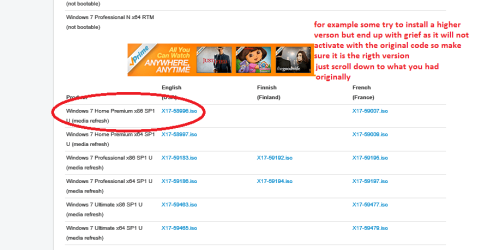
http://www.sevenforums.com/tutorials/219487-clean-reinstall-factory-oem-windows-7-a.html#post1839164 choose only the version you had originally as some get greedy and think they can get a higher level version and it ends in grief because the activation code tied to your motherboard will only install and activate say Home premium for example if that was the first version put on. See pic
If the problem carries on then maybe the SSD is faulty in some way - have you tried diagnosing it with Samsung Magician when you have had chance to keep it running?
Samsung SSD (Solid State Drives) 840 EVO | Samsung SSD US

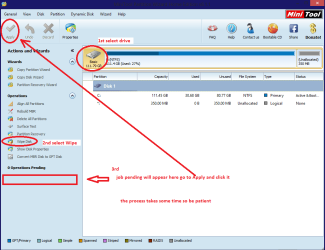
The other way to wipe that drive is with a USB to SATA gadget and access to another machine then you can use diskpart or the Partition Wizard wipe feature
http://www.sevenforums.com/tutorials/52129-disk-clean-clean-all-diskpart-command.html

see my pic for the PW wipe
 

Attachments

  • ISO.PNG
    ISO.PNG
    22.9 KB · Views: 1
  • MINI TOOLS _ WIPE.PNG
    MINI TOOLS _ WIPE.PNG
    31.5 KB · Views: 1

My Computer My Computer

At a glance

Desk1 7 Home Prem / Desk2 10 Pro / Main lap A...Desk1 i5 3750K / Laptop i7 GTX 860M / Desk2 i...Desk1 8GB (1866) / Desk2 16GB (1333) / Laptop...Desk 1& 2NVidia GTX 650 & Laptops on board Intel
Computer type
PC/Desktop
Computer Manufacturer/Model Number
Own build (new) Desk1 / Asus ROG Win 7 / Desk2 1st build
OS
Desk1 7 Home Prem / Desk2 10 Pro / Main lap Asus ROG 10 Pro 2 laptop Toshiba 7 Pro Asus P2520 7 & 10
CPU
Desk1 i5 3750K / Laptop i7 GTX 860M / Desk2 i5 2500
Motherboard
Desk1 Asus P877-V / Desk2 Gigabyte H67 UD3H / Laptop ?
Memory
Desk1 8GB (1866) / Desk2 16GB (1333) / Laptop 8Gb DDR3
Graphics Card(s)
Desk 1& 2NVidia GTX 650 & Laptops on board Intel
Sound Card
Desk 1 & 2 -XONAR DG Realtek High Def audio Laptop
Monitor(s) Displays
Desk 1 Benq HD 2450 / Desk2 Philips 24" / Laptop 17.5"
Screen Resolution
1920x1080 D1 & D2 & Laptop 1
Hard Drives
Desk1 Samsung 120GB 830 SSD
Asus ROG 256GB 850 Pro SSD
Desk2 Samsung 840 256 SSD
Toshiba 120GB EVO
PSU
Desk 1 Corsair HX 1050/ Laptop ? / Desk 2 Corsair HX 650
Case
Desk 1 Cooler HAF XM ? Toshiba laptop / Desk2 Coolermaster
Cooling
Fans on all Desk1 -2 Desk2 - all Coolermasters 5 Laptop ?
Keyboard
Desk 1 MS Sidewinder X6 Desk 2 MS Sidewinder X 4
Mouse
Desk 1&2 - Gigabyte MS 900 gamer - laptop - Logitec wireless
Internet Speed
ADSL2+
Other Info
One other Desktop (tester) and spare Toshba laptop both with SSD's
Running Kaspersky 2016 ISS on all machines config'd identically
Logitec audio stereo systems on each machine (x3)
Canon MG5250MFC
Router/modem TP-Link running WPA2SK
Lets start off with the for sure things that are simple.
When you get the computer back from the shop.

***Check and see how many anti virus programs you have installed.
You must have only one anti virus program on one computer at one time.***

Let us know what the repair shop finds and what they corrected.
 

My Computer My Computer

At a glance

Windows 10 Pro. 64/ version 1709 Windows 7 Pr...Intel i7-6800K @ 4.3Corsair Platinum 16 gig @2400EVGA GTX 1070 OC
Computer type
PC/Desktop
Computer Manufacturer/Model Number
Home made Desktop
OS
Windows 10 Pro. 64/ version 1709 Windows 7 Pro/64
CPU
Intel i7-6800K @ 4.3
Motherboard
ASUS X-99 Deluxe II
Memory
Corsair Platinum 16 gig @2400
Graphics Card(s)
EVGA GTX 1070 OC
Monitor(s) Displays
Asus 27" LED LCD/VE278Q
Screen Resolution
1920-1080 or 1280-720 HDMI
Hard Drives
INTEL SSD 730-240 Gb Sata 3.0/
PSU
EVGA Platium 1200W
Case
Phanteks Luxe Tempered Glass 8 fans/ one radiator
Cooling
XSPC/ Water Cooled CPU
Keyboard
Das 4 Professional
Mouse
Logitech M705/MX Anywhere 2-S
Internet Speed
100 mbits
Antivirus
Microsoft Security Essentials/ Malwarebytes Premium 3.0/ SAS
Browser
I.E. 11 default/Firefox/ ISP Time Warner Cable/Spectrum
Other Info
LG BluRay Burner/
Sound system-KLipsch-THX/
Icy Dock ssd Hot Swap bays.
The only time I see two AV's playing well together is when its with MSE. Even then, I don't think its really needed.
 

My Computer My Computer

At a glance

Dual Boot: Windows 8.1 & Server 2012r2 VMs: K...A10 7700 Kavari SteamRoller8GB DDR3 SDRAM PC3-85001024MB ATI AMD Radeon R7 Graphics
Computer type
PC/Desktop
Computer Manufacturer/Model Number
Custom
OS
Dual Boot: Windows 8.1 & Server 2012r2 VMs: Kali Linux, Backbox, Matriux, Windows 8.1
CPU
A10 7700 Kavari SteamRoller
Motherboard
ASUS A88XM-PLUS (FM2+ )
Memory
8GB DDR3 SDRAM PC3-8500
Graphics Card(s)
1024MB ATI AMD Radeon R7 Graphics
Sound Card
Realtek High Definition Audio
Monitor(s) Displays
Samsung
Hard Drives
SSD Crucial 120gb
WD VelociRaptor 1tb
PSU
Rosewill Gaming 650w
Case
Rosewill Galaxy 2
Internet Speed
55/12
Antivirus
Malwarebytes, MSE, SAS
Browser
FireFox, Chrome
All good advice about multiple AVs. I recon the OP tried them one at a time, or ran them independently. I would not assume he installed them all on the hard drive at the same time.

EDIT: you should confirm that dc42nr86. Did you install more than one at the same time?

But I don't see how any of that is going to explain erased partitions.
 

My Computer My Computer

At a glance

Windows 7 64 Bit Home Premium SP1i7-3820GSkill F3-14900CL9Q - 16GBEVGA GeForce GTX660 - Driver 352.86
Computer type
PC/Desktop
Computer Manufacturer/Model Number
Home Built - Jan 2013
OS
Windows 7 64 Bit Home Premium SP1
CPU
i7-3820
Motherboard
Asus P9X79-PRO - Bios 4608
Memory
GSkill F3-14900CL9Q - 16GB
Graphics Card(s)
EVGA GeForce GTX660 - Driver 352.86
Sound Card
On board Realtek ALC898
Monitor(s) Displays
Acer S271HL
Screen Resolution
1920 x 1080
Hard Drives
#1- Samsung 840 Pro Series
#2- Western Digital WD1002FAEX Sata3 Black
#3- Western Digital WD1002FAEX Sata3 Black
PSU
Corsair CMPSU-850TX-V2 - 850 watt (by Seasonic)
Case
Corsair Obsidian 550D
Cooling
Standard 3 120mm case fans, Cooler Master Hyper 212 EVO
Keyboard
MS KC-0405
Mouse
Intellimouse 5-button
Internet Speed
56 Mbits/Sec (on a good day)
Antivirus
Avast & Malwarebytes
Browser
Firefox
Other Info
Asus DVD - DRW-24B1ST 24X
Sorry, those were all the ones I used to scan. Only one was on the system at each time. Two more days until I get it back, wish me luck!
 

My Computer My Computer

At a glance

Win 7 64 BitIntel® Core™ i5-3320M (2.60 GHz, 3MB L3, 1600...Crucial 8GB (4GBx2) DDR3 1600 MT/s (PC3-12800...Intel HD 4000
Computer type
Laptop
Computer Manufacturer/Model Number
Lenovo Thinkpad x230
OS
Win 7 64 Bit
CPU
Intel® Core™ i5-3320M (2.60 GHz, 3MB L3, 1600MHz FSB)
Memory
Crucial 8GB (4GBx2) DDR3 1600 MT/s (PC3-12800) CL11 SODIMM
Graphics Card(s)
Intel HD 4000
Screen Resolution
1366x768
Hard Drives
Samsung Electronics 840 EVO-Series 250GB 2.5-Inch SATA III
MZ-7TE250BW
Antivirus
Kaspersky, TMicro, Avast, AVG, BitDefender, ClamAV, McAfee
Browser
Google Chrome
Yes I rather guessed it was that as loading that many would have taken forever on boot;) oh and good luck.
 

My Computer My Computer

At a glance

Desk1 7 Home Prem / Desk2 10 Pro / Main lap A...Desk1 i5 3750K / Laptop i7 GTX 860M / Desk2 i...Desk1 8GB (1866) / Desk2 16GB (1333) / Laptop...Desk 1& 2NVidia GTX 650 & Laptops on board Intel
Computer type
PC/Desktop
Computer Manufacturer/Model Number
Own build (new) Desk1 / Asus ROG Win 7 / Desk2 1st build
OS
Desk1 7 Home Prem / Desk2 10 Pro / Main lap Asus ROG 10 Pro 2 laptop Toshiba 7 Pro Asus P2520 7 & 10
CPU
Desk1 i5 3750K / Laptop i7 GTX 860M / Desk2 i5 2500
Motherboard
Desk1 Asus P877-V / Desk2 Gigabyte H67 UD3H / Laptop ?
Memory
Desk1 8GB (1866) / Desk2 16GB (1333) / Laptop 8Gb DDR3
Graphics Card(s)
Desk 1& 2NVidia GTX 650 & Laptops on board Intel
Sound Card
Desk 1 & 2 -XONAR DG Realtek High Def audio Laptop
Monitor(s) Displays
Desk 1 Benq HD 2450 / Desk2 Philips 24" / Laptop 17.5"
Screen Resolution
1920x1080 D1 & D2 & Laptop 1
Hard Drives
Desk1 Samsung 120GB 830 SSD
Asus ROG 256GB 850 Pro SSD
Desk2 Samsung 840 256 SSD
Toshiba 120GB EVO
PSU
Desk 1 Corsair HX 1050/ Laptop ? / Desk 2 Corsair HX 650
Case
Desk 1 Cooler HAF XM ? Toshiba laptop / Desk2 Coolermaster
Cooling
Fans on all Desk1 -2 Desk2 - all Coolermasters 5 Laptop ?
Keyboard
Desk 1 MS Sidewinder X6 Desk 2 MS Sidewinder X 4
Mouse
Desk 1&2 - Gigabyte MS 900 gamer - laptop - Logitec wireless
Internet Speed
ADSL2+
Other Info
One other Desktop (tester) and spare Toshba laptop both with SSD's
Running Kaspersky 2016 ISS on all machines config'd identically
Logitec audio stereo systems on each machine (x3)
Canon MG5250MFC
Router/modem TP-Link running WPA2SK
I got the machine back from the store I bought it from with no luck at all. The repair tech think it has something to do with lenovo's firmware on the hard drives. He says there might be a key on the HD that needs to match the motherboard or something. It looks like this machine still has warranty so I'm going to be calling Lenovo up and see from there.
 

My Computer My Computer

At a glance

Win 7 64 BitIntel® Core™ i5-3320M (2.60 GHz, 3MB L3, 1600...Crucial 8GB (4GBx2) DDR3 1600 MT/s (PC3-12800...Intel HD 4000
Computer type
Laptop
Computer Manufacturer/Model Number
Lenovo Thinkpad x230
OS
Win 7 64 Bit
CPU
Intel® Core™ i5-3320M (2.60 GHz, 3MB L3, 1600MHz FSB)
Memory
Crucial 8GB (4GBx2) DDR3 1600 MT/s (PC3-12800) CL11 SODIMM
Graphics Card(s)
Intel HD 4000
Screen Resolution
1366x768
Hard Drives
Samsung Electronics 840 EVO-Series 250GB 2.5-Inch SATA III
MZ-7TE250BW
Antivirus
Kaspersky, TMicro, Avast, AVG, BitDefender, ClamAV, McAfee
Browser
Google Chrome
Good idea mate as I have never heard of a "key" for a hard drive - the OS yes which is tied to that motherboard by the rules of using Windows especially an OEM version which Lenovo would have been using their licensing agreement with Microsoft. The retail version that an individual can buy is transferrable on a certain number of occasions to be used on one machine albeit a different one at any one time ie if the original motherboard should be bricked or you just buy a new machine and not use the previous one.

I stand to be corrected on what I have stated of course but as far as I know that is how it is.
 

My Computer My Computer

At a glance

Desk1 7 Home Prem / Desk2 10 Pro / Main lap A...Desk1 i5 3750K / Laptop i7 GTX 860M / Desk2 i...Desk1 8GB (1866) / Desk2 16GB (1333) / Laptop...Desk 1& 2NVidia GTX 650 & Laptops on board Intel
Computer type
PC/Desktop
Computer Manufacturer/Model Number
Own build (new) Desk1 / Asus ROG Win 7 / Desk2 1st build
OS
Desk1 7 Home Prem / Desk2 10 Pro / Main lap Asus ROG 10 Pro 2 laptop Toshiba 7 Pro Asus P2520 7 & 10
CPU
Desk1 i5 3750K / Laptop i7 GTX 860M / Desk2 i5 2500
Motherboard
Desk1 Asus P877-V / Desk2 Gigabyte H67 UD3H / Laptop ?
Memory
Desk1 8GB (1866) / Desk2 16GB (1333) / Laptop 8Gb DDR3
Graphics Card(s)
Desk 1& 2NVidia GTX 650 & Laptops on board Intel
Sound Card
Desk 1 & 2 -XONAR DG Realtek High Def audio Laptop
Monitor(s) Displays
Desk 1 Benq HD 2450 / Desk2 Philips 24" / Laptop 17.5"
Screen Resolution
1920x1080 D1 & D2 & Laptop 1
Hard Drives
Desk1 Samsung 120GB 830 SSD
Asus ROG 256GB 850 Pro SSD
Desk2 Samsung 840 256 SSD
Toshiba 120GB EVO
PSU
Desk 1 Corsair HX 1050/ Laptop ? / Desk 2 Corsair HX 650
Case
Desk 1 Cooler HAF XM ? Toshiba laptop / Desk2 Coolermaster
Cooling
Fans on all Desk1 -2 Desk2 - all Coolermasters 5 Laptop ?
Keyboard
Desk 1 MS Sidewinder X6 Desk 2 MS Sidewinder X 4
Mouse
Desk 1&2 - Gigabyte MS 900 gamer - laptop - Logitec wireless
Internet Speed
ADSL2+
Other Info
One other Desktop (tester) and spare Toshba laptop both with SSD's
Running Kaspersky 2016 ISS on all machines config'd identically
Logitec audio stereo systems on each machine (x3)
Canon MG5250MFC
Router/modem TP-Link running WPA2SK
Yours is a very unusual problem. It will probably take some out of the box thinking to track it down.

But the basic fact is that this machine does not function correctly and it is under warranty so it makes sense to get satisfaction through the manufacturer.

That said, there is firmware in a hard drive, but it is not Lenovo's firmware, it's Samsung's. And since you tried a second drive it is less likely it could be a corrupted firmware.

That leaves your PC firmware - the BIOS. If you have reset the BIOS defaults, and set the SATA Controller to AHCI mode, then it should work with any hard drive, spinning or SSD. The system will make no distinction.

You might check to see if there is a BIOS update that addresses SATA issues. Be sure you know the best way to update a BIOS before attempting an update though.

But if the SSD works normally in another computer then I suspect there is a problem with the SATA controller on your motherboard.

Did this system come with a spinning hard drive? Does the same thing happen if you install Wiondows on the spinner?
 

My Computer My Computer

At a glance

Windows 7 64 Bit Home Premium SP1i7-3820GSkill F3-14900CL9Q - 16GBEVGA GeForce GTX660 - Driver 352.86
Computer type
PC/Desktop
Computer Manufacturer/Model Number
Home Built - Jan 2013
OS
Windows 7 64 Bit Home Premium SP1
CPU
i7-3820
Motherboard
Asus P9X79-PRO - Bios 4608
Memory
GSkill F3-14900CL9Q - 16GB
Graphics Card(s)
EVGA GeForce GTX660 - Driver 352.86
Sound Card
On board Realtek ALC898
Monitor(s) Displays
Acer S271HL
Screen Resolution
1920 x 1080
Hard Drives
#1- Samsung 840 Pro Series
#2- Western Digital WD1002FAEX Sata3 Black
#3- Western Digital WD1002FAEX Sata3 Black
PSU
Corsair CMPSU-850TX-V2 - 850 watt (by Seasonic)
Case
Corsair Obsidian 550D
Cooling
Standard 3 120mm case fans, Cooler Master Hyper 212 EVO
Keyboard
MS KC-0405
Mouse
Intellimouse 5-button
Internet Speed
56 Mbits/Sec (on a good day)
Antivirus
Avast & Malwarebytes
Browser
Firefox
Other Info
Asus DVD - DRW-24B1ST 24X
I haven't tried on a spinning hard disk. The computer knows there a hard drive connected (per bios, diskpart, and even the bootmgr). I hope Lenovo takes care of it because I think I've tried everything lol
 

My Computer My Computer

At a glance

Win 7 64 BitIntel® Core™ i5-3320M (2.60 GHz, 3MB L3, 1600...Crucial 8GB (4GBx2) DDR3 1600 MT/s (PC3-12800...Intel HD 4000
Computer type
Laptop
Computer Manufacturer/Model Number
Lenovo Thinkpad x230
OS
Win 7 64 Bit
CPU
Intel® Core™ i5-3320M (2.60 GHz, 3MB L3, 1600MHz FSB)
Memory
Crucial 8GB (4GBx2) DDR3 1600 MT/s (PC3-12800) CL11 SODIMM
Graphics Card(s)
Intel HD 4000
Screen Resolution
1366x768
Hard Drives
Samsung Electronics 840 EVO-Series 250GB 2.5-Inch SATA III
MZ-7TE250BW
Antivirus
Kaspersky, TMicro, Avast, AVG, BitDefender, ClamAV, McAfee
Browser
Google Chrome
Lenovo is sending me a repair disk, they think it has something to do with it activating the retail version vs oem version -_-, we'll see lol
 

My Computer My Computer

At a glance

Win 7 64 BitIntel® Core™ i5-3320M (2.60 GHz, 3MB L3, 1600...Crucial 8GB (4GBx2) DDR3 1600 MT/s (PC3-12800...Intel HD 4000
Computer type
Laptop
Computer Manufacturer/Model Number
Lenovo Thinkpad x230
OS
Win 7 64 Bit
CPU
Intel® Core™ i5-3320M (2.60 GHz, 3MB L3, 1600MHz FSB)
Memory
Crucial 8GB (4GBx2) DDR3 1600 MT/s (PC3-12800) CL11 SODIMM
Graphics Card(s)
Intel HD 4000
Screen Resolution
1366x768
Hard Drives
Samsung Electronics 840 EVO-Series 250GB 2.5-Inch SATA III
MZ-7TE250BW
Antivirus
Kaspersky, TMicro, Avast, AVG, BitDefender, ClamAV, McAfee
Browser
Google Chrome
Back
Top