Help - Doc wants to resize HD partitions

As Greg asks, open up E and post a screenshot and we can see if there`s anything else on it that doesn`t belong.
 

My Computer My Computer

At a glance

Windows 10 Pro x64Intel Core i7 6700KGSkill TridentZ RGB 16GB 3600 16-16-16-36EVGA GTX 980 Ti SC x2
Computer type
PC/Desktop
Computer Manufacturer/Model Number
Skylake Special #666
OS
Windows 10 Pro x64
CPU
Intel Core i7 6700K
Motherboard
Asus Sabertooth Z170 Mark 1
Memory
GSkill TridentZ RGB 16GB 3600 16-16-16-36
Graphics Card(s)
EVGA GTX 980 Ti SC x2
Sound Card
Realtek High Definition
Monitor(s) Displays
AOC G2460PG
Screen Resolution
1920 x 1080 144Hz
Hard Drives
Samsung 860 Pro 256GB, Seagate Barracuda 4TB x2
PSU
EVGA 1000 P2, EVGA White Custom Braided Cables
Case
Corsair Vengeance C70 Gunmetal Black
Cooling
Corsair H100i v2, Corsair ML120 x2, Thermal Grizzly Kryonaut
Keyboard
Logitech G910 Orion Spectrum
Mouse
Logitech G700s
Internet Speed
Verizon Fios Quantum Gateway 75/75
Antivirus
Windows Defender, Malwarebytes Free 3.8.3
Browser
Chrome
Other Info
Corsair SP120 x4, LG Blu-ray Drive, Durabrand HT-395 100 Watt Dolby Digital Amp, Corsair H2100 Wireless 7.1 Headset
Do I need to delete the JW-HP folder on E: which is empty now ? But if I try to backup now, it says not enough space on E:
 

My Computer My Computer

At a glance

Win7 Enterprise, Win7 x86 (Ult 7600), Win7 x6...AMD fx8350 4ghz, AMD-32 2400mhz, AMD-64 3200m...2gb, 4gb on the Ult 7600, 4gb on Technet RTM,...Draw my own Graphics, several nVidia cards
Computer type
PC/Desktop
Computer Manufacturer/Model Number
Built them myself, Science Experiments !
OS
Win7 Enterprise, Win7 x86 (Ult 7600), Win7 x64 Ult 7600, TechNet RTM on AMD x64 (2.8Ghz)
CPU
AMD fx8350 4ghz, AMD-32 2400mhz, AMD-64 3200mhz, AMDx64 2.8G
Motherboard
SIS 755, ECS-K8M890M-M (Ult 7600), GigaByte & others
Memory
2gb, 4gb on the Ult 7600, 4gb on Technet RTM, 32gb on FX8350
Graphics Card(s)
Draw my own Graphics, several nVidia cards
Sound Card
on motherboard
Monitor(s) Displays
19" flat scr, 28" I-Inc widescr,22" Emprex Widescr, 23" Acer
Screen Resolution
1280 x 1024, 1440 x 900, 1920 x 1080
Hard Drives
6 pata Ide HD's & 2 Sata HD's
added 80gb external on Ult 7600 computer,
numerous extra 1tb, 2TB, 3Tb SATA HD's
A collection of ext HD Docks w/ HDs
PSU
430w, 550w, 600w, 700, 800, etc
Case
All Generic Full Towers
Cooling
Open Air & a few fans, some w/ colored LEDs
Keyboard
Compaq & Dell recycled from GoodWill
Mouse
Made in China Optical Wired Mouse
Internet Speed
Fast Cable InterNet
Antivirus
AVG Free on 24 different Desktops, NO Problems!
Browser
IE 8 is preferred, but use FireFox sometimes
Other Info
Linksys Routers, switches, & Hubs
Too Many USB Flash Drives to count, Biggest is 64GB !
Eight computers in my home network.
Sixteen computers at my business network.
Linked via TeamViewer !
Lots of old used spare computer parts everywhere!
You can`t do backups to E, we keep telling you.

Don`t use windows backup.

Don`t do backups unless you have an external hard drive.

You should be backing up your data yourself, not relying on windows to do it.

Don`t delete anything on E until you give us a screenshot.
 

My Computer My Computer

At a glance

Windows 10 Pro x64Intel Core i7 6700KGSkill TridentZ RGB 16GB 3600 16-16-16-36EVGA GTX 980 Ti SC x2
Computer type
PC/Desktop
Computer Manufacturer/Model Number
Skylake Special #666
OS
Windows 10 Pro x64
CPU
Intel Core i7 6700K
Motherboard
Asus Sabertooth Z170 Mark 1
Memory
GSkill TridentZ RGB 16GB 3600 16-16-16-36
Graphics Card(s)
EVGA GTX 980 Ti SC x2
Sound Card
Realtek High Definition
Monitor(s) Displays
AOC G2460PG
Screen Resolution
1920 x 1080 144Hz
Hard Drives
Samsung 860 Pro 256GB, Seagate Barracuda 4TB x2
PSU
EVGA 1000 P2, EVGA White Custom Braided Cables
Case
Corsair Vengeance C70 Gunmetal Black
Cooling
Corsair H100i v2, Corsair ML120 x2, Thermal Grizzly Kryonaut
Keyboard
Logitech G910 Orion Spectrum
Mouse
Logitech G700s
Internet Speed
Verizon Fios Quantum Gateway 75/75
Antivirus
Windows Defender, Malwarebytes Free 3.8.3
Browser
Chrome
Other Info
Corsair SP120 x4, LG Blu-ray Drive, Durabrand HT-395 100 Watt Dolby Digital Amp, Corsair H2100 Wireless 7.1 Headset
This happens because Users like Doc's friend see the notification in Action Center to Set up Backup, enable Scheduled Backup without paying attention to where it is set to write. There is a link there to Manage Storage locations to adjust this.

This is a problem with an OEM or REcovery partition having a Drive Letter and why System Reserved partition doesn't have one. Backup is meant to write to a storage drive or partition. It can be written to another partition on the drive but then it isn't really a backup if the HD dies.

I don't know what JP-HW is, but is it empty even with System and Hidden files unhidden?
 
It`s JW-HP so I would think it`s an HP folder.

Ya, I turn those tedious Action Center messages off after a new install.
 

My Computer My Computer

At a glance

Windows 10 Pro x64Intel Core i7 6700KGSkill TridentZ RGB 16GB 3600 16-16-16-36EVGA GTX 980 Ti SC x2
Computer type
PC/Desktop
Computer Manufacturer/Model Number
Skylake Special #666
OS
Windows 10 Pro x64
CPU
Intel Core i7 6700K
Motherboard
Asus Sabertooth Z170 Mark 1
Memory
GSkill TridentZ RGB 16GB 3600 16-16-16-36
Graphics Card(s)
EVGA GTX 980 Ti SC x2
Sound Card
Realtek High Definition
Monitor(s) Displays
AOC G2460PG
Screen Resolution
1920 x 1080 144Hz
Hard Drives
Samsung 860 Pro 256GB, Seagate Barracuda 4TB x2
PSU
EVGA 1000 P2, EVGA White Custom Braided Cables
Case
Corsair Vengeance C70 Gunmetal Black
Cooling
Corsair H100i v2, Corsair ML120 x2, Thermal Grizzly Kryonaut
Keyboard
Logitech G910 Orion Spectrum
Mouse
Logitech G700s
Internet Speed
Verizon Fios Quantum Gateway 75/75
Antivirus
Windows Defender, Malwarebytes Free 3.8.3
Browser
Chrome
Other Info
Corsair SP120 x4, LG Blu-ray Drive, Durabrand HT-395 100 Watt Dolby Digital Amp, Corsair H2100 Wireless 7.1 Headset
JW-HP folder is where it was putting the backup until it said there was not enough room left for a new backup ????
 

My Computer My Computer

At a glance

Win7 Enterprise, Win7 x86 (Ult 7600), Win7 x6...AMD fx8350 4ghz, AMD-32 2400mhz, AMD-64 3200m...2gb, 4gb on the Ult 7600, 4gb on Technet RTM,...Draw my own Graphics, several nVidia cards
Computer type
PC/Desktop
Computer Manufacturer/Model Number
Built them myself, Science Experiments !
OS
Win7 Enterprise, Win7 x86 (Ult 7600), Win7 x64 Ult 7600, TechNet RTM on AMD x64 (2.8Ghz)
CPU
AMD fx8350 4ghz, AMD-32 2400mhz, AMD-64 3200mhz, AMDx64 2.8G
Motherboard
SIS 755, ECS-K8M890M-M (Ult 7600), GigaByte & others
Memory
2gb, 4gb on the Ult 7600, 4gb on Technet RTM, 32gb on FX8350
Graphics Card(s)
Draw my own Graphics, several nVidia cards
Sound Card
on motherboard
Monitor(s) Displays
19" flat scr, 28" I-Inc widescr,22" Emprex Widescr, 23" Acer
Screen Resolution
1280 x 1024, 1440 x 900, 1920 x 1080
Hard Drives
6 pata Ide HD's & 2 Sata HD's
added 80gb external on Ult 7600 computer,
numerous extra 1tb, 2TB, 3Tb SATA HD's
A collection of ext HD Docks w/ HDs
PSU
430w, 550w, 600w, 700, 800, etc
Case
All Generic Full Towers
Cooling
Open Air & a few fans, some w/ colored LEDs
Keyboard
Compaq & Dell recycled from GoodWill
Mouse
Made in China Optical Wired Mouse
Internet Speed
Fast Cable InterNet
Antivirus
AVG Free on 24 different Desktops, NO Problems!
Browser
IE 8 is preferred, but use FireFox sometimes
Other Info
Linksys Routers, switches, & Hubs
Too Many USB Flash Drives to count, Biggest is 64GB !
Eight computers in my home network.
Sixteen computers at my business network.
Linked via TeamViewer !
Lots of old used spare computer parts everywhere!
I have to go to bed for the 5:45 wake up call tomorrow morning. I will do a back up to a ext portable HD tomorrow night. Thanks all.
 

My Computer My Computer

At a glance

Win7 Enterprise, Win7 x86 (Ult 7600), Win7 x6...AMD fx8350 4ghz, AMD-32 2400mhz, AMD-64 3200m...2gb, 4gb on the Ult 7600, 4gb on Technet RTM,...Draw my own Graphics, several nVidia cards
Computer type
PC/Desktop
Computer Manufacturer/Model Number
Built them myself, Science Experiments !
OS
Win7 Enterprise, Win7 x86 (Ult 7600), Win7 x64 Ult 7600, TechNet RTM on AMD x64 (2.8Ghz)
CPU
AMD fx8350 4ghz, AMD-32 2400mhz, AMD-64 3200mhz, AMDx64 2.8G
Motherboard
SIS 755, ECS-K8M890M-M (Ult 7600), GigaByte & others
Memory
2gb, 4gb on the Ult 7600, 4gb on Technet RTM, 32gb on FX8350
Graphics Card(s)
Draw my own Graphics, several nVidia cards
Sound Card
on motherboard
Monitor(s) Displays
19" flat scr, 28" I-Inc widescr,22" Emprex Widescr, 23" Acer
Screen Resolution
1280 x 1024, 1440 x 900, 1920 x 1080
Hard Drives
6 pata Ide HD's & 2 Sata HD's
added 80gb external on Ult 7600 computer,
numerous extra 1tb, 2TB, 3Tb SATA HD's
A collection of ext HD Docks w/ HDs
PSU
430w, 550w, 600w, 700, 800, etc
Case
All Generic Full Towers
Cooling
Open Air & a few fans, some w/ colored LEDs
Keyboard
Compaq & Dell recycled from GoodWill
Mouse
Made in China Optical Wired Mouse
Internet Speed
Fast Cable InterNet
Antivirus
AVG Free on 24 different Desktops, NO Problems!
Browser
IE 8 is preferred, but use FireFox sometimes
Other Info
Linksys Routers, switches, & Hubs
Too Many USB Flash Drives to count, Biggest is 64GB !
Eight computers in my home network.
Sixteen computers at my business network.
Linked via TeamViewer !
Lots of old used spare computer parts everywhere!
I'll post something quick and then go back and read again.

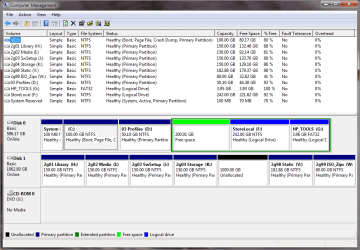
This is an HP box

Partitions
  • sysres
  • c:\
  • d:\mfgr recovery
  • e: HP_Tools
That's 4 partitions - you'll have to figure out how you want to create the next partition (no dynamic parts)


HP_Tools is fairly useless, it holds the
  1. HP UEFI dignostics, which can be downloaded and put on a stick. It is not true UEFI, just diags.
  2. QuickWeb - Linux based (I think) boot with simple network, browser, clock calendar.... There's a small power button on my laptop that launches QuickWeb @ power on
    Quickweb is neat, but I stopped using it after a few "what does this do"
I forget where the file is on D: that throws up the html (it's either in desktop.ini or another file with htt extension.

Make a set of HP Recovery Discs and you can use that space (some members say "No, don't do that, then you can't F11" - oh well, I have the discs "But discs are not failsafe" - neither are HDs... make the discs anyway - maybe your friend already did... try, you can only make one set)

Now here's where you can really help your friend Doc - back up / image the system and do a clean install with Win7 U media. Your friend will have a setup of backups, an HP Recovery Disc, and a shiny new PC.

But Bill, all I wanted to do was repartion the drive, not make a major project out of this.

Yeah, I know.

Oh, E: is FAT32 - the machine is NOT storing Shadow Copies there and the backup screen shot showed last backup never.

I'll post back after reading some more.
 
Last edited:

My Computer My Computer

At a glance

x64 (6.3.9600) Win8.1 Pro & soon dual boot x6...AMD A6-3420M APU with Radeon(tm) HD Graphics6.00 GBAMD Radeon(TM) HD 6520G
Computer type
Laptop
Computer Manufacturer/Model Number
HP Pavilion dv6-6c10us
OS
x64 (6.3.9600) Win8.1 Pro & soon dual boot x64 (6.1.7601) Win7_SP1 HomePrem
CPU
AMD A6-3420M APU with Radeon(tm) HD Graphics
Motherboard
Hewlett-Packard 1805
Memory
6.00 GB
Graphics Card(s)
AMD Radeon(TM) HD 6520G
Sound Card
(1) AMD High Definition Audio Device (2) IDT High Definiti
Monitor(s) Displays
HP W2072a 20" LCD (1600 x 900) @ 60 Hz
Screen Resolution
1366 x 768 x 32 bits (4294967296 colors) @ 60 Hz
Hard Drives
ST640LM0 00 HM641JI SATA Disk Device
Keyboard
Logitech k520 wireless KB
Mouse
Logitech m320 wireless mouse (bundled with KB)
Internet Speed
15/5 | 54 MB Wireless 'n'
Antivirus
Realtime: Defender or Avast | On-demand: Malwarebytes, ESET
Browser
IE 11 on Win8, IE 10 on win 7
Other Info
Media: [Gimp, Audacity, VLC] || Comm: [WEmail 2012, Skype] || Productivity: [OpenOffice,| Textpad] || Utils: [Sysinternals, cCleaner, Speccy, Defraggler]
These OEM partitions house the bootable Diagnostics on the Dell F12 and HP F9 BIOS Boot menus.

The question is why are they given a drive letter? Since I happen to have a factory HP and Dell here I am reinstalling tomorrow I will remove the drive letter and see if either Diagnostics or Recovery will boot. I don't believe either will boot on HP after a Clean Reinstall but OEM Utility Partition will boot on a Dell and is worth keeping for the wide range of hardware tests. But I'll do this while the factory install is still intact.

I'll also post back a screenshot of HP's E OEM partition after unhiding Hidden Files so we can compare the files with the ones Doc has on his to see what is still extra.

Doc, which folders exactly did you delete that were clogging the E partition? Were they titled Backup? The JW-HP might be intended to receive some backup files which were never written since it's empty.
 
here's my DiskMng
SysRes
C: Boot
D: User Profiles
Extended Part
Free Space
F: StoreLocal - holds install files, backups and dirty laundry
G: HP_TOOLS - must be CAPS, must be HP_TOOLS, does NOT have to be E:

You'll have to use Diskpart to create the Extended part and logical drives - I put all that junk at the end of my drive.
I installed the HP UEFI diags from the HP site - I did NOT reinstall QuickWeb
One thing the UEFI can do is manage BIOS updates/rollbacks - I just download and flash - neve used that feature
 

Attachments

  • Diskpart.png
    Diskpart.png
    33.9 KB · Views: 1

My Computer My Computer

At a glance

x64 (6.3.9600) Win8.1 Pro & soon dual boot x6...AMD A6-3420M APU with Radeon(tm) HD Graphics6.00 GBAMD Radeon(TM) HD 6520G
Computer type
Laptop
Computer Manufacturer/Model Number
HP Pavilion dv6-6c10us
OS
x64 (6.3.9600) Win8.1 Pro & soon dual boot x64 (6.1.7601) Win7_SP1 HomePrem
CPU
AMD A6-3420M APU with Radeon(tm) HD Graphics
Motherboard
Hewlett-Packard 1805
Memory
6.00 GB
Graphics Card(s)
AMD Radeon(TM) HD 6520G
Sound Card
(1) AMD High Definition Audio Device (2) IDT High Definiti
Monitor(s) Displays
HP W2072a 20" LCD (1600 x 900) @ 60 Hz
Screen Resolution
1366 x 768 x 32 bits (4294967296 colors) @ 60 Hz
Hard Drives
ST640LM0 00 HM641JI SATA Disk Device
Keyboard
Logitech k520 wireless KB
Mouse
Logitech m320 wireless mouse (bundled with KB)
Internet Speed
15/5 | 54 MB Wireless 'n'
Antivirus
Realtime: Defender or Avast | On-demand: Malwarebytes, ESET
Browser
IE 11 on Win8, IE 10 on win 7
Other Info
Media: [Gimp, Audacity, VLC] || Comm: [WEmail 2012, Skype] || Productivity: [OpenOffice,| Textpad] || Utils: [Sysinternals, cCleaner, Speccy, Defraggler]
Thanks Greg,

I doubt if the diags will run - HP seems to be tied to the volume name HP_TOOLS whether it's a HD or flash volume.

Your test will show if the drive letter is needed or not.

I might have misstated F11 boot option, I always have to look it up, but didn't this time.

Edit: The volume name will still be there even without a drive letter, so the diags might run, since the diags are letter independent
 
Last edited:

My Computer My Computer

At a glance

x64 (6.3.9600) Win8.1 Pro & soon dual boot x6...AMD A6-3420M APU with Radeon(tm) HD Graphics6.00 GBAMD Radeon(TM) HD 6520G
Computer type
Laptop
Computer Manufacturer/Model Number
HP Pavilion dv6-6c10us
OS
x64 (6.3.9600) Win8.1 Pro & soon dual boot x64 (6.1.7601) Win7_SP1 HomePrem
CPU
AMD A6-3420M APU with Radeon(tm) HD Graphics
Motherboard
Hewlett-Packard 1805
Memory
6.00 GB
Graphics Card(s)
AMD Radeon(TM) HD 6520G
Sound Card
(1) AMD High Definition Audio Device (2) IDT High Definiti
Monitor(s) Displays
HP W2072a 20" LCD (1600 x 900) @ 60 Hz
Screen Resolution
1366 x 768 x 32 bits (4294967296 colors) @ 60 Hz
Hard Drives
ST640LM0 00 HM641JI SATA Disk Device
Keyboard
Logitech k520 wireless KB
Mouse
Logitech m320 wireless mouse (bundled with KB)
Internet Speed
15/5 | 54 MB Wireless 'n'
Antivirus
Realtime: Defender or Avast | On-demand: Malwarebytes, ESET
Browser
IE 11 on Win8, IE 10 on win 7
Other Info
Media: [Gimp, Audacity, VLC] || Comm: [WEmail 2012, Skype] || Productivity: [OpenOffice,| Textpad] || Utils: [Sysinternals, cCleaner, Speccy, Defraggler]
Bill it would be interesting to see the contents of your OEM Tools partition after unhiding Hidden and System Files, which is about the same size as Doc's even though it's UEFI which may be different files.
 
Last edited:
Here ya go.... but I have it as my G: drive and as I mentioned
.. I never reinstalled QuickWeb after the clean reinstall

Let me know if you want to see it in explorer as well.

Code:
 Volume in drive G is [B][COLOR=red]HP_TOOLS[/COLOR][/B]
 Volume Serial Number is 9A85-CCA5
 Directory of G:\
11/03/2013  00:23    <DIR>          Hewlett-Packard
04/15/2013  23:28    <DIR>          $RECYCLE.BIN
               0 File(s)              0 bytes
 Directory of G:\Hewlett-Packard
11/03/2013  00:23    <DIR>          .
11/03/2013  00:23    <DIR>          ..
11/03/2013  00:23    <DIR>          SystemDiags
11/03/2013  00:23    <DIR>          BIOSUpdate
11/03/2013  00:23    <DIR>          BIOS
               0 File(s)              0 bytes
 Directory of G:\Hewlett-Packard\SystemDiags
11/03/2013  00:23    <DIR>          .
11/03/2013  00:23    <DIR>          ..
03/11/2013  15:51         3,620,752 SystemDiags.efi
03/11/2013  16:44               256 SystemDiags.sig
03/11/2013  16:32               256 SystemDiags.s09
03/11/2013  16:35               256 SystemDiags.s12
11/05/2012  13:02           443,904 CryptRSA.efi
03/11/2013  15:17           113,104 FirewireDiags.udm
03/11/2013  15:17           260,208 OpticalDiags.udm
03/11/2013  15:18           151,824 VideoMem.udm
03/11/2013  15:18            87,280 VideoDiags.udm
03/11/2013  15:18         1,174,384 USBDiags.udm
01/23/2013  15:30            45,814 firewirediags.msg.xml
01/23/2013  15:31            38,660 opticaldiags.msg.xml
01/23/2013  15:31           100,574 usbdiags.msg.xml
03/11/2013  15:51         3,332,464 SystemDiags32.efi
03/11/2013  16:44               256 SystemDiags32.sig
03/11/2013  16:33               256 SystemDiags32.s09
03/11/2013  16:37               256 SystemDiags32.s12
11/05/2012  13:02           259,072 CryptRSA32.efi
03/11/2013  15:17            94,000 FirewireDiags32.udm
03/11/2013  15:17           229,200 OpticalDiags32.udm
03/11/2013  15:18           142,768 VideoMem32.udm
03/11/2013  15:18            72,240 VideoDiags32.udm
03/11/2013  15:18         1,154,928 USBDiags32.udm
              23 File(s)     11,322,712 bytes
 Directory of G:\Hewlett-Packard\BIOSUpdate
11/03/2013  00:23    <DIR>          .
11/03/2013  00:23    <DIR>          ..
02/13/2013  12:44           822,928 HpBiosUpdate.efi
02/13/2013  14:53               256 HpBiosUpdate.sig
02/13/2013  15:06               256 HpBiosUpdate.s09
02/13/2013  15:07               256 HpBiosUpdate.s12
11/05/2012  13:02           443,904 CryptRSA.efi
02/13/2013  12:44           794,160 HpBiosUpdate32.efi
02/13/2013  14:53               256 HpBiosUpdate32.sig
02/13/2013  15:07               256 HpBiosUpdate32.s09
02/13/2013  15:07               256 HpBiosUpdate32.s12
11/05/2012  13:02           259,072 CryptRSA32.efi
              10 File(s)      2,321,600 bytes
 Directory of G:\Hewlett-Packard\BIOS
11/03/2013  00:23    <DIR>          .
11/03/2013  00:23    <DIR>          ..
11/03/2013  00:23    <DIR>          Current
11/03/2013  00:23    <DIR>          New
11/03/2013  00:23    <DIR>          Previous
               0 File(s)              0 bytes
 Directory of G:\Hewlett-Packard\BIOS\Current
11/03/2013  00:23    <DIR>          .
11/03/2013  00:23    <DIR>          ..
               0 File(s)              0 bytes
 Directory of G:\Hewlett-Packard\BIOS\New
11/03/2013  00:23    <DIR>          .
11/03/2013  00:23    <DIR>          ..
               0 File(s)              0 bytes
 Directory of G:\Hewlett-Packard\BIOS\Previous
11/03/2013  00:23    <DIR>          .
11/03/2013  00:23    <DIR>          ..
               0 File(s)              0 bytes
 Directory of G:\$RECYCLE.BIN
04/15/2013  23:28    <DIR>          .
04/15/2013  23:28    <DIR>          ..
04/15/2013  23:28               129 desktop.ini
               1 File(s)            129 bytes
     Total Files Listed:
              34 File(s)     13,644,441 bytes
              24 Dir(s)   4,224,577,536 bytes free

 

My Computer My Computer

At a glance

x64 (6.3.9600) Win8.1 Pro & soon dual boot x6...AMD A6-3420M APU with Radeon(tm) HD Graphics6.00 GBAMD Radeon(TM) HD 6520G
Computer type
Laptop
Computer Manufacturer/Model Number
HP Pavilion dv6-6c10us
OS
x64 (6.3.9600) Win8.1 Pro & soon dual boot x64 (6.1.7601) Win7_SP1 HomePrem
CPU
AMD A6-3420M APU with Radeon(tm) HD Graphics
Motherboard
Hewlett-Packard 1805
Memory
6.00 GB
Graphics Card(s)
AMD Radeon(TM) HD 6520G
Sound Card
(1) AMD High Definition Audio Device (2) IDT High Definiti
Monitor(s) Displays
HP W2072a 20" LCD (1600 x 900) @ 60 Hz
Screen Resolution
1366 x 768 x 32 bits (4294967296 colors) @ 60 Hz
Hard Drives
ST640LM0 00 HM641JI SATA Disk Device
Keyboard
Logitech k520 wireless KB
Mouse
Logitech m320 wireless mouse (bundled with KB)
Internet Speed
15/5 | 54 MB Wireless 'n'
Antivirus
Realtime: Defender or Avast | On-demand: Malwarebytes, ESET
Browser
IE 11 on Win8, IE 10 on win 7
Other Info
Media: [Gimp, Audacity, VLC] || Comm: [WEmail 2012, Skype] || Productivity: [OpenOffice,| Textpad] || Utils: [Sysinternals, cCleaner, Speccy, Defraggler]
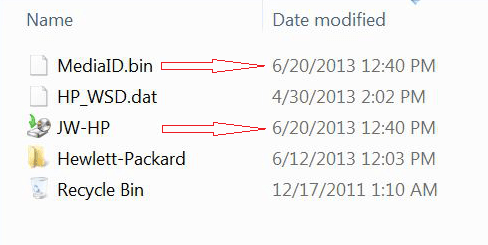
JW-HP is the backup folder named after the computer name.
MediaID.bin and that folder are backup related. I cropped the image attached from Doc's post 17 that show both were created at the same time.

Since you've deleted JW-HP, you migth as well get rid of MediaID.bin

I don't know what JP-HW JW-HP is, but is it empty even with System and Hidden files unhidden?
 

Attachments

  • jw-e.png
    jw-e.png
    30.5 KB · Views: 11

My Computer My Computer

At a glance

x64 (6.3.9600) Win8.1 Pro & soon dual boot x6...AMD A6-3420M APU with Radeon(tm) HD Graphics6.00 GBAMD Radeon(TM) HD 6520G
Computer type
Laptop
Computer Manufacturer/Model Number
HP Pavilion dv6-6c10us
OS
x64 (6.3.9600) Win8.1 Pro & soon dual boot x64 (6.1.7601) Win7_SP1 HomePrem
CPU
AMD A6-3420M APU with Radeon(tm) HD Graphics
Motherboard
Hewlett-Packard 1805
Memory
6.00 GB
Graphics Card(s)
AMD Radeon(TM) HD 6520G
Sound Card
(1) AMD High Definition Audio Device (2) IDT High Definiti
Monitor(s) Displays
HP W2072a 20" LCD (1600 x 900) @ 60 Hz
Screen Resolution
1366 x 768 x 32 bits (4294967296 colors) @ 60 Hz
Hard Drives
ST640LM0 00 HM641JI SATA Disk Device
Keyboard
Logitech k520 wireless KB
Mouse
Logitech m320 wireless mouse (bundled with KB)
Internet Speed
15/5 | 54 MB Wireless 'n'
Antivirus
Realtime: Defender or Avast | On-demand: Malwarebytes, ESET
Browser
IE 11 on Win8, IE 10 on win 7
Other Info
Media: [Gimp, Audacity, VLC] || Comm: [WEmail 2012, Skype] || Productivity: [OpenOffice,| Textpad] || Utils: [Sysinternals, cCleaner, Speccy, Defraggler]
I should note that I had difficulty finding the correct drivers for
Bluetooth - HP did not list it for my machine - had to search HP
--> Note: the BCM card is a combo card (BT & 802.11)
AMD USB 3.0 & SMBUS - had to install base offered on HP download page for chipset (only HP called it AMD Graphics) and then update Graphics to newer versions.

Biometrics - found the drivers searching HP, left it uninstalled last time (current)
Coolsense - found it ok, just had issues with it. Seems as though it was causing high temps. When I removed it, temps were in range, left it uninstalled last time (current)
DriveGuard - found it ok, left it uninstalled last time (current)

If I think of anything else.....

Oh wait..... HP laptop.... which one? :p
 

My Computer My Computer

At a glance

x64 (6.3.9600) Win8.1 Pro & soon dual boot x6...AMD A6-3420M APU with Radeon(tm) HD Graphics6.00 GBAMD Radeon(TM) HD 6520G
Computer type
Laptop
Computer Manufacturer/Model Number
HP Pavilion dv6-6c10us
OS
x64 (6.3.9600) Win8.1 Pro & soon dual boot x64 (6.1.7601) Win7_SP1 HomePrem
CPU
AMD A6-3420M APU with Radeon(tm) HD Graphics
Motherboard
Hewlett-Packard 1805
Memory
6.00 GB
Graphics Card(s)
AMD Radeon(TM) HD 6520G
Sound Card
(1) AMD High Definition Audio Device (2) IDT High Definiti
Monitor(s) Displays
HP W2072a 20" LCD (1600 x 900) @ 60 Hz
Screen Resolution
1366 x 768 x 32 bits (4294967296 colors) @ 60 Hz
Hard Drives
ST640LM0 00 HM641JI SATA Disk Device
Keyboard
Logitech k520 wireless KB
Mouse
Logitech m320 wireless mouse (bundled with KB)
Internet Speed
15/5 | 54 MB Wireless 'n'
Antivirus
Realtime: Defender or Avast | On-demand: Malwarebytes, ESET
Browser
IE 11 on Win8, IE 10 on win 7
Other Info
Media: [Gimp, Audacity, VLC] || Comm: [WEmail 2012, Skype] || Productivity: [OpenOffice,| Textpad] || Utils: [Sysinternals, cCleaner, Speccy, Defraggler]
The two HP programs which you mention and are debatable about reinstalling after a Clean Reinstall - Factory OEM Windows 7, Cool Sense and Drive Guard, are worth more discussion since they safeguard critical temperature and HD hardware on the PC, yet they can cause issues. What do others here think about their net value for reinstall?

I am facing this issue right now on an HP and don't want to fall short of Best Practice. The tutorial also needs something more determinative on this.
 

My Computer My Computer

At a glance

x64 (6.3.9600) Win8.1 Pro & soon dual boot x6...AMD A6-3420M APU with Radeon(tm) HD Graphics6.00 GBAMD Radeon(TM) HD 6520G
Computer type
Laptop
Computer Manufacturer/Model Number
HP Pavilion dv6-6c10us
OS
x64 (6.3.9600) Win8.1 Pro & soon dual boot x64 (6.1.7601) Win7_SP1 HomePrem
CPU
AMD A6-3420M APU with Radeon(tm) HD Graphics
Motherboard
Hewlett-Packard 1805
Memory
6.00 GB
Graphics Card(s)
AMD Radeon(TM) HD 6520G
Sound Card
(1) AMD High Definition Audio Device (2) IDT High Definiti
Monitor(s) Displays
HP W2072a 20" LCD (1600 x 900) @ 60 Hz
Screen Resolution
1366 x 768 x 32 bits (4294967296 colors) @ 60 Hz
Hard Drives
ST640LM0 00 HM641JI SATA Disk Device
Keyboard
Logitech k520 wireless KB
Mouse
Logitech m320 wireless mouse (bundled with KB)
Internet Speed
15/5 | 54 MB Wireless 'n'
Antivirus
Realtime: Defender or Avast | On-demand: Malwarebytes, ESET
Browser
IE 11 on Win8, IE 10 on win 7
Other Info
Media: [Gimp, Audacity, VLC] || Comm: [WEmail 2012, Skype] || Productivity: [OpenOffice,| Textpad] || Utils: [Sysinternals, cCleaner, Speccy, Defraggler]
Back
Top