Solved Help! Dual Boot of Win7 not switching drive to C:

MTL777

New member
Member
Local time
6:25 PM
Messages
44
I installed Win7 Pro 64-bit on a partition named AudioApp7. After fully testing that this partition works and activating Windows on this partition, I then cloned this partition to another partition named Michael7 with the intention of dual booting between the two partitions. The AudioApp7 partition is assigned drive letter C: and the Michael7 partition is assigned drive letter N:. I installed EasyBCD 2.3 in the AudioApp7 partition to setup the dual booting.

I'm having a problem in that when I boot into Michael7, its drive letter remains as N: and does not change to C:. Because of this, when I download from a website, the downloaded file is saved in drive C: which is the AudioApp7 partition. And when I make any changes such as moving icons in the desktop, the changes affect the desktop in drive C: which is the AudioApp7 partition, not the Michael7 partition which is the intended target of the changes.

How do I fix this problem so that when I boot into Michael7 it will automatically change the drive letter of Michael7 to C: so that the problem is avoided?

Thank you so much in advance for your much appreciated help!
 

My Computer My Computer

At a glance

Windows 7 Pro 64 BitAMD Phenom4 GBBuilt-in
Computer type
PC/Desktop
Computer Manufacturer/Model Number
Custom
OS
Windows 7 Pro 64 Bit
CPU
AMD Phenom
Motherboard
Asrock M3A790GXH128M
Memory
4 GB
Graphics Card(s)
Built-in
Hard Drives
Samsung SSD
Antivirus
MalwareBytes
Browser
Firefox
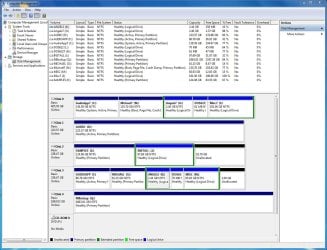
Post a screenshot of disk management window when you are booted into Michael7.
 

My Computers My Computers

  • At a glance

    7 X64i5 84002x8gb 3200mhz
    Computer type
    PC/Desktop
    OS
    7 X64
    CPU
    i5 8400
    Motherboard
    gigabyte b365m ds3h
    Memory
    2x8gb 3200mhz
    Hard Drives
    various
    PSU
    pure power 11 400w cm
    Case
    Coolermaster
    Cooling
    cryorig m9i
  • At a glance

    7x64g54008gb ddr4 2400
    Computer type
    PC/Desktop
    OS
    7x64
    CPU
    g5400
    Motherboard
    ga b365m ds3h
    Memory
    8gb ddr4 2400
    PSU
    xfx pro 450w
Post a screenshot of disk management window when you are booted into Michael7.


The screenshot is attached. Thanks!
 

Attachments

  • DiskMgt.JPG
    DiskMgt.JPG
    183.2 KB · Views: 6

My Computer My Computer

At a glance

Windows 7 Pro 64 BitAMD Phenom4 GBBuilt-in
Computer type
PC/Desktop
Computer Manufacturer/Model Number
Custom
OS
Windows 7 Pro 64 Bit
CPU
AMD Phenom
Motherboard
Asrock M3A790GXH128M
Memory
4 GB
Graphics Card(s)
Built-in
Hard Drives
Samsung SSD
Antivirus
MalwareBytes
Browser
Firefox
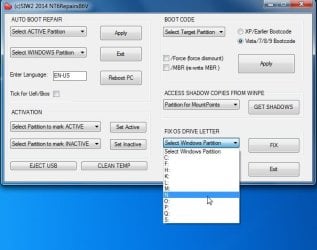
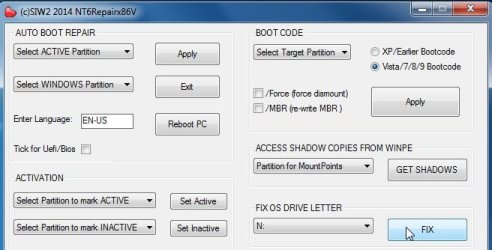
Boot into AudioApp7.

IN the FIX OS DRIVE LETTER section, Select the letter of Michael7 in the dropdown which you say is N ( as seen from AudioApp7)

Click Fix.


View attachment nt6repair.zip


nt6repair1.jpg

nt6repair2.jpg
 

My Computers My Computers

  • At a glance

    7 X64i5 84002x8gb 3200mhz
    Computer type
    PC/Desktop
    OS
    7 X64
    CPU
    i5 8400
    Motherboard
    gigabyte b365m ds3h
    Memory
    2x8gb 3200mhz
    Hard Drives
    various
    PSU
    pure power 11 400w cm
    Case
    Coolermaster
    Cooling
    cryorig m9i
  • At a glance

    7x64g54008gb ddr4 2400
    Computer type
    PC/Desktop
    OS
    7x64
    CPU
    g5400
    Motherboard
    ga b365m ds3h
    Memory
    8gb ddr4 2400
    PSU
    xfx pro 450w

My Computer My Computer

At a glance

Windows 7 Pro 64 BitAMD Phenom4 GBBuilt-in
Computer type
PC/Desktop
Computer Manufacturer/Model Number
Custom
OS
Windows 7 Pro 64 Bit
CPU
AMD Phenom
Motherboard
Asrock M3A790GXH128M
Memory
4 GB
Graphics Card(s)
Built-in
Hard Drives
Samsung SSD
Antivirus
MalwareBytes
Browser
Firefox
Boot into AudioApp7.

IN the FIX OS DRIVE LETTER section, Select the letter of Michael7 in the dropdown which you say is N ( as seen from AudioApp7)

Click Fix.


View attachment 404636


View attachment 404634

View attachment 404635


It worked! Thank you so much! :-)

There's just one problem though. :-) When I boot into Michael7, the AudioApp7 partition is not visible in Windows Explorer. So I look for AudioApp7 in Disk Management and it's there but it has no drive letter assigned to it. Maybe that's why it doesn't show up in Windows Explorer.

On the other hand, when I boot into AudioApp7, everything is fine. The Michael7 partition is visible in Windows Explorer with drive letter N: assigned to it.

What should I do now? Should I boot into Michael7 and use Disk Management to assign a drive letter to AudioApp7? If so, what drive letter should I assign to it? Does it have to be a drive letter that's not being used by another partition?
 

My Computer My Computer

At a glance

Windows 7 Pro 64 BitAMD Phenom4 GBBuilt-in
Computer type
PC/Desktop
Computer Manufacturer/Model Number
Custom
OS
Windows 7 Pro 64 Bit
CPU
AMD Phenom
Motherboard
Asrock M3A790GXH128M
Memory
4 GB
Graphics Card(s)
Built-in
Hard Drives
Samsung SSD
Antivirus
MalwareBytes
Browser
Firefox
Should I boot into Michael7 and use Disk Management to assign a drive letter to AudioApp7? If so, what drive letter should I assign to it?

Yes.

Does it have to be a drive letter that's not being used by another partition?

You can use any of the letters that disk management offers you.
 

My Computers My Computers

  • At a glance

    7 X64i5 84002x8gb 3200mhz
    Computer type
    PC/Desktop
    OS
    7 X64
    CPU
    i5 8400
    Motherboard
    gigabyte b365m ds3h
    Memory
    2x8gb 3200mhz
    Hard Drives
    various
    PSU
    pure power 11 400w cm
    Case
    Coolermaster
    Cooling
    cryorig m9i
  • At a glance

    7x64g54008gb ddr4 2400
    Computer type
    PC/Desktop
    OS
    7x64
    CPU
    g5400
    Motherboard
    ga b365m ds3h
    Memory
    8gb ddr4 2400
    PSU
    xfx pro 450w
Yes.


You can use any of the letters that disk management offers you.


Awesome! My problem is solved.

Thank you so much, SIW2! Your help is so very appreciated. :-)
 

My Computer My Computer

At a glance

Windows 7 Pro 64 BitAMD Phenom4 GBBuilt-in
Computer type
PC/Desktop
Computer Manufacturer/Model Number
Custom
OS
Windows 7 Pro 64 Bit
CPU
AMD Phenom
Motherboard
Asrock M3A790GXH128M
Memory
4 GB
Graphics Card(s)
Built-in
Hard Drives
Samsung SSD
Antivirus
MalwareBytes
Browser
Firefox
It is a pleasure. :-)
 

My Computers My Computers

  • At a glance

    7 X64i5 84002x8gb 3200mhz
    Computer type
    PC/Desktop
    OS
    7 X64
    CPU
    i5 8400
    Motherboard
    gigabyte b365m ds3h
    Memory
    2x8gb 3200mhz
    Hard Drives
    various
    PSU
    pure power 11 400w cm
    Case
    Coolermaster
    Cooling
    cryorig m9i
  • At a glance

    7x64g54008gb ddr4 2400
    Computer type
    PC/Desktop
    OS
    7x64
    CPU
    g5400
    Motherboard
    ga b365m ds3h
    Memory
    8gb ddr4 2400
    PSU
    xfx pro 450w
Back
Top