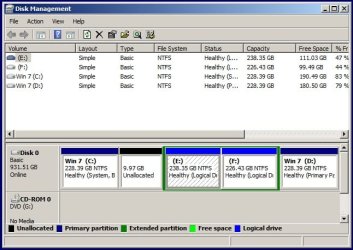
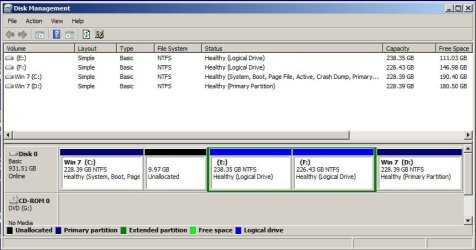
Mark old win7 not active first and then restore. Post disk amnagement screenshot after booting into new win7Kaktussoft - I have my backups stored on my F: drive since I don't have another external source at the moment. I'm assuming that will be okay and I won't have to worry about the USB things.
I think I'll only delete the XP partition initially and then try to restore the Win7 backup. After I've determined the restored partition is working, go back and delete the Win7 partition. Is it okay to do it that way? I'd hate like the devil to have the restore go foobar on me and be stuck. My only other question is this....If I keep the original Win7 install intact and restore my backup, will I need to change that partition from active to inactive first? Or, will, as you you've said, the restored partition take over and render the original Win7 inactive?
My Computer
At a glance
Microsoft Windows 7 Home Premium 64-bits 7601...Intel(R) Core(TM) i3 CPU M 370 @ 2.40GHz4,00 GBATI Mobility Radeon HD 5400 Series
- Computer type
- Laptop
- Computer Manufacturer/Model Number
- ACER ASPIRE 5742G
- OS
- Microsoft Windows 7 Home Premium 64-bits 7601 Multiprocessor Free Service Pack 1
- CPU
- Intel(R) Core(TM) i3 CPU M 370 @ 2.40GHz
- Motherboard
- Acer Aspire 5742G
- Memory
- 4,00 GB
- Graphics Card(s)
- ATI Mobility Radeon HD 5400 Series
- Sound Card
- (1) AMD High Definition Audio Device (2) Realtek High Defi
- Screen Resolution
- 1366 x 768 x 32 bits (4294967296 colors) @ 60 Hz
- Hard Drives
- WDC WD5000BEVT-22ZAT0