help dual booting win. 8 with my current copy of windows 7

Thornton

New member
Power User
Local time
4:33 PM
Messages
597
Location
Orlando Florida
exactly what the title says, the key is doing it without losing my current copy of windows 7 that is installed, i dont want to lose any of my current data.

as i understand it, this can be achieved by, first, shrinking current partition to just slightly larger than you absolutely need it, second, make sure you have room for another partition, boot from 8" disk, install in "new partition" without over writing my last one.

all simple in theory, but i have a few questions, first, i know that you generally have to be careful shrinking partition because of data loss, if this is true, are there any suggestions to do this more safely. second, would this even work! and third, assuming it would, am i correct on the process of creating the new partition for windows 8? ir is there a better way to do it?

also... before i get too far, if anyone has tried this, how did you install 8? when i try to unpack the iso to a DVD/R it is too big (the iso is 4.8gb, larger than your standard DVD/R). i though of using an 8gb thumb drive, but i really hate that process of changing my boot order atleast twice
 

My Computer My Computer

At a glance

windows 7 ProfessionalIntel I7 4790k16gb DDR3 1600mhzDual GTX 780 ASUS
Computer type
PC/Desktop
Computer Manufacturer/Model Number
Custom Build
OS
windows 7 Professional
CPU
Intel I7 4790k
Motherboard
ASUS Hero VII
Memory
16gb DDR3 1600mhz
Graphics Card(s)
Dual GTX 780 ASUS
Monitor(s) Displays
2x HP 2331
Screen Resolution
1080p
Hard Drives
750gb Hitachi 7200rpm
500gb Crucial SSD
PSU
Corsair 800g
Case
NZXT Phantom
Cooling
fan
Keyboard
Razer Deathstalker
Mouse
Razer Ouroboros
Internet Speed
70mbps
Antivirus
MSE + M-Bam
Browser
Chrome
Yes, that is how most people do it.

You can shrink a partition using win7 disk management.

If you got the bigger iso - that is the one containing the dev tools - which I am guessing you don't really need.

Never mind, you can install it anyway.

There are several ways to install - one way is to mount the iso from within win 7 and run setup from there.

You need something to mount it - I like the free version of Poweriso - but there are plenty of other apps. you could use.

Just click download - it runs as the free version with no time limit.

http://www.poweriso.com/

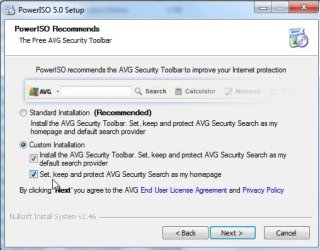
You might want to untick the boxes if you don't want the avg stuff:

piso.jpg
 

My Computers My Computers

  • At a glance

    7 X64i5 84002x8gb 3200mhz
    Computer type
    PC/Desktop
    OS
    7 X64
    CPU
    i5 8400
    Motherboard
    gigabyte b365m ds3h
    Memory
    2x8gb 3200mhz
    Hard Drives
    various
    PSU
    pure power 11 400w cm
    Case
    Coolermaster
    Cooling
    cryorig m9i
  • At a glance

    7x64g54008gb ddr4 2400
    Computer type
    PC/Desktop
    OS
    7x64
    CPU
    g5400
    Motherboard
    ga b365m ds3h
    Memory
    8gb ddr4 2400
    PSU
    xfx pro 450w
Yes, that is how most people do it.

You can shrink a partition using win7 disk management.

If you got the bigger iso - that is the one containing the dev tools - which I am guessing you don't really need.

Never mind, you can install it anyway.

There are several ways to install - one way is to mount the iso from within win 7 and run setup from there.

You need something to mount it - I like the free version of Poweriso - but there are plenty of other apps. you could use.

actually i got the dev version on purpose, i spend my deal of time web developing, and have been touching on silverlight and css3. i love my expression studio stuff and although i rarely use visual studio pro anymore except for database management (i like expression more ;) it will be nice to try out what they got.
by mount you mean unpack? i should be able to run it right from in windows if its been unpacked, i may be misunderstanding you, which is quite possible, im not huge on trying the next new os all the time, but i wanted to see how 8 games
 

My Computer My Computer

At a glance

windows 7 ProfessionalIntel I7 4790k16gb DDR3 1600mhzDual GTX 780 ASUS
Computer type
PC/Desktop
Computer Manufacturer/Model Number
Custom Build
OS
windows 7 Professional
CPU
Intel I7 4790k
Motherboard
ASUS Hero VII
Memory
16gb DDR3 1600mhz
Graphics Card(s)
Dual GTX 780 ASUS
Monitor(s) Displays
2x HP 2331
Screen Resolution
1080p
Hard Drives
750gb Hitachi 7200rpm
500gb Crucial SSD
PSU
Corsair 800g
Case
NZXT Phantom
Cooling
fan
Keyboard
Razer Deathstalker
Mouse
Razer Ouroboros
Internet Speed
70mbps
Antivirus
MSE + M-Bam
Browser
Chrome
Yes, that is how most people do it.

You can shrink a partition using win7 disk management.

If you got the bigger iso - that is the one containing the dev tools - which I am guessing you don't really need.

Never mind, you can install it anyway.

There are several ways to install - one way is to mount the iso from within win 7 and run setup from there.

You need something to mount it - I like the free version of Poweriso - but there are plenty of other apps. you could use.

Just click download - it runs as the free version with no time limit.

PowerISO - Create, Burn, Mount, Edit, Compress, Encrypt, Split, Extract ISO file, ISO/BIN converter, Virtual Drive

You might want to untick the boxes if you don't want the avg stuff:

View attachment 199164

i installed powerISO so it dowsnt really matter. so i should be fine shrinking my partition than? and as always, besides the obviouse, use disk manager, are there any other precautionary tips to prevent the need of using a back up, seeing as how i cant make one because my backup drive is a POS
 

My Computer My Computer

At a glance

windows 7 ProfessionalIntel I7 4790k16gb DDR3 1600mhzDual GTX 780 ASUS
Computer type
PC/Desktop
Computer Manufacturer/Model Number
Custom Build
OS
windows 7 Professional
CPU
Intel I7 4790k
Motherboard
ASUS Hero VII
Memory
16gb DDR3 1600mhz
Graphics Card(s)
Dual GTX 780 ASUS
Monitor(s) Displays
2x HP 2331
Screen Resolution
1080p
Hard Drives
750gb Hitachi 7200rpm
500gb Crucial SSD
PSU
Corsair 800g
Case
NZXT Phantom
Cooling
fan
Keyboard
Razer Deathstalker
Mouse
Razer Ouroboros
Internet Speed
70mbps
Antivirus
MSE + M-Bam
Browser
Chrome
You should be fine using windows disk management.

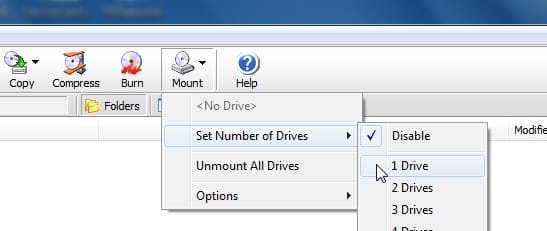
Whwn you have done that, run poweriso, click mount>set number of drives to 1.

That creates a virtual cd drive.

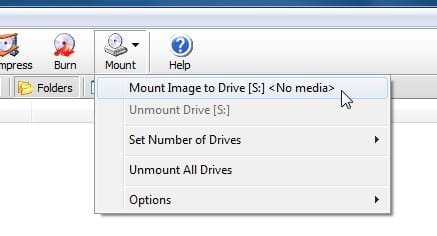
Select mount image to drive and browse to the win 8 iso.

piso2.jpg

piso3.jpg
 

My Computers My Computers

  • At a glance

    7 X64i5 84002x8gb 3200mhz
    Computer type
    PC/Desktop
    OS
    7 X64
    CPU
    i5 8400
    Motherboard
    gigabyte b365m ds3h
    Memory
    2x8gb 3200mhz
    Hard Drives
    various
    PSU
    pure power 11 400w cm
    Case
    Coolermaster
    Cooling
    cryorig m9i
  • At a glance

    7x64g54008gb ddr4 2400
    Computer type
    PC/Desktop
    OS
    7x64
    CPU
    g5400
    Motherboard
    ga b365m ds3h
    Memory
    8gb ddr4 2400
    PSU
    xfx pro 450w
You should be fine using windows disk management.

Whwn you have done that, run poweriso, click mount>set number of drives to 1.

That creates a virtual cd drive.

Select mount image to drive and browse to the win 8 iso.

View attachment 199173

View attachment 199174

this would entale that i have a disk/thumb drive with the iso? power iso is not an application for upacking isos correct? or is it?
 

My Computer My Computer

At a glance

windows 7 ProfessionalIntel I7 4790k16gb DDR3 1600mhzDual GTX 780 ASUS
Computer type
PC/Desktop
Computer Manufacturer/Model Number
Custom Build
OS
windows 7 Professional
CPU
Intel I7 4790k
Motherboard
ASUS Hero VII
Memory
16gb DDR3 1600mhz
Graphics Card(s)
Dual GTX 780 ASUS
Monitor(s) Displays
2x HP 2331
Screen Resolution
1080p
Hard Drives
750gb Hitachi 7200rpm
500gb Crucial SSD
PSU
Corsair 800g
Case
NZXT Phantom
Cooling
fan
Keyboard
Razer Deathstalker
Mouse
Razer Ouroboros
Internet Speed
70mbps
Antivirus
MSE + M-Bam
Browser
Chrome

My Computers My Computers

  • At a glance

    7 X64i5 84002x8gb 3200mhz
    Computer type
    PC/Desktop
    OS
    7 X64
    CPU
    i5 8400
    Motherboard
    gigabyte b365m ds3h
    Memory
    2x8gb 3200mhz
    Hard Drives
    various
    PSU
    pure power 11 400w cm
    Case
    Coolermaster
    Cooling
    cryorig m9i
  • At a glance

    7x64g54008gb ddr4 2400
    Computer type
    PC/Desktop
    OS
    7x64
    CPU
    g5400
    Motherboard
    ga b365m ds3h
    Memory
    8gb ddr4 2400
    PSU
    xfx pro 450w
I presume you downloaded the iso onto your hard drive - downloads folder probably.

Just browse to it there. No need to put it onto a thumb drive or anything.

How to use PowerISO as ISO Mounter?

ohok, so select mount... and it wil ask me for a location? and im assuming when it is done i can just run "win8" and it will pop up in a window, i select "un allocated space" as the location to install, and im good to go?
 

My Computer My Computer

At a glance

windows 7 ProfessionalIntel I7 4790k16gb DDR3 1600mhzDual GTX 780 ASUS
Computer type
PC/Desktop
Computer Manufacturer/Model Number
Custom Build
OS
windows 7 Professional
CPU
Intel I7 4790k
Motherboard
ASUS Hero VII
Memory
16gb DDR3 1600mhz
Graphics Card(s)
Dual GTX 780 ASUS
Monitor(s) Displays
2x HP 2331
Screen Resolution
1080p
Hard Drives
750gb Hitachi 7200rpm
500gb Crucial SSD
PSU
Corsair 800g
Case
NZXT Phantom
Cooling
fan
Keyboard
Razer Deathstalker
Mouse
Razer Ouroboros
Internet Speed
70mbps
Antivirus
MSE + M-Bam
Browser
Chrome
Back
Top