
How to Open 32-bit Help (.hlp) Files that Require WinHlp32.exe in Windows
Information
Windows Help (WinHlp32.exe) is a Help program that has been included with Microsoft Windows versions starting with the Microsoft Windows 3.1 operating system. However, the Windows Help program has not had a major update for many releases and no longer meets Microsoft's standards. Therefore, starting with the release of Windows Vista and continuing in Windows 7, the Windows Help program will not ship as a feature of Windows 7 and newer. If you want to view 32-bit .hlp files, you must download and install the program (WinHlp32.exe) from the Microsoft Download Center below.
This tutorial will show you how to install and uninstall WinHlp32.exe (KB917607) for 32-bit .hlp files in Vista, Windows 7, Windows 8, and Windows 8.1.
This tutorial will show you how to install and uninstall WinHlp32.exe (KB917607) for 32-bit .hlp files in Vista, Windows 7, Windows 8, and Windows 8.1.
Note
This is for when you try open an .hlp file in Windows, and you receive one of the following error messages in the Windows Help and Support window:
The Help for this program was created in Windows Help format, which depends on a feature that isn’t included in this version of Windows. However, you can download a program that will allow you to view Help created in the Windows Help format.
OR
Feature not included
OR
Help not supported
The Help for this program was created in Windows Help format, which depends on a feature that isn’t included in this version of Windows. However, you can download a program that will allow you to view Help created in the Windows Help format.
OR
Feature not included
OR
Help not supported
OPTION ONE
To Install WinHlp32.exe to be able to open .hlp Files in Windows
1. Click on the link below to go the Microsoft site. At the Microsoft site, click/tap on the link for the Windows you have installed.
Error opening Help in Windows-based programs: "Feature not included" or "Help not supported"

2. If Validation is Required before Allowed to Download
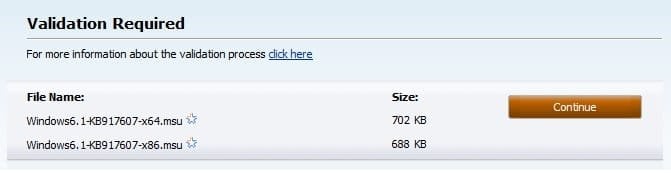
A) If you see a "Validation Required" message when you open the download page, then click/tap on the Continue button, and follow the on-screen instructions to validate your Windows. (see screenshot below)
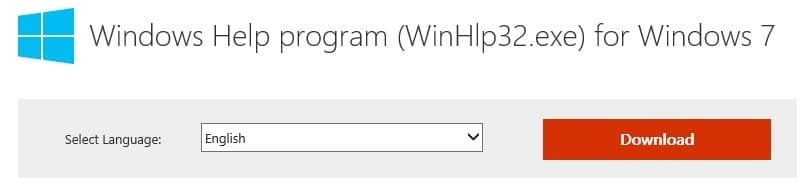
3. Select the language of your Windows, and click/tap on the Download button. (see screenshot below)
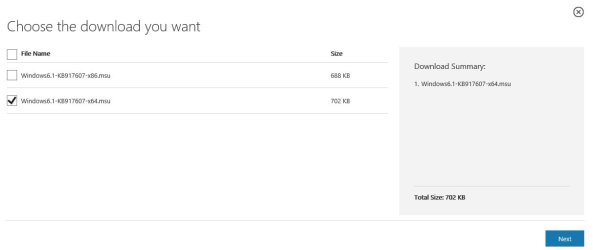
4. Check the Windows#-KB917607-x64.msu or Windows#-KB917607-x86.msu box that is the same as your installed 32-bit (x86) or 64-bit (x64) Windows, and click/tap on Next. (see screenshot below)
5. Save the Windows#-KB917607-x64.msu or Windows#-KB917607-x86.msu file to your desktop.
6. Install the downloaded Windows#-KB917607-x64.msu or Windows#-KB917607-x86.msu file.
7. You should now be able to open 32-bit .hlp files using Windows Help and Support.
OPTION TWO
To Uninstall WinHlp32.exe (KB917607) from Windows
1. Open Installed Updates in Programs and Features.
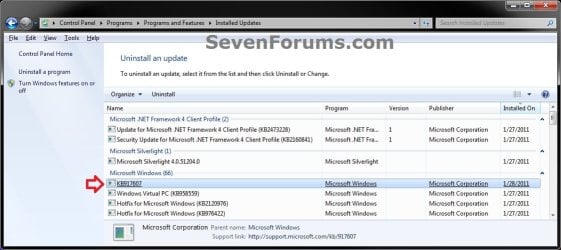
2. Click on KB917607 to uninstall WinHlp32.exe. (see screenshot below)
3. When it's finished, you can close the Installed Updates window.
That's it,
Shawn
Last edited:


 :
:

