
Help: HP Pavilion dv7 Instability Issues (Heat Related?)

josh99ta

New member
Local time
1:02 AM
Messages
59
I have an old HP Pavilion dv7 1135nr laptop that has developed some instability issues. I got it shortly after Vista came out and while many complained of Vista's reliability, the laptop was always rock solid. Over the years it's gotten bogged down though and was getting a bit slow, so I figured I'd do a fresh install of Vista to clean the drive up via the restore discs Best Buy created for me, but they didn't work.

So I tried to put XP on it. That didn't work out so well due to a lot of driver incompatibility issues, and the computer would keep giving me a BSOD during attempted installed, or just flat out cutting itself off completely with no BSOD or anything...like the battery went completely dead (it was still plugged in).

I figured the hard drive may be crapping out, so I replaced the hard drive and then put W7 on it (which installed fine), but it's still cutting itself off after it's been on for a few minutes. It seems to be related to heat (I think). The bottom of the computer gets hot, hotter than normal, and the fan runs non-stop. After it's really warm it'll cut itself off, and if I cut it back on it'll stay on for a few minutes and then cut itself off again. If it's completely cool and hasn't been turned on for a long time it'll run for half an hour until it gets really hot and cuts itself off again.

Is it possible that I damaged something trying to install XP on it, or is it just a coincidence that all these issues started coming up at the same time I tried to do a new OS install?

System Specs:
AMD Turion X2 RM-70 2.0GHz processor
4GB Memory
250GB Hard Drive (upgraded to WB Caviar Black 320GB 7200 RPM HD)
ATI RADEON HD 3200 video card
Windows Vista Home Premium 64-bit (upgraded to Windows 7 Home Premium)

The battery was barely holding on and I thought the hard drive was failing too, so I just dropped $100 on a new battery and a replacement hard drive, and just put Windows 7 on it, so I'd really like get it stable rather than just replacing it. Even if it means replacing RAM or something else.
 

My Computer My Computer

At a glance

Windows 7 Home Premium 64bitIntel Core2Duo E6850, LGA775, 3GHz, 4MB Cache...Corsair Dominator CM2X2048-8500C5DHIS ATi Radeon HD 4850 (512MB GDDR3)
Computer Manufacturer/Model Number
Built Desktop
OS
Windows 7 Home Premium 64bit
CPU
Intel Core2Duo E6850, LGA775, 3GHz, 4MB Cache, 1333 MHz FSB
Motherboard
GIGABYTE GA-EP43-UD3L
Memory
Corsair Dominator CM2X2048-8500C5D
Graphics Card(s)
HIS ATi Radeon HD 4850 (512MB GDDR3)
Monitor(s) Displays
Samsung SyncMaster 2253BW
Screen Resolution
1680x1050
Hard Drives
Asus DRW-2014L1T DVD-R/RW LightScribe 20X Drive
Case
Raidmax Smilodon Dirktooth
Cooling
Zalman CNPS9500A LED Intel Fan, CoolMax Case Fans
Keyboard
Logitech Wave Wireless
Mouse
Logitech Wave Wireless
Internet Speed
Edimax Wireless 802.11n 32-bit PCI Adapter (29.57/3.88 Mb/s)
Hello there.

When you opened the laptop to install the new HDD on it, did you see any signs of cummulated dust on the fans, or on the laptop in general? a can of compressed air would be the best choice here.. Of course, this is if the problem is heat related, which to me it sound like it.

Download this program: Speccy - System Information - Free Download

And post a screenshot with the summary :) that'll give us a hint about the temps.
 

My Computer My Computer

At a glance

Windows
Computer type
PC/Desktop
OS
Windows
Thanks for the quick reply Punkster. I didn't see any dust inside really, but the fan is pretty buried in the case. I can definitely hit it with some compressed air and see if that does the trick. I'll get on it and post the screenshot. Hopefully the computer will stay on long enough to do so.
 

My Computer My Computer

At a glance

Windows 7 Home Premium 64bitIntel Core2Duo E6850, LGA775, 3GHz, 4MB Cache...Corsair Dominator CM2X2048-8500C5DHIS ATi Radeon HD 4850 (512MB GDDR3)
Computer Manufacturer/Model Number
Built Desktop
OS
Windows 7 Home Premium 64bit
CPU
Intel Core2Duo E6850, LGA775, 3GHz, 4MB Cache, 1333 MHz FSB
Motherboard
GIGABYTE GA-EP43-UD3L
Memory
Corsair Dominator CM2X2048-8500C5D
Graphics Card(s)
HIS ATi Radeon HD 4850 (512MB GDDR3)
Monitor(s) Displays
Samsung SyncMaster 2253BW
Screen Resolution
1680x1050
Hard Drives
Asus DRW-2014L1T DVD-R/RW LightScribe 20X Drive
Case
Raidmax Smilodon Dirktooth
Cooling
Zalman CNPS9500A LED Intel Fan, CoolMax Case Fans
Keyboard
Logitech Wave Wireless
Mouse
Logitech Wave Wireless
Internet Speed
Edimax Wireless 802.11n 32-bit PCI Adapter (29.57/3.88 Mb/s)
Might want to install a temp monitoring software like speedfan and see what kind of temps you are running.
 

My Computer My Computer

At a glance

Window's 7 Ultimate 64bitE8400 LappedKingston 4 gig2=ATI 5670Video Crossfire / HVR2250 TV Tuner ...
Computer Manufacturer/Model Number
Custom Build
OS
Window's 7 Ultimate 64bit
CPU
E8400 Lapped
Motherboard
P5Q Pro Turbo Asus
Memory
Kingston 4 gig
Graphics Card(s)
2=ATI 5670Video Crossfire / HVR2250 TV Tuner Card
Sound Card
HDMI sound
Monitor(s) Displays
Sony 46"
Screen Resolution
1280x720
Hard Drives
1 WD 160gig YS, 1 Black Edition 320gig and one 250gig WD YS Model plus external Caviar Black 640gig Drives
PSU
Antec 550 Modular
Case
Antec Custom 180B
Cooling
X-1283 Lapped Artic Silver 5
Keyboard
Wave Combo Logitech
Mouse
Logitech LX-8
Internet Speed
5mb down 768 up
Other Info
Custom side fan in case, plus moved middle lower fan to the front of hard drives , also installed a second intake fan in lower two optical drive slots. Rear fans are controlled by Fan mate controllers. temps inside case are monitored by probe and temps coming out the top exhaust are also monitored, temps as of right now 20c inside and 22.7 out the exhaust. Front intake fans are controlled by Asu
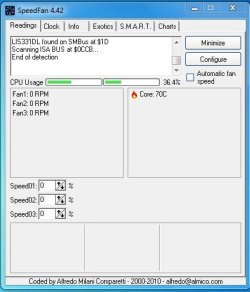
So I took a Rocket Blower to the vent for the fan on the backside of the laptop base, and a ton of dust came out. The fan isn't running all the time now. I also downloaded Speedfan and when I started the computer temps were at 58C, and after about 15 minutes of being on are now at 70C (as of my typing this they are hovering between 66-70C).

I'm going to let it run for a while and see what happens. Snippet from SpeedFan is attached. CPU Usage looks abnormally high for absolutely nothing happening, but that's to my untrained eye. Is that normal or is something up? CPU Usage is hovering between 32-55%.
 

Attachments

  • speedfan1.JPG
    speedfan1.JPG
    33.6 KB · Views: 28

My Computer My Computer

At a glance

Windows 7 Home Premium 64bitIntel Core2Duo E6850, LGA775, 3GHz, 4MB Cache...Corsair Dominator CM2X2048-8500C5DHIS ATi Radeon HD 4850 (512MB GDDR3)
Computer Manufacturer/Model Number
Built Desktop
OS
Windows 7 Home Premium 64bit
CPU
Intel Core2Duo E6850, LGA775, 3GHz, 4MB Cache, 1333 MHz FSB
Motherboard
GIGABYTE GA-EP43-UD3L
Memory
Corsair Dominator CM2X2048-8500C5D
Graphics Card(s)
HIS ATi Radeon HD 4850 (512MB GDDR3)
Monitor(s) Displays
Samsung SyncMaster 2253BW
Screen Resolution
1680x1050
Hard Drives
Asus DRW-2014L1T DVD-R/RW LightScribe 20X Drive
Case
Raidmax Smilodon Dirktooth
Cooling
Zalman CNPS9500A LED Intel Fan, CoolMax Case Fans
Keyboard
Logitech Wave Wireless
Mouse
Logitech Wave Wireless
Internet Speed
Edimax Wireless 802.11n 32-bit PCI Adapter (29.57/3.88 Mb/s)
High cpu usage without user initiated processes would mean you've likely got a ton of startup items. Click on the Start orb, type msconfig, hit Enter. In the msconfig window, click on startup tab and uncheck anything you dont need to start automatically. E.g. on my computers, only the AV, touchpad driver and password manager are checked.

Is this a clean install of win7 or an upgrade from vista, xp etc? Driver/software conflicts can also drive the cpu crazy.

Other than that, heat is a bit of a nuisance in notebooks. If you are handy with it, you can try changing out the thermal paste- that would likely help the most or maybe get a service center to do it for you. You can also buy a notebook cooling pad- that'll draw the warm air out and improve ventilation.
 

My Computer My Computer

At a glance

Windows 7 x64 pro/ Windows 7 x86 Pro/ XP SP3 x86
Computer Manufacturer/Model Number
Too many to describe...
OS
Windows 7 x64 pro/ Windows 7 x86 Pro/ XP SP3 x86
Clean W7 install. I like the idea of a cooling method for it. Any input on what the best option would be?
 

My Computer My Computer

At a glance

Windows 7 Home Premium 64bitIntel Core2Duo E6850, LGA775, 3GHz, 4MB Cache...Corsair Dominator CM2X2048-8500C5DHIS ATi Radeon HD 4850 (512MB GDDR3)
Computer Manufacturer/Model Number
Built Desktop
OS
Windows 7 Home Premium 64bit
CPU
Intel Core2Duo E6850, LGA775, 3GHz, 4MB Cache, 1333 MHz FSB
Motherboard
GIGABYTE GA-EP43-UD3L
Memory
Corsair Dominator CM2X2048-8500C5D
Graphics Card(s)
HIS ATi Radeon HD 4850 (512MB GDDR3)
Monitor(s) Displays
Samsung SyncMaster 2253BW
Screen Resolution
1680x1050
Hard Drives
Asus DRW-2014L1T DVD-R/RW LightScribe 20X Drive
Case
Raidmax Smilodon Dirktooth
Cooling
Zalman CNPS9500A LED Intel Fan, CoolMax Case Fans
Keyboard
Logitech Wave Wireless
Mouse
Logitech Wave Wireless
Internet Speed
Edimax Wireless 802.11n 32-bit PCI Adapter (29.57/3.88 Mb/s)
I've heard mostly good things about Antec, Zalman and Coolermaster. But just google, you'll get recos. Also check out customer reviews on Amazon etc. before buying. I personally have a targus but didnt help too much on my overheating HP.
 

My Computer My Computer

At a glance

Windows 7 x64 pro/ Windows 7 x86 Pro/ XP SP3 x86
Computer Manufacturer/Model Number
Too many to describe...
OS
Windows 7 x64 pro/ Windows 7 x86 Pro/ XP SP3 x86
My dv9720us just surfing, fan is on low with temps about 40-45 cpu both cores and the GPU about 54c and watching a video runs up to maybe 62c on the GPU and 48c on cpu so looks like you have a heat issue plus I check mine with coretemp and the beta version of speedfan just because it has more features.
 

My Computer My Computer

At a glance

Window's 7 Ultimate 64bitE8400 LappedKingston 4 gig2=ATI 5670Video Crossfire / HVR2250 TV Tuner ...
Computer Manufacturer/Model Number
Custom Build
OS
Window's 7 Ultimate 64bit
CPU
E8400 Lapped
Motherboard
P5Q Pro Turbo Asus
Memory
Kingston 4 gig
Graphics Card(s)
2=ATI 5670Video Crossfire / HVR2250 TV Tuner Card
Sound Card
HDMI sound
Monitor(s) Displays
Sony 46"
Screen Resolution
1280x720
Hard Drives
1 WD 160gig YS, 1 Black Edition 320gig and one 250gig WD YS Model plus external Caviar Black 640gig Drives
PSU
Antec 550 Modular
Case
Antec Custom 180B
Cooling
X-1283 Lapped Artic Silver 5
Keyboard
Wave Combo Logitech
Mouse
Logitech LX-8
Internet Speed
5mb down 768 up
Other Info
Custom side fan in case, plus moved middle lower fan to the front of hard drives , also installed a second intake fan in lower two optical drive slots. Rear fans are controlled by Fan mate controllers. temps inside case are monitored by probe and temps coming out the top exhaust are also monitored, temps as of right now 20c inside and 22.7 out the exhaust. Front intake fans are controlled by Asu
Back
Top