[Help] I have a 45 Second Boot Time with a SSD

ZeroManArmy

New member
Member
Local time
4:34 PM
Messages
50
Hello Seven Forums!

Hoping you guys can help me out with this super mysterious boot issue I am having. I never really put any thought into why my PC takes roughly 40-50 seconds to boot until a couple of days ago. M computer specs are on my Sever Forums profile.

So I have been researching and researching on how to get a faster boot time. I have some images below showing/describing what I have done and how it is setup. First off, I have followed all the steps at The SSD Review, and it didn't seem to help out much. I want to note as well, I have followed the guide here to change were my Users folder is located so that it is not on my SSD.

-- Begin Troubleshooting --
The same SSD boots in about 8-10 seconds on a laptop with a clean install of Windows.

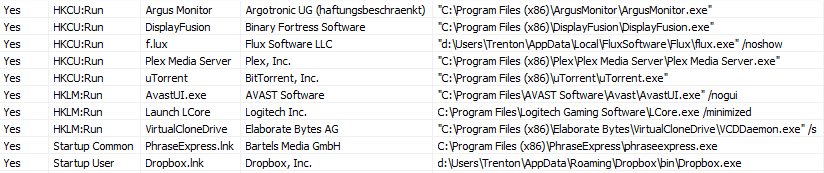
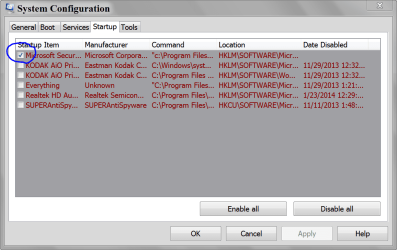
My Startup items as of today: Startup.png
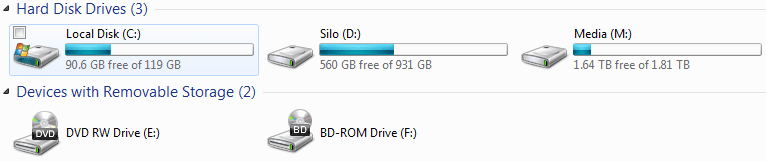
My installed drives: Installed_Drives.png

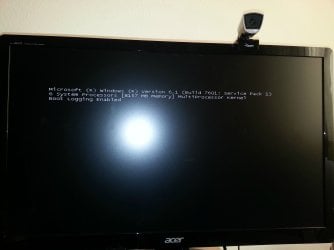
I enabled verbose booting and saw that it got stuck here: Verbose_Boot.jpg
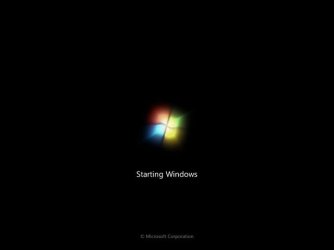
Now normally, when verbose is off, windows will hang up here for about 30 seconds: Windows_Logo.jpg
After forcing Windows to take the AHCI driver in the device manager, it shows this: Device_Manager.png
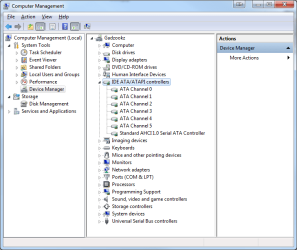
Gigabyte "has" ACHI drivers located here, but they change it from the AHCI drivers to the AMD SATA Controller drivers.
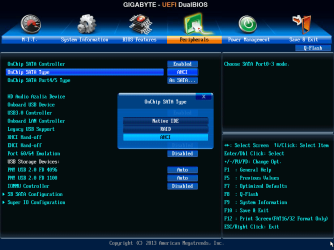
My BIOS also shows that I have AHCI enabled on my machine: BIOS_AHCI_Enabled.png
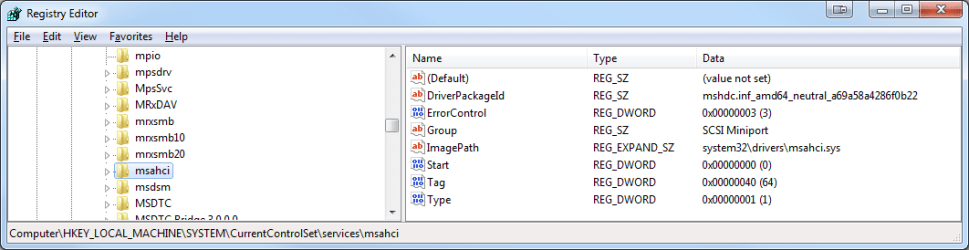
I also have the regkey for AHCI set to 0 to enable it: Regedit.png
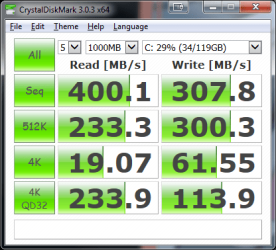
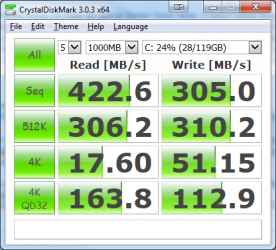
After finally getting AHCI enabled on my PC, I performed a benchmark to see if there was a difference. New: CrystalDiskMark_AHCI_Drivers.png Old: CrystalDiskMark_SATA_Drivers.png
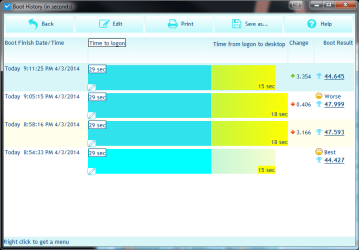
Here are my BootRacer screenshots.
Clean Install on SSD: BootRacer_New_Install.png
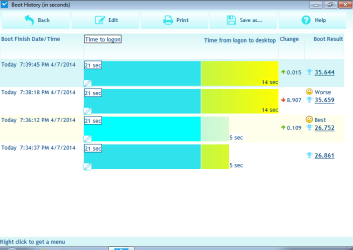
My current install: BootRacer_Normal.png
-- End Troubleshooting --
 
Last edited:

My Computer My Computer

Computer type
PC/Desktop
OS
Microsoft Windows 7 Ultimate 64-bit 7601 Multiprocessor Free Service Pack 1
CPU
AMD FX(tm)-6300 Six-Core Processor
Motherboard
Gigabyte Technology Co., Ltd. 970A-UD3P
Memory
8.00 GB
Graphics Card(s)
NVIDIA GeForce GTX 650
Sound Card
VIA High Definition Audio
Monitor(s) Displays
Acer S230HLAbii 23.0" Monitor
Screen Resolution
1920 x 1080 x 32 bits (4294967296 colors) @ 60 Hz
Hard Drives
(1) SAMSUNG SSD PM830 2.5" 7mm 128GB ATA Device (2) TOSHIBA DT01ACA200 ATA Device (3) TOSHIBA MQ01ABD100 ATA Device
PSU
Corsair CX 600W 80+ Bronze Certified Semi-Modular ATX Power
Case
Apevia X-DREAMER4-PK ATX Mid Tower Case

My Computer My Computer

Computer type
PC/Desktop
Computer Manufacturer/Model Number
My Own Build
OS
Windows 10 64 bit
CPU
Intel i7 6700K
Motherboard
ASUS ROG Maximus VIII Hero
Memory
16GB Corsair Dominator
Graphics Card(s)
Intel CPU Graphics
Sound Card
RealTek
Monitor(s) Displays
27" Dell S2719dgf
Screen Resolution
2560X1440
Hard Drives
1 TB Samsung 850 EVO SSD for Win 10 Pro
500GB Samsung 850 EVO SSD for Win 10 Insider
2 TB drive for backup
PSU
EVGA Supernova 750G2
Case
BeQuiet Silent Base 600
Cooling
Deepcool Captain 120EX
Keyboard
Microsoft Wireless 2000
Mouse
Microsoft wireless
Internet Speed
100 MB/sec (Cable)
Antivirus
Microsoft Defender and Malwarebytes
Browser
Edge/Firefox
Other Info
Cakewalk (Sonar) by BandLab and Studio One 4.1 Pro recording studio software. MOTU 896Mk3 Hybrid recording interface, Frontier Tranzport wireless control unit, Behringer X-Touch Control Surface.
Five USB connected optical drives for CD Audio production using Nero BurningROM
I understand that multiple other drives in your system can slow boot times down. Are you excluding the time from boot up until the BIOS hands over to the OS? Also, how full is your SSD?
 

My Computer My Computer

Computer type
PC/Desktop
Computer Manufacturer/Model Number
Custom
OS
Windows 7 - x64 Professional
CPU
Core i7 4770K @4.2 GHz
Motherboard
Asus Maximus Hero V1
Memory
Corsair DDR3-2400 16 GB
Graphics Card(s)
GTX 780 Ti Superclocked EVGA
Sound Card
Onboard Realtek
Monitor(s) Displays
Asus 27 inch
Screen Resolution
2560 x 1480
Hard Drives
Samsung EVO 840 500 GB SSD
Sandisk Extreme 250 GB SSD
Samsung 1.5TB HDD
PSU
Corsair 1150W
Case
A big one :-)
Cooling
Corsair H100i closed loop water cooler
Keyboard
Logitech G110 Gaming
Mouse
R.A.T 5
Internet Speed
1 GB ADSL
Antivirus
Bit Defender
Browser
I.E. 11
[Help] I have a 45 Second Boot Time with a SSD

How much of this time is POST/BOIS and how much is "Starting windows" Figure 10 seconds for POST/BOIS, that gives you 35 sec for the OS, not unusual depending on how much is in startup and services. Look at C:\Windows\System32\msconfig.exe.
 

My Computer My Computer

Computer type
PC/Desktop
Computer Manufacturer/Model Number
Custom, Dell and Lenono LT's
OS
Win8/8.1,Win7-U64, Vista U64, uncounted Linux distor's
CPU
AMD and Intell, 9590, 8350, i5 3570k
Motherboard
CFVFZ, GA990FXA, Z77e-itx
Memory
Corsair G Skill
Graphics Card(s)
Crossfired Sapphire HD 7950 Vapor-X, ASUS R9 280X TOP
Sound Card
Realtek ALC889
Monitor(s) Displays
ViewSonic VX2770SMH 27" / ViewSonic VX2433 LCD 24"
Screen Resolution
1080i HD
Hard Drives
Samsung SSD 840 Pro
OCZ Agility 3's
OCZ Vector's
WD's Blue, red, green, Velociraptors
Seagate USB3 & Hybrid's
ASUS Blu-Ray
ASUS DVD
PSU
Corsair AX1200i, Seasonice 850 Gold
Case
Cooler Master HAF 922 & HAF 932, Lian Li Train case.
Cooling
Air, Glacer 240L expanded, custom EK loop with duel D5's
Keyboard
Microsoft SideWinder X4 USB Keyboard / Logitech 250 PS2
Mouse
Logitech G500 / MS wireless 5000
Internet Speed
Best of 5ms / 75+ dn / 12+ up More or less.
Antivirus
MS esentials-MalwareBytes
Browser
Firefox Chromebook

My Computer My Computer

Computer Manufacturer/Model Number
HP, Dell, Gateway, Toshiba - 4 laptops and 2 desktops
OS
Vista, Windows7, Mint Mate, Zorin, Windows 8
CPU
from 1.6GHz Duo to i7
Monitor(s) Displays
2x HP w2207
Hard Drives
5x HDD, 7x SSD, 12x Externals
Keyboard
with trackball - no mices
Mouse
Trackball mice
Internet Speed
DSL 6000
I don't have an answer except to look at what is loading at boot up. Some startup application could be causing the extra time.

BTW, here is how to post screen shots on the forum. http://www.sevenforums.com/tutorials/9733-screenshots-files-upload-post-seven-forums.html
Startup is clean, as I do monthly maintenance to remove things that start up.

I understand that multiple other drives in your system can slow boot times down. Are you excluding the time from boot up until the BIOS hands over to the OS? Also, how full is your SSD?
I am excluding the BIOS POST in my time. My SSD is 128GB and only is using 28.4GB.

[Help] I have a 45 Second Boot Time with a SSD
How much of this time is POST/BOIS and how much is "Starting windows" Figure 10 seconds for POST/BOIS, that gives you 35 sec for the OS, not unusual depending on how much is in startup and services. Look at C:\Windows\System32\msconfig.exe.
The BIOS POST is not entered in the time. Once the BIOS passes onto the SSD for Windows boot, that is when I start counting.

1. Check your alignment:

http://www.sevenforums.com/tutorials/113967-ssd-alignment.html?ltr=S

2. See what you real boot time is in Event 100 - drill down this sequence:

Eventvwr
Applications and Service Logs
Microsoft
Windows
Diagnostics - performance
Operational
Event ID 100
I'd like to do the alignment, but I don't want to format my machine. Looking at the Event Viewer, anywhere from 80 to 100 seconds.


I couldn't seem to find anything using this, I did just skim it though.


Also, the same SSD boots in about 8-10 seconds on a laptop with a clean install of Windows.
 

My Computer My Computer

Computer type
PC/Desktop
OS
Microsoft Windows 7 Ultimate 64-bit 7601 Multiprocessor Free Service Pack 1
CPU
AMD FX(tm)-6300 Six-Core Processor
Motherboard
Gigabyte Technology Co., Ltd. 970A-UD3P
Memory
8.00 GB
Graphics Card(s)
NVIDIA GeForce GTX 650
Sound Card
VIA High Definition Audio
Monitor(s) Displays
Acer S230HLAbii 23.0" Monitor
Screen Resolution
1920 x 1080 x 32 bits (4294967296 colors) @ 60 Hz
Hard Drives
(1) SAMSUNG SSD PM830 2.5" 7mm 128GB ATA Device (2) TOSHIBA DT01ACA200 ATA Device (3) TOSHIBA MQ01ABD100 ATA Device
PSU
Corsair CX 600W 80+ Bronze Certified Semi-Modular ATX Power
Case
Apevia X-DREAMER4-PK ATX Mid Tower Case
Just updated the post with images embedded.
 

My Computer My Computer

Computer type
PC/Desktop
OS
Microsoft Windows 7 Ultimate 64-bit 7601 Multiprocessor Free Service Pack 1
CPU
AMD FX(tm)-6300 Six-Core Processor
Motherboard
Gigabyte Technology Co., Ltd. 970A-UD3P
Memory
8.00 GB
Graphics Card(s)
NVIDIA GeForce GTX 650
Sound Card
VIA High Definition Audio
Monitor(s) Displays
Acer S230HLAbii 23.0" Monitor
Screen Resolution
1920 x 1080 x 32 bits (4294967296 colors) @ 60 Hz
Hard Drives
(1) SAMSUNG SSD PM830 2.5" 7mm 128GB ATA Device (2) TOSHIBA DT01ACA200 ATA Device (3) TOSHIBA MQ01ABD100 ATA Device
PSU
Corsair CX 600W 80+ Bronze Certified Semi-Modular ATX Power
Case
Apevia X-DREAMER4-PK ATX Mid Tower Case

My Computer My Computer

Computer Manufacturer/Model Number
HP, Dell, Gateway, Toshiba - 4 laptops and 2 desktops
OS
Vista, Windows7, Mint Mate, Zorin, Windows 8
CPU
from 1.6GHz Duo to i7
Monitor(s) Displays
2x HP w2207
Hard Drives
5x HDD, 7x SSD, 12x Externals
Keyboard
with trackball - no mices
Mouse
Trackball mice
Internet Speed
DSL 6000
"Also, the same SSD boots in about 8-10 seconds on a laptop with a clean install of Windows."

This would point to something other than the SSD causing the slow boot times - something peculiar to your PC hardware/software. You have disabled unnecessary software start ups so you might have some driver or hardware in your PC that is 'waking up' and reporting to the OS slower than normal. A network or sound card perhaps? I'm sure your drivers are all good and that Device Manager is not reporting any problems. If you do have another HDD in your system for data, try unplugging that and comparing boot times as a start. I have a 1.5 TB HDD drive in my system and if I unplug that, boot times are marginally but noticeably faster, although I have never actually timed it accurately with software. Make sure you are using your MB manufacturers drivers for onboard equipment and SATA controllers etc, not Windows own ones.

Although not a hard rule, smaller capacity SSD's such as your usually offer faster boot times on average than larger capacity SSD's and a 8 - 10 second boot would be more reasonable on a clean install.

Could it be the AHCI issue you seem to have had - you mention "forcing" Windows to accept AHCI. Maybe a serious conflict going on there. You should have AHCI set up in the BIOS (usually it is set to this by default) before you start installing the OS.
 

My Computer My Computer

Computer type
PC/Desktop
Computer Manufacturer/Model Number
Custom
OS
Windows 7 - x64 Professional
CPU
Core i7 4770K @4.2 GHz
Motherboard
Asus Maximus Hero V1
Memory
Corsair DDR3-2400 16 GB
Graphics Card(s)
GTX 780 Ti Superclocked EVGA
Sound Card
Onboard Realtek
Monitor(s) Displays
Asus 27 inch
Screen Resolution
2560 x 1480
Hard Drives
Samsung EVO 840 500 GB SSD
Sandisk Extreme 250 GB SSD
Samsung 1.5TB HDD
PSU
Corsair 1150W
Case
A big one :-)
Cooling
Corsair H100i closed loop water cooler
Keyboard
Logitech G110 Gaming
Mouse
R.A.T 5
Internet Speed
1 GB ADSL
Antivirus
Bit Defender
Browser
I.E. 11
"Also, the same SSD boots in about 8-10 seconds on a laptop with a clean install of Windows."

This would point to something other than the SSD causing the slow boot times - something peculiar to your PC hardware/software. You have disabled unnecessary software start ups so you might have some driver or hardware in your PC that is 'waking up' and reporting to the OS slower than normal. A network or sound card perhaps? I'm sure your drivers are all good and that Device Manager is not reporting any problems. If you do have another HDD in your system for data, try unplugging that and comparing boot times as a start. I have a 1.5 TB HDD drive in my system and if I unplug that, boot times are marginally but noticeably faster, although I have never actually timed it accurately with software. Make sure you are using your MB manufacturers drivers for onboard equipment and SATA controllers etc, not Windows own ones.

Although not a hard rule, smaller capacity SSD's such as your usually offer faster boot times on average than larger capacity SSD's and a 8 - 10 second boot would be more reasonable on a clean install.

Could it be the AHCI issue you seem to have had - you mention "forcing" Windows to accept AHCI. Maybe a serious conflict going on there. You should have AHCI set up in the BIOS (usually it is set to this by default) before you start installing the OS.

I removed the two drives that are not SSD's and windows booted in about 10 seconds. 20ish if you count BIOS.

I found the cause of the slow boot times!
It turns out, the other two HDD's I have installed, are slowing Windows down. Without the drives attached, Windows boots in about 10 seconds. Now I need a way to stop it from initializing the disks until after boot. Anyone know how to do that?
 

My Computer My Computer

Computer type
PC/Desktop
OS
Microsoft Windows 7 Ultimate 64-bit 7601 Multiprocessor Free Service Pack 1
CPU
AMD FX(tm)-6300 Six-Core Processor
Motherboard
Gigabyte Technology Co., Ltd. 970A-UD3P
Memory
8.00 GB
Graphics Card(s)
NVIDIA GeForce GTX 650
Sound Card
VIA High Definition Audio
Monitor(s) Displays
Acer S230HLAbii 23.0" Monitor
Screen Resolution
1920 x 1080 x 32 bits (4294967296 colors) @ 60 Hz
Hard Drives
(1) SAMSUNG SSD PM830 2.5" 7mm 128GB ATA Device (2) TOSHIBA DT01ACA200 ATA Device (3) TOSHIBA MQ01ABD100 ATA Device
PSU
Corsair CX 600W 80+ Bronze Certified Semi-Modular ATX Power
Case
Apevia X-DREAMER4-PK ATX Mid Tower Case
That can only be startup programs. Disable ALL startup programs for a test and then we'll see.
 

My Computer My Computer

Computer Manufacturer/Model Number
HP, Dell, Gateway, Toshiba - 4 laptops and 2 desktops
OS
Vista, Windows7, Mint Mate, Zorin, Windows 8
CPU
from 1.6GHz Duo to i7
Monitor(s) Displays
2x HP w2207
Hard Drives
5x HDD, 7x SSD, 12x Externals
Keyboard
with trackball - no mices
Mouse
Trackball mice
Internet Speed
DSL 6000
That can only be startup programs. Disable ALL startup programs for a test and then we'll see.

It's not Startup items. Fresh install of Windows when I plug in the other HDD it boots slower. The second HDD, even slower. SSD by itself, 10 seconds.
 

My Computer My Computer

Computer type
PC/Desktop
OS
Microsoft Windows 7 Ultimate 64-bit 7601 Multiprocessor Free Service Pack 1
CPU
AMD FX(tm)-6300 Six-Core Processor
Motherboard
Gigabyte Technology Co., Ltd. 970A-UD3P
Memory
8.00 GB
Graphics Card(s)
NVIDIA GeForce GTX 650
Sound Card
VIA High Definition Audio
Monitor(s) Displays
Acer S230HLAbii 23.0" Monitor
Screen Resolution
1920 x 1080 x 32 bits (4294967296 colors) @ 60 Hz
Hard Drives
(1) SAMSUNG SSD PM830 2.5" 7mm 128GB ATA Device (2) TOSHIBA DT01ACA200 ATA Device (3) TOSHIBA MQ01ABD100 ATA Device
PSU
Corsair CX 600W 80+ Bronze Certified Semi-Modular ATX Power
Case
Apevia X-DREAMER4-PK ATX Mid Tower Case
The interference does not come out of thin air. There is some process that plays an act on those HDDs - and at boot that is most likely a startup - unless there is something wrong with the system itself.

Look into events 101, 102, 103 in the event viewer. That will tell you which process (ses) hold up progress. Drill down this chain:

Eventvwr
Applications and Service Logs
Microsoft
Windows
Diagnostics - performance
Operational
Event ID 101, 2, 3
 

My Computer My Computer

Computer Manufacturer/Model Number
HP, Dell, Gateway, Toshiba - 4 laptops and 2 desktops
OS
Vista, Windows7, Mint Mate, Zorin, Windows 8
CPU
from 1.6GHz Duo to i7
Monitor(s) Displays
2x HP w2207
Hard Drives
5x HDD, 7x SSD, 12x Externals
Keyboard
with trackball - no mices
Mouse
Trackball mice
Internet Speed
DSL 6000
Not sure if it is possible to delay HDD start up on Windows boot up. It is not a process that you can control as far as I am aware.

You can check processes that are running as suggested by others here but for some reason, on boot up, Windows does have a look over all the other drives in the system before presenting the login screen or desktop. Even if these drives are blank and freshly formatted, Windows still investigates their presence on start up and this slows the overall boot time. Perhaps a faster HDD drive would improve things. It could be that it is taking a while for the HDD to spin up to assigned speed so Windows can investigate it. Also make sure all your drives including the HDD are plugged into the native SATA controller (probably Intel Controller) and that they are all using AHCI mode. Beyond that you will probably have to live with the fact that the other drives will slow you down.

At least you know your boot SSD drive and/or OS are not at fault!

It is a long shot but try setting your power setting in Control Panel to High Performance and check that all discs in the system are set to High performance under the advanced settings also - so that they do not fall asleep when idle - this can significantly slow the system down as the disk has to wake up and speed up to normal rotation speed before data can be accessed. Definitely has an effect on performance while the system is running but not so sure you will see benefit on boot up.
 

My Computer My Computer

Computer type
PC/Desktop
Computer Manufacturer/Model Number
Custom
OS
Windows 7 - x64 Professional
CPU
Core i7 4770K @4.2 GHz
Motherboard
Asus Maximus Hero V1
Memory
Corsair DDR3-2400 16 GB
Graphics Card(s)
GTX 780 Ti Superclocked EVGA
Sound Card
Onboard Realtek
Monitor(s) Displays
Asus 27 inch
Screen Resolution
2560 x 1480
Hard Drives
Samsung EVO 840 500 GB SSD
Sandisk Extreme 250 GB SSD
Samsung 1.5TB HDD
PSU
Corsair 1150W
Case
A big one :-)
Cooling
Corsair H100i closed loop water cooler
Keyboard
Logitech G110 Gaming
Mouse
R.A.T 5
Internet Speed
1 GB ADSL
Antivirus
Bit Defender
Browser
I.E. 11
On my systems I have three things in boot order.
1. USB
2. CD/DVD
3. SSD

This will slow down the boot a little. I will explain.
When booting the system looks at the first thing in boot order. (USB) If it finds a boot USB it will boot from it.
If it doesn't it will look at the second thing in boot order (CD/DVD) and if it finds a boot it will boot from the CD/DVD and if not it looks at the third thing, (SSD/Windows 7) and will boot.

I do this for a reason.
When I'm tinkering my system will boot from what ever I want it to just by installing a USB or CD/DVD and it will boot from it with out me doing anything else in the bios.
Like I stated before the more things the system is set to look at before booting into Windows 7 on the (C) drive the longer it takes but by just a few seconds.

When it comes to msconfig/Start Up this is what I have on my systems.
To me this is a clean msconfig/Start Up.

MSCONFIG STARTUP.PNG
 

My Computer My Computer

Computer type
PC/Desktop
Computer Manufacturer/Model Number
Home made Desktop
OS
Windows 10 Pro. 64/ version 1709 Windows 7 Pro/64
CPU
Intel i7-6800K @ 4.3
Motherboard
ASUS X-99 Deluxe II
Memory
Corsair Platinum 16 gig @2400
Graphics Card(s)
EVGA GTX 1070 OC
Monitor(s) Displays
Asus 27" LED LCD/VE278Q
Screen Resolution
1920-1080 or 1280-720 HDMI
Hard Drives
INTEL SSD 730-240 Gb Sata 3.0/
PSU
EVGA Platium 1200W
Case
Phanteks Luxe Tempered Glass 8 fans/ one radiator
Cooling
XSPC/ Water Cooled CPU
Keyboard
Das 4 Professional
Mouse
Logitech M705/MX Anywhere 2-S
Internet Speed
100 mbits
Antivirus
Microsoft Security Essentials/ Malwarebytes Premium 3.0/ SAS
Browser
I.E. 11 default/Firefox/ ISP Time Warner Cable/Spectrum
Other Info
LG BluRay Burner/
Sound system-KLipsch-THX/
Icy Dock ssd Hot Swap bays.
The interference does not come out of thin air. There is some process that plays an act on those HDDs - and at boot that is most likely a startup - unless there is something wrong with the system itself.

Look into events 101, 102, 103 in the event viewer. That will tell you which process (ses) hold up progress. Drill down this chain:

Eventvwr
Applications and Service Logs
Microsoft
Windows
Diagnostics - performance
Operational
Event ID 101, 2, 3
Checked there. Saw the normal things.

Not sure if it is possible to delay HDD start up on Windows boot up. It is not a process that you can control as far as I am aware.

You can check processes that are running as suggested by others here but for some reason, on boot up, Windows does have a look over all the other drives in the system before presenting the login screen or desktop. Even if these drives are blank and freshly formatted, Windows still investigates their presence on start up and this slows the overall boot time. Perhaps a faster HDD drive would improve things. It could be that it is taking a while for the HDD to spin up to assigned speed so Windows can investigate it. Also make sure all your drives including the HDD are plugged into the native SATA controller (probably Intel Controller) and that they are all using AHCI mode. Beyond that you will probably have to live with the fact that the other drives will slow you down.

At least you know your boot SSD drive and/or OS are not at fault!

It is a long shot but try setting your power setting in Control Panel to High Performance and check that all discs in the system are set to High performance under the advanced settings also - so that they do not fall asleep when idle - this can significantly slow the system down as the disk has to wake up and speed up to normal rotation speed before data can be accessed. Definitely has an effect on performance while the system is running but not so sure you will see benefit on boot up.
Been set to high power since I made and turned off the turning the disks off.

On my systems I have three things in boot order.
1. USB
2. CD/DVD
3. SSD

This will slow down the boot a little. I will explain.
When booting the system looks at the first thing in boot order. (USB) If it finds a boot USB it will boot from it.
If it doesn't it will look at the second thing in boot order (CD/DVD) and if it finds a boot it will boot from the CD/DVD and if not it looks at the third thing, (SSD/Windows 7) and will boot.

I do this for a reason.
When I'm tinkering my system will boot from what ever I want it to just by installing a USB or CD/DVD and it will boot from it with out me doing anything else in the bios.
Like I stated before the more things the system is set to look at before booting into Windows 7 on the (C) drive the longer it takes but by just a few seconds.

When it comes to msconfig/Start Up this is what I have on my systems.
To me this is a clean msconfig/Start Up.

View attachment 313238
My system looks like that already and tested that way was well.


Another note, I installed Windows 8 and it boots in about 20ish seconds if I restart from the Desktop. If I power it off, then power it on, it takes about 10 seconds. So it looks like a Windows 7 issue.
The odd thing though, my BIOS has an option for OS booting. One is Other OS and the other is Windows 8. That may have something to do with it.
 

My Computer My Computer

Computer type
PC/Desktop
OS
Microsoft Windows 7 Ultimate 64-bit 7601 Multiprocessor Free Service Pack 1
CPU
AMD FX(tm)-6300 Six-Core Processor
Motherboard
Gigabyte Technology Co., Ltd. 970A-UD3P
Memory
8.00 GB
Graphics Card(s)
NVIDIA GeForce GTX 650
Sound Card
VIA High Definition Audio
Monitor(s) Displays
Acer S230HLAbii 23.0" Monitor
Screen Resolution
1920 x 1080 x 32 bits (4294967296 colors) @ 60 Hz
Hard Drives
(1) SAMSUNG SSD PM830 2.5" 7mm 128GB ATA Device (2) TOSHIBA DT01ACA200 ATA Device (3) TOSHIBA MQ01ABD100 ATA Device
PSU
Corsair CX 600W 80+ Bronze Certified Semi-Modular ATX Power
Case
Apevia X-DREAMER4-PK ATX Mid Tower Case
If you want to determine exactly which processes take how much time at boot, you can use Soluto. That gives you all the details: http://www.soluto.com/boot-time
 

My Computer My Computer

Computer Manufacturer/Model Number
HP, Dell, Gateway, Toshiba - 4 laptops and 2 desktops
OS
Vista, Windows7, Mint Mate, Zorin, Windows 8
CPU
from 1.6GHz Duo to i7
Monitor(s) Displays
2x HP w2207
Hard Drives
5x HDD, 7x SSD, 12x Externals
Keyboard
with trackball - no mices
Mouse
Trackball mice
Internet Speed
DSL 6000
A 10 sec difference is not a issue as you state.
Windows 8 boots a few seconds quicker than Windows 7; so what. That is just the way it is. Boot time by a few seconds difference in my mind is not the ruler one uses to judge whether a system is the one should be using for what ever they need or desire a computer.

The few seconds difference is just something one can tinker with to get it to work as designed and bragging rights.
 

My Computer My Computer

Computer type
PC/Desktop
Computer Manufacturer/Model Number
Home made Desktop
OS
Windows 10 Pro. 64/ version 1709 Windows 7 Pro/64
CPU
Intel i7-6800K @ 4.3
Motherboard
ASUS X-99 Deluxe II
Memory
Corsair Platinum 16 gig @2400
Graphics Card(s)
EVGA GTX 1070 OC
Monitor(s) Displays
Asus 27" LED LCD/VE278Q
Screen Resolution
1920-1080 or 1280-720 HDMI
Hard Drives
INTEL SSD 730-240 Gb Sata 3.0/
PSU
EVGA Platium 1200W
Case
Phanteks Luxe Tempered Glass 8 fans/ one radiator
Cooling
XSPC/ Water Cooled CPU
Keyboard
Das 4 Professional
Mouse
Logitech M705/MX Anywhere 2-S
Internet Speed
100 mbits
Antivirus
Microsoft Security Essentials/ Malwarebytes Premium 3.0/ SAS
Browser
I.E. 11 default/Firefox/ ISP Time Warner Cable/Spectrum
Other Info
LG BluRay Burner/
Sound system-KLipsch-THX/
Icy Dock ssd Hot Swap bays.
A 10 sec difference is not a issue as you state.
Windows 8 boots a few seconds quicker than Windows 7; so what. That is just the way it is. Boot time by a few seconds difference in my mind is not the ruler one uses to judge whether a system is the one should be using for what ever they need or desire a computer.

The few seconds difference is just something one can tinker with to get it to work as designed and bragging rights.

It's not even for bragging. I have a SSD for faster boot times and loading. Windows 8 does it flawlessly with my drives attached when booting. Windows 7 takes about 45 seconds with the drives attached. Doesn't make sense.
 

My Computer My Computer

Computer type
PC/Desktop
OS
Microsoft Windows 7 Ultimate 64-bit 7601 Multiprocessor Free Service Pack 1
CPU
AMD FX(tm)-6300 Six-Core Processor
Motherboard
Gigabyte Technology Co., Ltd. 970A-UD3P
Memory
8.00 GB
Graphics Card(s)
NVIDIA GeForce GTX 650
Sound Card
VIA High Definition Audio
Monitor(s) Displays
Acer S230HLAbii 23.0" Monitor
Screen Resolution
1920 x 1080 x 32 bits (4294967296 colors) @ 60 Hz
Hard Drives
(1) SAMSUNG SSD PM830 2.5" 7mm 128GB ATA Device (2) TOSHIBA DT01ACA200 ATA Device (3) TOSHIBA MQ01ABD100 ATA Device
PSU
Corsair CX 600W 80+ Bronze Certified Semi-Modular ATX Power
Case
Apevia X-DREAMER4-PK ATX Mid Tower Case
Back
Top