Solved Help increasing virtual memory windows 7

sangar

New member
Local time
5:20 PM
Messages
21
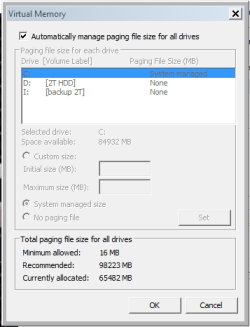
hello everyone i want to increase virtual memory windows 7 i have 64GB with of Ram in my computer what should i change to... anyone help, thanks i have attached a screenshot of my virtual memory,
 

Attachments

  • ram.PNG
    ram.PNG
    7.8 KB · Views: 42

My Computer

Computer type
PC/Desktop
OS
win 7 64bit
Hi Sangar, Welcome to Seven forums.

Did you get any errors saying that you need to increase the virtual memory or you just want to increase it?

You can check out this article. Maybe of some help.
 

My Computer

Computer type
PC/Desktop
Computer Manufacturer/Model Number
Custom Bulid/Self made
OS
Windows 11 x64
CPU
i5 2500K @ 3.3 GHz
Motherboard
ASUS P8 Z77 V pro
Memory
16 GB DDR 3 @ 1600Mhz
Graphics Card(s)
MSI 1050TI 4GB OC version
Sound Card
On Board (Realtek HD audio)
Monitor(s) Displays
Samsung 22" LCD
Screen Resolution
1920*1080
Hard Drives
Seagate 1 TB, WD 1TB, Seagate 2 TB ( I use a lot of space)
PSU
coolermaster 750 W
Case
Coolermaster HAF912
Cooling
Coolermaster hyper 212 EVO
Keyboard
Samsung
Mouse
Dell Wireless
Internet Speed
Wireless 50 Mbps
Antivirus
AVG 2016 Internet Security
Browser
Google Chrome
I wouldn't be concerned about the "Recommended" value. That is just a value based on the size of RAM and is out of step with current pagefile sizing standards. A 64 GB pagefile (which you have) is very large and would be more that adequate for all but the most extreme workloads. Most people would be wishing to reduce the pagefile size, and by a considerable value. It is impossible to make any meaningful recommendations without knowing your workload. 64 GB RAM is very large and presumably you have a need for this.

 

My Computer

Computer type
PC/Desktop
Computer Manufacturer/Model Number
HP
OS
Windows 7 Pro 64 bit
CPU
Xeon W3520
Memory
8 GB
Graphics Card(s)
Nvidia Geforce 210
I recommend leaving your settings just like they are.
Windows 7 will manager your memory quite well all by itself.
 

My Computer

Computer type
PC/Desktop
Computer Manufacturer/Model Number
Home made Desktop
OS
Windows 10 Pro. 64/ version 1709 Windows 7 Pro/64
CPU
Intel i7-6800K @ 4.3
Motherboard
ASUS X-99 Deluxe II
Memory
Corsair Platinum 16 gig @2400
Graphics Card(s)
EVGA GTX 1070 OC
Monitor(s) Displays
Asus 27" LED LCD/VE278Q
Screen Resolution
1920-1080 or 1280-720 HDMI
Hard Drives
INTEL SSD 730-240 Gb Sata 3.0/
PSU
EVGA Platium 1200W
Case
Phanteks Luxe Tempered Glass 8 fans/ one radiator
Cooling
XSPC/ Water Cooled CPU
Keyboard
Das 4 Professional
Mouse
Logitech M705/MX Anywhere 2-S
Internet Speed
100 mbits
Antivirus
Microsoft Security Essentials/ Malwarebytes Premium 3.0/ SAS
Browser
I.E. 11 default/Firefox/ ISP Time Warner Cable/Spectrum
Other Info
LG BluRay Burner/
Sound system-KLipsch-THX/
Icy Dock ssd Hot Swap bays.
With that much memory, I would say turn off the paging file, that`s valuable real estate on your hard drive.
 

My Computer

Computer type
PC/Desktop
Computer Manufacturer/Model Number
Skylake Special #666
OS
Windows 10 Pro x64
CPU
Intel Core i7 6700K
Motherboard
Asus Sabertooth Z170 Mark 1
Memory
GSkill TridentZ RGB 16GB 3600 16-16-16-36
Graphics Card(s)
EVGA GTX 980 Ti SC x2
Sound Card
Realtek High Definition
Monitor(s) Displays
AOC G2460PG
Screen Resolution
1920 x 1080 144Hz
Hard Drives
Samsung 860 Pro 256GB, Seagate Barracuda 4TB x2
PSU
EVGA 1000 P2, EVGA White Custom Braided Cables
Case
Corsair Vengeance C70 Gunmetal Black
Cooling
Corsair H100i v2, Corsair ML120 x2, Thermal Grizzly Kryonaut
Keyboard
Logitech G910 Orion Spectrum
Mouse
Logitech G700s
Internet Speed
Verizon Fios Quantum Gateway 75/75
Antivirus
Windows Defender, Malwarebytes Free 3.8.3
Browser
Chrome
Other Info
Corsair SP120 x4, LG Blu-ray Drive, Durabrand HT-395 100 Watt Dolby Digital Amp, Corsair H2100 Wireless 7.1 Headset
With that much memory, I would say turn off the paging file, that`s valuable real estate on your hard drive.

Normally I would disagree but with 64 GB RAM I find that very difficult. The usual problem with disabling the pagefile is the fixed and usually low limit on the commit limit. But with 64 GB RAM that limit would be nearly 64 GB and I have difficulty even imagining how that could be exceeded.

It appears that the drive has a capacity of about 147 GB of real capacity and almost certainly an SSD. That space can be put to better use than on an enormous pagefile.

Applications never access the pagefile (they can't) so it's lack should not cause any problems there. Some applications may complain without even looking at the commit limit but I expect they will be few.

Most likely the OP saw the recommended pagefile size and was naturally concerned that the current size was too small. That recommendation was from a time when typical RAM sizes were smaller but with 64 GB RAM it has no meaning.
 

My Computer

Computer type
PC/Desktop
Computer Manufacturer/Model Number
HP
OS
Windows 7 Pro 64 bit
CPU
Xeon W3520
Memory
8 GB
Graphics Card(s)
Nvidia Geforce 210
Back
Top