Help me build a new desktop!

gemini2010

New member
Member
Local time
6:05 AM
Messages
60
Location
Playford
Howdy,
Before I read hundreds of articles on all the different hardware available, I thought I would talk to the experts :) Can you please offer some advice on building a new machine?
Current setup;
Netgear Router with ADSL internet connection
Epson All in One Printer, Copier
Toshiba notebook running Win7 used for social networking, storage, games, research.
Current desktop does not access the network. Old system with win2000 pro used mainly for accounting, games, and storage

So,
I am looking at building a new “tower” system which is stable and secure enough to manage gaming/ multimedia and capable of supporting up to 5 users. I’m looking for the quickest and most stable computer within a budget of $1200-$1400 for the “box”.
Preferences;
Intel
scsi
I would most likely discontinue using my old desktop after it has been replaced so I could use the current wireless keyboard/mouse, and the ViewSonic monitor however, I may purchase a new monitor later on, better suited to gaming. It also has a DVD burner which may be useful depending; I am not sure on the cost of purchasing a new Blu-ray burner.
I would need to purchase the OS, is Win7 the best option? (This doesn’t need to be included in the budget)
I would be installing full version Norton 360 (already purchased)
I would look at using the new desktop rather than the laptop for transferring files between computer and phones and other devices such as iPod etc.
What is the best way to set up users? For example, I have a laptop (and with introducing a new desktop) to set up each user (5) on each computer attached to the network seems silly. Can I set up a server type application to manage the logins at a LAN level? I have heard that Win7 can do this.
 
Last edited:

My Computer My Computer

OS
Windows 7 Home Premium
I am looking at building a new “tower” system which is stable and secure enough to manage gaming/ multimedia and capable of supporting up to 5 users.
What do you mean by supporting 5 users? Do you just want to have 5 different user accounts on the same machine that any single computer user can use when they sit down and use the computer? If so, there really isn't anything special that you need for this.

I’m looking for the quickest and most stable computer within a budget of $1200-$1400 for the “box”.
You can build quite a gaming computer for $1,400. Your budget is going to be just fine.


Preferences;
Intel
scsi
SCSI???? What in the world do you want that for? Forget running SCSI drives, get an SSD for your OS and apps and a large capacity mechanical drive for storage.


Windows 7 is likely your best option. You can have multiple user accounts with Windows 7, but you cannot have a centralized setup like Active Directory using just Windows 7. So, if you have a laptop and this desktop, you would have to create 5 accounts on each and set passwords for each of these users on both machine.

BTW: Please don't change your font color to black on your posts. Many of us use a black theme here at SevenForums and when we view your post, we see a huge black box with nothing in it. We have to actually highlight your text in order to see it.
 

My Computer My Computer

Computer Manufacturer/Model Number
Self-Built in July 2009
OS
Windows 7 Ultimate x64
CPU
Intel Q9550 2.83Ghz OC'd to 3.40Ghz
Motherboard
Gigabyte GA-EP45-UD3R rev. 1.1, F12 BIOS
Memory
8GB G.Skill PI DDR2-800, 4-4-4-12 timings
Graphics Card(s)
EVGA 1280MB Nvidia GeForce GTX570
Sound Card
Realtek ALC899A 8 channel onboard audio
Monitor(s) Displays
23" Acer x233H
Screen Resolution
1920x1080
Hard Drives
Intel X25-M 80GB Gen 2 SSD
Western Digital 1TB Caviar Black, 32MB cache. WD1001FALS
PSU
Corsair 620HX modular
Case
Antec P182
Cooling
stock
Keyboard
ABS M1 Mechanical
Mouse
Logitech G9 Laser Mouse
Internet Speed
15/2 cable modem
Other Info
Windows and Linux enthusiast. Logitech G35 Headset.
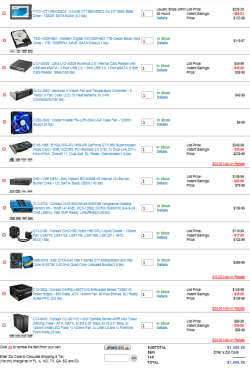
You should be able to use this as a guide, shop and get the discounts and I can see you dropping 150-250 off this USD pricing.
i5 system 1500.PNG
Forgot to add the OS.
This will rock all five users world's !
 

My Computer My Computer

Computer type
PC/Desktop
Computer Manufacturer/Model Number
A blend of brains, brawn and dumb luck.
OS
Windows 7 Ultimate 64
CPU
i7 3770k OC'd 4.6 @ 1.17v, also FX 8120 & i5 miniITX
Motherboard
MSI P67A-GD80 b3
Memory
32 gb G.Skill Sniper DDR3 10-12-12-31 @ 2133
Graphics Card(s)
XFX Radeon 7870 2GB DDR5
Sound Card
Sound Blaster Z Series Card
Monitor(s) Displays
(2) LG LED 23" 1920 x 1080 2ms Monitors via mini d-port
Screen Resolution
1680 X 1050 p
Hard Drives
Samsung 256 gb 830 SSD sata III
(1) 1 tb WD Black
(2) 1 tb Hitachi deskmates/sata II
(2) 1 tb WD green/sata II
(2) 3 tb Seagate Barracuda
(1) 120 gb OCZ Vertex SS
(1) Drobo 5N w/5 Seagate 3tb
PSU
EVGA modular 1000G2 80% gold rating & APC 1200 RS
Case
CoolerMaster Storm Styker
Cooling
7 case fans 140mm & 120mm, NZXT Kraken X60
Keyboard
(2) Logitech Illuminated Keyboards (1) usb (1) wireless
Mouse
Logitech G700 & T-BC21 - nano nx for the laptop
Internet Speed
Basic 120mbps down
Antivirus
Trend Micro Titanium Max Security & Malwarebytes Premium
Browser
Chrome and IE 10
Other Info
5 Noctua case fans + 3 Noctua in p/p on NZXT cooler
Integrated hot swap drive bays for 2.5" Drives
(2) Lite-on dvd/cd/Blu Ray optical 22X
Integrated fan controller and led on/off
HP Officejet Pro 8630 all-n-one
Hot-swappable 3.5" hard drive bay
Netgear Nighthawk router
Asus USB 3 & sata 6 PCIe card
Vantec IDE to sata adptr./Ultra sata adptr
Lenovo L420 i5 lappy with m sata
Drobo 5N advanced NAS
BTW: Please don't change your font color to black on your posts. Many of us use a black theme here at SevenForums and when we view your post, we see a huge black box with nothing in it. We have to actually highlight your text in order to see it.
ditto..
Same goes for white text on default themes, :D
 

My Computer My Computer

Computer Manufacturer/Model Number
Hewlett packard/p6512uk
OS
Microsoft Windows 7 Home Premium 64-bit 7600
CPU
IIx4 amd athelon 635 processor
Motherboard
FOXCONN 2AA9
Memory
2x2gb
Graphics Card(s)
ati radeon HD 5450
Sound Card
(1) Realtek High Definition Audio (2) AMD High Definition
Monitor(s) Displays
samsung lcd tv 32"
Screen Resolution
1360x 768
Hard Drives
(1) WDC WD10 01FAES-60Z2A0 SATA Disk Device (2) Maxtor OneTouch USB Device (3) ST310003 33AS USB Device (4) WD My Book 1111 USB Device
PSU
?
Cooling
air!
Keyboard
wireless hp
Mouse
wireless Hp,optical
Internet Speed
1.10mb/s
Antivirus
MSE
Browser
Firefox
Hi pparks1 – yes there will be 5 different users using the computer/network. I have got it set up currently so that each user has their own log on for the laptop and also for the old desktop, but I wanted to change that to one logon for the network. I don’t have a “sever” as such and couldn’t understand how to set this up in Win7 as someone had told me can be done.
But as you have mentioned, I cannot have an Active Dir using Win7, so I guess that cancels that idea out.

The reason I mention scsi is because I had a computer using scsi which, when I had the motherboard upgraded, I was left with IDE, and I couldn’t connect as many devices, for example I could no longer connect both my dvd burner and dvd drive. I haven’t been involved with computer builds for about 8 years and I haven’t heard of SSD – I shall look into that!

And, sorry about the font colour change, I didn’t realise it had the font colour set to black but I have edited that post to remove all text formatting, so hopefully this has removed the problem.

Linnemeyerhere thanks for your post, I shall look closer into that list now!!
 

My Computer My Computer

OS
Windows 7 Home Premium
Back
Top