
Help me make a WinPE for Minitool Partition Wizard help

SinghRauloS

New member
Local time
12:31 AM
Messages
17
Hi,

This is my first post here and I am in dire need to make a WinPE for MiniTool Partition Wizard Pro version 7.7. My pc does not detect my external drive efficiently when using Linux bootable cd so I have been using WinPE discs of Acronis True Image 2011 which I have created with it's Plus Pack. I was surprised to see that MiniTool has not a way of making a WinPE unlike that of Easeus Partition Master Pro. I recently got a license for the Pro version in a recent Facebook promo for Partition Wizard. I may in the future have a need to use a bootable disc for Partition Wizard so I'd like as much as I can have it ready for use.

Thing is that when I approached the CS of MiniTool it didn't helped me and said that MS is discontinuing the product and all. To top it they said,

...Creating WinPE is really out of scope of our help. In fact, Microsoft is discontinuing this product and we do not feel confident to give you the answer. Maybe you can find some information online forum such as http://www.sevenforums.com/."
..what a way to answer from a customer oriented organization.... :( :( :(

Anyway, so I went here for help and assistance.

As mentioned, I have already made an Acronis WinPE disc (from the Plus Pack builder) so I have WAIK installed in the pc. Kindly see image attached of my C:\ of which it has the winpe_x86 folder.

[URL=http://www.bild.me/bild.php?file=45127952013-02-27_034252.jpg] [/URL]


On one of the email sent by CS they said,

You can install the Partition Wizard on your computer first, then
copy the Partition Wizard folder to the WinPE image and burn it to the
disk.
I was asking a friend earlier about it and about how..(But unfortunately he also has created a WinPE via the builder of Macrium/Paragon --Incidentally I was browsing around and saw here that there is a custom-made Paragon PE and a downloadable Macrium PE made! That's great!)

as I do not understand the message...

"re: copy the Partition Wizard folder to the WinPE image" does that mean,

C:\Program Files\MiniTool Partition Wizard Professional Edition 7.7....?

How can I copy that to the WinPE image?

WinPE image what? Is that the winpe_x86 folder? or the C:\Program Files\Windows AIK..?

I am new to these and I am not a computer nerd-guy thing. These are all new to me and as all new one's a guide is needed or better yet some angel to help me out. I know these might be a bit elementary to you guys here as when I took a look at the discussions of the other PE making I got confused and had a hard time understanding it.

So please sirs do help me as I need this one badly... :(
 
Last edited:

My Computer My Computer

Computer type
PC/Desktop
OS
Windows 7 Ultimate x86

My Computer My Computer

Computer type
PC/Desktop
OS
Windows 7 Ultimate x86

My Computer My Computer

Computer type
PC/Desktop
Computer Manufacturer/Model Number
Home Built Desktop By DataTech
OS
Windows 7 Ultimate X64 SP1
CPU
Intel i5-2550K, Differing ~4.4-4.8GHz No built in GPU
Motherboard
ASUS P8Z68-V PRO/GEN3
Memory
16GB G.Skill Sniper 1866MHz @ 2133MHz 2x8GB
Graphics Card(s)
ASUS GTX650TIB-DC2OC-2GD5, (650TI Boost)
Sound Card
Onboard Realtek 5-1
Monitor(s) Displays
Samsung P2570HD
Screen Resolution
1920x1080
Hard Drives
Samsung 840 Pro 256GB SSD for OS, 500GB Seagate Constellation (Enterprise drive) for Data
PSU
Corsair HX650W
Case
Inwin Dragon Rider
Cooling
Hyper 212 EVO w/two Noctua fans, push-pull, @1300 RPM
Keyboard
E-Z Eyes, bright yellow keys with large characters
Mouse
steelseries SENSEI Laser Pro Gaming
Internet Speed
48-51Mbs Mbs down, 11 Mbs up Xfinity Cable
Antivirus
Norton Internet Security 2013
Browser
IE 10, Opera, Pale Moon if needed
Other Info
4 case fans, LG BluRay-RE, ASUS DVD-RW, Mr. Fusion power supply, 1.21 gigawatts.

-- was having trouble with the image...sorry. Sir moderator I cannot delete the #2 post I made..sorry again..please delete. Thanks :)

@Britton30,

Thank you for answering!

I have the bootable cd with me as I have used the free version before. Problem is that cd cannot also see my external. As mentioned I have had to use the WinPE disc of Acronis for me to recover an image from that external drive I have. So since that bootable media I have for MPW cannot see my external drive I have to make/have a WinPE. Even the Linux cd of Acronis does not see my external drive(the reason I got the Plus Pack to create the WinPE).
 

My Computer My Computer

Computer type
PC/Desktop
OS
Windows 7 Ultimate x86
I'm confused now, your thread title says you need to make a bootable PW CD bbut you did that already?
 

My Computer My Computer

Computer type
PC/Desktop
Computer Manufacturer/Model Number
Home Built Desktop By DataTech
OS
Windows 7 Ultimate X64 SP1
CPU
Intel i5-2550K, Differing ~4.4-4.8GHz No built in GPU
Motherboard
ASUS P8Z68-V PRO/GEN3
Memory
16GB G.Skill Sniper 1866MHz @ 2133MHz 2x8GB
Graphics Card(s)
ASUS GTX650TIB-DC2OC-2GD5, (650TI Boost)
Sound Card
Onboard Realtek 5-1
Monitor(s) Displays
Samsung P2570HD
Screen Resolution
1920x1080
Hard Drives
Samsung 840 Pro 256GB SSD for OS, 500GB Seagate Constellation (Enterprise drive) for Data
PSU
Corsair HX650W
Case
Inwin Dragon Rider
Cooling
Hyper 212 EVO w/two Noctua fans, push-pull, @1300 RPM
Keyboard
E-Z Eyes, bright yellow keys with large characters
Mouse
steelseries SENSEI Laser Pro Gaming
Internet Speed
48-51Mbs Mbs down, 11 Mbs up Xfinity Cable
Antivirus
Norton Internet Security 2013
Browser
IE 10, Opera, Pale Moon if needed
Other Info
4 case fans, LG BluRay-RE, ASUS DVD-RW, Mr. Fusion power supply, 1.21 gigawatts.
I'm confused now, your thread title says you need to make a bootable PW CD bbut you did that already?

Oh sorry for the confusion there. I have downloaded the bootable Linux cd from the site of MiniTool. That was the bootable cd that I was talking about. The WinPE bootable disc is what I need to make since when using the "downloaded-bootable disc" has issues reading/detecting my external drive.

The first time I experienced that non-reading/detection was when using the Linux cd of Acronis True Image 2011. Good thing I purchased the Plus Pack which when I did make the WinPE disc (WAIK + Plus Pack Builder) the non-reading/detection of my external drive was solved. So not wanting to experince the same with MiniTool I need to make a WinPE disc also.
 

My Computer My Computer

Computer type
PC/Desktop
OS
Windows 7 Ultimate x86
Run the exe file to install program onto your HD. I changed the location for install
from:
Code:
c:\Program Files\MiniTool Partition Wizard Home Edition 7.7
to:
c:\Program Files\pwhe7
My batch files for working with WAIK.
They are in          C:\WorkPE\                 directory.
-------------------------------------------------------------------------------------------------------------------------------------
1.  Make pe Directory.BAT
rd /s/q c:\winpe_x86
c:
cd "c:\program files\windows aik\tools\petools"
call copype.cmd x86 c:\winpe_x86
pause
-----------------------------------------------------------------------------------------------------------------------------------------
2.  Mount pe.BAT
Dism /Mount-Wim /WimFile:C:\winpe_x86\winpe.wim /index:1 /MountDir:C:\winpe_x86\mount
---------------------------------------------------------------------------------------------------------------------------------------------
3.    Unmount pe Commit.BAT
Dism /Unmount-Wim /MountDir:C:\winpe_x86\mount /Commit 
----------------------------------------------------------------------------------------------------------------------------------------------
4.   Copy pe to boot.BAT
copy c:\winpe_x86\winpe.wim c:\winpe_x86\iso\sources\boot.wim
------------------------------------------------------------------------------------------------------------------------------------------------
5.   Make ISO.BAT
c:
cd "c:\program files\windows aik\tools\x86"
call oscdimg -n -bC:\winpe_x86\etfsboot.com C:\winpe_x86\ISO C:\winpe_x86\winpe_x86.iso
pause
-----------------------------------------------------------------------------------------------------------------------------------------------------
The ideal here is that the c:\winpe_x86\winpe.wim file is the base file to work with. When you mount that file it
extracts the files to c:\winpe_x86\mount and this is where you make or add changes.

Copy the c:\Program Files\pwhe7 directory to
c:\winpe_x86\mount\Program Files\ so that you have a pwhe7 directory in the mounted directory.
Next you will need to use notepad to make a file called winpeshl.ini with this in the file:
[LaunchApp]
AppPath=x:\Program Files\pwhe7/PartitionWizard.exe
save it to: c:\winpe_x86\mount\windows\system32
as: "winpeshl.ini"
the quotes keep notepad from saving it with a .txt extention.
Then when you are finished, you unmount with commit to add changes back into that c:\winpe_x86\winpe.wim.
Then you copy that file into c:\winpe_x86\iso\sources\boot.wim making the winpe.wim the same file as
boot.wim, only the file in sources directory has to be called boot.wim. Once it is copyed, you can make the iso file.
All of the batch files must be ran with elevated command, or admin.

TJG
 

My Computer My Computer

Computer Manufacturer/Model Number
Dell Dimension E510
OS
Windows 7 Home Premium 32bits
CPU
Intel Pentium 4 521
Motherboard
Dell Inc. ORD203
Memory
DDR2 4096MBytes
Graphics Card(s)
ATI Radeon HD 2400 Series
Sound Card
On-Board Sigma Tel High Definition Audio
Monitor(s) Displays
Dell ST2210 1920x1080x60 hertz
Hard Drives
320 SATA
500 SATA
PSU
Antec 430 Watts
Case
Dell
Cooling
Standard Fans
I don't think he has WAIK.

If you hang on a while, I will make something that will do it for you. That assumes you are running it from windows 7.

I am right in the middle of something else at the moment.

If you are running win7 x86 it should be easier.
 

My Computers My Computers

System One System Two

  • Computer type
    PC/Desktop
    OS
    7 X64
    CPU
    i5 8400
    Motherboard
    gigabyte b365m ds3h
    Memory
    2x8gb 3200mhz
    Hard Drives
    various
    PSU
    pure power 11 400w cm
    Case
    Coolermaster
    Cooling
    cryorig m9i
  • Computer type
    PC/Desktop
    OS
    7x64
    CPU
    g5400
    Motherboard
    ga b365m ds3h
    Memory
    8gb ddr4 2400
    PSU
    xfx pro 450w
Hello Si

SinghRaulas - His first post he said he does have the WAIK installed on his ps and wished to know how to make the winpe with Partition Wizard installed. Just trying to say how I did it.
Thanks !
 

My Computer My Computer

Computer Manufacturer/Model Number
Dell Dimension E510
OS
Windows 7 Home Premium 32bits
CPU
Intel Pentium 4 521
Motherboard
Dell Inc. ORD203
Memory
DDR2 4096MBytes
Graphics Card(s)
ATI Radeon HD 2400 Series
Sound Card
On-Board Sigma Tel High Definition Audio
Monitor(s) Displays
Dell ST2210 1920x1080x60 hertz
Hard Drives
320 SATA
500 SATA
PSU
Antec 430 Watts
Case
Dell
Cooling
Standard Fans
I must have missed that bit.
 

My Computers My Computers

System One System Two

  • Computer type
    PC/Desktop
    OS
    7 X64
    CPU
    i5 8400
    Motherboard
    gigabyte b365m ds3h
    Memory
    2x8gb 3200mhz
    Hard Drives
    various
    PSU
    pure power 11 400w cm
    Case
    Coolermaster
    Cooling
    cryorig m9i
  • Computer type
    PC/Desktop
    OS
    7x64
    CPU
    g5400
    Motherboard
    ga b365m ds3h
    Memory
    8gb ddr4 2400
    PSU
    xfx pro 450w
Thanks guys for the reply. I am excited and am eager to make it work through your assistance/help. Was a bit frustrated with the CS of Minitool for not helping me out but it's a good thing "this" forum is around to lend a helping hand :)

@TJG,

Thanks for the reply. I just got online and will be reading your post. I am not a technical person since my main work is electronics manufacturing so please bear with me if I will have a ton of questions later. I have been really dependent on builders. I also saw your post with a member who does not have WAIK. I was reading that yesterday but got all confused in the head! Ha ha! Will do it again and compare and be back.

@SIW2,

Thanks for the reply. Yes I am interested in that "something" ;) I guess it'll be the same as/or something like that of another post I saw here (the one with the Paragon Backup and Restore).
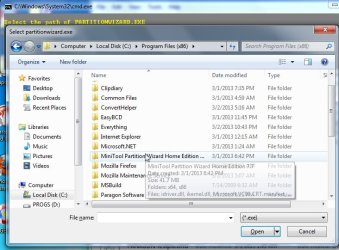
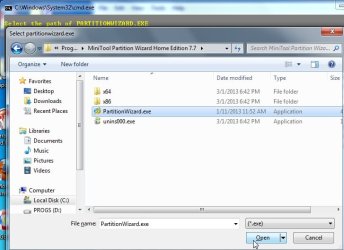
I have WAIK and running Windows 7 Ultimate x86 and Windows 7 Ultimate x64. I am trying to make this one in x86 first.
 

My Computer My Computer

Computer type
PC/Desktop
OS
Windows 7 Ultimate x86
Yes, I could probably just adapt paragonpe maker to include partition wizard.

Will have a look at it when I get the time.

If you want to put PW in , you will either need to make 64 pe with 32 bit support ( pretty difficult ). Or , just use 32 bit pe. That will be fine. You can use 32 bit pe even if you are running 64 bit o/s.
 

My Computers My Computers

System One System Two

  • Computer type
    PC/Desktop
    OS
    7 X64
    CPU
    i5 8400
    Motherboard
    gigabyte b365m ds3h
    Memory
    2x8gb 3200mhz
    Hard Drives
    various
    PSU
    pure power 11 400w cm
    Case
    Coolermaster
    Cooling
    cryorig m9i
  • Computer type
    PC/Desktop
    OS
    7x64
    CPU
    g5400
    Motherboard
    ga b365m ds3h
    Memory
    8gb ddr4 2400
    PSU
    xfx pro 450w
Yes, I could probably just adapt paragonpe maker to include partition wizard.

Will have a look at it when I get the time.

If you want to put PW in , you will either need to make 64 pe with 32 bit support ( pretty difficult ). Or , just use 32 bit pe. That will be fine. You can use 32 bit pe even if you are running 64 bit o/s.

Hi SIW2,

Might settle for x86 for now (as you stated, it can be used on both x86 and x64). Will wait for the "something" (wether it be adaptation of paragonpe or something simpler with eagerness. Thank you!
 

My Computer My Computer

Computer type
PC/Desktop
OS
Windows 7 Ultimate x86
Hope to have a go at it on Sunday.
 

My Computers My Computers

System One System Two

  • Computer type
    PC/Desktop
    OS
    7 X64
    CPU
    i5 8400
    Motherboard
    gigabyte b365m ds3h
    Memory
    2x8gb 3200mhz
    Hard Drives
    various
    PSU
    pure power 11 400w cm
    Case
    Coolermaster
    Cooling
    cryorig m9i
  • Computer type
    PC/Desktop
    OS
    7x64
    CPU
    g5400
    Motherboard
    ga b365m ds3h
    Memory
    8gb ddr4 2400
    PSU
    xfx pro 450w
Here you go :

View attachment 257850


D/L the zip file. Rt click it >properties>Unblock>Apply>OK.


Then extract it directly onto your drive, e.g. C.

It might need to download a small file.

It will ask you to browse for a couple of things if you want to include them, like this:

2013-03-03_015308.jpg


2013-03-03_015327.jpg

Have Fun.
 

My Computers My Computers

System One System Two

  • Computer type
    PC/Desktop
    OS
    7 X64
    CPU
    i5 8400
    Motherboard
    gigabyte b365m ds3h
    Memory
    2x8gb 3200mhz
    Hard Drives
    various
    PSU
    pure power 11 400w cm
    Case
    Coolermaster
    Cooling
    cryorig m9i
  • Computer type
    PC/Desktop
    OS
    7x64
    CPU
    g5400
    Motherboard
    ga b365m ds3h
    Memory
    8gb ddr4 2400
    PSU
    xfx pro 450w

My Computer My Computer

Computer type
PC/Desktop
OS
Windows 7 Ultimate x86
Hi SIW2,

I am in the office right now and I saved the PARAGONPEv5.zip here in my usb. I was trying it here in my pc but it was asking to download a "Winre..." file of 136mb size from Microsoft. Now I am in the office right now so the internet here is a bit faster than what I have at home. So maybe I can download it here separately from Microsoft and later apply it when I get home...? Is there any download link where I can download that needed file..?

Thank you very much.
 

My Computer My Computer

Computer type
PC/Desktop
OS
Windows 7 Ultimate x86
It will d/l the file for you. It needs to be downloaded to a specifc place.

Run the .cmd , let it downoload.

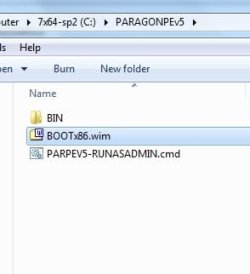
You will find it in the paragonpev5 folder like this:

parpev5-bootx86WIM.jpg


You can copy that and use it at home. You will need to put it in exactly the same place on your own pc.

Because you have copied it from another pc ( your work pc ), you may need to rt click bootx86.wim , Properties>Unblock>Apply>OK. Do that before running PARPEV5-RUNASADMIN.cmd on your home pc.
 

My Computers My Computers

System One System Two

  • Computer type
    PC/Desktop
    OS
    7 X64
    CPU
    i5 8400
    Motherboard
    gigabyte b365m ds3h
    Memory
    2x8gb 3200mhz
    Hard Drives
    various
    PSU
    pure power 11 400w cm
    Case
    Coolermaster
    Cooling
    cryorig m9i
  • Computer type
    PC/Desktop
    OS
    7x64
    CPU
    g5400
    Motherboard
    ga b365m ds3h
    Memory
    8gb ddr4 2400
    PSU
    xfx pro 450w
Hi SIW2,

I wasn't able to do what I intended at the office as the IT-staff there blocked what I was doing. So I did it at home. After 2hours(my wireless internet is so slow..) I was able to run it successfully. Please see the image that I got from the the booted pe disc.


Can I ask a couple of questions..?

Can I save that downloaded "BOOTx86.wim" (111658kb)file and zip it together with the PARAGONPEv5.zip...? I was thinking that if I was to use it again then it would not seek that download again as it's now included in the zip file.

I did not select any drivers during the creation as I needed to see first if what I am doing is correct. I have a feeling that it might be wise to add drivers such as that of mass storage drives/card readers/usb --especially usb. Where can I download the most common drivers for them?

If I get them I will select the whole folder right? or just the .sys file..?

Thank you so much for the help!
 

My Computer My Computer

Computer type
PC/Desktop
OS
Windows 7 Ultimate x86
Back
Top