
Help me please.....

Status
Not open for further replies.
how do you do a screen shot??
 

My Computer

Computer Manufacturer/Model Number
Enclosure Type: Desktop
OS
Microsoft Windows 7 version 7100 32x
CPU
AMD Sempron(tm)
Memory
1.25 GB
Graphics Card(s)
Standard VGA Graphics Adapter
Sound Card
NVIDIA(R) nForce(TM) Audio Codec Interface
Screen Resolution
1024x768 LCD screen
Keyboard
standart PS/2 Keyboard
Mouse
HID-compliant mouse
Other Info
BIOS Version: Phoenix - AwardBIOS v6.00PG

System Type: X86-based PC
My Computer

Computer Manufacturer/Model Number
Dell Vostro 1000
OS
Windows 7 Ultimate x86
CPU
AMD Sempron 3600+
Graphics Card(s)
ATI Radeon Xpress 1150
Monitor(s) Displays
Generic PnP Monitor
Screen Resolution
1200 x 800
Hard Drives
WD Scorpio Blue 500 GB (WD5000BEVT)
Mouse
Logitech V320 Cordless Optical Mouse
Yeah, the snipping tool is better IMO, as you can just click&drag the area you want to capture
 

My Computer

Computer Manufacturer/Model Number
Compaq Desktop
OS
Windows 7 Ultimate x64
CPU
AMD Sempron Dual Core
Memory
3GB
Graphics Card(s)
NVIDIA GeForce 6150SE nForce 430
Screen Resolution
1024x768
Hard Drives
150GB Sata

Attachments

  • Screenshot - 02_06_2009 , 22_40_52.jpg
    Screenshot - 02_06_2009 , 22_40_52.jpg
    27.5 KB · Views: 32

My Computer

Computer Manufacturer/Model Number
Enclosure Type: Desktop
OS
Microsoft Windows 7 version 7100 32x
CPU
AMD Sempron(tm)
Memory
1.25 GB
Graphics Card(s)
Standard VGA Graphics Adapter
Sound Card
NVIDIA(R) nForce(TM) Audio Codec Interface
Screen Resolution
1024x768 LCD screen
Keyboard
standart PS/2 Keyboard
Mouse
HID-compliant mouse
Other Info
BIOS Version: Phoenix - AwardBIOS v6.00PG

System Type: X86-based PC
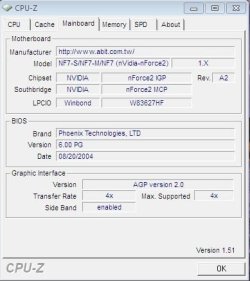
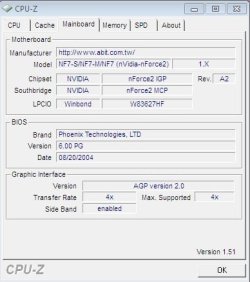
I think the problem is BIOS. look at the date..

8/20/2004. It needs to be updated. then he should go to.

Code:
http://www.nvidia.com/Download/index.aspx?lang=en-us
that is the Win7 Driver page at NVidia.

Code:
[B]GeForce/ION Driver Release 185[/B] WHQL
[B]Version[/B]:185.85
[B]Release Date[/B]:May 06, 2009
[B]Operating System[/B]:Windows 7 (32-bit)[B]Language[/B]:U.S. English
[B]File Size[/B]:81.9 MB
 
I think the problem is BIOS. look at the date..

8/20/2004. It needs to be updated. then he should go to.

Code:
http://www.nvidia.com/Download/index.aspx?lang=en-us
that is the Win7 Driver page at NVidia.

Code:
[B]GeForce/ION Driver Release 185[/B] WHQL
[B]Version[/B]:185.85
[B]Release Date[/B]:May 06, 2009
[B]Operating System[/B]:Windows 7 (32-bit)[B]Language[/B]:U.S. English
[B]File Size[/B]:81.9 MB

so how do I update my BIOS??
 

My Computer

Computer Manufacturer/Model Number
Enclosure Type: Desktop
OS
Microsoft Windows 7 version 7100 32x
CPU
AMD Sempron(tm)
Memory
1.25 GB
Graphics Card(s)
Standard VGA Graphics Adapter
Sound Card
NVIDIA(R) nForce(TM) Audio Codec Interface
Screen Resolution
1024x768 LCD screen
Keyboard
standart PS/2 Keyboard
Mouse
HID-compliant mouse
Other Info
BIOS Version: Phoenix - AwardBIOS v6.00PG

System Type: X86-based PC
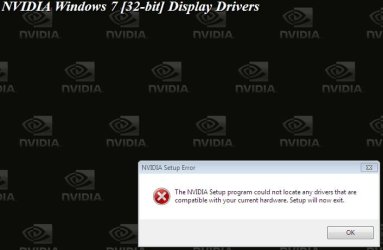
Download the installer from the link and after the download completes, run the installer, and after the installation is complete it may prompt for a restart, after the reboot, your graphics card may show up. :rolleyes:
 

My Computer

Computer type
Laptop
Computer Manufacturer/Model Number
Samsung
OS
Windows 8 x64
CPU
Intel Core i7 3630QM
Motherboard
Intel HM76
Memory
Samsung 8 GB DDR3 800 Mhz
Graphics Card(s)
ATI Radeon HD Graphics 7670M + Intel HD Graphics 4000
Screen Resolution
1366x768
Hard Drives
SAMSUNG Spinpoint M8 1TB
Internet Speed
4 Mb/sDownload Speed, 2 Mb/s Upload Speed
Antivirus
avast!

Attachments

  • Screenshot - 03_06_2009 , 13_22_30.jpg
    Screenshot - 03_06_2009 , 13_22_30.jpg
    24.4 KB · Views: 36

My Computer

Computer Manufacturer/Model Number
Enclosure Type: Desktop
OS
Microsoft Windows 7 version 7100 32x
CPU
AMD Sempron(tm)
Memory
1.25 GB
Graphics Card(s)
Standard VGA Graphics Adapter
Sound Card
NVIDIA(R) nForce(TM) Audio Codec Interface
Screen Resolution
1024x768 LCD screen
Keyboard
standart PS/2 Keyboard
Mouse
HID-compliant mouse
Other Info
BIOS Version: Phoenix - AwardBIOS v6.00PG

System Type: X86-based PC
My Computer

Computer type
Laptop
Computer Manufacturer/Model Number
Samsung
OS
Windows 8 x64
CPU
Intel Core i7 3630QM
Motherboard
Intel HM76
Memory
Samsung 8 GB DDR3 800 Mhz
Graphics Card(s)
ATI Radeon HD Graphics 7670M + Intel HD Graphics 4000
Screen Resolution
1366x768
Hard Drives
SAMSUNG Spinpoint M8 1TB
Internet Speed
4 Mb/sDownload Speed, 2 Mb/s Upload Speed
Antivirus
avast!
Don't know why you are downloading Display drivers yet, first you need the computer to recognize the one you have and by the sound of it you don't have one anyway aside from the integrated one, first you will need to update the Bios, I found one for your board dated 15th February 08 from here. http://drivers.softpedia.com/get/BIOS/Abit/Abit-NF7-S-V2-Bios-11.shtml.

Then you will need to install the Nforce drivers but the only ones I can find are from 2004 WinXP - UDP (5.10)

If that manages to install then you may have a chance of it seeing your display adapter.

I think if you can't find any drivers other then legacy drivers then it's time to upgrade your hardware.
 

My Computer

Computer Manufacturer/Model Number
Home Brew
OS
Windows 7 Ultimate Vista Ultimate x64
CPU
Core 2 Duo E8500 3.16Ghz @ 3.8Ghz
Motherboard
eVGA 750i FTW
Memory
2x2Gigs Patriot PC2-6400 LL
Graphics Card(s)
Inno3D GeForce GTX260 216 SP
Monitor(s) Displays
ASUS VW222U 22" 2ms Response time
Screen Resolution
1680x1050
Hard Drives
SATA 150GB
SATA II 250GB
USB IDE 750GB Ext.
PSU
HYTEC 600W & Thermaltake 650W Toughpower Power Exp
Case
Thermaltake Armor LCS (Liquid Cooling System)
Cooling
Liquid Cooling System
Keyboard
Logitech G15 Gaming Keyboard
Mouse
Logitech G9 Gaming Mouse
Don't know why you are downloading Display drivers yet, first you need the computer to recognize the one you have and by the sound of it you don't have one anyway aside from the integrated one, first you will need to update the Bios, I found one for your board dated 15th February 08 from here. http://drivers.softpedia.com/get/BIOS/Abit/Abit-NF7-S-V2-Bios-11.shtml.

Then you will need to install the Nforce drivers but the only ones I can find are from 2004 WinXP - UDP (5.10)

If that manages to install then you may have a chance of it seeing your display adapter.

I think if you can't find any drivers other then legacy drivers then it's time to upgrade your hardware.


The BIOS update is not working..... (the download link is not working...)
 

My Computer

Computer Manufacturer/Model Number
Enclosure Type: Desktop
OS
Microsoft Windows 7 version 7100 32x
CPU
AMD Sempron(tm)
Memory
1.25 GB
Graphics Card(s)
Standard VGA Graphics Adapter
Sound Card
NVIDIA(R) nForce(TM) Audio Codec Interface
Screen Resolution
1024x768 LCD screen
Keyboard
standart PS/2 Keyboard
Mouse
HID-compliant mouse
Other Info
BIOS Version: Phoenix - AwardBIOS v6.00PG

System Type: X86-based PC
Someone please try to find another way to help me I really need it.......

Maybe try to find another BIOS update or something like that......
 

My Computer

Computer Manufacturer/Model Number
Enclosure Type: Desktop
OS
Microsoft Windows 7 version 7100 32x
CPU
AMD Sempron(tm)
Memory
1.25 GB
Graphics Card(s)
Standard VGA Graphics Adapter
Sound Card
NVIDIA(R) nForce(TM) Audio Codec Interface
Screen Resolution
1024x768 LCD screen
Keyboard
standart PS/2 Keyboard
Mouse
HID-compliant mouse
Other Info
BIOS Version: Phoenix - AwardBIOS v6.00PG

System Type: X86-based PC
I told you to post a screen shot from the CPU-Z, keeping the CPU tab open. :sarc:
 

My Computer

Computer type
Laptop
Computer Manufacturer/Model Number
Samsung
OS
Windows 8 x64
CPU
Intel Core i7 3630QM
Motherboard
Intel HM76
Memory
Samsung 8 GB DDR3 800 Mhz
Graphics Card(s)
ATI Radeon HD Graphics 7670M + Intel HD Graphics 4000
Screen Resolution
1366x768
Hard Drives
SAMSUNG Spinpoint M8 1TB
Internet Speed
4 Mb/sDownload Speed, 2 Mb/s Upload Speed
Antivirus
avast!
Just popped in on this thread and seeing things like "update your BIOS" always makes my eyes bug out. DanR, before updating your BIOS, you should be aware of the dangers of doing so. Please take every precaution when/if you do the update.

Updating your BIOS can be a very scary process especially for older systems that don't have any roll-back.
 

My Computer

Computer type
PC/Desktop
Computer Manufacturer/Model Number
Custom Build/Mod
OS
Windows 7 Home Premium x64
CPU
Intel QX9650 Extreme 4.0 GHz
Motherboard
ASUS Rampage Extreme Rev2
Memory
8GB (4x2) Corsair Dominator DDR3
Graphics Card(s)
2x Radeon R390X [8GB]
Sound Card
SupremeFX X-Fi
Monitor(s) Displays
Dell 2408WFP 26" Panel
Screen Resolution
1920x1200
Hard Drives
4x WD 2TB (8TB+ Total)
2x Crucial SSD 128GB (RAID-0)
1x LG Blu-ray read/write
1x Phillips LightScribe DVD read/write
PSU
Corsair HX1000
Case
CoolerMaster - Cosmos S
Cooling
Custom Liquid - 320mm rad w/ 3x 80mm fans, CPU/NB/SB Blocks
Keyboard
Logitech Illuminater Pro
Mouse
Logitech
Internet Speed
Fractional T1 - 125Mbps
Antivirus
ESET Security Suite / Microsoft Security Essentials
Browser
Cyberfox Intel x64
Other Info
OC'd to 5.0GHz @ 44c under full load

Attachments

  • Screenshot - 04_06_2009 , 11_02_30.jpg
    Screenshot - 04_06_2009 , 11_02_30.jpg
    32.9 KB · Views: 14

My Computer

Computer Manufacturer/Model Number
Enclosure Type: Desktop
OS
Microsoft Windows 7 version 7100 32x
CPU
AMD Sempron(tm)
Memory
1.25 GB
Graphics Card(s)
Standard VGA Graphics Adapter
Sound Card
NVIDIA(R) nForce(TM) Audio Codec Interface
Screen Resolution
1024x768 LCD screen
Keyboard
standart PS/2 Keyboard
Mouse
HID-compliant mouse
Other Info
BIOS Version: Phoenix - AwardBIOS v6.00PG

System Type: X86-based PC
Just popped in on this thread and seeing things like "update your BIOS" always makes my eyes bug out. DanR, before updating your BIOS, you should be aware of the dangers of doing so. Please take every precaution when/if you do the update.

Updating your BIOS can be a very scary process especially for older systems that don't have any roll-back.

1. what dangers are you talking about??
2. nobody have another idea and nothing is working I think I will have to update my BIOS.....
 

My Computer

Computer Manufacturer/Model Number
Enclosure Type: Desktop
OS
Microsoft Windows 7 version 7100 32x
CPU
AMD Sempron(tm)
Memory
1.25 GB
Graphics Card(s)
Standard VGA Graphics Adapter
Sound Card
NVIDIA(R) nForce(TM) Audio Codec Interface
Screen Resolution
1024x768 LCD screen
Keyboard
standart PS/2 Keyboard
Mouse
HID-compliant mouse
Other Info
BIOS Version: Phoenix - AwardBIOS v6.00PG

System Type: X86-based PC
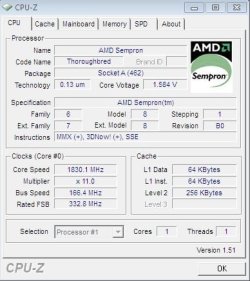
And the last question, pls post a shot with main board tab open
 

My Computer

Computer type
Laptop
Computer Manufacturer/Model Number
Samsung
OS
Windows 8 x64
CPU
Intel Core i7 3630QM
Motherboard
Intel HM76
Memory
Samsung 8 GB DDR3 800 Mhz
Graphics Card(s)
ATI Radeon HD Graphics 7670M + Intel HD Graphics 4000
Screen Resolution
1366x768
Hard Drives
SAMSUNG Spinpoint M8 1TB
Internet Speed
4 Mb/sDownload Speed, 2 Mb/s Upload Speed
Antivirus
avast!

Attachments

  • Screenshot - mainboard.jpg
    Screenshot - mainboard.jpg
    26.4 KB · Views: 10

My Computer

Computer Manufacturer/Model Number
Enclosure Type: Desktop
OS
Microsoft Windows 7 version 7100 32x
CPU
AMD Sempron(tm)
Memory
1.25 GB
Graphics Card(s)
Standard VGA Graphics Adapter
Sound Card
NVIDIA(R) nForce(TM) Audio Codec Interface
Screen Resolution
1024x768 LCD screen
Keyboard
standart PS/2 Keyboard
Mouse
HID-compliant mouse
Other Info
BIOS Version: Phoenix - AwardBIOS v6.00PG

System Type: X86-based PC
So as a recap, you had XP and you could play games and you had a Video card and there were drivers installed for it, is this correct so far?

What were the drivers that you had installed on XP?

Then you installed Windows and now it only shows a standard VGA adapter, right?

When you want to play games you get all sorts of errors, what errors are you getting?

What are the games you are trying to play that were working on XP?

Are you sure you actually have a Video Card?

Have you opened the computer and had a look the Big Card sticking up out of your motherboard and does your monitor connect to it. (It should be!)

We need more info, if you cant give it to us then you may need to find someone that can.
 

My Computer

Computer Manufacturer/Model Number
Home Brew
OS
Windows 7 Ultimate Vista Ultimate x64
CPU
Core 2 Duo E8500 3.16Ghz @ 3.8Ghz
Motherboard
eVGA 750i FTW
Memory
2x2Gigs Patriot PC2-6400 LL
Graphics Card(s)
Inno3D GeForce GTX260 216 SP
Monitor(s) Displays
ASUS VW222U 22" 2ms Response time
Screen Resolution
1680x1050
Hard Drives
SATA 150GB
SATA II 250GB
USB IDE 750GB Ext.
PSU
HYTEC 600W & Thermaltake 650W Toughpower Power Exp
Case
Thermaltake Armor LCS (Liquid Cooling System)
Cooling
Liquid Cooling System
Keyboard
Logitech G15 Gaming Keyboard
Mouse
Logitech G9 Gaming Mouse
"So as a recap, you had XP and you could play games and you had a Video card and there were drivers installed for it, is this correct so far?"

Yes.

"What were the drivers that you had installed on XP?"

I'm not sure I didn't do it.....

"Then you installed Windows and now it only shows a standard VGA adapter, right?"

Yes.

"When you want to play games you get all sorts of errors, what errors are you getting?"

most of the time the game just wont run but the thing that proves it is the game:
"TM nation for ever" the error said I have not good video card and it worked in XP.

"What are the games you are trying to play that were working on XP?"

Few things but the game that was the most important (like I said before) is "TM nation for ever".

"Are you sure you actually have a Video Card?"

Yes.

"Have you opened the computer and had a look the Big Card sticking up out of your motherboard and does your monitor connect to it. (It should be!)"

Yes I saw it and it is connected.
 

My Computer

Computer Manufacturer/Model Number
Enclosure Type: Desktop
OS
Microsoft Windows 7 version 7100 32x
CPU
AMD Sempron(tm)
Memory
1.25 GB
Graphics Card(s)
Standard VGA Graphics Adapter
Sound Card
NVIDIA(R) nForce(TM) Audio Codec Interface
Screen Resolution
1024x768 LCD screen
Keyboard
standart PS/2 Keyboard
Mouse
HID-compliant mouse
Other Info
BIOS Version: Phoenix - AwardBIOS v6.00PG

System Type: X86-based PC
Status
Not open for further replies.
Back
Top