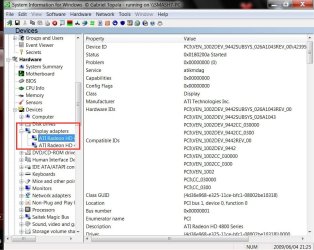
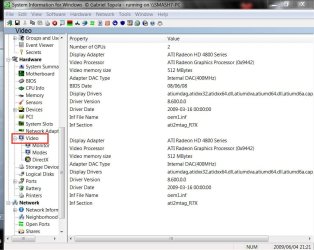
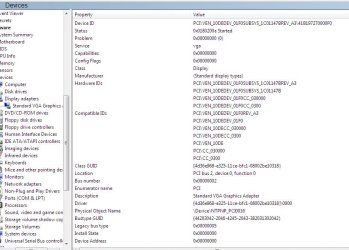
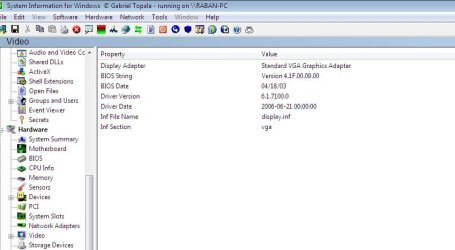
Help me please.....

Status
Not open for further replies.

My Computer

Computer type
PC/Desktop
Computer Manufacturer/Model Number
Systems by SmartEyeball
OS
8 Pro x64
CPU
i7 3770K 4.6GHz
Motherboard
ASUS P8Z77 WS
Memory
16GB G.Skill Trident X 2666mhz
Graphics Card(s)
x2 EVGA 780 Ti Superclocked SLI
Sound Card
SB X-FI Surround 5.1 PRO USB / ATH-AD900 Headphones
Monitor(s) Displays
x3 Dell U2410 / 58" Samsung
Screen Resolution
5760*1200/ 1920*1200
Hard Drives
2x Intel 520 240GB (RAID 0) * 2x WD Caviar Blacks 2TB (RAID 0) * 2TB WD Caviar Black * Sony Optirac DVD
PSU
Silverstone Strider Evolution 1200W
Case
Thermaltake Level 10 GT Snow Edition
Cooling
Noctua NH-D14
Keyboard
Topre Realforce // Ducky Shine MX Black // Filco Ninja TKL
Mouse
Thermaltake Theron (Highly Recommended) + Razer Imperator
Antivirus
MSE
Browser
IE, FF, WaterFox
Other Info
GT Extreme V2 Sim Racing Cockpit + 40" LCD and K/B Mouse stand ▼
Fanatec CSR Elite Wheel + Clubsport V1 Pedals + CSR shifter/7G-H ▼Saitek X52 Pro ▼ TrackIR 5 Pro
Buttkicker v2 Seat Rumbler with Dedicated 5.1 and Sub Woofer attached to frame ▼
=
Bloody Big Grin
this isn't the problem I have the CPU-Z program..... look at page 12 and see the pictures......
 

My Computer

Computer Manufacturer/Model Number
Enclosure Type: Desktop
OS
Microsoft Windows 7 version 7100 32x
CPU
AMD Sempron(tm)
Memory
1.25 GB
Graphics Card(s)
Standard VGA Graphics Adapter
Sound Card
NVIDIA(R) nForce(TM) Audio Codec Interface
Screen Resolution
1024x768 LCD screen
Keyboard
standart PS/2 Keyboard
Mouse
HID-compliant mouse
Other Info
BIOS Version: Phoenix - AwardBIOS v6.00PG

System Type: X86-based PC
CPU-Z is for your CPU not your GPU (video card).

CPU-Z is only useful for determining your CPU / Ram / mobo.

Those three I posted will show you everything inside your PC.
 

My Computer

Computer type
PC/Desktop
Computer Manufacturer/Model Number
Systems by SmartEyeball
OS
8 Pro x64
CPU
i7 3770K 4.6GHz
Motherboard
ASUS P8Z77 WS
Memory
16GB G.Skill Trident X 2666mhz
Graphics Card(s)
x2 EVGA 780 Ti Superclocked SLI
Sound Card
SB X-FI Surround 5.1 PRO USB / ATH-AD900 Headphones
Monitor(s) Displays
x3 Dell U2410 / 58" Samsung
Screen Resolution
5760*1200/ 1920*1200
Hard Drives
2x Intel 520 240GB (RAID 0) * 2x WD Caviar Blacks 2TB (RAID 0) * 2TB WD Caviar Black * Sony Optirac DVD
PSU
Silverstone Strider Evolution 1200W
Case
Thermaltake Level 10 GT Snow Edition
Cooling
Noctua NH-D14
Keyboard
Topre Realforce // Ducky Shine MX Black // Filco Ninja TKL
Mouse
Thermaltake Theron (Highly Recommended) + Razer Imperator
Antivirus
MSE
Browser
IE, FF, WaterFox
Other Info
GT Extreme V2 Sim Racing Cockpit + 40" LCD and K/B Mouse stand ▼
Fanatec CSR Elite Wheel + Clubsport V1 Pedals + CSR shifter/7G-H ▼Saitek X52 Pro ▼ TrackIR 5 Pro
Buttkicker v2 Seat Rumbler with Dedicated 5.1 and Sub Woofer attached to frame ▼
=
Bloody Big Grin
DanR,

I've just downloaded & run SIW & it give sooo much info i would advise using that.
 

My Computer

Computer Manufacturer/Model Number
Compaq Desktop
OS
Windows 7 Ultimate x64
CPU
AMD Sempron Dual Core
Memory
3GB
Graphics Card(s)
NVIDIA GeForce 6150SE nForce 430
Screen Resolution
1024x768
Hard Drives
150GB Sata
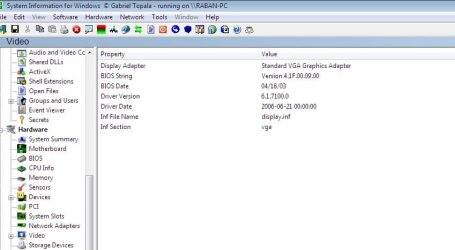
It says I have VGA to BUT I DON'T!!!!!
 

My Computer

Computer Manufacturer/Model Number
Enclosure Type: Desktop
OS
Microsoft Windows 7 version 7100 32x
CPU
AMD Sempron(tm)
Memory
1.25 GB
Graphics Card(s)
Standard VGA Graphics Adapter
Sound Card
NVIDIA(R) nForce(TM) Audio Codec Interface
Screen Resolution
1024x768 LCD screen
Keyboard
standart PS/2 Keyboard
Mouse
HID-compliant mouse
Other Info
BIOS Version: Phoenix - AwardBIOS v6.00PG

System Type: X86-based PC

Attachments

  • Screenshot - video.jpg
    Screenshot - video.jpg
    42.2 KB · Views: 47

My Computer

Computer Manufacturer/Model Number
Enclosure Type: Desktop
OS
Microsoft Windows 7 version 7100 32x
CPU
AMD Sempron(tm)
Memory
1.25 GB
Graphics Card(s)
Standard VGA Graphics Adapter
Sound Card
NVIDIA(R) nForce(TM) Audio Codec Interface
Screen Resolution
1024x768 LCD screen
Keyboard
standart PS/2 Keyboard
Mouse
HID-compliant mouse
Other Info
BIOS Version: Phoenix - AwardBIOS v6.00PG

System Type: X86-based PC

My Computer

Computer type
Laptop
Computer Manufacturer/Model Number
Samsung
OS
Windows 8 x64
CPU
Intel Core i7 3630QM
Motherboard
Intel HM76
Memory
Samsung 8 GB DDR3 800 Mhz
Graphics Card(s)
ATI Radeon HD Graphics 7670M + Intel HD Graphics 4000
Screen Resolution
1366x768
Hard Drives
SAMSUNG Spinpoint M8 1TB
Internet Speed
4 Mb/sDownload Speed, 2 Mb/s Upload Speed
Antivirus
avast!
It says I have VGA to BUT I DON'T!!!!!

That's because it's getting the information from the default windows VGA driver and not the device itself.

What does it show under "Devices>display adapters"
display2.JPG

and "Video"

displaya.JPG

Lastly, have you tried installing either Nvidia or ATI drivers.

If you have an older card, then I suggest you download an older driver first. The drivers available in Windows Update may not support your older video card and that is why it is using the default VGA driver.
 

My Computer

Computer type
PC/Desktop
Computer Manufacturer/Model Number
Systems by SmartEyeball
OS
8 Pro x64
CPU
i7 3770K 4.6GHz
Motherboard
ASUS P8Z77 WS
Memory
16GB G.Skill Trident X 2666mhz
Graphics Card(s)
x2 EVGA 780 Ti Superclocked SLI
Sound Card
SB X-FI Surround 5.1 PRO USB / ATH-AD900 Headphones
Monitor(s) Displays
x3 Dell U2410 / 58" Samsung
Screen Resolution
5760*1200/ 1920*1200
Hard Drives
2x Intel 520 240GB (RAID 0) * 2x WD Caviar Blacks 2TB (RAID 0) * 2TB WD Caviar Black * Sony Optirac DVD
PSU
Silverstone Strider Evolution 1200W
Case
Thermaltake Level 10 GT Snow Edition
Cooling
Noctua NH-D14
Keyboard
Topre Realforce // Ducky Shine MX Black // Filco Ninja TKL
Mouse
Thermaltake Theron (Highly Recommended) + Razer Imperator
Antivirus
MSE
Browser
IE, FF, WaterFox
Other Info
GT Extreme V2 Sim Racing Cockpit + 40" LCD and K/B Mouse stand ▼
Fanatec CSR Elite Wheel + Clubsport V1 Pedals + CSR shifter/7G-H ▼Saitek X52 Pro ▼ TrackIR 5 Pro
Buttkicker v2 Seat Rumbler with Dedicated 5.1 and Sub Woofer attached to frame ▼
=
Bloody Big Grin

Attachments

  • Screenshot - siw.jpg
    Screenshot - siw.jpg
    72.2 KB · Views: 25
  • Screenshot - video.jpg
    Screenshot - video.jpg
    42.2 KB · Views: 19
  • Screenshot - video2.jpg
    Screenshot - video2.jpg
    44.4 KB · Views: 18
  • Screenshot - video3.jpg
    Screenshot - video3.jpg
    45.8 KB · Views: 19
  • Screenshot - video4.jpg
    Screenshot - video4.jpg
    65.2 KB · Views: 16

My Computer

Computer Manufacturer/Model Number
Enclosure Type: Desktop
OS
Microsoft Windows 7 version 7100 32x
CPU
AMD Sempron(tm)
Memory
1.25 GB
Graphics Card(s)
Standard VGA Graphics Adapter
Sound Card
NVIDIA(R) nForce(TM) Audio Codec Interface
Screen Resolution
1024x768 LCD screen
Keyboard
standart PS/2 Keyboard
Mouse
HID-compliant mouse
Other Info
BIOS Version: Phoenix - AwardBIOS v6.00PG

System Type: X86-based PC
Hi DanR, as someone suggested earlier, if you have an XP install CD then it may help you discover your Video Adapter (make/model). It could be worth the suggestion of dual booting XP with 7 as you can run both. This option does save any re-formatting you would have to do, plus you can format the XP partition again from withing 7 once XP has identified your drivers.
 

My Computer

Computer Manufacturer/Model Number
Compaq Desktop
OS
Windows 7 Ultimate x64
CPU
AMD Sempron Dual Core
Memory
3GB
Graphics Card(s)
NVIDIA GeForce 6150SE nForce 430
Screen Resolution
1024x768
Hard Drives
150GB Sata
Did you try run DXdiag? it might see something.
 

My Computer

Computer Manufacturer/Model Number
Self Build 64bit
OS
Vista Ult64, Win7600
CPU
Intel Core 2 Quad Q6600 @ 2400 MHz 64bit OS
Motherboard
Asus P5E3 Deluxe WiFi @p 64 bit OS
Memory
4096 MB DDR3-SDRAM
Graphics Card(s)
ATI Radeon HD 3870 Series x2 Crossfired
Sound Card
Realtek on board
Monitor(s) Displays
Samsung SyncMaster - 23 inches
Screen Resolution
1680x1050 pixels at 60 Hz in True Colors
Hard Drives
Hitachi (250 GB)/Samsung 750 GB. /Barracuda 160 GB.
My Book 1 TB external..
PSU
Cooler Master 1000w
Case
Cooler Master Cosmos 1000.
Cooling
Fans and fresh air,
Keyboard
Wireless
Mouse
Wireless
Internet Speed
Never fast enough
Other Info
I use a Magnum.
I don't want to do the thing with the WIN7 and WIN XP....... if nobody have another way to help me I will just have to use what I have..... but please if you think there is another way LOOK FOR IT AND HELP ME!!!! PLEASE I REALLY NEED IT!!!!!!

thank you.
 

My Computer

Computer Manufacturer/Model Number
Enclosure Type: Desktop
OS
Microsoft Windows 7 version 7100 32x
CPU
AMD Sempron(tm)
Memory
1.25 GB
Graphics Card(s)
Standard VGA Graphics Adapter
Sound Card
NVIDIA(R) nForce(TM) Audio Codec Interface
Screen Resolution
1024x768 LCD screen
Keyboard
standart PS/2 Keyboard
Mouse
HID-compliant mouse
Other Info
BIOS Version: Phoenix - AwardBIOS v6.00PG

System Type: X86-based PC
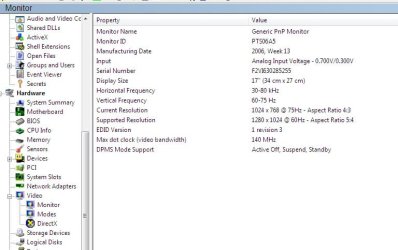
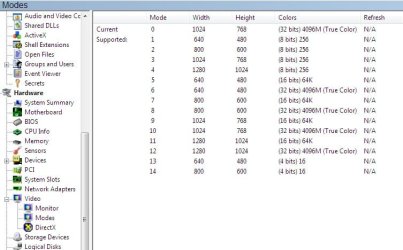
Unfortunately those shots didn't give any information that could help identify your card except that it's an AGP x4 card.


..... but please if you think there is another way LOOK FOR IT

That was my next suggestion. Open the case and physically inspect the card. At least identify what brand it is: ATI or Nvidia.
 

My Computer

Computer type
PC/Desktop
Computer Manufacturer/Model Number
Systems by SmartEyeball
OS
8 Pro x64
CPU
i7 3770K 4.6GHz
Motherboard
ASUS P8Z77 WS
Memory
16GB G.Skill Trident X 2666mhz
Graphics Card(s)
x2 EVGA 780 Ti Superclocked SLI
Sound Card
SB X-FI Surround 5.1 PRO USB / ATH-AD900 Headphones
Monitor(s) Displays
x3 Dell U2410 / 58" Samsung
Screen Resolution
5760*1200/ 1920*1200
Hard Drives
2x Intel 520 240GB (RAID 0) * 2x WD Caviar Blacks 2TB (RAID 0) * 2TB WD Caviar Black * Sony Optirac DVD
PSU
Silverstone Strider Evolution 1200W
Case
Thermaltake Level 10 GT Snow Edition
Cooling
Noctua NH-D14
Keyboard
Topre Realforce // Ducky Shine MX Black // Filco Ninja TKL
Mouse
Thermaltake Theron (Highly Recommended) + Razer Imperator
Antivirus
MSE
Browser
IE, FF, WaterFox
Other Info
GT Extreme V2 Sim Racing Cockpit + 40" LCD and K/B Mouse stand ▼
Fanatec CSR Elite Wheel + Clubsport V1 Pedals + CSR shifter/7G-H ▼Saitek X52 Pro ▼ TrackIR 5 Pro
Buttkicker v2 Seat Rumbler with Dedicated 5.1 and Sub Woofer attached to frame ▼
=
Bloody Big Grin
I did it before (look at the previous pages......

Its NVIDIA nForce2
 

My Computer

Computer Manufacturer/Model Number
Enclosure Type: Desktop
OS
Microsoft Windows 7 version 7100 32x
CPU
AMD Sempron(tm)
Memory
1.25 GB
Graphics Card(s)
Standard VGA Graphics Adapter
Sound Card
NVIDIA(R) nForce(TM) Audio Codec Interface
Screen Resolution
1024x768 LCD screen
Keyboard
standart PS/2 Keyboard
Mouse
HID-compliant mouse
Other Info
BIOS Version: Phoenix - AwardBIOS v6.00PG

System Type: X86-based PC
Have you tried these then? nForce Driver

You will have to right-click the .exe file once downloaded, and select the compatability tab, and select XP Service Pack 2.

Hope this helps :)
 

My Computer

Computer Manufacturer/Model Number
Compaq Desktop
OS
Windows 7 Ultimate x64
CPU
AMD Sempron Dual Core
Memory
3GB
Graphics Card(s)
NVIDIA GeForce 6150SE nForce 430
Screen Resolution
1024x768
Hard Drives
150GB Sata

My Computer

Computer Manufacturer/Model Number
Enclosure Type: Desktop
OS
Microsoft Windows 7 version 7100 32x
CPU
AMD Sempron(tm)
Memory
1.25 GB
Graphics Card(s)
Standard VGA Graphics Adapter
Sound Card
NVIDIA(R) nForce(TM) Audio Codec Interface
Screen Resolution
1024x768 LCD screen
Keyboard
standart PS/2 Keyboard
Mouse
HID-compliant mouse
Other Info
BIOS Version: Phoenix - AwardBIOS v6.00PG

System Type: X86-based PC
Install XP on another partition and identify what version your graphic card is.
 

My Computer

Computer type
Laptop
Computer Manufacturer/Model Number
Samsung
OS
Windows 8 x64
CPU
Intel Core i7 3630QM
Motherboard
Intel HM76
Memory
Samsung 8 GB DDR3 800 Mhz
Graphics Card(s)
ATI Radeon HD Graphics 7670M + Intel HD Graphics 4000
Screen Resolution
1366x768
Hard Drives
SAMSUNG Spinpoint M8 1TB
Internet Speed
4 Mb/sDownload Speed, 2 Mb/s Upload Speed
Antivirus
avast!
Install XP on another partition and identify what version your graphic card is.


I don't want to do this.....

I told you before try to another way and if there isn't so ill just be with what I have now..... BUT AS I SAID BEFORE TRY TO LOOK FOR ANOTHER WAY!!!!!

tnx.....
 

My Computer

Computer Manufacturer/Model Number
Enclosure Type: Desktop
OS
Microsoft Windows 7 version 7100 32x
CPU
AMD Sempron(tm)
Memory
1.25 GB
Graphics Card(s)
Standard VGA Graphics Adapter
Sound Card
NVIDIA(R) nForce(TM) Audio Codec Interface
Screen Resolution
1024x768 LCD screen
Keyboard
standart PS/2 Keyboard
Mouse
HID-compliant mouse
Other Info
BIOS Version: Phoenix - AwardBIOS v6.00PG

System Type: X86-based PC
I don't want to do this.....

I told you before try to another way and if there isn't so ill just be with what I have now..... BUT AS I SAID BEFORE TRY TO LOOK FOR ANOTHER WAY!!!!!

tnx.....

I'm afraid that there is NO OTHER WAY, unless if you want to play your games, you SHOULD INSTALL XP ON ANOTHER PARTITION (OR over windows 7; I suggest you to install it in a different partition, as it won't erase windows 7). Example; If windows 7 is on C:, then try installing XP on D:. And LOOK here: http://www.sevenforums.com/tutorials/8057-dual-boot-installation-windows-7-xp.html?ltr=D (Start looking from "METHOD 2") :sarc:

Hope this helps :)
 

My Computer

Computer type
Laptop
Computer Manufacturer/Model Number
Samsung
OS
Windows 8 x64
CPU
Intel Core i7 3630QM
Motherboard
Intel HM76
Memory
Samsung 8 GB DDR3 800 Mhz
Graphics Card(s)
ATI Radeon HD Graphics 7670M + Intel HD Graphics 4000
Screen Resolution
1366x768
Hard Drives
SAMSUNG Spinpoint M8 1TB
Internet Speed
4 Mb/sDownload Speed, 2 Mb/s Upload Speed
Antivirus
avast!
Your motherboard is a Nforce 2 chipset and that has nothing to do with what graphics card you have, you need to pull out your Graphics card and find the info on that.
 

My Computer

Computer Manufacturer/Model Number
Home Brew
OS
Windows 7 Ultimate Vista Ultimate x64
CPU
Core 2 Duo E8500 3.16Ghz @ 3.8Ghz
Motherboard
eVGA 750i FTW
Memory
2x2Gigs Patriot PC2-6400 LL
Graphics Card(s)
Inno3D GeForce GTX260 216 SP
Monitor(s) Displays
ASUS VW222U 22" 2ms Response time
Screen Resolution
1680x1050
Hard Drives
SATA 150GB
SATA II 250GB
USB IDE 750GB Ext.
PSU
HYTEC 600W & Thermaltake 650W Toughpower Power Exp
Case
Thermaltake Armor LCS (Liquid Cooling System)
Cooling
Liquid Cooling System
Keyboard
Logitech G15 Gaming Keyboard
Mouse
Logitech G9 Gaming Mouse
Status
Not open for further replies.
Back
Top