Help me please.....

Status
Not open for further replies.
Your motherboard is a Nforce 2 chipset and that has nothing to do with what graphics card you have, you need to pull out your Graphics card and find the info on that.

Does Nvidia provide their motherboards with integrated graphics or something?
 

My Computer

Computer type
Laptop
Computer Manufacturer/Model Number
Samsung
OS
Windows 8 x64
CPU
Intel Core i7 3630QM
Motherboard
Intel HM76
Memory
Samsung 8 GB DDR3 800 Mhz
Graphics Card(s)
ATI Radeon HD Graphics 7670M + Intel HD Graphics 4000
Screen Resolution
1366x768
Hard Drives
SAMSUNG Spinpoint M8 1TB
Internet Speed
4 Mb/sDownload Speed, 2 Mb/s Upload Speed
Antivirus
avast!
Your motherboard is a Nforce 2 chipset and that has nothing to do with what graphics card you have, you need to pull out your Graphics card and find the info on that.

Yes but I never did this i'm afraid ill do something wrong...
 

My Computer

Computer Manufacturer/Model Number
Enclosure Type: Desktop
OS
Microsoft Windows 7 version 7100 32x
CPU
AMD Sempron(tm)
Memory
1.25 GB
Graphics Card(s)
Standard VGA Graphics Adapter
Sound Card
NVIDIA(R) nForce(TM) Audio Codec Interface
Screen Resolution
1024x768 LCD screen
Keyboard
standart PS/2 Keyboard
Mouse
HID-compliant mouse
Other Info
BIOS Version: Phoenix - AwardBIOS v6.00PG

System Type: X86-based PC
Well unless you can give us more information then we won't be able to help you, if you are not confident enough then you need to find someone who is that can help you.

If that is not going to possible then your only solution will be to install XP again and as you don't have any idea what drivers you need for anything then you will not be able to play games on XP any more either.
 

My Computer

Computer Manufacturer/Model Number
Home Brew
OS
Windows 7 Ultimate Vista Ultimate x64
CPU
Core 2 Duo E8500 3.16Ghz @ 3.8Ghz
Motherboard
eVGA 750i FTW
Memory
2x2Gigs Patriot PC2-6400 LL
Graphics Card(s)
Inno3D GeForce GTX260 216 SP
Monitor(s) Displays
ASUS VW222U 22" 2ms Response time
Screen Resolution
1680x1050
Hard Drives
SATA 150GB
SATA II 250GB
USB IDE 750GB Ext.
PSU
HYTEC 600W & Thermaltake 650W Toughpower Power Exp
Case
Thermaltake Armor LCS (Liquid Cooling System)
Cooling
Liquid Cooling System
Keyboard
Logitech G15 Gaming Keyboard
Mouse
Logitech G9 Gaming Mouse
1) im talking to you from my other computer and the one I need help with is in the other room open.
tell me what do I need to take out of the computer to see which Graphics card ??

2) I installed the game "cross fire" and when I installed it everything was fine but when I tried to open it my computer restart it self......
 

My Computer

Computer Manufacturer/Model Number
Enclosure Type: Desktop
OS
Microsoft Windows 7 version 7100 32x
CPU
AMD Sempron(tm)
Memory
1.25 GB
Graphics Card(s)
Standard VGA Graphics Adapter
Sound Card
NVIDIA(R) nForce(TM) Audio Codec Interface
Screen Resolution
1024x768 LCD screen
Keyboard
standart PS/2 Keyboard
Mouse
HID-compliant mouse
Other Info
BIOS Version: Phoenix - AwardBIOS v6.00PG

System Type: X86-based PC
The Graphics card is what your monitor should have been attached to and should be standing upright from your motherboard.

All you need to do is remove the monitor cable and take out the retaining screw on the card that connects to the case and then you should be able to lift it out.

If it won't come out then you may have a release clip on the front of the VGA slot that needs to be either pushed in or pulled out to release the graphics card.
 

My Computer

Computer Manufacturer/Model Number
Home Brew
OS
Windows 7 Ultimate Vista Ultimate x64
CPU
Core 2 Duo E8500 3.16Ghz @ 3.8Ghz
Motherboard
eVGA 750i FTW
Memory
2x2Gigs Patriot PC2-6400 LL
Graphics Card(s)
Inno3D GeForce GTX260 216 SP
Monitor(s) Displays
ASUS VW222U 22" 2ms Response time
Screen Resolution
1680x1050
Hard Drives
SATA 150GB
SATA II 250GB
USB IDE 750GB Ext.
PSU
HYTEC 600W & Thermaltake 650W Toughpower Power Exp
Case
Thermaltake Armor LCS (Liquid Cooling System)
Cooling
Liquid Cooling System
Keyboard
Logitech G15 Gaming Keyboard
Mouse
Logitech G9 Gaming Mouse
yes but I have 3 boards like those which one to get out??
 

My Computer

Computer Manufacturer/Model Number
Enclosure Type: Desktop
OS
Microsoft Windows 7 version 7100 32x
CPU
AMD Sempron(tm)
Memory
1.25 GB
Graphics Card(s)
Standard VGA Graphics Adapter
Sound Card
NVIDIA(R) nForce(TM) Audio Codec Interface
Screen Resolution
1024x768 LCD screen
Keyboard
standart PS/2 Keyboard
Mouse
HID-compliant mouse
Other Info
BIOS Version: Phoenix - AwardBIOS v6.00PG

System Type: X86-based PC
The one that had your monitor connected to it.
 

My Computer

Computer Manufacturer/Model Number
Home Brew
OS
Windows 7 Ultimate Vista Ultimate x64
CPU
Core 2 Duo E8500 3.16Ghz @ 3.8Ghz
Motherboard
eVGA 750i FTW
Memory
2x2Gigs Patriot PC2-6400 LL
Graphics Card(s)
Inno3D GeForce GTX260 216 SP
Monitor(s) Displays
ASUS VW222U 22" 2ms Response time
Screen Resolution
1680x1050
Hard Drives
SATA 150GB
SATA II 250GB
USB IDE 750GB Ext.
PSU
HYTEC 600W & Thermaltake 650W Toughpower Power Exp
Case
Thermaltake Armor LCS (Liquid Cooling System)
Cooling
Liquid Cooling System
Keyboard
Logitech G15 Gaming Keyboard
Mouse
Logitech G9 Gaming Mouse
Is this the Motherboard you have?

01.jpg


If that is the board you have then it is the one in the large Black slot.
 

My Computer

Computer Manufacturer/Model Number
Home Brew
OS
Windows 7 Ultimate Vista Ultimate x64
CPU
Core 2 Duo E8500 3.16Ghz @ 3.8Ghz
Motherboard
eVGA 750i FTW
Memory
2x2Gigs Patriot PC2-6400 LL
Graphics Card(s)
Inno3D GeForce GTX260 216 SP
Monitor(s) Displays
ASUS VW222U 22" 2ms Response time
Screen Resolution
1680x1050
Hard Drives
SATA 150GB
SATA II 250GB
USB IDE 750GB Ext.
PSU
HYTEC 600W & Thermaltake 650W Toughpower Power Exp
Case
Thermaltake Armor LCS (Liquid Cooling System)
Cooling
Liquid Cooling System
Keyboard
Logitech G15 Gaming Keyboard
Mouse
Logitech G9 Gaming Mouse
this isn't the monitor I have.....
 

My Computer

Computer Manufacturer/Model Number
Enclosure Type: Desktop
OS
Microsoft Windows 7 version 7100 32x
CPU
AMD Sempron(tm)
Memory
1.25 GB
Graphics Card(s)
Standard VGA Graphics Adapter
Sound Card
NVIDIA(R) nForce(TM) Audio Codec Interface
Screen Resolution
1024x768 LCD screen
Keyboard
standart PS/2 Keyboard
Mouse
HID-compliant mouse
Other Info
BIOS Version: Phoenix - AwardBIOS v6.00PG

System Type: X86-based PC
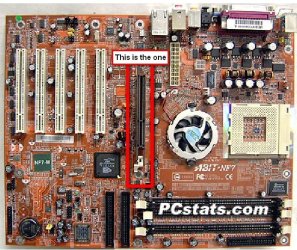
Well it doesn't matter, you should still have the slots on your board arranged in a similar way, notice the one black slot followed by the 5 white ones, it's the black one you want to pay attention to, notice that it's set back further then the others, yours should look the same, pull out the card in that slot.
 

My Computer

Computer Manufacturer/Model Number
Home Brew
OS
Windows 7 Ultimate Vista Ultimate x64
CPU
Core 2 Duo E8500 3.16Ghz @ 3.8Ghz
Motherboard
eVGA 750i FTW
Memory
2x2Gigs Patriot PC2-6400 LL
Graphics Card(s)
Inno3D GeForce GTX260 216 SP
Monitor(s) Displays
ASUS VW222U 22" 2ms Response time
Screen Resolution
1680x1050
Hard Drives
SATA 150GB
SATA II 250GB
USB IDE 750GB Ext.
PSU
HYTEC 600W & Thermaltake 650W Toughpower Power Exp
Case
Thermaltake Armor LCS (Liquid Cooling System)
Cooling
Liquid Cooling System
Keyboard
Logitech G15 Gaming Keyboard
Mouse
Logitech G9 Gaming Mouse
can you circle it in the picture?? tnx:D
 

My Computer

Computer Manufacturer/Model Number
Enclosure Type: Desktop
OS
Microsoft Windows 7 version 7100 32x
CPU
AMD Sempron(tm)
Memory
1.25 GB
Graphics Card(s)
Standard VGA Graphics Adapter
Sound Card
NVIDIA(R) nForce(TM) Audio Codec Interface
Screen Resolution
1024x768 LCD screen
Keyboard
standart PS/2 Keyboard
Mouse
HID-compliant mouse
Other Info
BIOS Version: Phoenix - AwardBIOS v6.00PG

System Type: X86-based PC
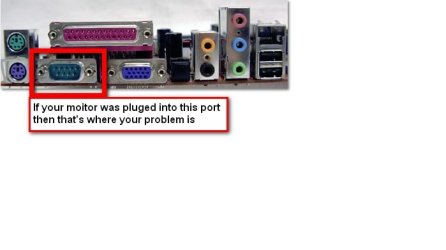
This should make it clear for you.

2009-06-05_053209.jpg

2009-06-05_053403.jpg
 

My Computer

Computer Manufacturer/Model Number
Home Brew
OS
Windows 7 Ultimate Vista Ultimate x64
CPU
Core 2 Duo E8500 3.16Ghz @ 3.8Ghz
Motherboard
eVGA 750i FTW
Memory
2x2Gigs Patriot PC2-6400 LL
Graphics Card(s)
Inno3D GeForce GTX260 216 SP
Monitor(s) Displays
ASUS VW222U 22" 2ms Response time
Screen Resolution
1680x1050
Hard Drives
SATA 150GB
SATA II 250GB
USB IDE 750GB Ext.
PSU
HYTEC 600W & Thermaltake 650W Toughpower Power Exp
Case
Thermaltake Armor LCS (Liquid Cooling System)
Cooling
Liquid Cooling System
Keyboard
Logitech G15 Gaming Keyboard
Mouse
Logitech G9 Gaming Mouse
O.K. I have to go to sleep now (its Israel now its 11:00 for me..... and im only 13 so its late.....) I will do it tomorrow and ill will tell you what I saw..... tnx for all.....
 

My Computer

Computer Manufacturer/Model Number
Enclosure Type: Desktop
OS
Microsoft Windows 7 version 7100 32x
CPU
AMD Sempron(tm)
Memory
1.25 GB
Graphics Card(s)
Standard VGA Graphics Adapter
Sound Card
NVIDIA(R) nForce(TM) Audio Codec Interface
Screen Resolution
1024x768 LCD screen
Keyboard
standart PS/2 Keyboard
Mouse
HID-compliant mouse
Other Info
BIOS Version: Phoenix - AwardBIOS v6.00PG

System Type: X86-based PC

My Computer

Computer Manufacturer/Model Number
Home Brew
OS
Windows 7 Ultimate Vista Ultimate x64
CPU
Core 2 Duo E8500 3.16Ghz @ 3.8Ghz
Motherboard
eVGA 750i FTW
Memory
2x2Gigs Patriot PC2-6400 LL
Graphics Card(s)
Inno3D GeForce GTX260 216 SP
Monitor(s) Displays
ASUS VW222U 22" 2ms Response time
Screen Resolution
1680x1050
Hard Drives
SATA 150GB
SATA II 250GB
USB IDE 750GB Ext.
PSU
HYTEC 600W & Thermaltake 650W Toughpower Power Exp
Case
Thermaltake Armor LCS (Liquid Cooling System)
Cooling
Liquid Cooling System
Keyboard
Logitech G15 Gaming Keyboard
Mouse
Logitech G9 Gaming Mouse
Status
Not open for further replies.
Back
Top