Help Needed. Audio Problems

Kepler

New member
Local time
3:59 PM
Messages
7
Heres the problem

When i connect headphones to rear sound panel (Pink + Green)
Sound does not play out of my left speaker but mic works fine.

When i plug headset in front sound ports (Pink + Green)
Sound plays fine in both speakers but mic does not work

I use my rear sound port for the speakers on my monitor and use the front sound ports for my headset.

Uninstalled drivers and reinstalled (No luck)
Rebooted OS Fresh Install (No Luck)
Used old drivers (No Luck)
Used new drivers (No Luck)

The headset is working
Motherboard ASrock FM2A55M-HD+
Tower Case CiT 1017

Can anyone help me. ive tried everything i can think of
 

My Computer

Computer type
PC/Desktop
Computer Manufacturer/Model Number
Custom Build
OS
Windows 7 x64 Home Premium
CPU
AMD A6 6400k
Motherboard
Asrock FM2A55M-HD+
Memory
4GB DDr
Hard Drives
250GB WD Blue 2.5" sata
40GB Seagate Barracuda Sata
Antivirus
None
Browser
Chrome
Disconnect the front panel audio connector on the motherboard. Then try the rear Green speaker jack to see if you have both channels. If the sound works OK with the front panel disconnected, the problem is most likely in the front panel or connector.
 

My Computer

Computer type
PC/Desktop
Computer Manufacturer/Model Number
My Own Build
OS
Windows 10 64 bit
CPU
Intel i7 6700K
Motherboard
ASUS ROG Maximus VIII Hero
Memory
16GB Corsair Dominator
Graphics Card(s)
Intel CPU Graphics
Sound Card
RealTek
Monitor(s) Displays
27" Dell S2719dgf
Screen Resolution
2560X1440
Hard Drives
1 TB Samsung 850 EVO SSD for Win 10 Pro
500GB Samsung 850 EVO SSD for Win 10 Insider
2 TB drive for backup
PSU
EVGA Supernova 750G2
Case
BeQuiet Silent Base 600
Cooling
Deepcool Captain 120EX
Keyboard
Microsoft Wireless 2000
Mouse
Microsoft wireless
Internet Speed
100 MB/sec (Cable)
Antivirus
Microsoft Defender and Malwarebytes
Browser
Edge/Firefox
Other Info
Cakewalk (Sonar) by BandLab and Studio One 4.1 Pro recording studio software. MOTU 896Mk3 Hybrid recording interface, Frontier Tranzport wireless control unit, Behringer X-Touch Control Surface.
Five USB connected optical drives for CD Audio production using Nero BurningROM
Not worked. Its not the tower. I tried the front audio ports on my old tower and still have the same problem. I know it works as it worked before. I want both speakers working on the rear of my tower and i want the mic working on the front panel. Its either a software fault or hardware fault
 

My Computer

Computer type
PC/Desktop
Computer Manufacturer/Model Number
Custom Build
OS
Windows 7 x64 Home Premium
CPU
AMD A6 6400k
Motherboard
Asrock FM2A55M-HD+
Memory
4GB DDr
Hard Drives
250GB WD Blue 2.5" sata
40GB Seagate Barracuda Sata
Antivirus
None
Browser
Chrome
Did you disconnect the front panel, as I suggested and then tried it?


What sound do you have? RealTek? or some other sound type?
 

My Computer

Computer type
PC/Desktop
Computer Manufacturer/Model Number
My Own Build
OS
Windows 10 64 bit
CPU
Intel i7 6700K
Motherboard
ASUS ROG Maximus VIII Hero
Memory
16GB Corsair Dominator
Graphics Card(s)
Intel CPU Graphics
Sound Card
RealTek
Monitor(s) Displays
27" Dell S2719dgf
Screen Resolution
2560X1440
Hard Drives
1 TB Samsung 850 EVO SSD for Win 10 Pro
500GB Samsung 850 EVO SSD for Win 10 Insider
2 TB drive for backup
PSU
EVGA Supernova 750G2
Case
BeQuiet Silent Base 600
Cooling
Deepcool Captain 120EX
Keyboard
Microsoft Wireless 2000
Mouse
Microsoft wireless
Internet Speed
100 MB/sec (Cable)
Antivirus
Microsoft Defender and Malwarebytes
Browser
Edge/Firefox
Other Info
Cakewalk (Sonar) by BandLab and Studio One 4.1 Pro recording studio software. MOTU 896Mk3 Hybrid recording interface, Frontier Tranzport wireless control unit, Behringer X-Touch Control Surface.
Five USB connected optical drives for CD Audio production using Nero BurningROM
Yes i disconnected the front panel. Sound is Realtek HD Audio. downloaded the latest drivers from Asrocks website
 

My Computer

Computer type
PC/Desktop
Computer Manufacturer/Model Number
Custom Build
OS
Windows 7 x64 Home Premium
CPU
AMD A6 6400k
Motherboard
Asrock FM2A55M-HD+
Memory
4GB DDr
Hard Drives
250GB WD Blue 2.5" sata
40GB Seagate Barracuda Sata
Antivirus
None
Browser
Chrome
Try the High Definition Codec driver direct from RealTek. It will work as I have that installed on both of my desktop systems, one with a Gigabyte motherboard and the other with an ASUS motherboard.

Realtek

Also what do you have listed in the Device Manager, Sounds section?
 

My Computer

Computer type
PC/Desktop
Computer Manufacturer/Model Number
My Own Build
OS
Windows 10 64 bit
CPU
Intel i7 6700K
Motherboard
ASUS ROG Maximus VIII Hero
Memory
16GB Corsair Dominator
Graphics Card(s)
Intel CPU Graphics
Sound Card
RealTek
Monitor(s) Displays
27" Dell S2719dgf
Screen Resolution
2560X1440
Hard Drives
1 TB Samsung 850 EVO SSD for Win 10 Pro
500GB Samsung 850 EVO SSD for Win 10 Insider
2 TB drive for backup
PSU
EVGA Supernova 750G2
Case
BeQuiet Silent Base 600
Cooling
Deepcool Captain 120EX
Keyboard
Microsoft Wireless 2000
Mouse
Microsoft wireless
Internet Speed
100 MB/sec (Cable)
Antivirus
Microsoft Defender and Malwarebytes
Browser
Edge/Firefox
Other Info
Cakewalk (Sonar) by BandLab and Studio One 4.1 Pro recording studio software. MOTU 896Mk3 Hybrid recording interface, Frontier Tranzport wireless control unit, Behringer X-Touch Control Surface.
Five USB connected optical drives for CD Audio production using Nero BurningROM
These are the only things in my sound

AMD High Definition Audio Device
Magic Sound (Webcam Mic) Disabled
Realtek High Definition Audio
 

My Computer

Computer type
PC/Desktop
Computer Manufacturer/Model Number
Custom Build
OS
Windows 7 x64 Home Premium
CPU
AMD A6 6400k
Motherboard
Asrock FM2A55M-HD+
Memory
4GB DDr
Hard Drives
250GB WD Blue 2.5" sata
40GB Seagate Barracuda Sata
Antivirus
None
Browser
Chrome
What is in the Device Manager is OK and would not cause your problem.

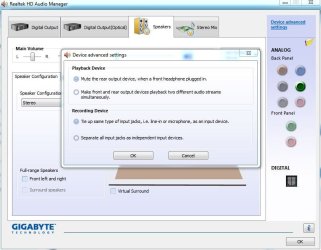
Along with the direct from RealTek drivers, check the RealTek HD Audio Manager, for setups.

Here is mine:
 

Attachments

  • Capture.JPG
    Capture.JPG
    62.7 KB · Views: 1

My Computer

Computer type
PC/Desktop
Computer Manufacturer/Model Number
My Own Build
OS
Windows 10 64 bit
CPU
Intel i7 6700K
Motherboard
ASUS ROG Maximus VIII Hero
Memory
16GB Corsair Dominator
Graphics Card(s)
Intel CPU Graphics
Sound Card
RealTek
Monitor(s) Displays
27" Dell S2719dgf
Screen Resolution
2560X1440
Hard Drives
1 TB Samsung 850 EVO SSD for Win 10 Pro
500GB Samsung 850 EVO SSD for Win 10 Insider
2 TB drive for backup
PSU
EVGA Supernova 750G2
Case
BeQuiet Silent Base 600
Cooling
Deepcool Captain 120EX
Keyboard
Microsoft Wireless 2000
Mouse
Microsoft wireless
Internet Speed
100 MB/sec (Cable)
Antivirus
Microsoft Defender and Malwarebytes
Browser
Edge/Firefox
Other Info
Cakewalk (Sonar) by BandLab and Studio One 4.1 Pro recording studio software. MOTU 896Mk3 Hybrid recording interface, Frontier Tranzport wireless control unit, Behringer X-Touch Control Surface.
Five USB connected optical drives for CD Audio production using Nero BurningROM
Still not working. Now doesn't recognize front panel after plugging back in
 

My Computer

Computer type
PC/Desktop
Computer Manufacturer/Model Number
Custom Build
OS
Windows 7 x64 Home Premium
CPU
AMD A6 6400k
Motherboard
Asrock FM2A55M-HD+
Memory
4GB DDr
Hard Drives
250GB WD Blue 2.5" sata
40GB Seagate Barracuda Sata
Antivirus
None
Browser
Chrome
Did you get it plugged back in correctly? Its keyed but it still could be plugged in partially or wrong.

Also, did you power off and unplug it, same way power off to plug back in? Doing it powered on could cause problems.

Also go to the Device Manager and Uninstall the RealTek - RIGHT click to highlight it and then LEFT click "Uninstall". DO NOT uninstall the drivers. Then restart the PC and when Windows starts it will detect and reinstall the sound.
 

My Computer

Computer type
PC/Desktop
Computer Manufacturer/Model Number
My Own Build
OS
Windows 10 64 bit
CPU
Intel i7 6700K
Motherboard
ASUS ROG Maximus VIII Hero
Memory
16GB Corsair Dominator
Graphics Card(s)
Intel CPU Graphics
Sound Card
RealTek
Monitor(s) Displays
27" Dell S2719dgf
Screen Resolution
2560X1440
Hard Drives
1 TB Samsung 850 EVO SSD for Win 10 Pro
500GB Samsung 850 EVO SSD for Win 10 Insider
2 TB drive for backup
PSU
EVGA Supernova 750G2
Case
BeQuiet Silent Base 600
Cooling
Deepcool Captain 120EX
Keyboard
Microsoft Wireless 2000
Mouse
Microsoft wireless
Internet Speed
100 MB/sec (Cable)
Antivirus
Microsoft Defender and Malwarebytes
Browser
Edge/Firefox
Other Info
Cakewalk (Sonar) by BandLab and Studio One 4.1 Pro recording studio software. MOTU 896Mk3 Hybrid recording interface, Frontier Tranzport wireless control unit, Behringer X-Touch Control Surface.
Five USB connected optical drives for CD Audio production using Nero BurningROM
Ive done everything you said. Still nothing. Im hoping it not my motherboard as ive waited ages for this and dont fancy sending back
 

My Computer

Computer type
PC/Desktop
Computer Manufacturer/Model Number
Custom Build
OS
Windows 7 x64 Home Premium
CPU
AMD A6 6400k
Motherboard
Asrock FM2A55M-HD+
Memory
4GB DDr
Hard Drives
250GB WD Blue 2.5" sata
40GB Seagate Barracuda Sata
Antivirus
None
Browser
Chrome
Uninstalled audio drivers, rebooted, installed audio drivers, rebooted. Still same problem. Really hope its not the motherboard dont fancy reverting back to my old one
 

My Computer

Computer type
PC/Desktop
Computer Manufacturer/Model Number
Custom Build
OS
Windows 7 x64 Home Premium
CPU
AMD A6 6400k
Motherboard
Asrock FM2A55M-HD+
Memory
4GB DDr
Hard Drives
250GB WD Blue 2.5" sata
40GB Seagate Barracuda Sata
Antivirus
None
Browser
Chrome
Sadly, it would appear to be a problem with the sound chip on the motherboard.

If you have a separate sound card that you can install and use, you could try that (disable the on-board in the BIOS when you use a separate sound card).
 

My Computer

Computer type
PC/Desktop
Computer Manufacturer/Model Number
My Own Build
OS
Windows 10 64 bit
CPU
Intel i7 6700K
Motherboard
ASUS ROG Maximus VIII Hero
Memory
16GB Corsair Dominator
Graphics Card(s)
Intel CPU Graphics
Sound Card
RealTek
Monitor(s) Displays
27" Dell S2719dgf
Screen Resolution
2560X1440
Hard Drives
1 TB Samsung 850 EVO SSD for Win 10 Pro
500GB Samsung 850 EVO SSD for Win 10 Insider
2 TB drive for backup
PSU
EVGA Supernova 750G2
Case
BeQuiet Silent Base 600
Cooling
Deepcool Captain 120EX
Keyboard
Microsoft Wireless 2000
Mouse
Microsoft wireless
Internet Speed
100 MB/sec (Cable)
Antivirus
Microsoft Defender and Malwarebytes
Browser
Edge/Firefox
Other Info
Cakewalk (Sonar) by BandLab and Studio One 4.1 Pro recording studio software. MOTU 896Mk3 Hybrid recording interface, Frontier Tranzport wireless control unit, Behringer X-Touch Control Surface.
Five USB connected optical drives for CD Audio production using Nero BurningROM
Back
Top