Help partitioning drive

vv211

New member
Member
Local time
3:02 AM
Messages
57
Location
Not NYC, NY, USA
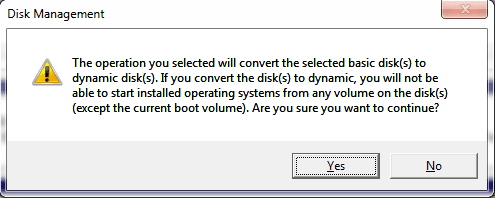
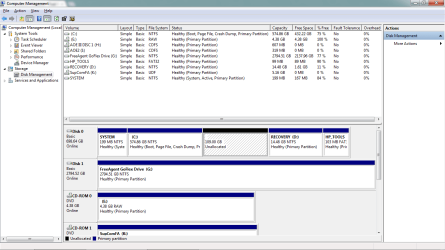
I would like to create a new partition on my drive so I can dual boot between Windows and Ubuntu. I've shrunk the C: drive so I have a little over 100GB of unallocated space, but when I try to make a new partition with that space I get an error box saying that I would need to convert to a dynamic drive and installed OS's (except the current boot volume) will not start. So here are my questions:

-Since I currently have ONLY Windows 7 installed, does the "except current boot volume" mean that I will be able to reboot into windows fine?
-If it doesn't mean that, is there any way to get around this?
-Would converting to a dynamic disk delete my files and such?

Here's some screenshots
 

Attachments
  • Untitled.png
    Untitled.png
    35.4 KB · Views: 28
  • Untitled again.png
    Untitled again.png
    5.5 KB · Views: 11

My Computer

Computer type
PC/Desktop
Computer Manufacturer/Model Number
Custom
OS
Windows 7 Professional x64 w/SP1
CPU
Intel i7-3770 3.4GHz
Motherboard
Gigabyte GA-Z77-D3H
Memory
32GB (8GB x4) DDR3 1600MHz Corsair Vengeance Dual Channel
Graphics Card(s)
Sapphire Radeon HD 7950 3GB GDDR5 VRAM
Sound Card
Sound Blaster ZxR PCIe
Monitor(s) Displays
1x 21.5"
Screen Resolution
1920x1080
Hard Drives
128GB OCZ Vertex 4 SSD
1TB 7200 rpm Seagate Barracuda
4TB 7200 rpm Western Digital Black
PSU
600W Coolmax ZU-600B
Case
Antec Nine Hundred Two V3
Cooling
4 stock case fans. 1 stock cpu fan. 2 stock gpu fans
Keyboard
Logitech K800 wireless backlit
Mouse
Roccat Tyon
Internet Speed
400 KB/s or so
Antivirus
992KB Hosts file, Hardware firewall, not clicking on links
Browser
Chrome
Any physical disk can only have 4 partition. In your case they are all Primary partitions which is the limit for any one physical disk.

If one of them was an extended partition with Logical drives then you could have more then 4 with many Logical drive in the extended partition. But you don't.

You could try VMware Player Virtual Machine software to install Ubuntu to. Or you can wipe out your drive and start over. But then you would lose all the HP stuff that is included on that drive.

Have you made the System Restore disks? If not I suggest that be the first thing you do whether or not you wipe the drive and start anew.

EDIT:

I would not convert that disk to a Dynamic disk. Very bad to do for what you want.
 

My Computer

OS
7 x64
Providing you have created a set of HP recovery discs you can delete HP's recovery drive and tools drive, which will then allow to create a primary partion for your dual-boot with Ubuntu.

Basic disks can have either four primary partitions or three primary and one extended partition.

As edwar states, do not convert the disk to a dynamic disk. If you do need more than three partitions you can create a logical partition as part of an extended primary partition.

http://windows.microsoft.com/en-US/windows-vista/What-are-basic-and-dynamic-disks

http://msdn.microsoft.com/en-us/library/windows/desktop/aa363785(v=vs.85).aspx
 

My Computer

Computer Manufacturer/Model Number
HP Pavilion Elite 495UK
OS
Windows 7 Ultimate SP1 64-Bit
CPU
Intel Core i7 870 @ 2.93GHz
Motherboard
MSI 2A9C (CPU1)
Memory
8Gb Dual-Channel DDR3 @ 664MHz
Graphics Card(s)
nVidia GeForce GTX 460 1024MB dedicated RAM
Sound Card
Realtek HD Audio
Monitor(s) Displays
HP2310i
Screen Resolution
1920 x 1080
Hard Drives
1x1954GB Hitachi HDS22020ALA 330 (RAID), 1x1954GB Hitachi External for backup and storage
PSU
460W
Case
HP Elite
Cooling
Air cooled
Keyboard
Logitech K750 solar-powered keyboard
Mouse
Logitech Wireless M180 mouse
Internet Speed
2Mb
Other Info
Pure Avanti Flow Internet Radio with iPod Dock, 64Gb iPod, HP USB Speakers, Sony MDR-V500 Headphones, Sony Vaio F-Series Laptop
vv211,

Do not convert to dynamic. I'm lazy right now, so I'll just suggest that you google dynamic disk and even check the wiki info that shows up.

Either add another physical disk OR:
This is what I would do:
1. make the HP recovery discs in case you ever want to put things back the way they are,
2. Using Win 7 Backup and Restore, make a system image backup of all partitions on the disk to an external usb drive (this is optional, but would give you a complete restore capability.)
3. make a 100% clean install of Win 7. This way you will have only used two of the max of four primary partitions.

http://www.sevenforums.com/tutorials/1649-clean-install-windows-7-a.html
 

My Computer

Computer Manufacturer/Model Number
Toshiba Satellite S875D-S7239 laptop
OS
MS Windows 7 Ultimate SP1 64-bit
CPU
AMD A10-4600M
Motherboard
AMD Pumori (Socket FT1)
Memory
6.00 GB Dual-Channel DDR3 @ 798MHz (11-11-12-28)
Graphics Card(s)
AMD Radeon HD 7660G
Sound Card
High Definition Audio Device
Monitor(s) Displays
Generic PnP Monitor (1600x900@60Hz)
Screen Resolution
1600x900@60Hz
Hard Drives
SSD 119GB Corsair CSSD-V128GB2 ATA Device
Keyboard
Standard PS/2 Keyboard
Mouse
HP Wireless Optical Mobile Mouse Model FHA-3410
Internet Speed
What the local pub, local coffee shop offers.
Other Info
Optical Drive:MATSHITA BD-CMB UJ160B ATA Device


Also have an Asus ha1002xp netbook with Win 7 Ultimate installed.
The easiest solution for you is to boot free Partition Wizard bootable CD, rightclick on C to Modify>convert to Logical, then you can add as many contiguous Logical sub-partitions as you wish.

Ubuntu can install to Logical, and WIn7 can also be on one as long as it's System boot files remain on the Primary 100mb System Reserved partition.

In addition I would use only this method to Dual boot Ubuntu-Win7
 
ok, sorry for taking so long to respond back.

here is my new setup:
System partition: primary
C: primary
U: logical
HP_Tools: primary

should i be able to boot into ubuntu using their bootable CD and install on the U: partition?
would it be better to delete U: and leave it as unallocated and install ubuntu on that?
or would it be better to not give a drive letter to U:?
also, should i format the new partition, or leave it as RAW?
 

Attachments

  • Capture.PNG
    Capture.PNG
    4.3 KB · Views: 12

My Computer

Computer type
PC/Desktop
Computer Manufacturer/Model Number
Custom
OS
Windows 7 Professional x64 w/SP1
CPU
Intel i7-3770 3.4GHz
Motherboard
Gigabyte GA-Z77-D3H
Memory
32GB (8GB x4) DDR3 1600MHz Corsair Vengeance Dual Channel
Graphics Card(s)
Sapphire Radeon HD 7950 3GB GDDR5 VRAM
Sound Card
Sound Blaster ZxR PCIe
Monitor(s) Displays
1x 21.5"
Screen Resolution
1920x1080
Hard Drives
128GB OCZ Vertex 4 SSD
1TB 7200 rpm Seagate Barracuda
4TB 7200 rpm Western Digital Black
PSU
600W Coolmax ZU-600B
Case
Antec Nine Hundred Two V3
Cooling
4 stock case fans. 1 stock cpu fan. 2 stock gpu fans
Keyboard
Logitech K800 wireless backlit
Mouse
Roccat Tyon
Internet Speed
400 KB/s or so
Antivirus
992KB Hosts file, Hardware firewall, not clicking on links
Browser
Chrome
You have lost your Recovery partition. If you don't plan a full "clean install" this is not good. HP partition their PCs in a way that make it a problem for their customers who want more than one user partition!

I would also tread carefully with Ubuntu dual booting. I have seen so many posts where people come to grief. It is best to put a linux OS on a separate HDD.
 

My Computer

Computer type
PC/Desktop
Computer Manufacturer/Model Number
Own build
OS
Windows 7x64 Home Premium SP1
CPU
Intel i7 2600k
Motherboard
ASUS P8Z68 Deluxe
Memory
G.Skill Ripjaws (DDR3-1600) 2x4GB
Graphics Card(s)
Nvidia GeForce GTS 450; Intel HD Graphics 3000(GT2+)
Monitor(s) Displays
Dell Ultrasharp IPS panel U2311H, Samsung SyncMaster P2350
Screen Resolution
1920x1080
Hard Drives
Samsung 850 Pro SSD 256GB, Samsung SSD 840 120GB, Seagates 1TB Barracuda ST31000528AS x2
PSU
Seasonic M12II 520W
Case
Lian Li Lancool PC-K60
Cooling
Case: 1x120mm, 3x140mm CPU: Hyper 212+
Keyboard
Logitech MK520 (wireless)
Mouse
Logitech MK520
Internet Speed
6-7 Mbps
Antivirus
Norton Security Premium, Malwarebytes on 2 (MSE on 3rd PC)
Browser
FireFox
Other Info
Audio: Logitech Z523 2.1
Why did you delete the Recovery partition? I gave you the steps to convert C to Logical and shrink it to add as many Logical sub-partitions as you need. This is how we have helped resolve this on HP's for countless users.

Did you make Recovery disks first?
 
yes i did make recovery discs. I got rid of the recovery partition cause i wanted that 15 gigs of space back.
 

My Computer

Computer type
PC/Desktop
Computer Manufacturer/Model Number
Custom
OS
Windows 7 Professional x64 w/SP1
CPU
Intel i7-3770 3.4GHz
Motherboard
Gigabyte GA-Z77-D3H
Memory
32GB (8GB x4) DDR3 1600MHz Corsair Vengeance Dual Channel
Graphics Card(s)
Sapphire Radeon HD 7950 3GB GDDR5 VRAM
Sound Card
Sound Blaster ZxR PCIe
Monitor(s) Displays
1x 21.5"
Screen Resolution
1920x1080
Hard Drives
128GB OCZ Vertex 4 SSD
1TB 7200 rpm Seagate Barracuda
4TB 7200 rpm Western Digital Black
PSU
600W Coolmax ZU-600B
Case
Antec Nine Hundred Two V3
Cooling
4 stock case fans. 1 stock cpu fan. 2 stock gpu fans
Keyboard
Logitech K800 wireless backlit
Mouse
Roccat Tyon
Internet Speed
400 KB/s or so
Antivirus
992KB Hosts file, Hardware firewall, not clicking on links
Browser
Chrome
OK, but the Recovery partition is the most stable way to run Recovery. You cannot always count on the disks.

However many tech enthusiasts want a much cleaner installation than what's provided by factory Recovery, using these steps to Clean Up Factory Bloatware or even Clean Reinstall - Factory OEM Windows 7.

And with Win7 backup imaging you can store externally your own customized backup which can reimage the HD or its replacement in 20 minutes: Backup Complete Computer - Create an Image Backup

Enjoy Win7!
 
vvv211,
Since i have a family member with a HP:
I used diskpart to wipe the disk 100% clean (no more anything from hp)
Installed Windows
Found that Windows drivers worked fine, did not even need to go to HP site and download a single driver.

No HP bloat., no HP partitons, just a clean system.
 

My Computer

Computer Manufacturer/Model Number
Toshiba Satellite S875D-S7239 laptop
OS
MS Windows 7 Ultimate SP1 64-bit
CPU
AMD A10-4600M
Motherboard
AMD Pumori (Socket FT1)
Memory
6.00 GB Dual-Channel DDR3 @ 798MHz (11-11-12-28)
Graphics Card(s)
AMD Radeon HD 7660G
Sound Card
High Definition Audio Device
Monitor(s) Displays
Generic PnP Monitor (1600x900@60Hz)
Screen Resolution
1600x900@60Hz
Hard Drives
SSD 119GB Corsair CSSD-V128GB2 ATA Device
Keyboard
Standard PS/2 Keyboard
Mouse
HP Wireless Optical Mobile Mouse Model FHA-3410
Internet Speed
What the local pub, local coffee shop offers.
Other Info
Optical Drive:MATSHITA BD-CMB UJ160B ATA Device


Also have an Asus ha1002xp netbook with Win 7 Ultimate installed.
If you or other people want to be able to revert back the original HP partitions after a clean install, then simply use free Macrium Reflect to image all 4 partitions. Store the images away on an external HDD (or 2).
If you want to say sell the PC in its original condition just reimage back.
 

My Computer

Computer type
PC/Desktop
Computer Manufacturer/Model Number
Own build
OS
Windows 7x64 Home Premium SP1
CPU
Intel i7 2600k
Motherboard
ASUS P8Z68 Deluxe
Memory
G.Skill Ripjaws (DDR3-1600) 2x4GB
Graphics Card(s)
Nvidia GeForce GTS 450; Intel HD Graphics 3000(GT2+)
Monitor(s) Displays
Dell Ultrasharp IPS panel U2311H, Samsung SyncMaster P2350
Screen Resolution
1920x1080
Hard Drives
Samsung 850 Pro SSD 256GB, Samsung SSD 840 120GB, Seagates 1TB Barracuda ST31000528AS x2
PSU
Seasonic M12II 520W
Case
Lian Li Lancool PC-K60
Cooling
Case: 1x120mm, 3x140mm CPU: Hyper 212+
Keyboard
Logitech MK520 (wireless)
Mouse
Logitech MK520
Internet Speed
6-7 Mbps
Antivirus
Norton Security Premium, Malwarebytes on 2 (MSE on 3rd PC)
Browser
FireFox
Other Info
Audio: Logitech Z523 2.1
Back
Top