
Solved Win7 Won't Hibernate after Manjaro install on another drive

Blake81

New member
Member
Local time
10:10 AM
Messages
55
So, I just recently installed Manjaro on a NVMe, and since it was a fully separate SSD, and while its only interaction with Win7 was the fact that now Grub is in charge of my dual boot, I thought that there would be no problems.

However, when I try to Hibernate the PC now, the screen goes black for a moment, and immediately comes back.

This reminded me of a problem I had years ago, when while moving disks around, my C stopped being the Active volume. So I checked Disk Management, and I found out I now have TWO active drives; my Win7 C disk, and the letterless (I've been told that Windows can wreck some serious shit on Linux drives, so I've let them unassigned) Manjaro drive.
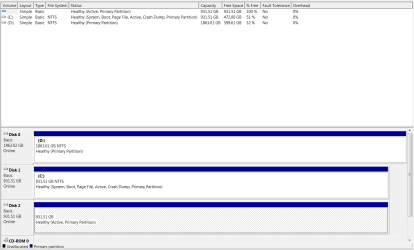
Part.PNG

It seems that's what's rendered my Hibernation function useless. Is there some way around it? I can't set C as Active, as it already is, nor I can De-Active-ate the Manjaro partition. How can I do to suspend my PC now?

Thanks in advance.
 

My Computer My Computer

At a glance

Windows 7 Ultimate SP1 x64Intel(R) Core(TM) i7-7700 CPU @ 3.60GHz32 GBNVIDIA GeForce RTX 2060
Computer type
PC/Desktop
OS
Windows 7 Ultimate SP1 x64
CPU
Intel(R) Core(TM) i7-7700 CPU @ 3.60GHz
Motherboard
Asrock Z279 Extreme 4
Memory
32 GB
Graphics Card(s)
NVIDIA GeForce RTX 2060
Hi Blake81,

Curious, why do you use hibernate & not sleep?

Not sure if this was what caused your issue, however, this is how I setup my dual boots.

I dual boot Win7 and Black Arch, Win7 and Kali, Win7 and Linux Lite
Win10 & Black Arch, Win10 & Kali, Win10 and Linux lite.

I do not permit Grub to be the boot-manager/loader. I place grub on the Linux partition or drive, boot from widows boot manager and point the boot-manager to the grub boot-loader on the Linux partition.

Windows updates do not play nice with Grub. Speaking from experience here.

Matthew Moore has an excellent video on the process to complete this task.

How to Dual Boot Windows and Linux. ( The Nontraditional way )
 

My Computer My Computer

At a glance

Win 10 x64, Linux Lite, Win 7 x64, BlackArch,...
Computer type
PC/Desktop
Computer Manufacturer/Model Number
HP Desktop & Compaq Laptop
OS
Win 10 x64, Linux Lite, Win 7 x64, BlackArch, & Kali
Hard Drives
Samsung 850 Pro 256Gb,
Hitachi HDD 1Tb,
Crucial MX SSD 250Gb
Segate 3Tb USB 3.0 Ext. Backup HDD
Internet Speed
150Mbps dn, 20Mbps up
Antivirus
Avast Free, Malwarebytes Anti-Exploit & Anti-Ransomware
Browser
Firefox, Chrome, Opera, & VPN

My Computer My Computer

At a glance

Win 10 x64, Linux Lite, Win 7 x64, BlackArch,...
Computer type
PC/Desktop
Computer Manufacturer/Model Number
HP Desktop & Compaq Laptop
OS
Win 10 x64, Linux Lite, Win 7 x64, BlackArch, & Kali
Hard Drives
Samsung 850 Pro 256Gb,
Hitachi HDD 1Tb,
Crucial MX SSD 250Gb
Segate 3Tb USB 3.0 Ext. Backup HDD
Internet Speed
150Mbps dn, 20Mbps up
Antivirus
Avast Free, Malwarebytes Anti-Exploit & Anti-Ransomware
Browser
Firefox, Chrome, Opera, & VPN
Hi Blake81,

Curious, why do you use hibernate & not sleep?

Not sure if this was what caused your issue, however, this is how I setup my dual boots.

I dual boot Win7 and Black Arch, Win7 and Kali, Win7 and Linux Lite
Win10 & Black Arch, Win10 & Kali, Win10 and Linux lite.

I do not permit Grub to be the boot-manager/loader. I place grub on the Linux partition or drive, boot from widows boot manager and point the boot-manager to the grub boot-loader on the Linux partition.

Windows updates do not play nice with Grub. Speaking from experience here.

Matthew Moore has an excellent video on the process to complete this task.

How to Dual Boot Windows and Linux. ( The Nontraditional way )

To be honest, you've made me realize something... I've always Hibernated it because I was told before that just putting it to Sleep let the HDDs on (as, their engines working) and that made them age more than necessary. Thing is, I have full SSDs now, so would it even be worth to still hibernate it instead of putting them to Sleep? I think I'll look into this first; maybe I am doing what I do for nothing but tradition's sake.

Still, that's an interesting boot style. May try it out just to see if I like it more.

I'm not too worried about Win7 updates, however; with Win7 being """"dead"""" (lots of sarcastic air quotes), I've been doing my updates manually on a per-need basis (for instance, when my new NWMe didn't work, I found out I needed two updates, and got them), so if I need to do one of them, I change the boot order (I have Manja and Win7 on different SSDs) and Win7 takes boot control again. I've just started into Manja, and it's mostly due to me seeing quite a few incoming games (Cyberpunk 2077, the HZD PC Port) that claim to require DX12, and lo, won't work on Win7. So I'm doing a gradual move into Linux, to slowly learn the ropes and fully move over once Win7 no longer supports newer hardware.

Will keep that video around, tho. I'm a full rookie with Linux, and I really need to learn as much as I can.

Thanks you very much.
 

My Computer My Computer

At a glance

Windows 7 Ultimate SP1 x64Intel(R) Core(TM) i7-7700 CPU @ 3.60GHz32 GBNVIDIA GeForce RTX 2060
Computer type
PC/Desktop
OS
Windows 7 Ultimate SP1 x64
CPU
Intel(R) Core(TM) i7-7700 CPU @ 3.60GHz
Motherboard
Asrock Z279 Extreme 4
Memory
32 GB
Graphics Card(s)
NVIDIA GeForce RTX 2060
Blake81

So you're saying your main issue is resolved?

Hibernate and Sleep both suspend power to the Drive, SSD and HDD, sleep remains using minimal power, hibernation does not. Sleep retain power to RAM, thus retain your open programs, files, folders, etc.. Hibernation utilizes a file on your drive to retain your open programs, files, folders, etc. and powers off the computer. From sleep, it simply powers up drive, etc. and windows resumes rather quickly. Hibernate, has to access the file it created, load that data into RAM, I power up almost as though you were booting the system. Personally, I use Sleep. If I wish to power down the computer I use shutdown. Maybe once a week or so I double-click my restart.bat

Simple explanation for How To Geek

What's the Difference Between Sleep and Hibernate

Have you perused the Linux distros available? There are several that are very similar in appearance to Windows. Linux Lite is my favorite, authored by Jerry Bezencon
Linux Mint Cinnamon and Ubuntu have more downloadable apps via the repository they use, many other distros are beginning to permit access to the same repository with simple choose and click. No more, sudo apt-get and all the related past obstacles.

Linuxlite - My name is Jerry Bezencon and I am the creator ...
What Is a Linux Distro, and How Are They Different from One ...
DistroWatch.com: Put the fun back into computing. Use Linux ...
5 Linux Distributions to Replace Windows 7 - It's FOSS
Best Linux distributions which look like Windows OS
Forums - Linux.org

Do you know that you can create a multi-boot drive and choose a plethora of Linux and other apps to be accessed by clicking on the menu? I haven't demoed SARDU, have all the rest.

5 Apps to Create Multiboot USB - Linux and Windows ISOs ...
5 best software to create multiboot USB drives [2020 Guide]


My Computer My Computer

At a glance

Win 10 x64, Linux Lite, Win 7 x64, BlackArch,...
Computer type
PC/Desktop
Computer Manufacturer/Model Number
HP Desktop & Compaq Laptop
OS
Win 10 x64, Linux Lite, Win 7 x64, BlackArch, & Kali
Hard Drives
Samsung 850 Pro 256Gb,
Hitachi HDD 1Tb,
Crucial MX SSD 250Gb
Segate 3Tb USB 3.0 Ext. Backup HDD
Internet Speed
150Mbps dn, 20Mbps up
Antivirus
Avast Free, Malwarebytes Anti-Exploit & Anti-Ransomware
Browser
Firefox, Chrome, Opera, & VPN
The problem wasn't really solved- more like I figured I didn't need to solve it (A.K.A. The Psychologist's Solution, heh). Just gonna be using Sleep mode from now, as I don't wanna stop using Grub. I've liked it quite a bit of what Windows has.

And yeah, I'm aware of all the distros available, but the main reason I picked Manjaro Gnome is because is the one I have more friends who are savvy on it, so if I encounter some issue, I have plenty of capable people nearby who can help me solve it. My main purpose on it is to mess around, learn the ropes, and get my Linux knowledge at least to the point I'm no longer on "Grandma is Using the Computer" levels of knowledge.

I don't really mind if it doesn't look like Win7, or looks a lot like Win10. My main gripe with Win10 is not only all the (Ox's Feces) it comes with, but how microsoft is bullying everyone into using it; I didn't let them bully me into Vista or 8, and I'm not letting them bully me into this one either. But as much as I love Win7, I know it won't last forever, especially for gaming, so I'm basically preparing my escape route before things get too critical. Maybe then I'll look for another distro for more permanent usage.
 

My Computer My Computer

At a glance

Windows 7 Ultimate SP1 x64Intel(R) Core(TM) i7-7700 CPU @ 3.60GHz32 GBNVIDIA GeForce RTX 2060
Computer type
PC/Desktop
OS
Windows 7 Ultimate SP1 x64
CPU
Intel(R) Core(TM) i7-7700 CPU @ 3.60GHz
Motherboard
Asrock Z279 Extreme 4
Memory
32 GB
Graphics Card(s)
NVIDIA GeForce RTX 2060
OK,

Sorry that didn't help you.

Hopefully, through our dialog you learned something.

That is always my hope, the OP gains knowledge on how their system works.
Wishing you the best!

Don't understand the displeasure with Microsoft. Where would the computer world be without them?

Backup you computer regularly, preferably to an external Hard Drive.

Happy Computing!

Snick
 

My Computer My Computer

At a glance

Win 10 x64, Linux Lite, Win 7 x64, BlackArch,...
Computer type
PC/Desktop
Computer Manufacturer/Model Number
HP Desktop & Compaq Laptop
OS
Win 10 x64, Linux Lite, Win 7 x64, BlackArch, & Kali
Hard Drives
Samsung 850 Pro 256Gb,
Hitachi HDD 1Tb,
Crucial MX SSD 250Gb
Segate 3Tb USB 3.0 Ext. Backup HDD
Internet Speed
150Mbps dn, 20Mbps up
Antivirus
Avast Free, Malwarebytes Anti-Exploit & Anti-Ransomware
Browser
Firefox, Chrome, Opera, & VPN
The problem wasn't really solved- more like I figured I didn't need to solve it (A.K.A. The Psychologist's Solution, heh). Just gonna be using Sleep mode from now, as I don't wanna stop using Grub. I've liked it quite a bit of what Windows has.
And yeah, I'm aware of all the distros available, but the main reason I picked Manjaro Gnome is because is the one I have more friends who are savvy on it, so if I encounter some issue, I have plenty of capable people nearby who can help me solve it. My main purpose on it is to mess around, learn the ropes, and get my Linux knowledge at least to the point I'm no longer on "Grandma is Using the Computer" levels of knowledge.
I don't really mind if it doesn't look like Win7, or looks a lot like Win10. My main gripe with Win10 is not only all the (Ox's Feces) it comes with, but how microsoft is bullying everyone into using it; I didn't let them bully me into Vista or 8, and I'm not letting them bully me into this one either. But as much as I love Win7, I know it won't last forever, especially for gaming, so I'm basically preparing my escape route before things get too critical. Maybe then I'll look for another distro for more permanent usage.


I run Windows 7/Pro/x86 as my daily OS. I simply have NO need for anything newer. If I did, I'd probably use Windows 8.1/Pro.
But as far as Windows 10 is concerned, in spite of all the negatives, it does have a few benefits.
For instance, it comes with one really great "Driver Pack" so it will install on almost any computer.


As for the neg's, with just a little bit of effort, those can be eliminated. And with the addition of the new and improved "Open Shell" it can look and act pretty much like Windows 7.


I've set it (Win-10) up like that many times now, and the casual observer would never know it wasn't Win-7.

And, as for those two 'Trouble Makers' Hibernate and Sleep.....I just shut them both OFF, and never worry about them again. Both have been troublesome, since the day MS invented them.


Cheers Mates!
TechnoMage :cool:
 

My Computer My Computer

At a glance

Win 7 Pro, SP1, x86, Win-11/Pro/64AMD8GB CrucialVarious
Computer type
PC/Desktop
Computer Manufacturer/Model Number
Various
OS
Win 7 Pro, SP1, x86, Win-11/Pro/64
CPU
AMD
Motherboard
Various
Memory
8GB Crucial
Graphics Card(s)
Various
Sound Card
OnBoard
Monitor(s) Displays
Acer 21.5"
Hard Drives
Crucial SSD, 500 GB
PSU
OEM
Case
SFF Slim Line Case
Cooling
OEM
Keyboard
eMachines
Mouse
Logitech Wireless
Internet Speed
varies
Antivirus
Windows Defender/Super Anti-Spyware
Browser
Firefox
TechnoMage2016
Agree with you.
I never use Hibernate, I use Sleep, and if it is for a while I use Shutdown.
If my machine has been on and Sleep back and forth for say a week, I restart.
 

My Computer My Computer

At a glance

Win 10 x64, Linux Lite, Win 7 x64, BlackArch,...
Computer type
PC/Desktop
Computer Manufacturer/Model Number
HP Desktop & Compaq Laptop
OS
Win 10 x64, Linux Lite, Win 7 x64, BlackArch, & Kali
Hard Drives
Samsung 850 Pro 256Gb,
Hitachi HDD 1Tb,
Crucial MX SSD 250Gb
Segate 3Tb USB 3.0 Ext. Backup HDD
Internet Speed
150Mbps dn, 20Mbps up
Antivirus
Avast Free, Malwarebytes Anti-Exploit & Anti-Ransomware
Browser
Firefox, Chrome, Opera, & VPN
Back
Top