
Help Please! Control mouse/cursor with keyboard lacking numeric keypad

rt30000

New member
Local time
3:29 PM
Messages
1
Hi All, I visit thee forums frequently but rarely post. Anyhow, on to my issue -

I am running an HTPC on Win7 64-bit. I have a Microsoft Arc keyboard, no mouse. I can do most navigation, etc with a keyboard fine (majority of the time it's in Media Center anyhow) but there are a few applications/buttons that are inaccessible without using a mouse/cursor. Windows has Mouse Keys built-in but you must use the numeric keypad to control which is not an option for me (or most laptop users probably). I have done some searching but haven't found a solution yet. Ideally, in a perfect world, I wish I could do something as simple as when I hold down another button the arrow keys could be used to move mouse instead of normal arrow key movement.
 

My Computer

OS
Windows 7 Pro 64-bit
CPU
Intel Core i7-920
Motherboard
Asus P6T SE
Memory
Corsair Dominator 6GB (3x2GB)
Graphics Card(s)
XFX Radeon 5870
Monitor(s) Displays
Dell 30" (3007?)
Hard Drives
OCZ Vertex 128GB SSD (boot disk)
WD 250GB (storage)
PSU
Corsair 650w
Case
Antec P-182
Cooling
Coolermaster
hum....and can you please tell me again why buying of an USB mouse is not an option for you?
 

My Computer

Computer type
PC/Desktop
Computer Manufacturer/Model Number
intel x58 selfmade
OS
Windows 7 Ultimate x64
CPU
[email protected] (non overclocked)
Motherboard
x58
Memory
8gb DDR3
Graphics Card(s)
Asus 6850
Monitor(s) Displays
lg 22"
Hard Drives
1TB
PSU
Corsair 650w
Case
Gigabyte
Cooling
Scytech
Keyboard
noname
Mouse
Logitech wireless xy
Internet Speed
70GB
Antivirus
Windows Defender
Browser
Chrome (default)

My Computer

Computer Manufacturer/Model Number
SMN-Productions
OS
Windows 7 x86/x64, Server 2008r2, Web Server 2008
CPU
i7 v2 3930K Steping stone 2
Motherboard
ASUS Rampage IV Extreme
Memory
G.SKILL Ripjaws Z Series 32GB
Graphics Card(s)
AMD HD 5770
Monitor(s) Displays
Acer 21" and Samsung 20"
Hard Drives
Patriot Pyro 80GB
PSU
1000 Watt
Case
HAF-X
Cooling
4 Fans
Keyboard
Black Widow Ultimate
hum....and can you please tell me again why buying of an USB mouse is not an option for you?


The OP is running a home theater pc..... I am doing the same thing. It is not ALWAYS convenient to have to run a mouse across your living room to use your computer.... I am using my old wireless mouse and keyboard at the moment on mine but it can be a pain cause, honestly whos going to have a flat surface when you on the couch....
 

My Computer

Computer Manufacturer/Model Number
SMN-Productions
OS
Windows 7 x86/x64, Server 2008r2, Web Server 2008
CPU
i7 v2 3930K Steping stone 2
Motherboard
ASUS Rampage IV Extreme
Memory
G.SKILL Ripjaws Z Series 32GB
Graphics Card(s)
AMD HD 5770
Monitor(s) Displays
Acer 21" and Samsung 20"
Hard Drives
Patriot Pyro 80GB
PSU
1000 Watt
Case
HAF-X
Cooling
4 Fans
Keyboard
Black Widow Ultimate
I have an iHome wireless mouse, and I can use it on my leg ;) It's very convienient, and the dongle fits inside the mouse, and it is very very small, so if you had a USB on the front of your home theater PC it wouldn't stick out a thousand feet.
 

My Computer

Computer Manufacturer/Model Number
Pugh Technologies
OS
W7 Professional x64
CPU
AMD Athlon II X3 445 Rana 3.10 GHz
Motherboard
MSI 870A-G54
Memory
PNY XLR DDR3 1600 4x2GB
Graphics Card(s)
NVIDIA GeForce GTS 450 (fermi) 1GB GDDR5
Sound Card
Realtek ALC892 onboard
Monitor(s) Displays
ASUS VE205t, Viewsonic VX2035WM
Screen Resolution
1600x900, 1600x1050
Hard Drives
977GB Hitachi Hitachi HDS721010CLA332
244GB Western Digital WDC WD2500AAJS-65B4A0
488GB Western Digital WDC WD5000AAJS-00A8B0
488GB Western Digital WDC WD5000AAKS-00UU3A0
PSU
Antec EarthWatts EA650 650W
Case
ThermalTake Armor A90 Mid Tower
Cooling
3x 120mm in, 1x 120mm & 200mm out, self built hydro-cooler
Keyboard
Logitec 55
Mouse
Razer Deathadder
Internet Speed
20 Mbps D/L, 9 Mbps U/L

My Computer

Computer Manufacturer/Model Number
Pugh Technologies
OS
W7 Professional x64
CPU
AMD Athlon II X3 445 Rana 3.10 GHz
Motherboard
MSI 870A-G54
Memory
PNY XLR DDR3 1600 4x2GB
Graphics Card(s)
NVIDIA GeForce GTS 450 (fermi) 1GB GDDR5
Sound Card
Realtek ALC892 onboard
Monitor(s) Displays
ASUS VE205t, Viewsonic VX2035WM
Screen Resolution
1600x900, 1600x1050
Hard Drives
977GB Hitachi Hitachi HDS721010CLA332
244GB Western Digital WDC WD2500AAJS-65B4A0
488GB Western Digital WDC WD5000AAJS-00A8B0
488GB Western Digital WDC WD5000AAKS-00UU3A0
PSU
Antec EarthWatts EA650 650W
Case
ThermalTake Armor A90 Mid Tower
Cooling
3x 120mm in, 1x 120mm & 200mm out, self built hydro-cooler
Keyboard
Logitec 55
Mouse
Razer Deathadder
Internet Speed
20 Mbps D/L, 9 Mbps U/L
If a keyboard is lacking a numeric keypad then there's normally keypad functionality built into some of the other keys (just like a laptop keyboard) via use of a 'Function' button. Pressing the FN key and the desired key will produce keypad-like inputs.
 

My Computer

Computer Manufacturer/Model Number
Compaq Desktop
OS
Windows 7 Ultimate x64
CPU
AMD Sempron Dual Core
Memory
3GB
Graphics Card(s)
NVIDIA GeForce 6150SE nForce 430
Screen Resolution
1024x768
Hard Drives
150GB Sata
hum....and can you please tell me again why buying of an USB mouse is not an option for you?


The OP is running a home theater pc..... I am doing the same thing. It is not ALWAYS convenient to have to run a mouse across your living room to use your computer.... I am using my old wireless mouse and keyboard at the moment on mine but it can be a pain cause, honestly whos going to have a flat surface when you on the couch....

Uh,I am not into home theatar and don't want to argue at all,but basically what you are saying it is easier for you to stand up of couch and grab your keyboard(wireless or with cable across your living room again)then use a wireless mouse or trackball which you can put under your pillow,or next to your head or leg if you feel a bit sleepy?
 

My Computer

Computer type
PC/Desktop
Computer Manufacturer/Model Number
intel x58 selfmade
OS
Windows 7 Ultimate x64
CPU
[email protected] (non overclocked)
Motherboard
x58
Memory
8gb DDR3
Graphics Card(s)
Asus 6850
Monitor(s) Displays
lg 22"
Hard Drives
1TB
PSU
Corsair 650w
Case
Gigabyte
Cooling
Scytech
Keyboard
noname
Mouse
Logitech wireless xy
Internet Speed
70GB
Antivirus
Windows Defender
Browser
Chrome (default)
Uh,I am not into home theatar and don't want to argue at all,but basically what you are saying it is easier for you to stand up of couch and grab your keyboard(wireless or with cable across your living room again)then use a wireless mouse or trackball which you can put under your pillow,or next to your head or leg if you feel a bit sleepy?

Look at the keyboard as a big remote. You keep it next to your couch when you need it you pick it up... Just like with your TV remote. do you keep your tv remote attached to the tv, or close to your tv?

Granted I think a better solution is an all-in-one keyboard which looks ALOT like the bottom half of a laptop. Those are just a lil more expensive....
 

My Computer

Computer Manufacturer/Model Number
SMN-Productions
OS
Windows 7 x86/x64, Server 2008r2, Web Server 2008
CPU
i7 v2 3930K Steping stone 2
Motherboard
ASUS Rampage IV Extreme
Memory
G.SKILL Ripjaws Z Series 32GB
Graphics Card(s)
AMD HD 5770
Monitor(s) Displays
Acer 21" and Samsung 20"
Hard Drives
Patriot Pyro 80GB
PSU
1000 Watt
Case
HAF-X
Cooling
4 Fans
Keyboard
Black Widow Ultimate
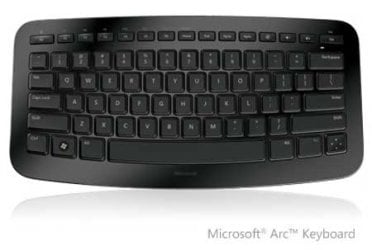
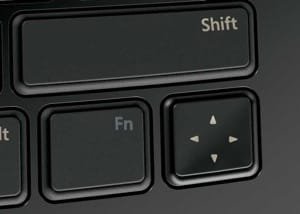
This is going to sound like a silly question but have you tried using the 4-way directional button?

Microsoft-Arc-Keyboard.jpg
Arc_Keyboard_Stop_print.jpg


OS
 

My Computer

Computer Manufacturer/Model Number
Compaq Desktop
OS
Windows 7 Ultimate x64
CPU
AMD Sempron Dual Core
Memory
3GB
Graphics Card(s)
NVIDIA GeForce 6150SE nForce 430
Screen Resolution
1024x768
Hard Drives
150GB Sata
All the options I listed come with some sort of trackball or touchpad, and one of them is certainly remote sized. All of them are also ~$50
 

My Computer

Computer Manufacturer/Model Number
Pugh Technologies
OS
W7 Professional x64
CPU
AMD Athlon II X3 445 Rana 3.10 GHz
Motherboard
MSI 870A-G54
Memory
PNY XLR DDR3 1600 4x2GB
Graphics Card(s)
NVIDIA GeForce GTS 450 (fermi) 1GB GDDR5
Sound Card
Realtek ALC892 onboard
Monitor(s) Displays
ASUS VE205t, Viewsonic VX2035WM
Screen Resolution
1600x900, 1600x1050
Hard Drives
977GB Hitachi Hitachi HDS721010CLA332
244GB Western Digital WDC WD2500AAJS-65B4A0
488GB Western Digital WDC WD5000AAJS-00A8B0
488GB Western Digital WDC WD5000AAKS-00UU3A0
PSU
Antec EarthWatts EA650 650W
Case
ThermalTake Armor A90 Mid Tower
Cooling
3x 120mm in, 1x 120mm & 200mm out, self built hydro-cooler
Keyboard
Logitec 55
Mouse
Razer Deathadder
Internet Speed
20 Mbps D/L, 9 Mbps U/L
Look at the keyboard as a big remote. You keep it next to your couch when you need it you pick it up... Just like with your TV remote. do you keep your tv remote attached to the tv, or close to your tv?

Yea,sorry,you are right,you can walk your keyboard around the house,but doing the same thing with wireless trackball,touchpad or mouse is mission impossible because you can loose it same way it happens you loose your remote on the couch sometimes.
 

My Computer

Computer type
PC/Desktop
Computer Manufacturer/Model Number
intel x58 selfmade
OS
Windows 7 Ultimate x64
CPU
[email protected] (non overclocked)
Motherboard
x58
Memory
8gb DDR3
Graphics Card(s)
Asus 6850
Monitor(s) Displays
lg 22"
Hard Drives
1TB
PSU
Corsair 650w
Case
Gigabyte
Cooling
Scytech
Keyboard
noname
Mouse
Logitech wireless xy
Internet Speed
70GB
Antivirus
Windows Defender
Browser
Chrome (default)
Yea,sorry,you are right,you can walk your keyboard around the house,but doing the same thing with wireless trackball,touchpad or mouse is mission impossible because you can loose it same way it happens you loose your remote on the couch sometimes.


Hince why I suggested the built in feature in windows, and a all in one. So you have one piece of hardware that's big enough, I can still lose it but only if I have had one to many and try to hide it in my closet, but functional as two :)
 

My Computer

Computer Manufacturer/Model Number
SMN-Productions
OS
Windows 7 x86/x64, Server 2008r2, Web Server 2008
CPU
i7 v2 3930K Steping stone 2
Motherboard
ASUS Rampage IV Extreme
Memory
G.SKILL Ripjaws Z Series 32GB
Graphics Card(s)
AMD HD 5770
Monitor(s) Displays
Acer 21" and Samsung 20"
Hard Drives
Patriot Pyro 80GB
PSU
1000 Watt
Case
HAF-X
Cooling
4 Fans
Keyboard
Black Widow Ultimate
Yea,sorry,you are right,you can walk your keyboard around the house,but doing the same thing with wireless trackball,touchpad or mouse is mission impossible because you can loose it same way it happens you loose your remote on the couch sometimes.


Hince why I suggested the built in feature in windows, and a all in one. So you have one piece of hardware that's big enough, I can still lose it but only if I have had one to many and try to hide it in my closet, but functional as two :)

Is it right to say "I was ironic" or "I was being ironic"? :)
 

My Computer

Computer type
PC/Desktop
Computer Manufacturer/Model Number
intel x58 selfmade
OS
Windows 7 Ultimate x64
CPU
[email protected] (non overclocked)
Motherboard
x58
Memory
8gb DDR3
Graphics Card(s)
Asus 6850
Monitor(s) Displays
lg 22"
Hard Drives
1TB
PSU
Corsair 650w
Case
Gigabyte
Cooling
Scytech
Keyboard
noname
Mouse
Logitech wireless xy
Internet Speed
70GB
Antivirus
Windows Defender
Browser
Chrome (default)
I was being... sarcastic I believe would be the best phrase :) Either way, being is the key word ;)
 

My Computer

Computer Manufacturer/Model Number
Pugh Technologies
OS
W7 Professional x64
CPU
AMD Athlon II X3 445 Rana 3.10 GHz
Motherboard
MSI 870A-G54
Memory
PNY XLR DDR3 1600 4x2GB
Graphics Card(s)
NVIDIA GeForce GTS 450 (fermi) 1GB GDDR5
Sound Card
Realtek ALC892 onboard
Monitor(s) Displays
ASUS VE205t, Viewsonic VX2035WM
Screen Resolution
1600x900, 1600x1050
Hard Drives
977GB Hitachi Hitachi HDS721010CLA332
244GB Western Digital WDC WD2500AAJS-65B4A0
488GB Western Digital WDC WD5000AAJS-00A8B0
488GB Western Digital WDC WD5000AAKS-00UU3A0
PSU
Antec EarthWatts EA650 650W
Case
ThermalTake Armor A90 Mid Tower
Cooling
3x 120mm in, 1x 120mm & 200mm out, self built hydro-cooler
Keyboard
Logitec 55
Mouse
Razer Deathadder
Internet Speed
20 Mbps D/L, 9 Mbps U/L
I know this is an old thread, but just in case someone else comes across it, here is a tool I found called NeatMouse that will solve this issue. It works like Mouse Keys, but it lets you assign the keyboard keys that you want to use to move the mouse.
NeatMouse - Keyboard Mouse Emulator | Neat Decisions
 

My Computer

Computer type
PC/Desktop
OS
Windows 7 Professional
- - - Updated - - -

Sé que este es un hilo antiguo, pero en caso de que alguien más lo encuentre, aquí hay una herramienta que encontré llamada NeatMouse que resolverá este problema. Funciona como las teclas del mouse, pero le permite asignar las teclas del teclado que desea usar para mover el mouse.
NeatMouse - Emulador de ratón y teclado | Decisiones ordenadas
Thanks, really. I created an account to thank you. I don't have a numeric keypad on my laptop, nor keys to emulate them. This program is what I was looking for and could not find.
 

My Computers

System One System Two

  • OS
    Windows 8.1 Update
  • Computer type
    PC/Desktop
Back
Top