Solved Help please!!!

I have an win 7 64 bit and i didnt have java, so i downloaded a clean win 7 but it turns out to be shit and the drivers are messed up so is there a way to get back my old stuff?
I didnt make a backup but i have all the files in my usb.
Please help me!

Info :
Win 7 home premium
Service pack 1
Intel core i3 CPU M380 @ 2.53GHz
4 gb
64 bit operating system

It used to have smooth high graphics, internet, okay drivers and lotsa stuff
Now it has xp graphics, is slow, no internet, bad drivers and nothing but normal files and old files that i cant do shit with

I HAD WIN 7 THEN I INSTALLED A CLEAN WIN 7 AND NOW I WANT TO KNOW HOW TO
UNDO IT, I HAVE NO BACK UPS OR ANYTHING
HELP

After a clean install YOU DON'T have a windows.old folder!

I do have a windows old folder, but i merged it with the new windows folder and replaced all the things that needed to be replaced
Did you move all files from windows.old to windows? Not a smart thing to do... at least not in this case now. Are some (or all) applications you had before still working (or visible on desktop)?

Its just the windows wallpaper with only the trashcan, its just the clean win 7 but in 'Computer' theres the old files, nothing different
 

My Computer

Computer type
Laptop
Computer Manufacturer/Model Number
Toshiba, Model name: SATELLITE C660-1J2
OS
64 bit, Windows 7 Home Premium
Antivirus
Used to have Norton
No applications at all installed? So really a clean install....hmmm
Very strange ... normally no windows.old folder then!!

I think nobody can fix it totally....it's a mess now. Please save all your important data to external drive. Post back when done
 

My Computer

Computer type
Laptop
Computer Manufacturer/Model Number
ACER ASPIRE 5742G
OS
Microsoft Windows 7 Home Premium 64-bits 7601 Multiprocessor Free Service Pack 1
CPU
Intel(R) Core(TM) i3 CPU M 370 @ 2.40GHz
Motherboard
Acer Aspire 5742G
Memory
4,00 GB
Graphics Card(s)
ATI Mobility Radeon HD 5400 Series
Sound Card
(1) AMD High Definition Audio Device (2) Realtek High Defi
Screen Resolution
1366 x 768 x 32 bits (4294967296 colors) @ 60 Hz
Hard Drives
WDC WD5000BEVT-22ZAT0
No applications at all installed? So really a clean install....hmmm
Very strange ... normally no windows.old folder then!!

I think nobody can fix it totally....it's a mess now. Please save all your important data to external drive. Post back when done

Well, its like 104g and i have a 7 gb usb and a 10 year old 700 mb disk :(
 

My Computer

Computer type
Laptop
Computer Manufacturer/Model Number
Toshiba, Model name: SATELLITE C660-1J2
OS
64 bit, Windows 7 Home Premium
Antivirus
Used to have Norton
No applications at all installed? So really a clean install....hmmm
Very strange ... normally no windows.old folder then!!
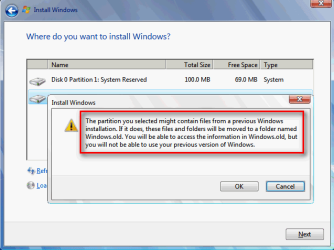
Windows.old is ALWAYS created when selecting a custom install (only other selection being in-place upgrade) on top of existing Windows without formatting the system disk.

It is NEVER created when in-place upgrading.

Kari
 

My Computer

Computer type
Laptop
Computer Manufacturer/Model Number
HP ENVY 17-1150eg
OS
Windows 10 Pro x64 EN-GB
CPU
1.6 GHz Intel Core i7-720QM Processor
Memory
6 GB
Graphics Card(s)
ATI Mobility Radeon HD 5850 Graphics
Sound Card
Beats sound system with integrated subwoofer
Monitor(s) Displays
17" laptop display, 22" LED and 32" Full HD TV through HDMI
Screen Resolution
1600*900 (1), 1920*1080 (2&3)
Hard Drives
Internal: 2 x 500 GB SATA Hard Disk Drive 7200 rpm
External: 2TB for backups, 3TB USB3 network drive for media
Cooling
As Envy runs a bit warm, I have it on a Cooler Master pad
Keyboard
Logitech diNovo Media Desktop Laser (bluetooth)
Mouse
Logitech Performance Mouse MX
Internet Speed
50/10 Mbps VDSL
Antivirus
Windows Defender 4.3.9431.0
Browser
Maxthon 3.5.2., IE11
No applications at all installed? So really a clean install....hmmm
Very strange ... normally no windows.old folder then!!

I think nobody can fix it totally....it's a mess now. Please save all your important data to external drive. Post back when done

Well, its like 104g and i have a 7 gb usb and a 10 year old 700 mb disk :(
post screenshot of "disk managment" please.
 

My Computer

Computer type
Laptop
Computer Manufacturer/Model Number
ACER ASPIRE 5742G
OS
Microsoft Windows 7 Home Premium 64-bits 7601 Multiprocessor Free Service Pack 1
CPU
Intel(R) Core(TM) i3 CPU M 370 @ 2.40GHz
Motherboard
Acer Aspire 5742G
Memory
4,00 GB
Graphics Card(s)
ATI Mobility Radeon HD 5400 Series
Sound Card
(1) AMD High Definition Audio Device (2) Realtek High Defi
Screen Resolution
1366 x 768 x 32 bits (4294967296 colors) @ 60 Hz
Hard Drives
WDC WD5000BEVT-22ZAT0
No applications at all installed? So really a clean install....hmmm
Very strange ... normally no windows.old folder then!!
Windows.old is ALWAYS created when selecting a custom install (only other selection being in-place upgrade) on top of existing Windows without formatting the system disk.

It is NEVER created when in-place upgrading.

Kari
thanx for explaining Kari. But if installed from DVD (boot from DVD)... windows.old is never created. Correct?
 

My Computer

Computer type
Laptop
Computer Manufacturer/Model Number
ACER ASPIRE 5742G
OS
Microsoft Windows 7 Home Premium 64-bits 7601 Multiprocessor Free Service Pack 1
CPU
Intel(R) Core(TM) i3 CPU M 370 @ 2.40GHz
Motherboard
Acer Aspire 5742G
Memory
4,00 GB
Graphics Card(s)
ATI Mobility Radeon HD 5400 Series
Sound Card
(1) AMD High Definition Audio Device (2) Realtek High Defi
Screen Resolution
1366 x 768 x 32 bits (4294967296 colors) @ 60 Hz
Hard Drives
WDC WD5000BEVT-22ZAT0
No applications at all installed? So really a clean install....hmmm
Very strange ... normally no windows.old folder then!!

I think nobody can fix it totally....it's a mess now. Please save all your important data to external drive. Post back when done

Well, its like 104g and i have a 7 gb usb and a 10 year old 700 mb disk :(
post screenshot of "disk managment" please.

Can you pm your number? Because i want to take alot of pics and imgur wont work
 

My Computer

Computer type
Laptop
Computer Manufacturer/Model Number
Toshiba, Model name: SATELLITE C660-1J2
OS
64 bit, Windows 7 Home Premium
Antivirus
Used to have Norton
It sounds like you need to download your network driver(s) from the Laptop manufacturer website.
Download them on a PC that can connect to the internet, save them to a flash drive, then install them on your laptop.
When you get the Network driver(s) updated, Windows should then be able to get all the other drivers for your laptop.

Also, where did you download the Win 7 ISO from that you used for this install?
 
Last edited:

My Computer

Computer type
PC/Desktop
Computer Manufacturer/Model Number
home built
OS
Multi-Boot W7_Pro_x64 W8.1_Pro_x64 W10_Pro_x64 +Linux_VMs +Chromium_VM
CPU
AMD Athlon II x4 620
Motherboard
Gigabyte GA-MA785G-UD3H
Memory
6GB GSkill DDR2 800
Graphics Card(s)
AMD 4670 GPU + AMD 4200 IGP
Sound Card
on board Realtek ALC889A
Monitor(s) Displays
RCA 40" LCD TV, Insignia 32" LCD TV, HP 15" LCD monitor
Screen Resolution
1680 x 1050
Hard Drives
OCZ Vertex 3 120GB,
Samsung F3 1TB (3),
Several others - WD, Seagate, Hitachi, ...
PSU
Corsair 500 W
Case
Rosewill mid tower
Cooling
CM 90mm rifle
Keyboard
Gyration wireless, Logitech wireless, Dell USB wired
Mouse
Gyration wireless, Logitech wireless, V7 USB wired
Internet Speed
Spectrum - 100Mbps D / 10Mbps U
Antivirus
Avast, MBAM3, EMET, WinPatrol
Browser
Pale Moon, Firefox, IE
Other Info
2 multi-boot PC's
Mainly HTPC/Office/Gen purpose (no gaming).
Trendnet USB KVM.
LG DVD burner/Blue Ray Player.
Tray system for removable SATA backup drives.

Not currently OCd, under-volted.
I use Hybrid sleep, rarely re-boot or shutdown.

Hauppauge HD-PVR, Avermedia PCIe TV Tuner, Hauppauge PCI TV Tuner.
No applications at all installed? So really a clean install....hmmm
Very strange ... normally no windows.old folder then!!
Windows.old is ALWAYS created when selecting a custom install (only other selection being in-place upgrade) on top of existing Windows without formatting the system disk.

It is NEVER created when in-place upgrading.

Kari
thanx for explaining Kari. But if installed from DVD (boot from DVD)... windows.old is never created. Correct?
Incorrect.

Just to give something else than just my word I booted a Windows 7 Professional virtual machine with Windows 7 Professional DVD and selected custom install and when asked, the same partition where the existing Windows installation is located:

2013-05-03_001616.png
 

My Computer

Computer type
Laptop
Computer Manufacturer/Model Number
HP ENVY 17-1150eg
OS
Windows 10 Pro x64 EN-GB
CPU
1.6 GHz Intel Core i7-720QM Processor
Memory
6 GB
Graphics Card(s)
ATI Mobility Radeon HD 5850 Graphics
Sound Card
Beats sound system with integrated subwoofer
Monitor(s) Displays
17" laptop display, 22" LED and 32" Full HD TV through HDMI
Screen Resolution
1600*900 (1), 1920*1080 (2&3)
Hard Drives
Internal: 2 x 500 GB SATA Hard Disk Drive 7200 rpm
External: 2TB for backups, 3TB USB3 network drive for media
Cooling
As Envy runs a bit warm, I have it on a Cooler Master pad
Keyboard
Logitech diNovo Media Desktop Laser (bluetooth)
Mouse
Logitech Performance Mouse MX
Internet Speed
50/10 Mbps VDSL
Antivirus
Windows Defender 4.3.9431.0
Browser
Maxthon 3.5.2., IE11
Why not simple attach pictures to the thread? Just press the paperclip above the post.
 

My Computer

Computer type
Laptop
Computer Manufacturer/Model Number
ACER ASPIRE 5742G
OS
Microsoft Windows 7 Home Premium 64-bits 7601 Multiprocessor Free Service Pack 1
CPU
Intel(R) Core(TM) i3 CPU M 370 @ 2.40GHz
Motherboard
Acer Aspire 5742G
Memory
4,00 GB
Graphics Card(s)
ATI Mobility Radeon HD 5400 Series
Sound Card
(1) AMD High Definition Audio Device (2) Realtek High Defi
Screen Resolution
1366 x 768 x 32 bits (4294967296 colors) @ 60 Hz
Hard Drives
WDC WD5000BEVT-22ZAT0
No applications at all installed? So really a clean install....hmmm
Very strange ... normally no windows.old folder then!!

I think nobody can fix it totally....it's a mess now. Please save all your important data to external drive. Post back when done

Well, its like 104g and i have a 7 gb usb and a 10 year old 700 mb disk :(
post screenshot of "disk managment" please.

It sounds like you need to download your network driver(s) from the Laptop manufacturer website.
Download them on a PC that can connect to the internet, save them to a flash driver, then install them on your laptop.
When you get the Network driver(s) updated, Windows should then be able to get all the other drivers for your laptop.

Also, where did you download the Win 7 ISO from that you used for this install?

I dont remember but i googled something like how to install win 7 w/o disk and there was a site where i coul download win 7 and iso to usb tool
 

My Computer

Computer type
Laptop
Computer Manufacturer/Model Number
Toshiba, Model name: SATELLITE C660-1J2
OS
64 bit, Windows 7 Home Premium
Antivirus
Used to have Norton

My Computer

Computer type
Laptop
Computer Manufacturer/Model Number
ACER ASPIRE 5742G
OS
Microsoft Windows 7 Home Premium 64-bits 7601 Multiprocessor Free Service Pack 1
CPU
Intel(R) Core(TM) i3 CPU M 370 @ 2.40GHz
Motherboard
Acer Aspire 5742G
Memory
4,00 GB
Graphics Card(s)
ATI Mobility Radeon HD 5400 Series
Sound Card
(1) AMD High Definition Audio Device (2) Realtek High Defi
Screen Resolution
1366 x 768 x 32 bits (4294967296 colors) @ 60 Hz
Hard Drives
WDC WD5000BEVT-22ZAT0
Pics
 

My Computer

Computer type
Laptop
Computer Manufacturer/Model Number
Toshiba, Model name: SATELLITE C660-1J2
OS
64 bit, Windows 7 Home Premium
Antivirus
Used to have Norton

My Computer

Computer type
Laptop
Computer Manufacturer/Model Number
ACER ASPIRE 5742G
OS
Microsoft Windows 7 Home Premium 64-bits 7601 Multiprocessor Free Service Pack 1
CPU
Intel(R) Core(TM) i3 CPU M 370 @ 2.40GHz
Motherboard
Acer Aspire 5742G
Memory
4,00 GB
Graphics Card(s)
ATI Mobility Radeon HD 5400 Series
Sound Card
(1) AMD High Definition Audio Device (2) Realtek High Defi
Screen Resolution
1366 x 768 x 32 bits (4294967296 colors) @ 60 Hz
Hard Drives
WDC WD5000BEVT-22ZAT0
It wont load on my iphone
 

My Computer

Computer type
Laptop
Computer Manufacturer/Model Number
Toshiba, Model name: SATELLITE C660-1J2
OS
64 bit, Windows 7 Home Premium
Antivirus
Used to have Norton
I'd start over using the latest official installer for your licensed version to get a perfect Clean Reinstall - Factory OEM Windows 7.

You'll get and keep a perfect install (even for retail) by sticking with the tools and methods given in the link if you have the patience.
 

My Computer

Computer type
Laptop
Computer Manufacturer/Model Number
Toshiba, Model name: SATELLITE C660-1J2
OS
64 bit, Windows 7 Home Premium
Antivirus
Used to have Norton
You can try again with the installer you've got but if it's from a Torrent or other dodgy site it may be tampered with.

It would be better to borrow a PC long enough to download and write to stick or burn to DVD the official installer for your licensed version.

Whichever you decide this time study the steps so you get a perfect Clean Reinstall - Factory OEM Windows 7
 
AWW YEAH! I FIXED IT! I downloaded a wireless lan driver from another laptop to my usb and downloaded it on my laptop, then i downloaded the rest!
 

My Computer

Computer type
Laptop
Computer Manufacturer/Model Number
Toshiba, Model name: SATELLITE C660-1J2
OS
64 bit, Windows 7 Home Premium
Antivirus
Used to have Norton

My Computer

Computer type
Laptop
Computer Manufacturer/Model Number
ACER ASPIRE 5742G
OS
Microsoft Windows 7 Home Premium 64-bits 7601 Multiprocessor Free Service Pack 1
CPU
Intel(R) Core(TM) i3 CPU M 370 @ 2.40GHz
Motherboard
Acer Aspire 5742G
Memory
4,00 GB
Graphics Card(s)
ATI Mobility Radeon HD 5400 Series
Sound Card
(1) AMD High Definition Audio Device (2) Realtek High Defi
Screen Resolution
1366 x 768 x 32 bits (4294967296 colors) @ 60 Hz
Hard Drives
WDC WD5000BEVT-22ZAT0
Back
Top