help.. RAM not displaying correct MHz

neeraj

New member
Pro User
Local time
1:39 PM
Messages
452
Location
New Delhi, India
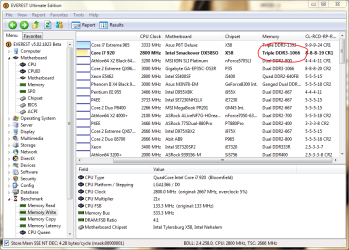
can some one tell me why in everest ultimate edition and in Bios aslo (ram is showing only 1066 Mhz but i have Corsair 6GB 1333Mhz)....


but here intel says 1066 Mhz is default value....... ( Processors - Frequently asked questions )
so i want to know that how to increase Ram's Mhz to 1333Mhz..!!!

please post any screenshot or any link with screenshots if possible........i'll be very thankful..!!!!
 

Attachments
  • pic.PNG
    pic.PNG
    50.5 KB · Views: 230

My Computer My Computer

Computer Manufacturer/Model Number
Custom Built (by me)
OS
Windows 8 CP x64
CPU
Intel(R) Core(TM) i7 CPU 920 @ 2.97GHz
Motherboard
DX58SO
Memory
Corsair 6GB DDR3 (1333Mhz)
Graphics Card(s)
Nvidia GeForce 9800GT (1GB)
Sound Card
Creative Sound Blaster Audigy Value (24bit internal)
Monitor(s) Displays
22" Samsung SyncMaster B2230 (1920*1080)
Screen Resolution
1920*1080
Hard Drives
Seagate Barracuda 500gb
PSU
i ball 450W
Case
i ball (Work Horse)
Keyboard
Microsoft Wireless Keyboard 700 v2.0
Mouse
Microsoft Wireless Mouse 700 v2.0
Internet Speed
1MB
In your BIOS you should have a setting that will allow you to manually clock your ram. You might have to enable the option if it is off. That is where you can adjust the frequency of the ram to 1333.
 

My Computer My Computer

Computer Manufacturer/Model Number
Custom
OS
Win7 64bit Ultimate
CPU
AMD Phenom II X6 1100T Black Edition Thuban 3.3GHz, 3.7GHz
Motherboard
Gigabyte GA-890FXA-UD5
Memory
CORSAIR DOMINATOR GT 8GB (2 x 4GB) 1866 DDR3
Graphics Card(s)
XFX HD-697A-CNDC Radeon HD6970 2GB 256-bit
Sound Card
Creative SoundBlaster X-Fi Platinum Fatal1ty Edition
Monitor(s) Displays
Dual 25 Inch Hanns-G HZ251
Screen Resolution
1920x1080 X 2
PSU
Corsair 850W Single Rail
Case
Thermaltake V9 BlacX w/ Dual HDD Docking Station
Cooling
Air lots and lots of air and copper...
Keyboard
Kensington (Low-Profile)
Mouse
Creative Fatal1ty
Internet Speed
15Gbit (15 Down 5 Up)
Other Info
XIGMATEK HDT-S1284F 120mm HYPRO Bearing CPU Cooler, LG Blu-Ray Burner.
In your BIOS you should have a setting that will allow you to manually clock your ram. You might have to enable the option if it is off. That is where you can adjust the frequency of the ram to 1333.
   Warning
This is not recommended to do by yourself!!!
 

My Computer My Computer

OS
OS
In your BIOS you should have a setting that will allow you to manually clock your ram. You might have to enable the option if it is off. That is where you can adjust the frequency of the ram to 1333.


anything else will increase with frequency or not (core voltage)
 

My Computer My Computer

Computer Manufacturer/Model Number
Custom Built (by me)
OS
Windows 8 CP x64
CPU
Intel(R) Core(TM) i7 CPU 920 @ 2.97GHz
Motherboard
DX58SO
Memory
Corsair 6GB DDR3 (1333Mhz)
Graphics Card(s)
Nvidia GeForce 9800GT (1GB)
Sound Card
Creative Sound Blaster Audigy Value (24bit internal)
Monitor(s) Displays
22" Samsung SyncMaster B2230 (1920*1080)
Screen Resolution
1920*1080
Hard Drives
Seagate Barracuda 500gb
PSU
i ball 450W
Case
i ball (Work Horse)
Keyboard
Microsoft Wireless Keyboard 700 v2.0
Mouse
Microsoft Wireless Mouse 700 v2.0
Internet Speed
1MB
In your BIOS you should have a setting that will allow you to manually clock your ram. You might have to enable the option if it is off. That is where you can adjust the frequency of the ram to 1333.
   Warning
This is not recommended to do by yourself!!!


so what to do Sassa????
 

My Computer My Computer

Computer Manufacturer/Model Number
Custom Built (by me)
OS
Windows 8 CP x64
CPU
Intel(R) Core(TM) i7 CPU 920 @ 2.97GHz
Motherboard
DX58SO
Memory
Corsair 6GB DDR3 (1333Mhz)
Graphics Card(s)
Nvidia GeForce 9800GT (1GB)
Sound Card
Creative Sound Blaster Audigy Value (24bit internal)
Monitor(s) Displays
22" Samsung SyncMaster B2230 (1920*1080)
Screen Resolution
1920*1080
Hard Drives
Seagate Barracuda 500gb
PSU
i ball 450W
Case
i ball (Work Horse)
Keyboard
Microsoft Wireless Keyboard 700 v2.0
Mouse
Microsoft Wireless Mouse 700 v2.0
Internet Speed
1MB
Go to computer shop where you bought a computer and ask them to fix that.
It's much safer that way...
I can guide you, but I can't see what you are doing and I don't want to be responsible if something goes wrong.
 

My Computer My Computer

OS
OS
Your RAM IS showing the correct MHz. You are the victim of marketing. The default MHz is 1066. The RAM is capable of running, overclocked, at 1333. I am not looking at the specs, but I will wager that 1333 is not in your RAM's SPD.

Your local computer shop, even if they are willing to OC your system for you, will charge you more money than it is worth, IMO. As a shop owner, I would not OC your system - I would not accept the liability.

If you are still in the first 30 days, I would demand a swap out on the RAM for RAM that includes 1333 in the SPD - RAM that defaults to 1333. This depends, of course, on whether or not the company that sold you the system claimed the RAM would run out of the box at 1333.
 
Besides, it is not that big of a hinderance. In real world experience, you are not likely to notice a difference.

I am just as angry at Kingston and Asus for marketing 1066 RAM to me that actually runs at 800. I have to double my FSB from 266 to 533 to get 1066.
 
Your RAM IS showing the correct MHz. You are the victim of marketing. The default MHz is 1066. The RAM is capable of running, overclocked, at 1333. I am not looking at the specs, but I will wager that 1333 is not in your RAM's SPD.

Your local computer shop, even if they are willing to OC your system for you, will charge you more money than it is worth, IMO. As a shop owner, I would not OC your system - I would not accept the liability.

If you are still in the first 30 days, I would demand a swap out on the RAM for RAM that includes 1333 in the SPD - RAM that defaults to 1333. This depends, of course, on whether or not the company that sold you the system claimed the RAM would run out of the box at 1333.

Besides, it is not that big of a hinderance. In real world experience, you are not likely to notice a difference.

I am just as angry at Kingston and Asus for marketing 1066 RAM to me that actually runs at 800. I have to double my FSB from 266 to 533 to get 1066.
Antman, as usual, you are right.:);)
+1
 

My Computer My Computer

OS
OS
Besides, it is not that big of a hinderance. In real world experience, you are not likely to notice a difference.

I am just as angry at Kingston and Asus for marketing 1066 RAM to me that actually runs at 800. I have to double my FSB from 266 to 533 to get 1066.

Actually that Ram might run at 1066 without raising the FSB by using the correct divider. Linked and synked isn't the only setting that works for memory. ;)
 

My Computer My Computer

Computer type
PC/Desktop
Computer Manufacturer/Model Number
Home built
OS
Windows 7 Ult, Windows 8.1 Pro,
CPU
Q9650-4.275GHz, E8600 4.5GHz, E6750-3.8GHz
Motherboard
Evga 780i FTW
Memory
G.Skill PC2 9600 1200Mhz 5 5 5 15 2T
Graphics Card(s)
GTX480
Sound Card
Asus Xonar D2
Monitor(s) Displays
HannsG
Screen Resolution
1680X1050
Hard Drives
GSkill Phoenix Pro 120GB SSD
PSU
ThermalTake Toughpower 1000Watt modular
Case
ThermalTake XaserV
Cooling
Xigmatek S1283
Keyboard
Logitech G15
Mouse
Logitech G9
Internet Speed
T1
Back
Top